





galgier
Members
-
Joined
-
Last visited
-
I did open a case with support but I fixed it myself before I got a response from them. Poking around in the license section of unraid's web site I found I could download a file: Starter.key I looked on my NAS in /boot/config and it was a zero length file. I replaced it with the contents of the download and rebooted. It cam up properly licensed. Now to get the Apps page to work again. The USB replacement was attempt to fix that problem. Thanks
-
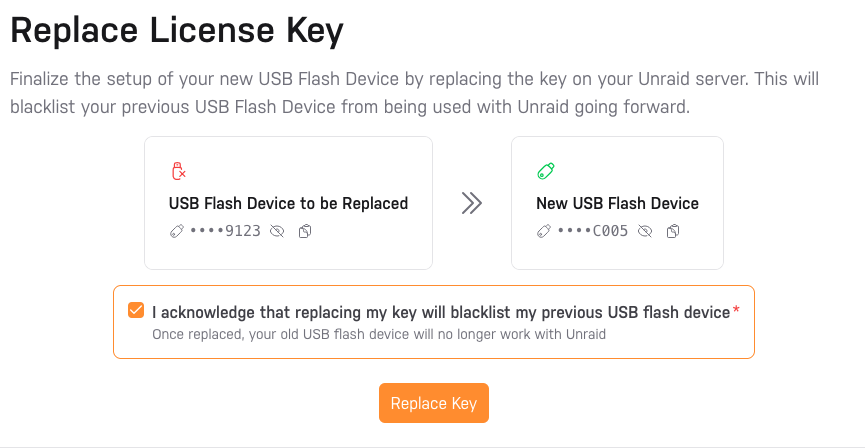
I had problems with the Apps page hanging. Suggestions on this forum lead me to create a new USB, copy my old /config/ directory to it and perform the "Replace Key" function. It failed and every attempt to do it again keeps failing. Now what do I do? I have a useless NAS at this point. Update: Looking at the Replace messages is shows: Looking at my account at UNRAID it shows: So the problem seems to be that the GUID is updated online already so the replacement can't happen "again". Can anyone help me get these in sync? Gary

-
Maybe this is a noob question, but what is "un-get". root@nas:~# un-get install tcptrack -bash: un-get: command not found root@nas:~# I also need to sniff network problems.
-
unRAID does not allow edit ot running VMs and containers. Shut it down and the Edit button should appear.
-
I created an SMB share for use as a Time Machine backup. Got that working for backups, but... I connected to it from the Finder and tested creation of a folder and a file. The folder was created as mode 777, the file as as 766. With these permissions, if I also share it via NFS the files could be modified by anyone. I plan on creating other shares intended for both NFS and SMB but I want the permissions to keep the files at least unwritable by others. Is there any way to modify the SMB permissions used for file creation? Is there an Ideally, the users could use something like chmod or nfs4_setacl on an NFS client after creation to set exactly what they want if they need to share it.
-
I have an update... I tried this container on my Fedora 42 laptop where I can strace. No better results. 1. Once it settles down, it shows endless FUTEX calls and nothing else. 2. I was able to see a lot of messages about library loads as it started up and among those was: <frozen zipimport>:259: UserWarning: google.protobuf.service module is deprecated. RPC implementations should provide code generator plugins which generate code specific to the RPC implementation. service.py will be removed in Jan 2025 It is after January 2025. I don't know if this matters. Note that on my laptop I can run the same dropbox code on the host OS as a --user level systemd service. I can't do that on unRAID because it has no real users or systemd.
-
I have setup otherguy/dropbox on unRaid 7 using the CA setup. It ran this: docker run -d --name='Dropbox-by-otherguy' --net='bridge' --pids-limit 2048 -e TZ="America/New_York" -e HOST_OS="Unraid" -e HOST_HOSTNAME="nas" -e HOST_CONTAINERNAME="Dropbox-by-otherguy" -e 'DROPBOX_UID'='1000' -e 'DROPBOX_GID'='100' -l net.unraid.docker.managed=dockerman -l net.unraid.docker.icon='https://raw.githubusercontent.com/mgutt/unraid-docker-templates/main/mgutt/images/dropbox.png' -v '/home/gaa/Dropbox/':'/opt/dropbox/Dropbox':'rw' -v '/home/gaa/.dropbox':'/opt/dropbox/.dropbox':'rw' 'otherguy/dropbox' I looked at the logs, copied the ;link and registered this with Dropbox: Please visit https://www.dropbox.com/cli_link_nonce?nonce=XXXXXXXXXXXX to link this device. This computer is now linked to Dropbox. Welcome Gary I checked the status: root@nas:~# docker exec -it Dropbox-by-otherguy gosu dropbox dropbox status Starting... And later I see: root@nas:~# docker exec -it Dropbox-by-otherguy gosu dropbox dropbox status Dropbox isn't responding! It looks like it does not really start. Any ideas? BTW, those mounted locations are ZFS (there is no non-ZFS storage here): root@nas:~# docker exec -it Dropbox-by-otherguy mount | grep /opt/dropbox heart on /opt/dropbox type zfs (rw,relatime,xattr,noacl,casesensitive) placid/home/gaa on /opt/dropbox/Dropbox type zfs (rw,relatime,xattr,noacl,casesensitive) placid/home/gaa on /opt/dropbox/.dropbox type zfs (rw,relatime,xattr,noacl,casesensitive) Viewed from the host these are on /home/gaa: root@nas:~# zfs list placid/home/gaa NAME USED AVAIL REFER MOUNTPOINT placid/home/gaa 7.59M 8.51T 7.59M /home/gaa root@nas:~# ls -lnd /home/gaa/{.dropbox,Dropbox} drwxrwxrwx 9 1000 100 16 May 1 19:36 /home/gaa/.dropbox/ drwxr-xr-x 2 1000 100 2 May 1 11:07 /home/gaa/Dropbox/ The /opt/dropbox/.dropbox directory has the code, etc and /opt/dropbox/Dropbox is empty. They both belong to the correct UID:GID = 1000:100. I can't see anything else in the logs. I can see the dropbox executable is running but there is no strace on unRAID so I don't know what it is doing. Could they have re-disabled ZFS? Any way I can troubleshoot this? Any suggestions?
