





plunderisley
Members
-
Joined
-
Last visited
Everything posted by plunderisley
-
Same problem for me too.
-
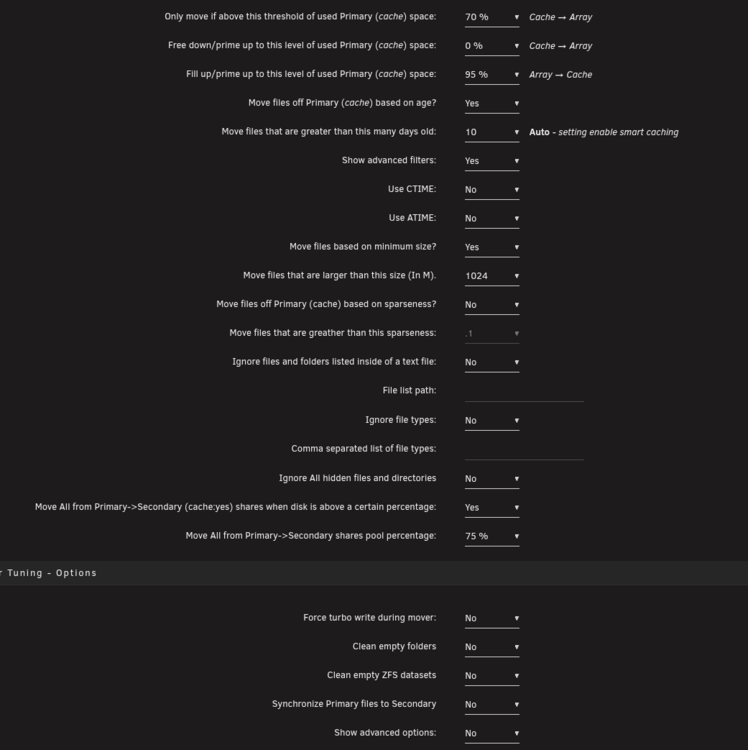
I think I follow now - any variables I add (such as the file size, date) all must be met to move the files. So if I turn off all of those other variables and just leave the % of cache used, then it should trigger, I'm guessing.
-
Ahhh, so the mover wont run if the other criteria are met if the schedule is set differently? I have it set hourly - every 8hrs. Last time it hit the 8hr mark, it ran but moved 0 items. 23-05-2025 08:00 Unraid Status Mover Tuning Notification A total of 0 files representing 0B were successfully moved/synced by Mover Tuning plugin. normal
-
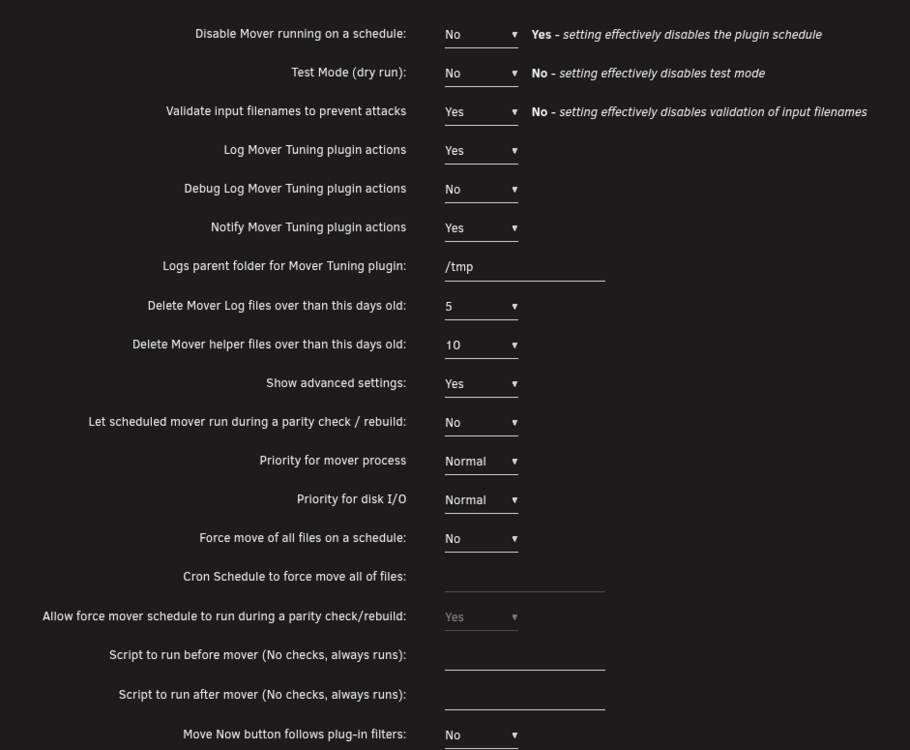
See a few posts above - its set 70% full to move and then move all at 75% full. So me getting an alert that the cache is over 80% means that neither triggered. I did that and when I had the mover set to follow the tuning rules, it moved nothing.
-
Doesn't seem to run. Got an alert that the disk full is over 80% and the mover tuning didn't run.
-
Thanks. I added the clean parent folders
-
I'm not sure if I set the settings right for the mover tuning. My goal is that stuff will first go on the cache and then get moved (especially TV shows and movies) to the array in the morning daily. Would this be correct?
-
@JorgeBpost might be the solution and it would kinda make sense. I'm running a Ryzen 5800x. I don't recall the bios setup but I know I didn't really set anything manually and it's all basically automatic. When the parity tuning pauses and restarts, I'd guess it would cause a spike of CPU use which would cause it to hang/crash. Would that make sense? And if I'm reading that right for the solution, I need to increase the CPU voltage by 4pts and disabling c-state. Not too sure how to do this, but I guess I'll have to give it a try. Though I'll try and let the parity sync finish first..
-
But how to find out what hardware issue would be causing it? Looking at the SNMP graphs, the CPU was steady with normal temp and nothing that showed me any power issues. I guess if it crashes again with these plugins turned off, I can go to the bios and run everything at a slower speed but I'm not sure if that would fix it.
-
I have no idea what else could be causing it. Yesterday it did the parity sync all day without issues. Today, that was the last thing in the syslog (the parity tuning) before it rebooted. Unless it's something else outside the logs is causing it, it has to be that plugin. Power, for sure, is stable and there are no power spikes or anything like that. And the box before the parity check was running fine for a few weeks (before adding the parity drive after copying over all my stuff from the old NAS to the array). These unclean shutdowns started when I started the parity sync.
-
It was about half way through and it rebooted this AM. Attached is the log, but I don't see anything there that would cause it. syslog-192.168.6.105.log I removed the parity tuning and mover tuning plugins to see if that would fix it
-
Ah okay. Well let's see if the issue pops up again. Last time it was about 2ish hrs (roughly 10%) before that happened. Also, is having the syslog loopback (so it stores the log files locally) bad to have always on? Are there any disadvantages? I wouldn't mind just logging everything and setting a log rotation and keeping an archive just in case some random issue pops up in the future. Not that it matters much, but checking the SNMP logs, I can't see any odd blip that could of caused it. Then again the polling probably wouldn't catch it.
-
no, but I just did (local syslog to temp which is the cache folder). Hardware wise, not sure what could be causing it as I did before this a array check that took the 1 day+ (actually what the message said about completing the parity was actually the read check that completed yesterday).
-
I added a drive to an existing array to by the parity drive. I started the parity check (well it auto started when I started the array). It ran for a few hours then I got the following: Parity sync / Data rebuild finished (0 errors)Duration: 1 day, 1 hour, 21 minutes, 4 seconds. Average speed: 175.3 MB/s Parity Check Tuning[.....] Unclean shutdown detected The sync def didn't finish as it needs a good day+ (over 30TB) and ran for about 2hrs only so I'm not sure what caused the reboot. Is there a way to find out? I didn't unplug anything nor touched the server that would cause it to reboot/take the array off-line
-
I'm trying out Krusader Sync option. It seems to be syncing the folders quite well. I looked into rsync, tried a few times, but didn't work out. I'll need to look more into it as I do want a off-site server (probably will use my old Synology) to keep just the data.
-
I'm trying the Filezilla way and it's still around the gbps speed. Oh well, the amount of time I've wasted to get this to work, I could have just transferred the files... Whats the best way to transfer all the files from my ols server to the unRAID and make sure the files are all correct (in case of dropped connections)?
-
I'm migrating from my old Synology (4x 1GBe) NAS to a new unRAID that I'm setting up (1x 10GBe). I have plenty of data that I want to copy over. On the Synology I activated SMB Multi Channel and plugged in all 4 of the ethernet to the switch. All have separate IPs (I followed some reddit guides). For the unRAID, its a 10GBe PCIe connected by SFP+ DAC. All the connections are on the same switch. On the unRAID box, I turned on SMB multi channel in the SMB settings. The dashboard shows the 10GBe running at the 10gbps speed along with the switch showing that too. I then mounted the SMB share using unassigned devices, and tried to copy some large files over and it only goes as high as 100MB/sec. I tied it in Krusader and same thing. I'd love to get this to work. How can I get this to work? EDIT: I did a iperf3 between the Synology and unRAID and its 1gbps. When I did the iperf3 between my PC (2.5gbps) and the unRAID, I got 2.5gbps speeds. So I know the server can do over 1gbps.
-
I'm trying to install the nvidia-driver from the apps section on unraid. It never gets past: -----------------Downloading Nvidia Driver Package v575.51.02------------------ ----------This could take some time, please don't close this window!------------ is there some setting I need to change to get this to install? Thanks

