





b-riched
Members
-
Joined
-
Last visited
-
Sorry, just found out that this obviously is a mover but no backup problem. Backing up the shares instead of the array disks to get around this. Thanks anyway.
-
[false alarm, resolved] luckyBackup ignores files to sync after renaming there are 3 of 5 new files in a newly created folder that are ignored during sync process. Theses three .jpg files were created new and renamed with names taken from another folder. After that the files were again adjusted (date contained in the title). The other two .html files were synced ok (files are on disk, the others are not). I experienced in the past that files were ignored but I cannot tell any circumstances. I would be glad if we could solve this puzzle.
-
luckyBackup -- backing up system unraid system from USB stick hi there, I am currently using luckyBackup for saving my unraid installation. The aim is to being able to completely restore the system if needed. The appdata and docker folders are stored ok, but the initial system's backup from everything on the USB stick throws tons of warnings and errors. Any ideas on how to set this up correctly. Many thanks in advance! My setup: Profile: BACKUP_system_files Task: BACKUP -- system Source: / Do NOT create extra directory: YES Snapshots to keep: 3 Exclude: Backup files, Cache folders, Trash, System mount folders Include: none Remote: no Command Options: Preserver Ownership times: YES Preserve Permissions: YES Preserve symlinks: YES Preserve hard links: NO Use numeric group and user IDs: NO Delete files on the destination: NO Recurese into directories: YES Ignore files the CVS way: NO Destination is FAT/NTFS: No Atempt super-user activities: YES Also Execute: none Log summary from "manage backups\view log" reads as follows: ===================================== execution of task : BACKUP -- system, starting Source : / Destination : /mnt/user/fn-backup/system/ sending incremental file list [...] Number of files: 73,333 (reg: 57,274, dir: 7,855, link: 8,175, dev: 11, special: 18) Number of created files: 28,573 (reg: 27,807, dir: 132, link: 634) Number of deleted files: 0 Number of regular files transferred: 59,491 Total file size: 2.16G bytes Total transferred file size: 1.35G bytes Literal data: 1.35G bytes Matched data: 0 bytes File list size: 327.65K File list generation time: 0.001 seconds File list transfer time: 0.000 seconds Total bytes sent: 1.35G Total bytes received: 1.20M sent 1.35G bytes received 1.20M bytes 17.25M bytes/sec total size is 2.16G speedup is 1.59 rsync error: some files/attrs were not transferred (see previous errors) (code 23) at main.c(1338) [sender=3.2.7] -----| Backing-up profile, logfiles and snapshot data -> Ok |----- execution of task : BACKUP -- system, finished =====================================
-
luckyBackup syslog entry hi there, would you help me with some luckyBackup automation? The tool sends log eMails ok, but I would prefer reading things in the UnRaid syslog (just as everything else). Basically everything that is currently put into an eMail could occur in the syslog file. Plus a link to the curresponding log file. Unfortunately I am not good at linux scripting and logging so I need some help here please. If I was to misuse the eMail function for this, what command / options are best? BTW: I believe summarizing actions into the syslog would be a nice feature in general. Many thanks in advance.
-
Hi there, I have some issues and questions: My setting: latest adguard home container v0.107.61 running on latest unraid build v7.1.2. fritzbox 6690 on 192.168.y.1, DNS set to adguard IP: 192.168.y.2 clients get forced IP addresses via DHCP (router), adguard DHCP not in use adguard docker port set to 3000 (default) various clients (PC's, phones, iPads) access WAN using the routet DNS, traffic (DNS calls, filtered rejects, etc, is listet by adguard GUI). My issues: calling adguard's GUI via 192.168.y.2:3000 gets rejected. I have to delete the port from the address to get access. (since installation) adguard GUI reports only one client to generate traffic: 192.168.0.0 (since last update on 2025-05-23) forcing DNS IPv6 address via router blocks WAN access completely (since install, I think) Any ideas? Many thanks in advance.
-
Hermine to Ron and Harry: “Honestly boys, it would do you good reading!” 😁
-
Yup… modified some files, reran mover. Log states it updated the sync day. Cfg. files contains: lastCacheSync=1747568606 So seems to work although I don’t understand why it didn’t before. Thx.
-
I am afraid it isn’t. If I am looking at the right file. === /config/plugins/ca.mover.tuning/ca.mover.tuning.cfg === testmode="no" logging="yes" movenow="yes" version="2025.05.04" freeingThreshold="70" fillupThreshold="0" omovercfg="no" age="yes" cleanFolders="yes" cleanDatasets="no" ctime="no" atime="no" enableTurbo="no" filelistf="no" filetypesf="no" ignoreHidden="no" rebalanceShares="no" sizef="no" sparsnessf="no" synchronizeCache="yes" resynchronizeCache="no" notify="yes" debuglogging="no" loggingFolder="/tmp" logfilesDaysold="5" listfilesDaysold="10" validateFilenames="yes" moverDisabled="no" advancedSettings="no" parity="yes" moverNice="0" moverIO="-c 2 -n 0" force="no" beforeScript="" afterScript="" movingThreshold="90" advancedFilters="yes" advancedOptions="no" daysold="-1" ===
-
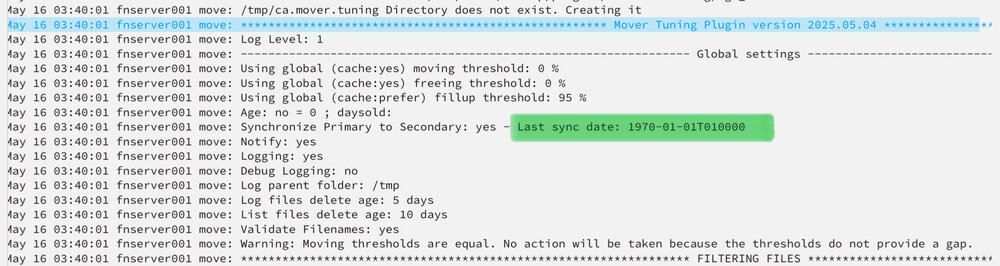
Hmmmm /config/plugins/ca.mover.tuning/ca.mover.tuning.cfg tells me: version="2025.05.04" although I thought it had updated recently. Cannot find any last update date in here. Anyway, log of 2025-05-16 tells me mover was on sync, no test, synced 3 files to array. Last sync day was not updated (at least not in the log file).
-
Yes, I did, and the mover was counting them all for actions. specifically, I touched some 1500 files reading from the array which were not stored in the cache. I created 201 files which are saved to the cache and the mover identified them for syncing (but did not sync due to test mode).
-
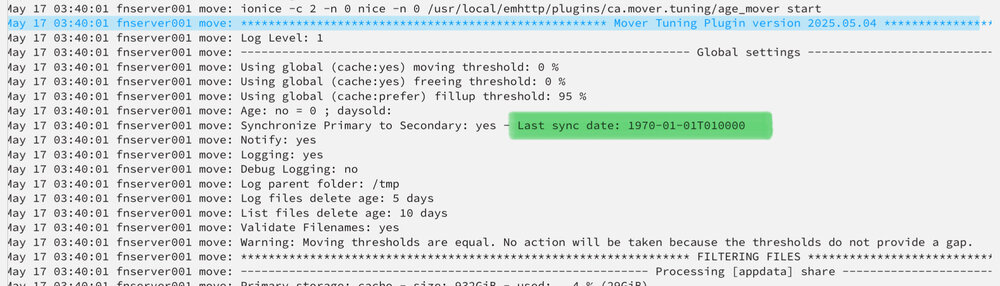
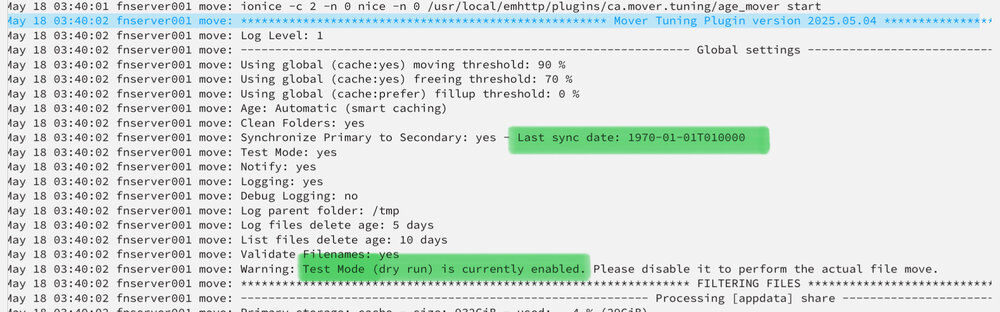
Not sure whether we talk about the same thing. Toggling test mode is not the issue. Mover has been running for two weeks now in either test or real mode. Issue is: last sync date message stays on 1970-01-01 regardless of mover running in the past in whatever mode. Me personally couldn’t care less but if the last sync date determines the mover’s behaviour (which it presumably does) it is probably worth having a closer look?
-
No Sir, test mode has in fact been switched on again for the first time last night. Before it was running in real mode for some days. No matter which mode it was running in the message stayed the same.
-
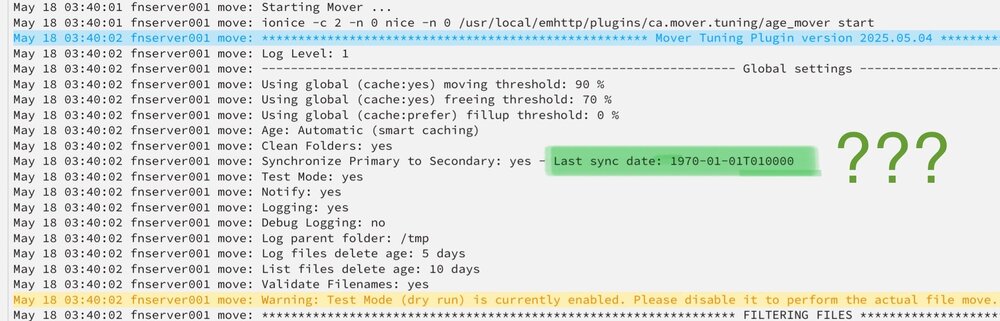
This Message stays the same regardless of daily activity. Bug or feature? 😁
-
Ok that lifts most of the fog.
-
I see, so if the share is configured cache -> array I can ignore this setting?



