




-
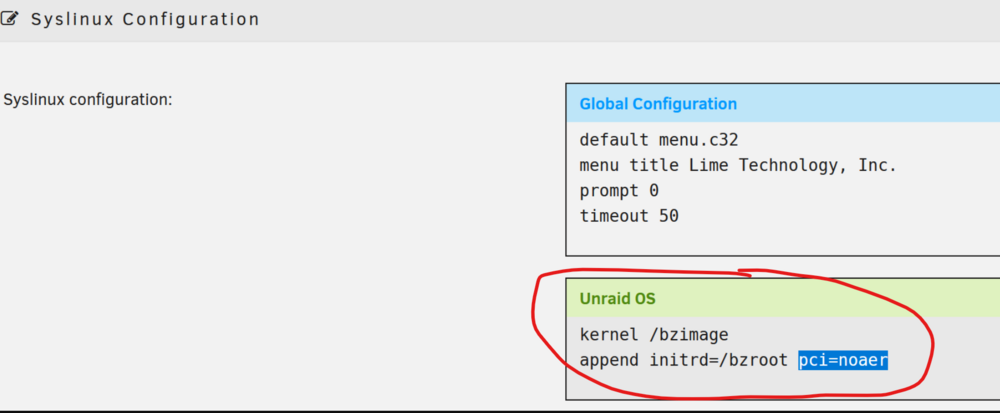
You add the kernel parameters in syslinux configuration:
-
Unfortunately, no one was able to run Arc Raiders, including myself. I recommend you take a look at programs/tools that detect virtualized environments, like the ones below, and try to patch those areas where the VM is detected: https://github.com/a0rtega/pafish https://github.com/ayoubfaouzi/al-khaser https://github.com/kernelwernel/VMAware Here are two videos by a guy showing how he made his VM undetected so he could play Fortnite, this is where I started: https://www.youtube.com/watch?v=CPQLnLPx5Wo https://www.youtube.com/watch?v=ECoWXGvjcjM You can also take a look at this GitHub project that tries to spoof QEMU: https://github.com/zhaodice/qemu-anti-detection If you have the time and dedication to try these programs/tools and it worked. Let us know. Thank you.
-
I wanted to try Arc Raiders as well and this is also a problem that I encounter. I saw someone that was able to run it, but once he was in the game, it terminated his game. The anti-cheat software they use seems to be impossible to bypass. We need a real computer.
-
Are you looking for something that would bypass Arc Raiders or similar?
-
I had no choice but to use a headset or a usb speaker in order to have audio.
-
Yes, this is the worst anti-cheat engine. I refunded the game and won't be playing it.
-
I can't seem to get Arc Raiders working, may still be relevant for this thread. I have not tried using the <vmport state='off'/> code block. When I run it through Steam, it gives me these error message below. LoginId:6fa7c59d4ccad4d57915ab9f70e63ee5 EpicAccountId: Unhandled Exception: EXCEPTION_ACCESS_VIOLATION 0x00007ffa34600001 runtime_7ffa34600000 kernel32 ntdll
-
Try blacklisting the USB zigbee device using udev rules.
-
Did this solve your issue?
-
I had this issue and what I did is to using the udev blacklist rule: here
-
Type it before running and print screen it, then type it again after running the VM then prints screen it. This does not tell me anything.
-
Can you type this in the terminal BEFORE and AFTER running the VM? Is it just black screen? dmesg | grep -i vfio
-
Try adding these in your XML if it works: <features> <kvm> <hidden state='on'/> </kvm> <vmport state='off'/> <ioapic driver='kvm'/> </features>
-
We need more information than this, most cards including the 50 series can be passthrough now. Are you saying that Unraid does not detect your 5090 series?
-
Try using Claude instead of Gemini, it's free but it's limited per few hours. Claude is more powerful when it comes to coding, he can suggest you betters bast scripts/XML Sorry I can't help other than suggesting another AI.

View in the app
A better way to browse. Learn more.


