





Everything posted by CMDMC12
-
That did it, thank you!
-
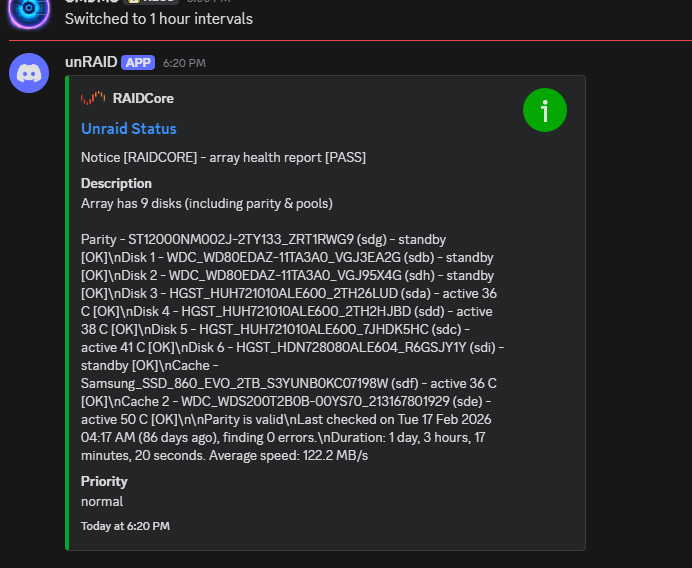
Unfortunately, mine is still putting out bad formatting:
-
I don't have a non-production system to test with, and seeing the contents of this bug report makes me want to hold off on updating, as I am also using XFS on my array. I'll keep an eye on things though and test when I feel confident in updating.
-
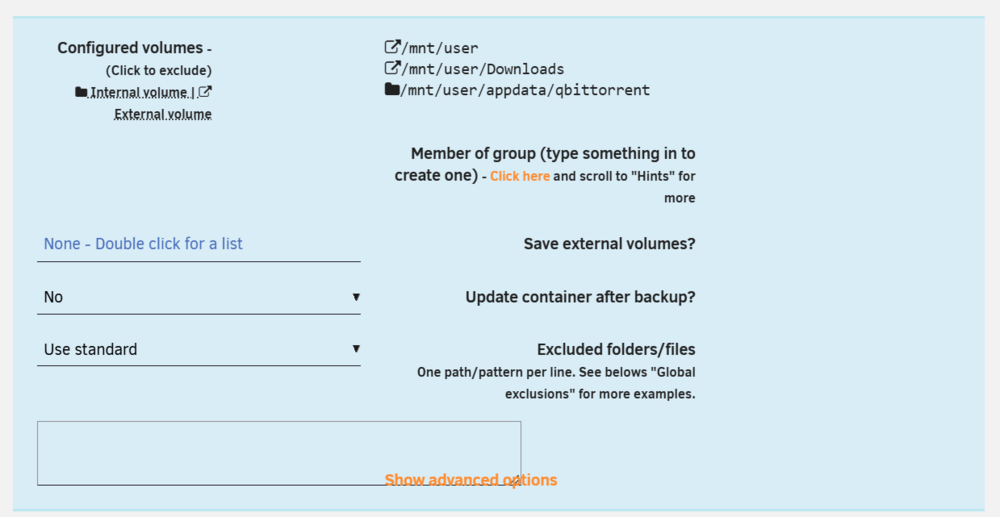
After updating to 7.2.3, the issue persists.The other day I went to change how often unRAID sent status reports to my Discord server from every hour to every 6 hours, and after that it started sending them with broken formatting: Even if I change it back to 1 hour, it continues to send them with newlines written out instead of being parsed as formatting. Other notifications (like the test message, temp warnings, update notifications) seem to be parsing fine. I've tried rebooting, using a different webhook in a different channel, tried digging into the Discord.sh notification script to see if anything looked off but I think the issue is either with the data going into the script or something on Discord's end (although a friend of mine also running unRAID with Discord notifications says his are showing up fine. I haven't tested any of the other agents because I don't have any of those services set up already. raidcore-diagnostics-20251203-1926.zipYep, I force transcoded a movie to verify it was actually on disk now, and good call on adding the memory limit. Set the container to 8GB and overnight the transcoder got killed 4 separate times in a span of 10 minutes, but it no longer takes down my VM so I consider that a win for now. Now I guess I need to dig through Plex's logs to narrow things down.Came across this message a few times in my syslog while troubleshooting an out of memory issue [error] 36572#36572: *152734 open() "/usr/local/emhttp/webGui/javascript/ace/mode-log.js" Can confirm there is no mode-log.js in the indicated folder. Just figured I'd make y'all aware. raidcore-diagnostics-20251124-2034.zipSo for the past couple of days I've been getting pinged by Fix Common Problems about OOM errors and have come back to find my AMP server VM shut off. It came to a head the other day when while I was watching the Dashboard, I saw my in use memory shoot from ~42GB (of 64GB) to completely maxed out for a moment before unRAID locked up entirely, requiring a hard reset. Now, that AMP VM is set to start at 8GB and peak at 32GB, so it becomes the prime target for the OOM Killer. At first I thought maybe transcoding to /dev/shm was the problem, so I've temporarily set Plex to transcode to my cache. Today it OOM'd twice, the first time killing the VM again, but the second time it killed the Plex Transcoder, and if I'm reading this right: Out of memory: Killed process 4127540 (Plex Transcoder) total-vm:55839484kB, anon-rss:55779032kB, file-rss:364kB, shmem-rss:0kB, UID:99 pgtables:109296kB oom_score_adj:0 It was using ~53 GB of physical RAM when it was killed. If I'm misreading that do tell me, I'm still fairly new to unRAID and not nearly as well versed in Linux as I am in Windows. EDIT: For anyone who finds this thread later on, the issue was a corrupted Blobs DB. The DBRepair script was able to set things straight and the transcoder process is no longer causing problems. Diagnostics attached. raidcore-diagnostics-20251124-2034.zipSo after struggling for a few days to figure out why the plugin kept erroring out on a couple of my containers (specifically binhex-krusader and qBittorrent) I finally discovered the root cause. They both have mappings to /mnt/user, for obvious reasons. Having /mnt/user as an exclusion will cause the plugin to ignore everything in /mnt/user, which includes the container's appdata folder, even though the appdata folder is explicitly chosen to be backed up. For anyone else who comes across this issue, the proper way to handle a container with a /mnt/user mapping is to not set an exclusion for those but instead set "Save External Volumes" to No. Also on version 7.2.0, I'm assuming due to the new responsive WebUI backend, the option boxes for the plugin are a bit discombobulated, so make sure you're setting the correct option (the middle one) to No.
 I don't want to take my array, containers, and VMs down to change a single setting (in this case, enabling SMB Multi-channel), but by the time I need to take the whole thing down for whatever reason, I will absolutely forget to set it before restarting the array and the cycle continues. Plenty of other settings fall into this cycle too though. When I was first setting up it took me 4 different times before I finally remembered to set my array's new name before starting it.


