





Everything posted by MHzTweaker
-
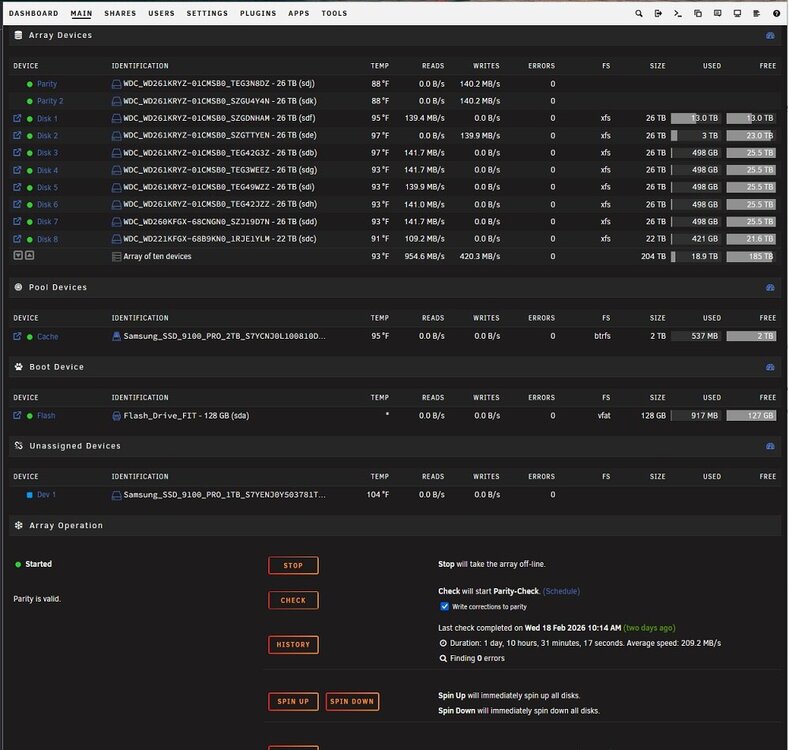
@trurl that's really where I will be once I get all this stuff moved and gain mental confidence I won't lose my data hoard. Early in the morning and late at night I put new content on my media server which gets scanned by desktop computers running KODI connected to TV's. Once the stuff is on the server it doesn't really move around. Well, it did once a year on Windows Server 2019 when I found myself outgrowing single disk volumes and having to copy stuff to bigger drives. What a pain that was. It was an event like going to the Dentist for a root canal. That's why I'm here and on unRAID. With Windows Server 2019, the first 5 gigabytes copied at full 10gbit 900MB/sec to 1000MB/sec network speed, I supposed because of whatever buffer Server 2019 had set aside for writes. unRAID is just a different animal. Maybe I read too much into or assumed the SSD disk cache was like a revolving door and that stuff came in super fast then automatically trickled out to the array as the array could accept it. I had no idea about the "MOVER" task or any of that stuff. I've installed both new shielded Ethernet cables. Throughput hasn't changed. I will wait for this current round of copying to finish, add the 2nd cache drive as a mirror then try to test some. I did the parity sync before I started copying data and that took about 35 hours for two 26TB parity disks. I may leave parity off when I do my second one of these in a month.
-
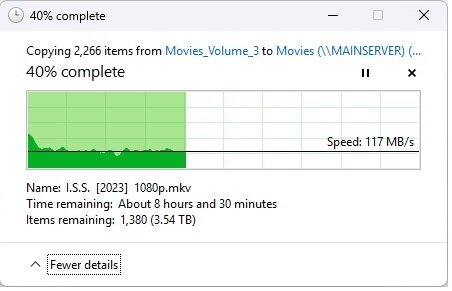
Yes, I am using reconstruct write method and getting 120+ MB/sec. Before changing that setting I was getting like 65MB/sec I found this trick doing a google search on a Reddit page I think. So many of these things are not obvious to me. I have no idea why a person WOULDN'T want reconstruct write turned on. Are there negatives? My current situation copying some Sci-Fi movies to the Movie share without using cache. @JorgeB I will try to figure out how to run this iperf test you requested as soon as this round of copying is done, I also need to install the new Ethernet cables and the 2nd Samsung 9100 cache drive. I also need to flash the motherboard BIOS and go through that with a fine tooth comb making sure settings are proper for unRAID as well. It will be late tonight or tomorrow morning before I can make all these mods.
-
Thank you for your reply. Yes, I've discovered there's more in lost time babysitting the Mover and potential for the 2TB cache drive filling up than just disabling the cache from whatever share I am trying to populate. I'm just going to let the slow transfer take it's course. One of my Win Server Music drive volumes is 26TB. No way am I babysitting unRAID mover during this data copy. My main reasons for trying unRAID was to have massive volumes that I could expand AND the ability to use different sized disks. I have not checked to see if raidz can accommodate different sized disks. I have nothing else running on this new machine, no VM's, Docker or anything else. I'm not sure I will ever use this for anything other than file server duties. We shall see. I have plenty of hardware lying around. I own and run a computer service company for 20 years (40+ years in I.T.). My current two Windows 2019 servers (primary and backup) have many different sized disks which I will combine into a 2nd BACKUP unRAID server. I just don't trust 20 years of work on a single machine or array. Right now this unRAID server (3rd server) was built with all new components including ten new 26TB WD Gold drives. Something that still urks me is just how slow copying data to a 2TB Samsung 9100 Pro SSD is on unRAID. These drives can write over 14GB a second!! Right now they run at SATA HDD speeds or slower. There has GOT to be a reason for this. I just bought a 2nd one which arrived this morning because I want an SSD mirror for redundancy. Right now the new unRAID server is on my bench for testing. I'm not sure about the bench network cable specs. I have a new pair of Cat 8 shielded cables coming today capable of 40gbit. We shall see if any of this makes a difference. unRAID machine specs: 24 bay 4U SAS 12gbit backplane hot swap chassis 1000watt eVGA SuperNOVA P5 platinum power supply Asus Z890 ProArt motherboard Intel Ultra 5 245K CPU G.Skill Trident Royal DDR5 6400 RAM 96GB LSI 9305 16 port SAS controller Ten WD Gold Enterprise 26TB drives Two Samsung 2TB 9100 Pro cache pool drives. 60 watt fan controller for massive fan wall server fans, manual speed adjustment. Intel 710-DA2 Dual port 10GB Ethernet (SFP+ transceivers) Cyberpower 1500VA PFCLCD UPS backup unRAID 7.23 Pro lifetime license
-
I am not even sure where to post or ask at this point. I tried posting this question 4 times on Reddit https://www.reddit.com/r/unRAID/ All 4 of my posts were deleted. I don't know who runs that area but I won't go back there. It is toxic. I have the current version of unRAID up and running finally but have been rather disappointed at just how slow the transfer speed is even with a rather fast Samsung 2tb 9100 Pro NVMe drive used for cache assigned to my shares. Can someone point in the direction of best tips and tricks to maximize my transfer speed to the array? I am only getting about 200MB/sec currently. I would have thought transfers speeds would have been MUCH higher. I am copying over 150TB of data from eleven Windows Server 2019 volumes via 10Gbit Ethernet. At this rate it will take weeks to copy this data. thanks
-
Okay thanks for that Now if I could get my misspelled User ID changed, that'd be just wonderful MHzTweaker I have no idea what a "Teaker" is???
-
I purchased a license years ago and attempted to setup a small test server only to realize I need much better hardware. Now I have the hardware but cannot get into my account. The password reset doesn't work. I never have received a code from UNRaid to reset the password. I cannot (and shouldn't) signup for a new account. My user ID is active and I cannot use it again. I have been sending direct emails and plastering requests for help on Facebook with no help in sight. Why is this so difficult????
-
Ok. I had no luck with the LSI P16 firmware on the Perc h310 but I did manage to get the Dell HBA firmware to flash. Dell firmware: http://www.dell.com/support/drivers/us/en/19/DriverDetails?driverId=YJ78T&fileId=3203984450#OldVersion SASHBA_Firmware_6GBPS-SAS-HBA_07.03.06.00_A10_ZPE.exe I used this pack of tools: http://forums.laptopvideo2go.com/topic/29059-sas2008-lsi92409211-firmware-files/ and created a DOS USB Flash boot drive and put MegaRec.exe and sbrempty.bin on it along with the contents of SASHBA_Firmware_6GBPS-SAS-HBA_07.03.06.00_A10_ZPE.exe from Dell I booted my Asus A8N-SLI with the Perc h310 in the 2nd PCI Express x16 slot and a PCI MX400 video card. I had everything but the sata controller and USB turned off in the Mobo BIOS. At the C:\ prompt I entered: megacli -AdpAllInfo -aAll to find the SAS address (be ready to hit the pause/break key as it scrolls) Now to wipe the card megarec -writesbr 0 sbrempty.bin megarec -cleanflash 0 then I programmed the firmware: sas2flsh -o -f 6gbpsas.fw I did not need boot time BIOS access so I went right to programming the SAS address sas2flsh -o -sasadd 590b1cxxxxxxxxx I restarted the machine and entered: sas2flsh -list This showed of course there was no BIOS installed on the card. At this point I am almost ready to install the card. I searched around and came up with smallish 40 or 50mm PWM fan and attached it to the Perc h310 heatsink with a couple course thread machine screws. I installed the card in my Win 7 x64 Ultimate backup media server. Win7 already had drivers but I went to LSI and got their latest here: http://www.lsi.com/support/Pages/Download-Results.aspx?productcode=P00049&assettype=Firmware&component=Storage%20Component&productfamily=Host%20Bus%20Adapters&productname=LSI%20SAS%209211-8i I used these: LSImpt_SAS2_Windows7_Windows_Server_2008_R2_P16.zip All is good again. I am getting 120MB transfers between Movie drives in the same machine vs. the dismal 28MB/sec transfers I got using a couple Silicon Image 3114 PCI adapters. Yay!!!
-
Can Dell Perc h310 be flashed with LSI 2008 P16 firmware or does it need to be flashed with Dell's HBA IT firmware? I have both firmwares, instructions and all the tools and files I have collected from this site, dell, LSI, etc. ready to put on a bootable USB DOS stick and flash it once my card arrives in the mail this afternoon. I found a nice compilation of tools here: http://forums.laptopvideo2go.com/topic/29059-sas2008-lsi92409211-firmware-files/ The Dell firmware I have is 07.03.06.00 A10 The LSI package is 9211_8i_Package_P16_IR_IT_Firmware_BIOS_for_MSDOS_Windows I had many issues trying to get an LSI card to work in an eVGA Classified 3 x58 motherboard 3 years ago because their BIOS and the LSI BIOS uses the same option ROM address space. My plan is to find another system I have that is not a tweaked out overclocker board and use that to flash with. I have some simpler Z68, Z77, B75, 680i LT etc. boards I could use flash. Any advice on this card would be helpful. thanks

