





Everything posted by MHzTweaker
-
Yes, I am in the I.T. industry and noticed pricing shenanigans starting in late August 2025. By late September I was advising many clients to get off the fence concerning new build-outs. Some listened, some didn't. Most in the news reporting sector were predicting the same for SSD's and HDDs. There was still channel stock of HDDs last November so I bought up 10 of them, some NVMe drives and a few sticks of RAM. I'm feeling completely justified right now. My platforms are not more than 1 generation older than current and are plenty fast enough for me. I will give preclear a look-see once this Parity sync finishes by tomorrow morning. If I can find that the drive is stable for a few months by itself I may use it for something rather that toss what is now an almost $600 drive. thanks, good advice.
-
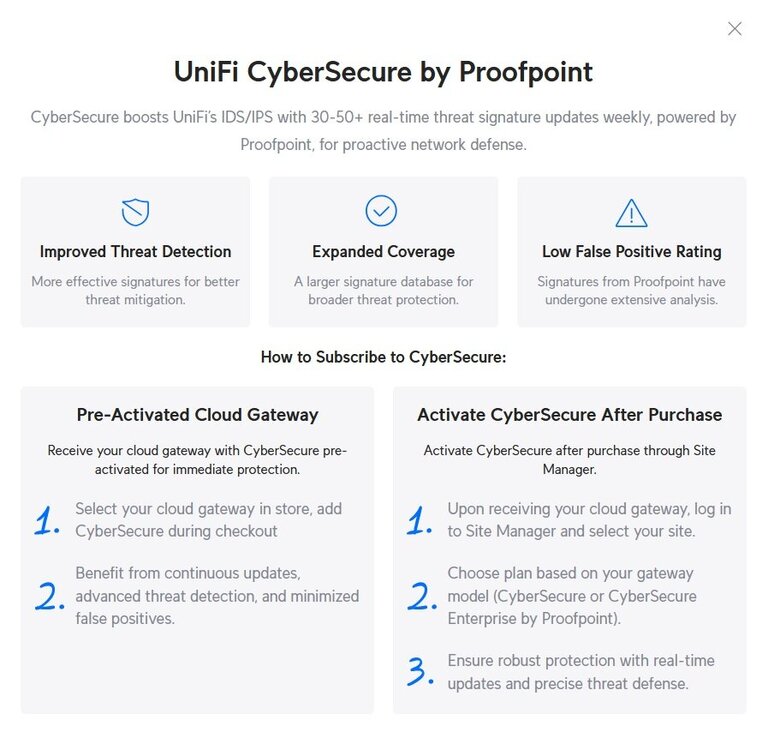
Okay, so far I have managed to extract the not yet filled with data 14TB drive from my 3rd unRAID server and used the "New Config" preserve current assignments to relaunch the old array minus the unfilled 14TB drive. I am about to introduce a parity drive to that array and start the SYNC this morning. On to the real problem child. I brought the BACKUP server down, replaced the ailing 14TB drive with a like 14TB drive I just removed from the 3rd server. I started the BACKUP server then assigned the new drive to replace the failed one, then started the array in Maintenance mode to speed the rebuild. If all goes well, in 15-16 hours the array will be healthy again. Now back to what it really going on.... I pulled the ailing drive and put it in a dock on my PC and ran HD Sentinel. The drive seems to have 8 weak sectors after 1956 days of ON time. So the drive isn't DEAD but health is starting to decline. Technically data should still be good but ADMIN BEWARE, use at your own risk. The deed is done. Thankfully I had a drive I could quickly swap in there. Now on to some really disturbing news. As of right now drives at and above 10TB are either difficult to find or criminally expensive!!! I just checked on a 14TB new replacement. It seems those drives are at or near $600 which is more than I paid for my bundle of new 26TB drives in November 2025. 26TB drives are now around $900 each. Ouch! I am regretting not buying a few spares for the shelf.I have a drive in my BACKUP server array showing smart erros I want to remove a drive from my 3rd unRAID server array that doesn't yet have any data on it and place it in the array with the failing drive replacing the drive with errors. I don't know how to properly remove a drive from an array and make the array whole again without the missing drive. There's no SHARE data on the 3rd server drive but there IS share data on the 2nd unRAID server drive that needs to be put back on the replacement drive. Sorry lost it above...OMG, what is wrong with this forum software!!!!! 🤬🤬🤬🤬🤬🤬🤬🤬🤬 I have typed multiple very long messages of a critical nature with many details only to have my entire message erased when I attach a photo!!!!! Dammit I need to walk away for a while.... This is a reoccurring problem with this forum software..... I have nothing but expletives in my mouth right now.... backupserver-smart-20260401-1732.zip@Veah I am not sure I want to get started on collecting distros. The fact that I have this much of an digital entertainment media hoard is just one symptom of my illness. The last time I went down such a rabbit hole was in 2016 with a simple Sony TC-K870ES cassette deck. Five years later I have over 120 of the things! However, 120 Linux distros would certainly take up far less physical space than 120 cassette decks. Oh, it seems that spinning down the drives saves me about 50% in electricity costs of running each box. So, in about 58 years I will have saved enough money on the power bill to pay for these upgrades. Nice 😉@trurl my pair of 24 bay chassis' have each tray labeled with a number. I have a chart of each tray number and which drive is in it using recorded serial numbers. Each array has the drives arranged ascending by tray number location so it's easy to go right to the exact drive in question. The parity drives are in the bottom 2 trays away from the array drives. I have zero plans on disturbing any existing array drive unless they develop S.M.A.R.T. errors and the health declines. They're installed until death do they depart. I can literally more than double each array size before running out of trays. It's taken me almost 20 years to fill up 140TB which includes a LOT of older content. I am not sure there will be enough new stuff during the remainder of my life to exceed 400+TB. I believe I have my end game setup unless they start making cheap 500TB SSD drives.Many thanks @Frank1940Okay, I will leave well enough alone. I brought everything back up and started the parity sync on both parity drives for my backup unRAID server. In 28 hours, all should be well. I actually have built a 3rd unRAID array from the drive leftovers of the first two Windows servers which should in the end have about 100TB with just one parity drive. I have started it as a 72TB array initially until I finish dumping stuff off an 18TB and a 24TB drive on to the new array. Once complete, I will expand the array using the 18TB and another 14TB drive and then use the 24TB as parity for this array. This will be my first test of learning how to expand an existing array, hopefully without trashing the existing data. Fingers crossed. Going back to why this thread was initially created, I have adjusted my expectations and learned some of the strengths and weaknesses of unRAID. I must say the pluses vastly outweigh any negatives. The way I was using Windows Server 2019, I didn't have ANY parity, just single drive sized volumes which was a pain in the ass from the very beginning. I know Win Server 2025 can do drive pools but is still a royal pain. Having both one large array, the ability to expand it easily and NOW hot swap drive trays is end game life changing stuff for me. If not careful, Linux will replace Windows on many of my desktops as well. I spend too much time stripping out the Microsoft crap apps, AI slop, telemetry and data harvesting. Then I worry about new garbage showing up every Patch Tuesday. I am wondering if there is a setting that encourages drives (especially in the BACKUP server) to spin down. Technically I only need the backup server drives running long enough to sync Main Server contents in the middle of the night.Again, I am very frustrated. It seems like the simplest things escape me. I have created a backup (2nd unRAID server) except THIS time I did not add my parity drives until after I had copied the 140TB of data to it. So that is now complete. I am trying to add the 2 parity drives but since they are recycled from their previous life in a Windows server, they are GPT partitioned. I want to repartition them and format them as XFS but I cannot figure out how to do it. No where can I find where this is done. Online docs are of no help either. Why is something so simple, so bloody difficult???? The drives are available, I can add them as parity but they show up as GPT, I do not want this. No manner of taking the array offline gives me any new options. Stuff like this makes me question my sanity. EDIT: I am to the point now where I just want to pop the drive trays out, put the drives in a SATA dock on my Windows machine and use DiskPart to run a clean command to wipe the partitions. I don't know how to accomplish this in unRAID.@MAM59 thanks, I just needed some reassurances. The devil is in the details. I'm only allowing 2 close friends of 5 decades read access to my hoard shares (tailscale) and a small read-write share if either has something interesting they want to leave for me to check out. I don't plan on turning on DMZ for it. I guess if I get super duper paranoid, I can investigate the UniFi CyberSecure Intrusion Detection System yearly subscription that can be added to the Gateway for $99 a year. The Mikrotik seemed like a good idea but I soon realized it's "router OS" while powerful just did not equate to the amount of time I wanted to spend learning it. I replaced the Mikrotik with the Ubiquiti because it couldn't handle my new fiber bandwidth. No way was I leaving 2/3 of my new fiber transfer speed on the table. Don't get me wrong, I never had issues with the CloudRouter. It ran from Dec 2018 to December 2025 with no issues. I should probably sell it or something. It wasn't exactly cheap: https://www.amazon.com/dp/B08437WT3Q?ref_=ppx_hzsearch_conn_dt_b_fed_asin_title_23
 As to whether I believe an am a worthy target, I am not sure I care to live in paranoia just wondering. I prefer being proactive. My old router was a Mikrotik cloud router that pretty much required me to do everything manually. Firewall rules had to be programmed manually one by one via the command line or by running a script to do so. It was miserable for me. During the learning curve between the time it took for me to turn it on and realize there was no default active firewall, I watched a continuous stream of attempted logins to this router, I mean like every second at least 1 attempt from many IP addresses all over the planet. Scary $hit. I switched to one of these last December: https://store.ui.com/us/en/category/cloud-gateways-large-scale/products/udm-pro-max How would I do this? All my shares are private but I don't recall any setting to disable guest access. thanksI'm completely noobish to Linux so it's not a shock to me I do not know what behavior to expect. Nice. I'm stoked I splurged for 96GB DDR5 just before the RAMpocalypse. It seems like I also got through the door with the HDDs before they went unobtanium. I am slowly discovering a wealth of stuff I can do out of the box that Windows server either couldn't or not without a stack of cash $$$ or even more gnashing of teeth. Wow, centralized KODI !!! Now that would be a huge time saver. Running the database on the same server the files live probably is a massive time save. Having 3 different KODI clients doing new program searches every couple hours seems like a bottleneck. I will look into this right now. Thanks No, I'm still not using the cache for anything as of yet. For what I am doing, I don't need super speed once the data is on the array. I'm flipping in over in my head what do about hosting my Quickbooks Enterprise company file. Much reading has lead me to the conclusion I either need to run a VM of Windows off the cache or host on a local workstation (do not want to do this). EDIT: Media is the only contents of the array currently.Okay, some progress concerning what is going on and my experiences thus far. I've copied 138 TB of data so I had a bit less than I had estimated and under the 150 TB I thought existed. Nice Yesterday I redirected a KODI desktop PC TV node to point to this new unRAID server and it scanned for video content for roughly 7 hours before finishing. That much seems to work correctly. I have 2 more KODI/TV setups to convert to the new server but my point is, unRAID is LIVE and working correctly to meet my needs. Here's the weird part. My daily grind has me adding content in the morning and evening to the unRAID server. When I was doing the initial content transfer, I mostly got 130MB/sec while transferring this huge hoard. The weird part is while copying individual and a few shows or movies at a time, I am getting full 10Gbit saturation or 1000+ MB/sec while doing these relatively small transfers to the HDD array. This is better than I expected. It would seem as if something is buffering gigabytes of data at a time as I copy. With Windows 2019 Server, I could drag about 6GbB and then the server would have to catch up pausing the copy until data was written. With unRAID I have not figured out what that limit is yet but I like what I am seeing. This helps my work flow. I was afraid I was stuck forever at 130MB/sec while doing my daily administration. NOW, I am very pleased. Keep in mind, I am not using the NVMe SSD cache at all right now. In fact the server and the array has been up for just about 20 days. Anyone have insights into why after a few weeks the server copy speed is so speedy? It wasn't in the beginning. This week I will finish making this new server my new main server then decommission the old MAIN and BACKUP Windows servers, stripping out all the largest drives to create a backup unRAID server. Then the 138TB data copy process starts all over again, only this time I will wait to add the 2 parity drives after the copy has finished. It is then I will add the 2nd Samsung 9100 Pro SSD cache drive as a mirror. I must say these 24 bay hot swap chassis's are the Bee's Knees!!! This is end game stuff for me.Shouldn't there just be a setting somewhere that could just be easily switched off. Why does something so simple have to be complicated. Who would even want guest access turned on by default???? 🤬 This is frightening. I thought Linux was supposed to be secure? This product seems the exact opposite of secure. How many more things are switched on making me a target ? I don't want anyone anytime to have access to my stuff unless I explicitly allow it with a specific user name and password.Ouch.... thanks This is what frightens me about putting this stuff up. I will change everything to Private then make sure only read access is available. Thank you P.S. Is there a way to turn off GUEST logins ???? I do not want any guest access to my stuff.thanks for the tips, I never used "Windows Credentials" but wondered how to access saved logins. I will only ever have the 2 close friends accessing the server. I will see how it goes. We all have new fiber connections in the past 8 months so hopefully bandwidth won't be an issue. Right now all but one of my shares is setup as "Secure" with read only access to those guys. The other is PRIVATE and only accessible by me. All my parts are here for the 2nd (backup) unRAID server which I will begin once this main server is doing primary duty (still copying data ATM).So basically I just connect directly to the server share in say Windows File manager? No need to login? //server-something-something/music ? THANKS UPDATE: That seems to work here locally using the address bar in file manager. The tailscale server also shows up in Windows Networking and can be browsed as well. My friend will try it on his desktop when home from work tonight. I knew this had to be bonehead simple. LOLI barely have a few weeks of unRAID use under my belt. I have the server going and am copying my stuff to the array currently. I want 2 friends to be able to access things so I setup tailscale and have been trying to get logged into unRAID to get to the shares. I have unRAID user IDs setup. None of them are accepted at the unRAID login prompt through tailscale. It always says wrong user ID or password. I really need help. No ideal why I cannot get in through tailscale.
 I may be at least another week. I have four 26TB drives worth of stuff to copy over first before I add the 2nd Samsung and try the cache pool again. It is looking like 2 days per drive. Two are music drives so there's like a million+ files, so miserable small file reads and writes. 😔 Also, I'm hoping this data dump can help validate that things are solid and reliable.@trurl ThanksI'm leaving the Samsung 9100 Pro cache pool OFF until I finish copying the remaining 100+ TB of data. It makes no sense to use a feature not suited to task. I'm also not removing the PARITY drives. I've already copied 36TB of the data and do not want to lose more time including the 2 days I spent syncing the pair of 26TB parity drives. I will just tough this out. I have a second unRAID server to build as a mirror image backup of this new unRAID server. I will wait until data has copied before syncing parity when I begin work on the 2nd unRAID build. Since the backup server isn't constantly accessed, the hardware will not be as new but still up to task I hope. I will repurpose either an i7-11700k (socket 1200) or a Xeon E52630L V4 (socket 2011) with 64GB DDR4. Current unRAID server's Intel Ultra 5 245k CPU usage NEVER peaks above 6%. Ever. Certainly no one in the room believes a 2TB Samsung 9100 Pro PCI express 5.0 drive is limited to 250MB/sec ? Whether the Samsung's DRAM cache is full or not, these drives are capable of more than this. At least 1800MB/sec according to Tom's Hardware review. It is almost like these drives are not being accessed as NVMe devices but SATA/Chipset type devices. Even if so, SATA is capable of 550MB/sec. I have a 2nd 9100 Pro to add when I am done copying data and I'll reconfigure the Cache pool as a mirror for redundancy. https://www.harddrivebenchmark.net/hdd.php?hdd=Samsung+9100+PRO+1TB+SSD https://www.tomshardware.com/pc-components/ssds/samsung-9100-pro-ssd-review/2 The SSD ReviewSamsung 9100 Pro Gen5 4TB SSD Review - Fastest & Highest...Isn't competition a great thing? I have always considered the development of flash technology as somewhat a sport. It is simply one company trying to creat I am wondering where unRAID deals with SSD TRIM? Is this automatic? Can I invoke garbage collection manually?







Account
Navigation
Search
Configure browser push notifications
Chrome (Android)
- Tap the lock icon next to the address bar.
- Tap Permissions → Notifications.
- Adjust your preference.
Chrome (Desktop)
- Click the padlock icon in the address bar.
- Select Site settings.
- Find Notifications and adjust your preference.
Safari (iOS 16.4+)
- Ensure the site is installed via Add to Home Screen.
- Open Settings App → Notifications.
- Find your app name and adjust your preference.
Safari (macOS)
- Go to Safari → Preferences.
- Click the Websites tab.
- Select Notifications in the sidebar.
- Find this website and adjust your preference.
Edge (Android)
- Tap the lock icon next to the address bar.
- Tap Permissions.
- Find Notifications and adjust your preference.
Edge (Desktop)
- Click the padlock icon in the address bar.
- Click Permissions for this site.
- Find Notifications and adjust your preference.
Firefox (Android)
- Go to Settings → Site permissions.
- Tap Notifications.
- Find this site in the list and adjust your preference.
Firefox (Desktop)
- Open Firefox Settings.
- Search for Notifications.
- Find this site in the list and adjust your preference.