kaedinger
Members
-
Joined
-
Last visited
-
Script: move finished torrents into dated folders so same-named downloads don't overwrite each other Hi all, If you use qBittorrent's "Set location" / move-on-complete with a shared final folder, you may have been bitten by this: a newer torrent with the same file or folder name as an older one silently overwrites it. I wrote a small bash script that runs inside binhex-qbittorrentvpn and avoids that. Each finished torrent whose save path is exactly one of your configured final folders gets moved through the WebUI API into a subfolder named after its completion date: /data/a/linux.iso -> /data/a/20261015/linux.isoIf something with the same name is already in that folder (on disk, or claimed by another torrent in qB), it uses 20261015_1, 20261015_2 and so on instead. Dated folders that end up empty (e.g. after you delete torrents with their files) are removed at the end of each run. Setup (binhex-qbittorrentvpn): 1. Put qb-dated-move.sh into /mnt/user/appdata/binhex-qbittorrentvpn/scripts/ (that's /config/scripts/ inside the container). 2. Copy qb-dated-move.conf.example to qb-dated-move.conf in the same folder and fill in your WebUI user/password and final folders. Use container paths, the way qB shows them. Then: chown nobody:users qb-dated-move.conf chmod 600 qb-dated-move.conf3. In qB: Tools → Options → Downloads → Run external program → Run on torrent finished: /bin/bash /config/scripts/qb-dated-move.shcurl, jq and flock are already in the binhex image, so nothing else needs to be installed. Try it first without moving anything: docker exec -it binhex-qbittorrentvpn bashto enter qB's container (assumes the container is still called binhex-qbittorrentvpn), or use qB's Console. Then: DRY_RUN=1 /config/scripts/qb-dated-move.shThe log is at /config/scripts/qb-dated-move.log. To sort an existing backlog, you can limit a manual run to older torrents with MIN_AGE_MONTHS=12. Tested with qBittorrent 5.2.4. Torrents with Automatic Torrent Management enabled are untested. Before the first big run, best back up /config/qBittorrent/BT_backup. Source, docs and license (GPL-3.0): https://github.com/kaedinger/qb-dated-move Feedback and bug reports are welcome, here or as GitHub issues.
-
Unspin is back on CA! Thanks Unraid team!
-
Thanks, done!
-
Unspin is temporarily missing from Community Applications Hi all, If you've searched for Unspin in Community Applications (CA) in the last few days and couldn't find it: it has been removed from the CA listing for now. That was my mistake. What happened On 2026-09-18 I changed where the plugin checks for updates, from a file on GitHub's main branch to the GitHub release itself. I forgot to update the separate template that tells CA where Unspin lives, so the two URLs no longer matched. CA treats that as a fatal error and removed the plugin. Both sides were fixed on 2026-09-20 and match again, and CA no longer reports an error. It hasn't put Unspin back on its own, though, so I've asked the CA moderators to re-list it. If you already have Unspin installed Nothing changes for you. Your install, settings and update checks keep working, and the latest version, 2026.09.20.50926, is available through the normal plugin update check. If you want to install it now Until it's back in CA, you can install it by hand: go to Plugins → Install Plugin, paste this URL and click Install: https://github.com/kaedinger/unspin/releases/latest/download/unspin.plg You'll get the same plugin CA installs, and it keeps updating normally. I'll post here when Unspin is back in CA. Sorry for the trouble!
-
Unspin plugin removed from CA after PluginURL mismatch, fixed but not re-listed Hi all, My plugin Unspin (Support page: https://forums.unraid.net/topic/198091-plugin-unspin-rudimentary-hot-file-tiering-for-unraid/, template repo: https://github.com/kaedinger/unraid-ca-xml-templates) was removed from CA on about 2026-09-18 with: That was my mistake: I moved the .plg's pluginURL to the GitHub release asset without updating the CA template. It was fixed on 2026-09-20 and both now match: Template PluginURL: https://github.com/kaedinger/unspin/releases/latest/download/unspin.plg The .plg served at that URL (release 2026.09.20.50926) declares the same pluginURL The error has gone from the template errors. But Unspin is still missing from the app feed after several days of regular rebuilds, so it looks like it has to be re-listed by hand. Could a moderator re-enable it, or tell me if anything else needs fixing? Thanks!
-
Hi @mmm77, excellent diagnosis, your Gemini nailed it. Since I am not myself a ZFS user, I didn't immediately recognize the problem. I filed it as GH #8 with your comment as the source, credited. Fixed in 2026.09.14.59405 (make sure you're on 2026.09.18.38737 or later - there was an unrelated installer hiccup inbetween). The fix does basically what you suggested: at startup, unspind walks the immediate children of each disk mount and marks any that are themselves separate mounts with fanotify - that covers ZFS datasets, since Unraid only ever datasets the top-level shares, never nested subfolders. (It also rescans every 60s so a share you use for the first time (which is when Unraid actually creates its dataset) gets picked up without a daemon restart.) Would appreciate it if you could confirm on your box once you've updated - promotions on your ZFS shares should now behave the same as on XFS/Btrfs. Thanks again for the thorough writeup, that made this a quite simple fix instead of a guessing game. 😉 Best, kaedinger
-
Hi Mike, sorry for the late answer. I work on Unspin in my free time. Thanks for the detailed report (no worries on the AI write-up, the log you attached is what I needed). Good news: Unspin should work on ZFS as well. fanotify (the mechanism Unspin uses to watch file access) works at a level below the filesystem, so it doesn't actually care whether a disk is XFS, Btrfs, or ZFS, encrypted or not. Your log confirms this is working correctly: all four of your ZFS disks got watched successfully (Watching mount at: /mnt/disk1... etc.), and events are being picked up fine. So this isn't a ZFS compatibility issue. (Caveat: I don't have a ZFS array to test against myself, so this is reasoned from the fanotify docs and your log rather than something I've verified hands-on) So I think it looks like this: every one of the events in your log is for a file sitting directly at the top level of the disk (e.g. /mnt/disk1/757176000.tmp...) rather than inside one of your shares (e.g. /mnt/disk1/Movies/...). Unspin only promotes files that belong to a real user share, so anything living outside a share folder gets skipped - which is exactly what the [skip share] lines mean. That's working as intended, just maybe not obvious from the log wording. The interesting question is what's actually creating those .tmp files directly at the disk root, at the same second, across four disks at once. The numeric format (757176000.tmp) indicates they are auto-generated atomic write fallbacks or temporary file tests. So maybe: Unraid's management engine itself or an active Docker container trying to test disk capabilities or sync states. A backup, sync, or maintenance tool that's mapped directly to /mnt/diskX instead of a share path A Docker container or VM with a bind-mount pointed straight at the disk root Some other periodic Unraid/ZFS housekeeping process Could you check what's writing those files? If you can tell me what created them, I can figure out whether Unspin should be handling that case differently, or whether it's something worth pointing you to reconfigure on your end. Thanks again for reporting this with logs, that's exactly what makes it possible to track down. Oh, and regarding share monitoring: a user share in Unraid is a virtual, cross-disk pooling of folders that exist independently on each physical disk - there's no single mount point for "a share" the way there is for a disk. fanotify marks a mount, so watching at the share level isn't a smaller/simpler version of what Unspin does now, it's structurally backwards - you'd need to watch every disk anyway and then filter, which is exactly the current design. Best, kaedinger
-
Assuming I did not mess up terribly, it should not be possible for the plugin to keep the disks awake, as it's only accessing the disks directly after they actually have been accessed from somewhere else. As it does no live-switching (which is a thing best implemented by the Unraid team itself), it's suited best for frequently accessed files, like samples in an audio library, or pdfs holding data that you open every day, or the infamous desktop.ini files that windows creates, or drives holding original videos while editing, etc. If you want movies cached while they are playing, this is NOT what Unspin does. To me it's most helpful in audio and video editing projects: projects that I currently work on have their files moved to cache, despite having set the shares to "Cache -> Array". Kind of like the old "Prefer Cache" setting, but only for data that is actually being used. I think this plugin works best in conjunction with two other plugins: CA Mover Tuning and Dynamix Cache Directories. Since the goal is not spinning up disks unnecessarily, caching the directory content is the first thing you should do anyway. And Mover Tuning is used to move old/cold files back to the array where they belong - Unspin only moves to Cache. I have mover tuning set so that it only reacts to ATIME and moves files based on age, smart caching enabled (Auto setting in file age), fill up level 95%, free down to 50%, running every 4 hours. Disable the stock mover. This works perfect for me. Enable debug logging in Unspin to exactly see which files are being watched, moved, and why. Play around with the rules in Unspin to fine tune the behavior according to your needs. Use the File Activity plugin's filters to monitor and control Unspin if you are unsure. And pause Unspin automatically during backups, mover actions, and similar procedures - this is important, otherwise you have a lot of files moved back and forth unnecessarily. I hope this helps a bit. If you feel there's something wrong with the functionality, please open a Github issue. Thanks.
-
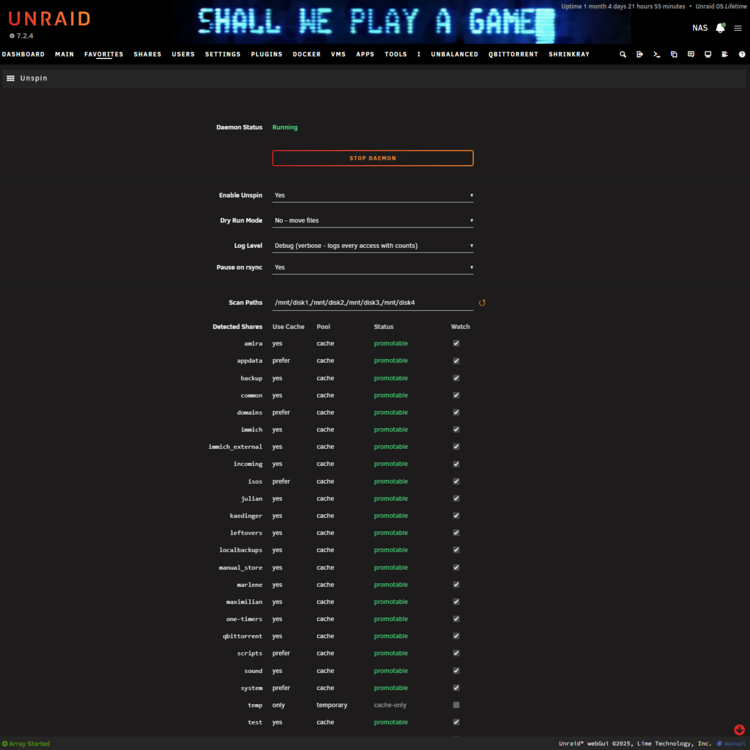
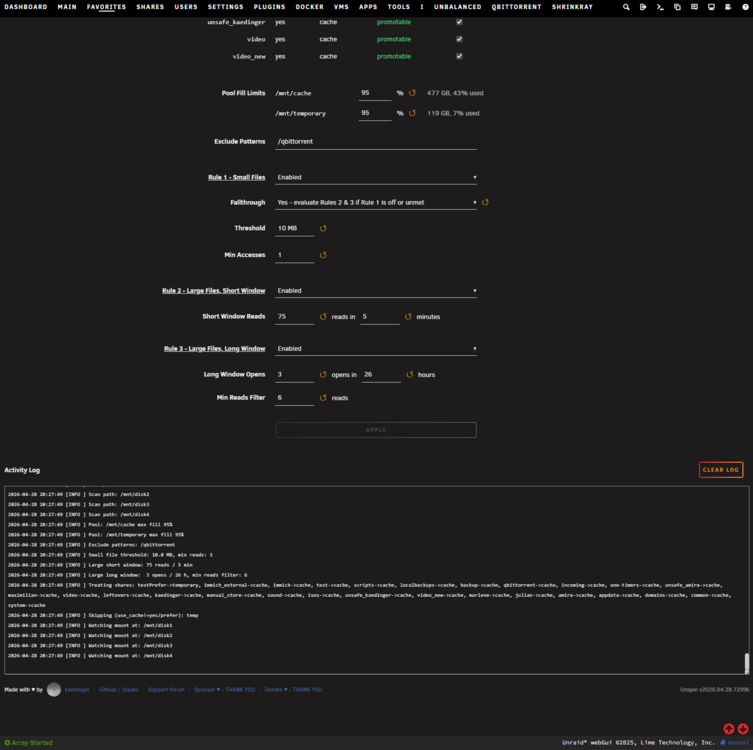
Unspin - Rudimentary Hot-File Tiering for UnraidUnspin automatically promotes your most-accessed files to faster storage (cache/NVMe) using a lightweight C++ daemon that monitors file access in real time. The main goal is to have fewer disk spin-ups (hence the name), but we'll take the faster access, too 😉 There's no explicit cold demotion (yet) - for now we rely on Unraid's mover. There is also no real hotfile-tiering as in: live switching to cache while your movie is playing. Make sure this does what you want! There's a dry-run mode; use it! How It WorksUnspin runs unspind, a daemon that uses Linux's fanotify interface to receive events every time a file is opened or read on your array disks. It applies three configurable promotion rules: Small file rule - files below a size threshold get promoted after N total reads (e.g. promote a config file on first access) Large file - short window - N reads within M minutes triggers promotion (e.g. 100 reads in 5 min = streaming video) Large file - long window - N opens within H hours triggers promotion (e.g. 3 opens in 24h = frequently consulted PDF) Promotion is always deferred until all open file handles are closed, so readers (SMB, NFS, local) never lose their file mid-stream. Why these rules? Under ideal circumstances we would cache everything - but we don't have the space. We can't have a huge Linux ISO using up precious cache space if it's just held open for a few bytes of torrent upload. But of course that changes if it's being constantly read, or accessed on a regular basis. You'll have to play around with the rule settings to best match your own use cases. FeaturesEvent-driven: reacts to each file read in real time via fanotify, no polling or cron Three-rule promotion: separate thresholds for small files and large files (streaming burst / periodic access) Deferred promotion: waits until all open handles are closed, so readers never lose their file Per-share cache pool routing: destinations follow each share's own [font=monospace]shareCachePool[/font] setting in Unraid, so different shares can promote to different pools. Shares with "Use Cache: No" or "only" are skipped automatically. Detected Shares table: the settings page lists every share with its current routing and a per-share Watch toggle to opt individual shares out Mover/rsync-aware: automatically pauses while Unraid's mover or rsync is running Per-pool fill guard: each pool gets its own fill % threshold; promotion to that pool stops once it's exceeded Dry-run mode: logs every decision without moving anything Exclude patterns: skip any path substring Rule toggles: each rule can be individually enabled/disabled Pause / unpause: stackable pause locks via rc.unspin pause <name> - also useful for backup scripts over SSH Live log viewer: auto-refreshing tail of the last 200 log lines in the settings page Screenshots Most of the settings provide help bubbles when clicking on the respective label. InstallationVia Community Applications (recommended): (Hopefully coming soon) Install the Community Applications plugin Search for Unspin Click Install Manual: Navigate to Plugins -> Install plugin and enter the following URL: https://raw.githubusercontent.com/kaedinger/unspin/main/unspin.plgOR: Open the terminal on your unraid server, make sure you're root, then use plugin install https://raw.githubusercontent.com/kaedinger/unspin/main/unspin.plgPause for BackupsWrap your backup jobs on remote machines or VMs with pause/unpause over SSH so Unspin doesn't inflate counters while the backup tool reads your files: ssh root@nas /etc/rc.d/rc.unspin pause borgbackup borg create ssh://root@nas/mnt/disk1/backups::daily /data ssh root@nas /etc/rc.d/rc.unspin unpause borgbackupLocks stack - multiple backup tools can pause independently without interfering with each other. RequirementsUnraid 7.0+ (probably even earlier, but tested with 7.2.3 onwards) No external dependencies LinksGitHub: https://github.com/kaedinger/unspin Issues / feature requests: https://github.com/kaedinger/unspin/issues AI disclaimer / HistoryClaude has been used to simplify refactoring, restructuring, commenting & documenting, cleaning up etc. It also helped immensely setting up the general structure of an Unraid plugin and with getting the settings page right. BUT: Every functional code line has been human written at some point by meticulously reordering bits on an old hard drive using a VERY small magnet. Jokes aside, this one started as a batch script a few years ago on my old Ubuntu machine Gregory (RIP) while trying out MergerFS, then turned into a C++ daemon for a proprietary project I did for a German car company (where it was called Hotfile and already using fanotify). As I started using Unraid this year and wanted to give something back to its fantastic community, I turned it into this plugin.
-
...but I can't because I am not allowed to start a topic in "Plugins". I wanted to publish this plugin: https://github.com/kaedinger/unspin I am relatively new to Unraid (so no other posts in the forum except one reply) but have been developing software for 30 years, and I want to give back something useful. If I understand correctly, someone has to just approve this one, and then I can post a new plugin? Keep up the good work, Florian
-
kaedinger changed their profile photo
-
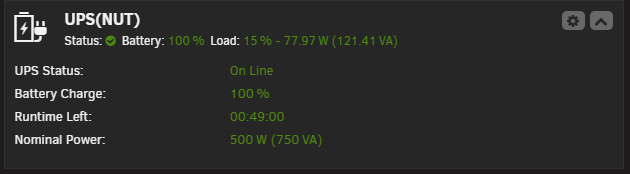
Just a heads up in 2026: The current Schneider Electric Firmware Update Wizard (v4.3.8v9a) did recognize my trusty old APC Smart-UPS 750I as upgradeable but did NOT contain a firmware file for it... In addition my UPS did not show any Firmware ID as described by Schneider, just Firmware Versions 1-4. I managed to track down a v4.2.1 which could update the UPS to Firmware ID 18. After that I could enable Modbus on the UPS, and - using nut-2.8.4 stable - I had to switch the UPS Driver to apc_modbus and voila: