





lovingHDTV
Members
-
Joined
-
Last visited
-
I'm trying to add an eac3 audio to all my movies with TrueHD audio. I tried to use Add Audio Stream Codec, but it doesn't do anything. It processes the file, but says nothing needs to happen. When I google around it mentions a Tdarr_Plugin_075a_FFMPEG_Audio, but I don't see that plugin in the container. This has got to be a common request, any help on how to get it working? I have a TV that doesn't support truehd so for that TV I want eac3 available. thanks
-
It worked. Wouldn't be a bad idea to provide a few more details to the wiki. I now have one of 8 14TB drives upgraded to v5. It will take several weeks to months to migrate all the files to get them all swapped out. But the first one is important. thank you for all the help.
-
The rebuild will finish in 12 hours. I'll try again after that comlpetes. So I ensure the drive is still empty stop the array start the array in maintenance mode ERASE Start array in normal mode Format <does it now rebuild again?>
-
I copied all the data off, following the directions on the Wiki. Stop the array, mark as empty, start array, hit mover, verified the disk has no files. I stopped the array, removed the drive (because I wanted to upsize it). I precleared the replacement drive, add it to the array and it started a rebuild. I stopped the array manually formatted with: mkfs.xfs -m crc=1 /dev/sde -f start the array and it rebuilds. Do I have to remove the drive from the array completely, rebuild, then add the new drive? thanks
-
How do I update a drive that is already in my system and not have the rebuild process just revert it back to XFXv4? I even manually formatted it to v5 and it just reverts as soon as the rebuild happens (automatically). Also, is there anyway to do this without having to rebuild the array for every drive?
-
-
I plan to swap out two 5TB drives with two 14TB drives. Can I take this opportunity to also ensure the new drives are v5 instead of v4? Can this be done by changing out to the new drives and rebuilding, or do I need to move everything off the soon to be retired 5TB drives prior to replacing them. thanks
-
Thank you! I missed that when I chose br0.10 I needed to specify a static IP address. Everything up and running. I don't care if it is a dedicated IP, I Just wanted it on the 192.168.10.0 subnet.
-
I couldn't find a place in the Docker section to ask this question as it doesn't pertain to a specific docker, more how containers interact with each other and networking. I run gluetun and run my *arr, etc programs through that docker. One of the ports used is port 8000 seen here: This is all on the bridge network or 192.168.1.0. This all works fine. I want to install the Spoolman docker on the br0.10 network. It uses port 8000 that I set to 7912 in the template: This work fine as, I can access it via 192.168.1.107:7912. I want that to run on the br0.10 network as well, but when I set it to that network it doesn't work: For other containers when I use the br0.10 it works fine. Is this caused by the port 8000 conflicting with gluetun? The other containers use non-coflicting ports. Like this; Any help would be appreciated. I don't really understand all the docker networking. I'm hoping to get Spoolman to run on the br0.10 network. thanks david




-
Yes, this is what I'm doing and had a clash. In other ones I just change the ports to not clash and move one. That didn't work with this container, but my qbittorrent container did so I just resolved the clash with it. It's all working find now. Downloads great.
-
My network type is None as I run it through GlueTun or are you referring to a different network called bridge?
-
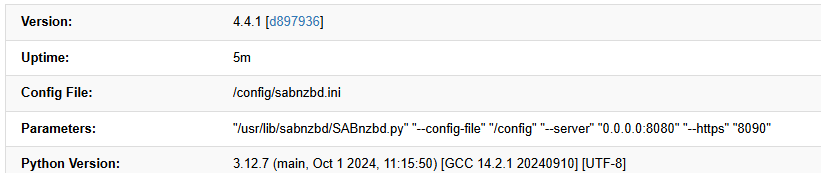
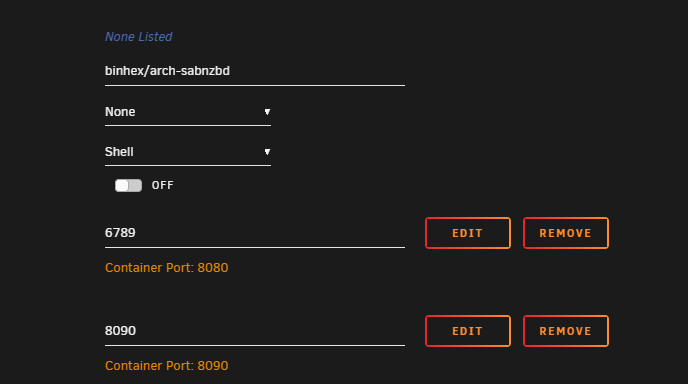
I have mapped my 8080 port -> 6789 to avoid a conflict with qbittorent, but it still runs on 8080. When I look at the details I see: 8080 does indeed work, but why isn't it 6789 instead? My fix was to move qbittorrent instead and that works perfectly. Seems something is broken with this docker.
-
for the last month I've got about a 90% failure rate. They all download, but die downloading PAR files. I spoke with a friend that uses the same newserver and he doesn't have issues.
-
When you say "restore the key". I just copied it back to the root dir of the flash drive.
-
No Key, this it gave the flash GUID I see the gUID on my account purchases, but I have no keys associated with my account.

