





poto2
Members
-
Joined
-
Last visited
Everything posted by poto2
-
Just checking in to keep hope alive on update to AutoFan Speed plugin. Ongoing issue with NVME drive temps not being ignored, even if checking in setup dialog. Results in fan speeds (and noise levels) much higher than needed, and WAF being much lower than desired Details here: I realize that the plugins are supported in the free time of talented and generous community members, and they are very much appreciated. In that same spirit of generosity, some communication regarding future direction of plugin would be helpful. If this is the wrong channel to reach the right people, please redirect as needed.
-
Can anyone respond as to status of Fan Auto Control? Not sure if the "owner" is busy with other projects, or if plugin is no longer being supported/developed. I consider it integral to the function of UnRaid - just as important as UPS, parity check, mover, etc. Would be happy to help test any changes or donate funds to support current issues being addressed.
-
After upgrading my cache drive from 1.6tb Intel NVME to 3.8tb HGST NVME, fan auto control plugin is no longer ignoring NVME drive when calculating drive temp. The new cache drive model is HGST N150 3800GB, and shows in Unraid dashboard as model UCSC-F-H38001. Fans used to idle at 800rpm, now with min cache drive temp at 40C, a much louder 2000+rpm. The new drive does run hot - 40C is after I switched pcie slots so open space next to drive heat sink, and also have 2000 rpm 12cm fan blowing directly down onto pcie slots. I had a similar problem with plugin a couple of years ago, when NVME drives were newer, but something about this drive seems to be different, resulting in its temp not being ignored as configured. Pics showing systemp temp/fan auto control settings, as well as drive status and log file. Diagnostics attached. Any help or suggestions appreciated, as this server used to be whisper-quiet except for parity checks! unraid-one-diagnostics-20190430-1146.zip
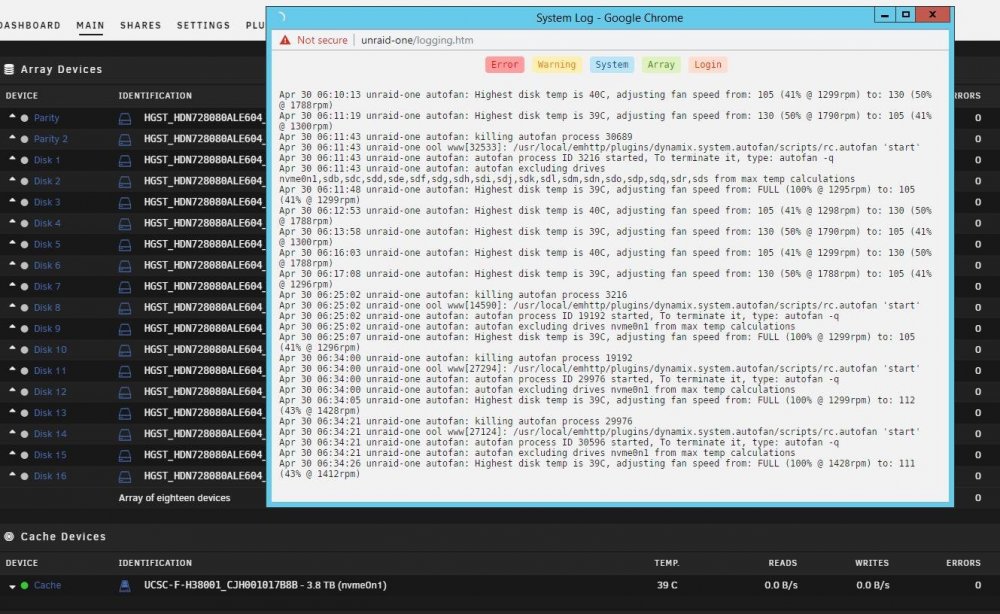
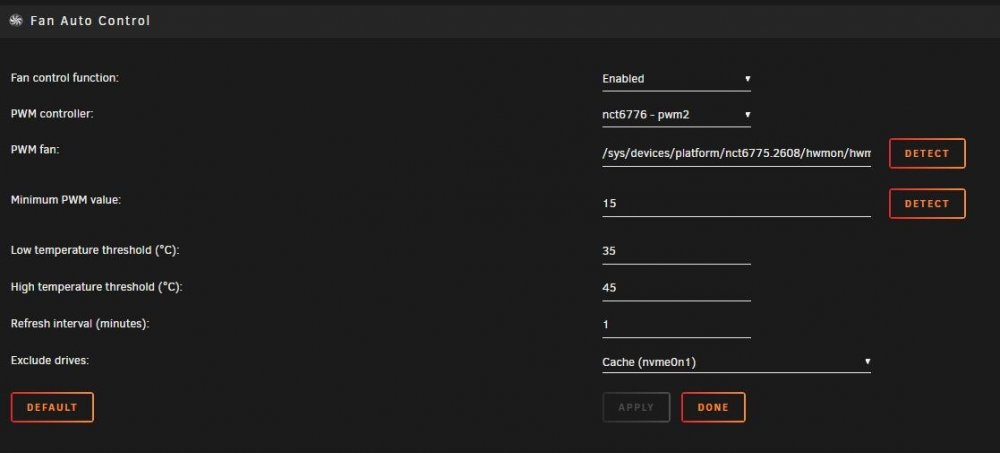
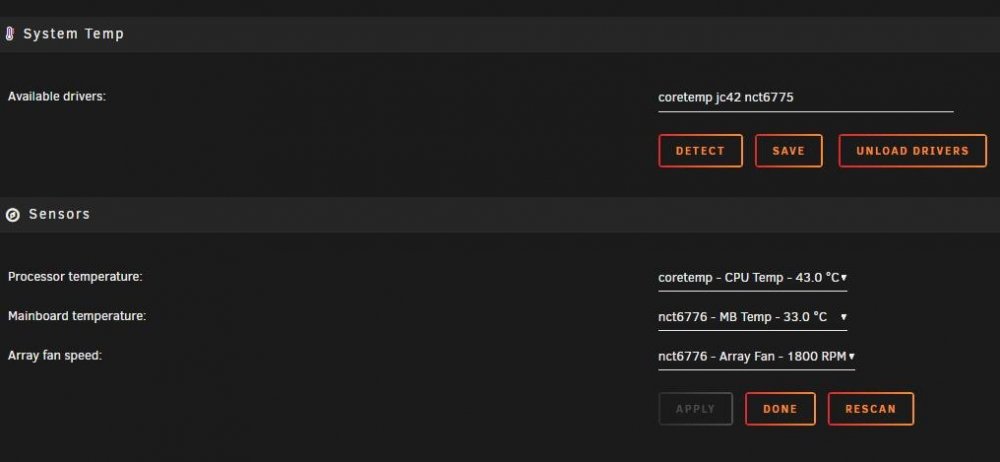
-
Great option, thanks!
-
Thanks for the suggestions and quick response, plugin installing now.
-
Really looking forward to this version, very helpful plugin! Had a bit of a problem installing, though. Check for updates was not finding update after a few hours, so I uninstalled old version, and tried to install updated plugin. plugin: installing: https://raw.githubusercontent.com/jbrodriguez/unraid/master/plugins/unbalance.plg plugin: downloading https://raw.githubusercontent.com/jbrodriguez/unraid/master/plugins/unbalance.plg plugin: downloading: https://raw.githubusercontent.com/jbrodriguez/unraid/master/plugins/unbalance.plg ... done Warning: simplexml_load_file(): /tmp/plugins/unbalance.plg:85: parser error : xmlParseEntityRef: no name in /usr/local/emhttp/plugins/dynamix.plugin.manager/scripts/plugin on line 214 Warning: simplexml_load_file(): [ -f "/usr/local/emhttp/plugins/&name;/scripts/stop" ] && /usr/local/emhttp/plug in /usr/local/emhttp/plugins/dynamix.plugin.manager/scripts/plugin on line 214 Warning: simplexml_load_file(): ^ in /usr/local/emhttp/plugins/dynamix.plugin.manager/scripts/plugin on line 214 Warning: simplexml_load_file(): /tmp/plugins/unbalance.plg:85: parser error : xmlParseEntityRef: no name in /usr/local/emhttp/plugins/dynamix.plugin.manager/scripts/plugin on line 214 Warning: simplexml_load_file(): [ -f "/usr/local/emhttp/plugins/&name;/scripts/stop" ] && /usr/local/emhttp/plug in /usr/local/emhttp/plugins/dynamix.plugin.manager/scripts/plugin on line 214 Warning: simplexml_load_file(): ^ in /usr/local/emhttp/plugins/dynamix.plugin.manager/scripts/plugin on line 214 Warning: simplexml_load_file(): /tmp/plugins/unbalance.plg:85: parser error : xmlParseEntityRef: no name in /usr/local/emhttp/plugins/dynamix.plugin.manager/scripts/plugin on line 214 Warning: simplexml_load_file(): [ -f "/usr/local/emhttp/plugins/&name;/scripts/stop" ] && /usr/local/emhttp/plug in /usr/local/emhttp/plugins/dynamix.plugin.manager/scripts/plugin on line 214 Warning: simplexml_load_file(): ^ in /usr/local/emhttp/plugins/dynamix.plugin.manager/scripts/plugin on line 214 Warning: simplexml_load_file(): /tmp/plugins/unbalance.plg:85: parser error : xmlParseEntityRef: no name in /usr/local/emhttp/plugins/dynamix.plugin.manager/scripts/plugin on line 214 Warning: simplexml_load_file(): [ -f "/usr/local/emhttp/plugins/&name;/scripts/stop" ] && /usr/local/emhttp/plug in /usr/local/emhttp/plugins/dynamix.plugin.manager/scripts/plugin on line 214 Warning: simplexml_load_file(): ^ in /usr/local/emhttp/plugins/dynamix.plugin.manager/scripts/plugin on line 214 Warning: simplexml_load_file(): /tmp/plugins/unbalance.plg:85: parser error : xmlParseEntityRef: no name in /usr/local/emhttp/plugins/dynamix.plugin.manager/scripts/plugin on line 214 Warning: simplexml_load_file(): [ -f "/usr/local/emhttp/plugins/&name;/scripts/stop" ] && /usr/local/emhttp/plug in /usr/local/emhttp/plugins/dynamix.plugin.manager/scripts/plugin on line 214 Warning: simplexml_load_file(): ^ in /usr/local/emhttp/plugins/dynamix.plugin.manager/scripts/plugin on line 214 Warning: simplexml_load_file(): /tmp/plugins/unbalance.plg:85: parser error : xmlParseEntityRef: no name in /usr/local/emhttp/plugins/dynamix.plugin.manager/scripts/plugin on line 214 Warning: simplexml_load_file(): [ -f "/usr/local/emhttp/plugins/&name;/scripts/stop" ] && /usr/local/emhttp/plug in /usr/local/emhttp/plugins/dynamix.plugin.manager/scripts/plugin on line 214 Warning: simplexml_load_file(): ^ in /usr/local/emhttp/plugins/dynamix.plugin.manager/scripts/plugin on line 214 plugin: xml parse error
-
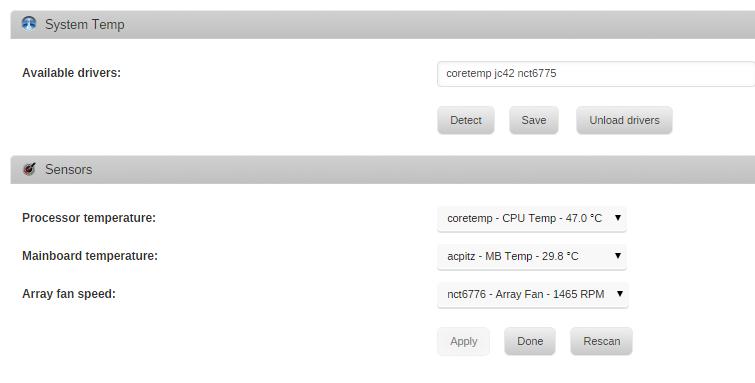
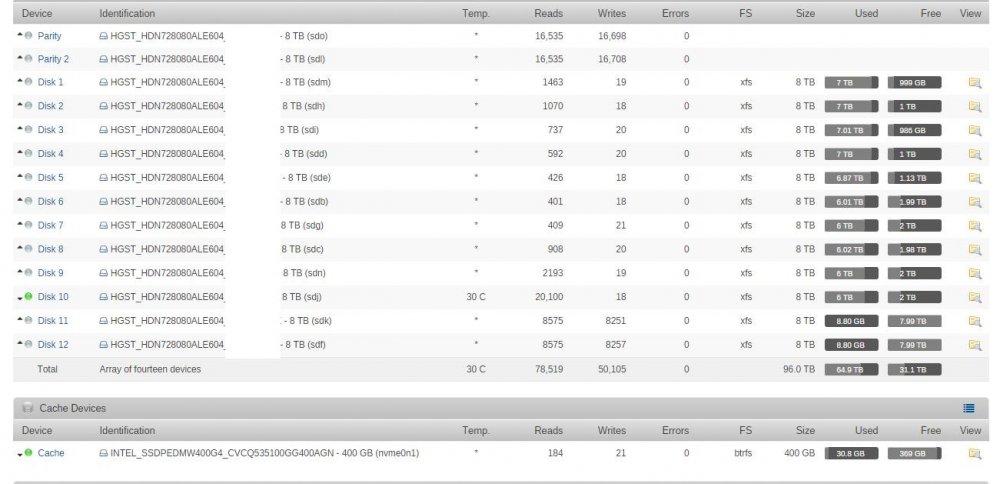
Thanks for updates to Dynamix Fan Control - ignore drive feature will really help with fan noise. I'm posting also to document a couple of anomalies regarding implementation: NVME drive (Intel 750 AIC) is visible in Dynamix Fan Control, and able to be "checked" to ignore, but does not seem to be actually ignored. Previous to update of plugin, fans would idle at 800rpm, now around 1300rpm since nvme drive began being displayed in plugin. Main menu view shows NVME drive listed under cache devices, but temp is never displayed, even when cache drive is active. System log shows fan speed being adjusted in response to 37C temp, but none of the spinners are near that temp. Oct 22 11:52:23 unraid-one emhttp: err: shcmd: shcmd (612): exit status: 25 Oct 22 11:52:50 unraid-one autofan: Highest disk temp is 36C, adjusting fan speed from: 90 (35% @ 1632rpm) to: 70 (27% @ 1616rpm) Oct 22 11:55:55 unraid-one autofan: Highest disk temp is 37C, adjusting fan speed from: 70 (27% @ 1618rpm) to: 90 (35% @ 1628rpm) Screen shots and diagnostics attached. Very impressed with development this last year - finally retiring the last of H/W raid! unraid-one-diagnostics-20171022-1125.zip
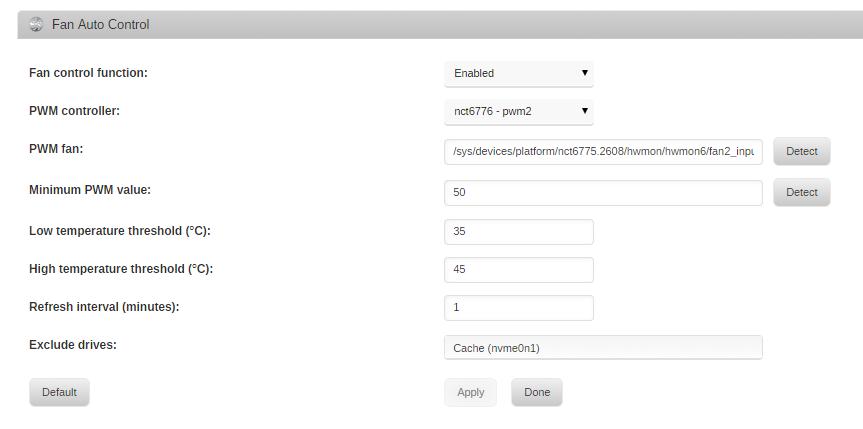
-
I'm doing some testing with Oracle F80 flash accelerator as a cache device, and have a question regarding the Dynamix System Autofan plugin: Is it possible to exclude specific drives from the plugin's calculations? The ssd's attached to the F80's hba have a 74C operating ceiling, and average 50C under load even with 120x38mm delta fan @ 3500rpm. I would like to leave the plugin default (35-45C) in place for 3.5" HDDs, but the SSD temps on the F80 are maxing out the fans currently. Thanks!


