





Alex.vision
Members
-
Joined
-
Last visited
Everything posted by Alex.vision
-
Should I conduct this repair with the array started, in maintenance mode?
-
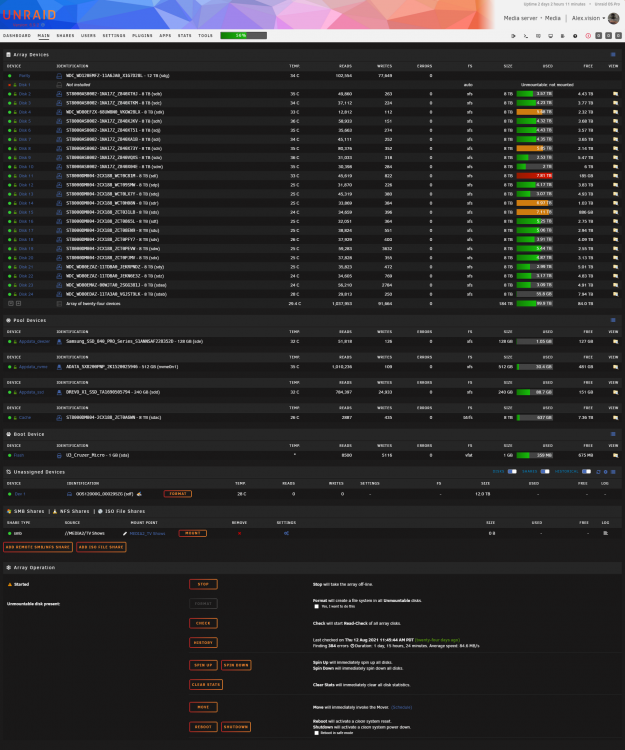
I followed the steps listed above, the array does start and if I hover over the red "x" for disk1, it says "Device is missing (Disabled), Contents Emulated". Where it shows the drives size, file system and the folder icon to view the drives content, it shows as Unmountable: not mounted. So it looks like I will need to do some file system repair. Attached are the requested files from the previous post. alex.vision media-diagnostics-20210905-2226.zip
-
OK, will do. Thanks
-
OK I have finally had enough time to try and test old disk4, which has completely failed now. So I guess I am ready to put the new disk4 into the array. The array is currently running, it is emulating disk4, and I would like to install new disk4 in place, tell the system that parity is still good, and rebuild disk1 on its replacement per Trurls idea. How should I proceed?
-
That was what I was afraid of, oh well guess some data loss is better than all data lost. I did try to run old disk4 in the test server but the drive is not detected by the OS for more than a few seconds. I can see the drive on the Main page, but within 10-30 seconds the drive disappears completely from the main page. Im guessing that drive is failing a lot more than it was. I am going to try plugging it back in to the server I pulled it from, in case there is some strange reason why the test server doesn't recognize it. If it still isn't recognized I think I will call old disk4 dead, and hopefully I can proceed with Trurl's idea to set a New Config with Parity Valid and replace my failing disk1. I will attempt to get old disk4 back online tonight, just so I can have as a backup, then post here for more help on Trurl's idea.
-
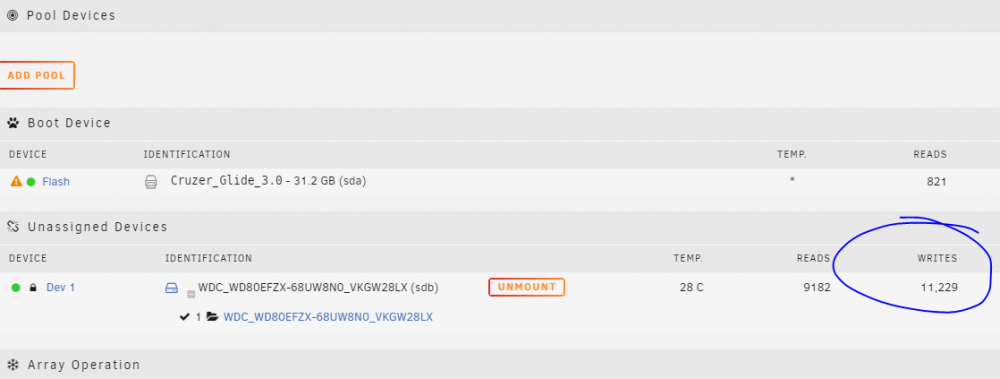
I've tested new disk4, and I will swap it for old disk4 when I get off work and test it as well. The files all seem to be there, I traversed some of the folders with midnight commander, and opened a few small text files to read their contents. It all seemed to work. One thing that concerned me though, was I saw the write count go up after i had mounted the drive. I've attached a snippet of the main gui for reference. Did these writes potentially invalidate the parity of the array or could the writes have been the superblock repair and not part of the array. If I try the same steps for old disk4 should I make any changes?
-
OK, it finished, looks like it made repairs/reset to the superblock. I will try to remount it with UD, if successful I will traverse the files. I am assuming I should do the same thing to old disk4, then we can decide if one of them makes a better candidate for putting back in the array, then follow Trurl's suggestion to "If the replacement looks good as an Unassigned Device, maybe we can use it as disk4 in a New Config with Parity Valid and then try to rebuild disk1 to a new disk. And, since you will have original disk4 and original disk1, if there are any problems maybe files can be copied from those." File System Check output FS: crypto_LUKS /sbin/xfs_repair /dev/mapper/WDC_WD80EFZX-68UW8N0_VKGW28LX 2>&1 Phase 1 - find and verify superblock... Phase 2 - using internal log - zero log... totally zeroed log - scan filesystem freespace and inode maps... - found root inode chunk Phase 3 - for each AG... - scan and clear agi unlinked lists... - process known inodes and perform inode discovery... - agno = 0 - agno = 1 - agno = 2 - agno = 3 - agno = 4 - agno = 5 - agno = 6 - agno = 7 - process newly discovered inodes... Phase 4 - check for duplicate blocks... - setting up duplicate extent list... - check for inodes claiming duplicate blocks... - agno = 1 - agno = 2 - agno = 3 - agno = 0 - agno = 4 - agno = 5 - agno = 6 - agno = 7 Phase 5 - rebuild AG headers and trees... - reset superblock... Phase 6 - check inode connectivity... - resetting contents of realtime bitmap and summary inodes - traversing filesystem ... - traversal finished ... - moving disconnected inodes to lost+found ... Phase 7 - verify and correct link counts... Maximum metadata LSN (1:639326) is ahead of log (0:0). Format log to cycle 4. done
-
Well, when you say it like that.... it does make sense. OK running now.
-
If you mean the check box next to the drive partition in UD, then yes I am able to run that, but I get an identical output to the one I ran before at dlandon's suggestion. There is an option to " Run with correct flag", I could click that and run it again. FS: crypto_LUKS /sbin/xfs_repair -n /dev/mapper/WDC_WD80EFZX-68UW8N0_VKGW28LX 2>&1 Phase 1 - find and verify superblock... Phase 2 - using internal log - zero log... totally zeroed log - scan filesystem freespace and inode maps... - found root inode chunk Phase 3 - for each AG... - scan (but don't clear) agi unlinked lists... - process known inodes and perform inode discovery... - agno = 0 - agno = 1 - agno = 2 - agno = 3 - agno = 4 - agno = 5 - agno = 6 - agno = 7 - process newly discovered inodes... Phase 4 - check for duplicate blocks... - setting up duplicate extent list... - check for inodes claiming duplicate blocks... - agno = 1 - agno = 3 - agno = 2 - agno = 0 - agno = 4 - agno = 5 - agno = 6 - agno = 7 No modify flag set, skipping phase 5 Phase 6 - check inode connectivity... - traversing filesystem ... - traversal finished ... - moving disconnected inodes to lost+found ... Phase 7 - verify link counts... Maximum metadata LSN (1:639318) is ahead of log (0:0). Would format log to cycle 4. No modify flag set, skipping filesystem flush and exiting.
-
Can I run xfs_repair on my encrypted disk? I found this post where the troubleshooting steps need the array to be running and in maintenance mode. Currently the disk is running on a test server as the only drive, so there is no array to run.
-
Ok, will do, I’ll report back when finished. Thanks
-
I moved new disk4 to a test server and tried to mount the drive. I tried mounting before I remembered it was encrypted. I added the encryption key and then tried to mount it again. This is the output I received. ug 25 18:42:46 TempTestSrv unassigned.devices: Adding disk '/dev/mapper/WDC_WD80EFZX-68UW8N0_VKGW28LX'... Aug 25 18:42:46 TempTestSrv unassigned.devices: Using Unrqid api to open the 'crypto_LUKS' device. Aug 25 18:42:48 TempTestSrv unassigned.devices: Mount drive command: /sbin/mount -o rw,noatime,nodiratime '/dev/mapper/WDC_WD80EFZX-68UW8N0_VKGW28LX' '/mnt/disks/WDC_WD80EFZX-68UW8N0_VKGW28LX' Aug 25 18:42:48 TempTestSrv kernel: /dev/mapper/WDC_WD80EFZX-68UW8N0_VKGW28LX: Can't open blockdev Aug 25 18:42:48 TempTestSrv kernel: device-mapper: ioctl: 4.43.0-ioctl (2020-10-01) initialised: [email protected] Aug 25 18:42:48 TempTestSrv unassigned.devices: Mount of '/dev/mapper/WDC_WD80EFZX-68UW8N0_VKGW28LX' failed: 'mount: /mnt/disks/WDC_WD80EFZX-68UW8N0_VKGW28LX: special device /dev/mapper/WDC_WD80EFZX-68UW8N0_VKGW28LX does not exist. ' Aug 25 18:42:49 TempTestSrv unassigned.devices: Partition 'WDC_WD80EFZX-68UW8N0_VKGW28LX' cannot be mounted. Aug 25 18:43:39 TempTestSrv unassigned.devices: Adding disk '/dev/mapper/WDC_WD80EFZX-68UW8N0_VKGW28LX'... Aug 25 18:43:39 TempTestSrv unassigned.devices: Using disk password to open the 'crypto_LUKS' device. Aug 25 18:43:41 TempTestSrv unassigned.devices: Mount drive command: /sbin/mount -o rw,noatime,nodiratime '/dev/mapper/WDC_WD80EFZX-68UW8N0_VKGW28LX' '/mnt/disks/WDC_WD80EFZX-68UW8N0_VKGW28LX' Aug 25 18:43:41 TempTestSrv kernel: SGI XFS with ACLs, security attributes, no debug enabled Aug 25 18:43:41 TempTestSrv kernel: XFS (dm-0): Mounting V5 Filesystem Aug 25 18:43:41 TempTestSrv kernel: XFS (dm-0): totally zeroed log Aug 25 18:43:41 TempTestSrv kernel: XFS (dm-0): Corruption warning: Metadata has LSN (1:639326) ahead of current LSN (1:0). Please unmount and run xfs_repair (>= v4.3) to resolve. Aug 25 18:43:41 TempTestSrv kernel: XFS (dm-0): log mount/recovery failed: error -22 Aug 25 18:43:41 TempTestSrv kernel: XFS (dm-0): log mount failed Aug 25 18:43:41 TempTestSrv unassigned.devices: Mount of '/dev/mapper/WDC_WD80EFZX-68UW8N0_VKGW28LX' failed: 'mount: /mnt/disks/WDC_WD80EFZX-68UW8N0_VKGW28LX: wrong fs type, bad option, bad superblock on /dev/mapper/WDC_WD80EFZX-68UW8N0_VKGW28LX, missing codepage or helper program, or other error. ' Aug 25 18:43:41 TempTestSrv unassigned.devices: Partition 'WDC_WD80EFZX-68UW8N0_VKGW28LX' cannot be mounted.
-
The difficulty lies in that what were trying to figure out is, does one of my drives, old disk4 or new disk4 still work. Old disk4 failed, was replaced by new disk4, during the rebuild at 99.8% complete, disk1 started having errors. Now Unraid doesn't recognise new disk4 as having been installed ever. So we have been trying to mount both disks so I can verify if they contain any files. At this point I don't know what steps should be taken to try and mount these disk. for verification. I did mention earlier to others helping that I could move one of the disks to another Unraid server for mounting with UD, I'm not sure if that would help.
-
OK here is the output FS: crypto_LUKS /sbin/xfs_repair -n /dev/mapper/WDC_WD80EFZX-68UW8N0_VKGW28LX 2>&1 Phase 1 - find and verify superblock... Phase 2 - using internal log - zero log... totally zeroed log - scan filesystem freespace and inode maps... - found root inode chunk Phase 3 - for each AG... - scan (but don't clear) agi unlinked lists... - process known inodes and perform inode discovery... - agno = 0 - agno = 1 - agno = 2 - agno = 3 - agno = 4 - agno = 5 - agno = 6 - agno = 7 - process newly discovered inodes... Phase 4 - check for duplicate blocks... - setting up duplicate extent list... - check for inodes claiming duplicate blocks... - agno = 0 - agno = 3 - agno = 6 - agno = 1 - agno = 7 - agno = 5 - agno = 4 - agno = 2 No modify flag set, skipping phase 5 Phase 6 - check inode connectivity... - traversing filesystem ... - traversal finished ... - moving disconnected inodes to lost+found ... Phase 7 - verify link counts... Maximum metadata LSN (1:639318) is ahead of log (0:0). Would format log to cycle 4. No modify flag set, skipping filesystem flush and exiting.
-
OK, I placed my array password in the Set Encryption Disk Password for the selected disk, new disk4, then re-ran Change UUID, but I received the same error. Aug 23 11:01:20 Media unassigned.devices: Error: shell_exec(/usr/sbin/xfs_admin -U generate /dev/mapper/sdab) took longer than 10s! Aug 23 11:01:20 Media unassigned.devices: Changing disk '/dev/sdab' UUID. Result: command timed out after I set the password, the GUI refreshed but neither the syslog nor the page said any confirmation, not sure if it was supposed to. Edit: ok not quite the same error, it didn't have this line. Aug 23 09:49:19 Media emhttpd: shcmd (10921412): /usr/sbin/cryptsetup luksOpen /dev/sdab1 sdab
-
Should I use the command xfs_admin -U generate /dev/sdab1
-
After downloading the UD update (thanks for doing that @dlandon), I tried running the change UUID on new disk4. Aug 23 09:49:19 Media emhttpd: shcmd (10921412): /usr/sbin/cryptsetup luksOpen /dev/sdab1 sdab Aug 23 09:49:38 Media unassigned.devices: Error: shell_exec(/usr/sbin/xfs_admin -U generate /dev/mapper/sdab) took longer than 10s! Aug 23 09:49:38 Media unassigned.devices: Changing disk '/dev/sdab' UUID. Result: command timed out So still looks like a no go. I took diagnostics and a syslog dump before and after I tried to implement the UUID change. Thoughts?
-
OK, I'll hold off until we see if dlandon has any ideas. I'm attaching the Smart report for the old disk4. old disk4 ST8000AS0002-1NA17Z_Z840XT2C-20210818-1304.txt
-
I just found this post from superloopy1 With recommendations from itimpi and JorgeB a manual xfs-repair and uuidgen they were able to get the drive to mount in UD. I could follow those steps if it seems advisable.
-
OK, using the Change Disk UUID option in UD I selected the new disk4 drive and clicked Change UUID. The syslog reported Aug 17 15:03:00 Media unassigned.devices: Changing disk 'sda' UUID. Result: I waited about a minute before attempting to mount the device again in UD, it didn't mount. Aug 17 15:03:00 Media unassigned.devices: Changing disk 'sda' UUID. Result: Aug 17 15:03:57 Media unassigned.devices: Adding disk '/dev/mapper/WDC_WD80EFZX-68UW8N0_VKGW28LX'... Aug 17 15:03:57 Media emhttpd: shcmd (202422): /usr/sbin/cryptsetup luksOpen /dev/sdab1 WDC_WD80EFZX-68UW8N0_VKGW28LX Aug 17 15:03:58 Media unassigned.devices: Mount drive command: /sbin/mount -o rw,noatime,nodiratime '/dev/mapper/WDC_WD80EFZX-68UW8N0_VKGW28LX' '/mnt/disks/WDC_WD80EFZX-68UW8N0_VKGW28LX' Aug 17 15:03:58 Media kernel: XFS (dm-28): Filesystem has duplicate UUID 55c3e94c-c28a-4132-adb2-43d2ff58c702 - can't mount Aug 17 15:03:58 Media unassigned.devices: Mount of '/dev/mapper/WDC_WD80EFZX-68UW8N0_VKGW28LX' failed: 'mount: /mnt/disks/WDC_WD80EFZX-68UW8N0_VKGW28LX: wrong fs type, bad option, bad superblock on /dev/mapper/WDC_WD80EFZX-68UW8N0_VKGW28LX, missing codepage or helper program, or other error. ' Aug 17 15:03:58 Media unassigned.devices: Partition 'WDC_WD80EFZX-68UW8N0_VKGW28LX' cannot be mounted. It still seems to be identified by the same duplicate UUID. Would it be worth it to try mounting it in one of my other Unraid servers and bypass the duplicate UUID issue entirely. I can do that in an hour or two when I get off work.
-
OK, sounds good. Should I wait for the Extended SMART Test to complete on the old disk4 (eta 13hours), or go ahead and change the UUID on the new disk4 and try to mount it again with UD?
-
Trurl, just so I'm clear with what your asking, you want me to change the UUID of new disk4, then try to mount it with UD? Edit: Does it matter that the disk in my array are encrypted? Do I need to add the encryption passcode to each drive in UD, or because they are the same as the array it will be unlocked using that?
-
OK, make sense, thanks. I'm still waiting for the Extended SMART report on old disk4 to finish, though I don't know if you still want it after UD couldn't mount it.
-
Also just thought I would ask, is it strange that right when attempting to mount both old disk4 and new disk4 with Unassigned devices there would be this line in the syslog.. Media kernel: XFS (dm-28): Filesystem has duplicate UUID 55c3e94c-c28a-4132-adb2-43d2ff58c702 - can't mount I didn't notice it at first but is that saying that both devices have the same UUID? I'm not sure what I'm reading in the syslog, so it may be nothing at all.
-
OK here is the extended smart report for disk1, though I received an error when it was running "Errors occurred - Check SMART report" disk1 SMART-ST8000AS0002-1NA17Z_Z840X72E.txt


