





j5428
Members
-
Joined
-
Last visited
-
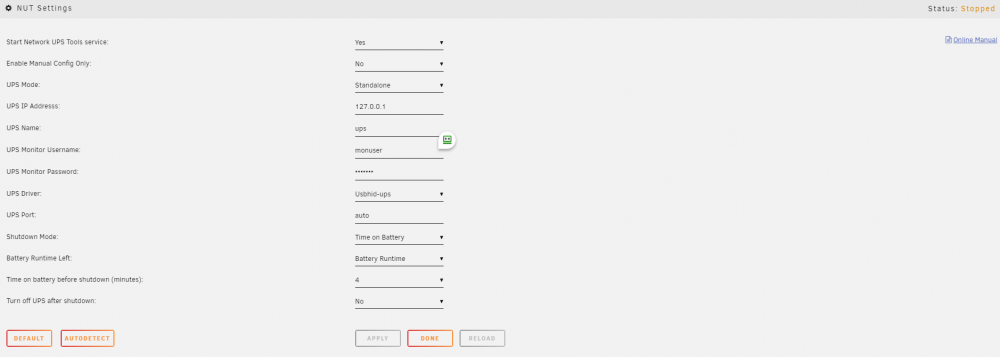
Has anyone tried to get a Liebert GXT3 1500 UPS connected with a USB cable to work? When I try to start the Nut plugin I get the following: Writing nut config Updating permissions... Network UPS Tools - UPS driver controller 2.7.4.1 Network UPS Tools - Generic HID driver 0.55 (2.7.4.1) USB communication driver 0.43 This Liebert device (10af:0000) is not (or perhaps not yet) supported by usbhid-ups. Please make sure you have an up-to-date version of NUT. If this does not fix the problem, try running the driver with the '-x productid=0000' option. Please report your results to the NUT user's mailing list <[email protected]>. No matching HID UPS found Driver failed to start (exit status=1) Here is the ups.conf file I tried to add the suggestion in the error log to and it did not help. [ups] driver = Usbhid-ups -x productid=0000 port = 10af:0000 Thank you in advance for any help.
-
Reflashed my M1015 using kkm's instructions working great with 5.0-beta6d.
-
Flashed card using Win 7 32bit: MegaCli_x64.exe -adpfwflash -f imr_fw.rom -NoSigChk -NoVerChk -a0 -ApplogFile Flashlog.txt version 4.24.00 Build March 03,2011 20.10.1-0037 now
-
I downloaded the latest file and it will now identify the M1015 card but will not flash it. Current fw version on the card is 4.20.00 Build date Nov 19 2010. FW package: 20.10.1-0020 I did not see the IT file in the latest download. thanks.
-
Thats awesome! Just make sure that the foam does not wear thru and the motherboard pins start hitting metal. That would be bad. I would put some plastic risers under the motherboard just to make sure it doesn't short out.
