redlaws
Members
-
Joined
-
Last visited
Everything posted by redlaws
-
here they are stower03-64-diagnostics-20230503-2314.zip
-
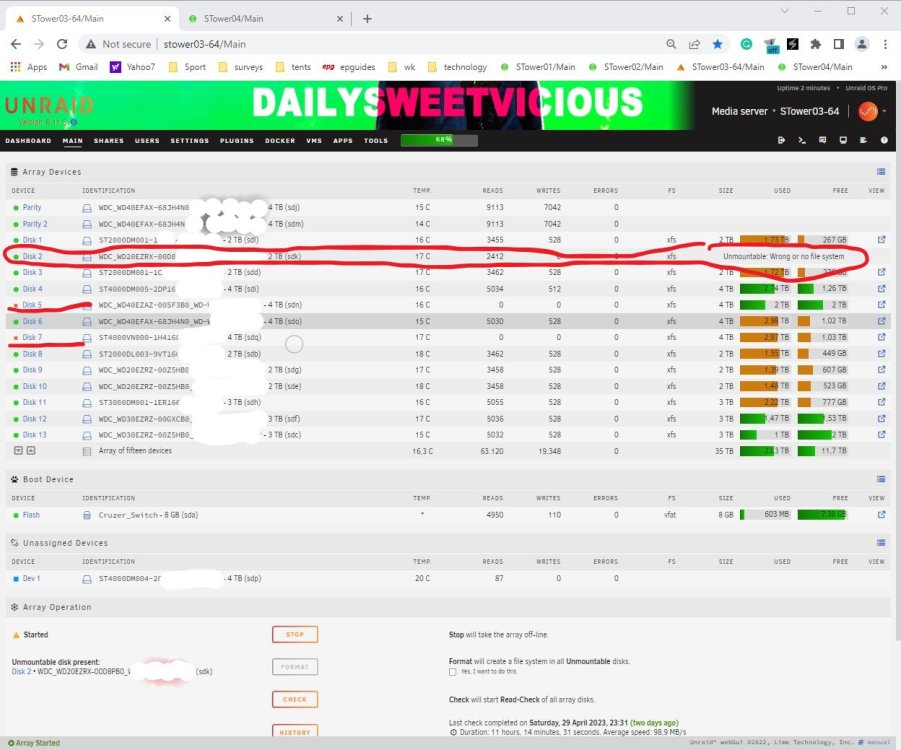
I have only just updated this array to 6.11.5 from 6.9.2. I had disks 5-7 extra 4tb play up so I built a new config & parity & then rebuilt all 3 with new disks. I then put the original disk 5-7 back into tower 3 and was able run a parity check this year. I had started to delete and clean up some data and wanted to update parity disks, for disk 5 & 7 to to give me a Red X. I have played around with the connections for disk 2, 5 & 7. I can afford to lose disk 5, 6 & 7 from this array. Should I remove 5 & 7, but can I rebuild disk 2 or the parity disks not complete. I might take disk 2 & add it to my new array & rebuild onto a new disk.
-
thank you for that, I am hoping that I can find the easiest & quickest way to hopefully put the 1.63gb of data on the 4tb hdd from the old 2tb.
-
I have been pondering this comment for a while now as I am hopeful that I still have data on my old 2tb disk 5. one option was to copy the setup of the usb to another usb & add a 4tb parity & just try to a new config with those 2 drives & then once parity is correct for that replace my 4tb disk 5 in as a rebuild, so that then I can re-add it back to my server & rebuild parity again. is this a quicker way to fix my missing data on disk 5 (4tb).
-
thanks trurl for that suggestion I will try that, I am not sure if I have many/any spare sata ports but it may be time to clean it up a bit & put in another card. Also clean up the usb drive too.
-
when I starting up the Server & could not get the windows page up but the monitor connected showed something like this. similar error.pdf
-
I believe the controller card errors may date back when I purchase 3x 8 way controller cards from ebay, because when I was testing them I place 1 card into this server at a time with the sas leads attached to see if they worked in unraid bought 3 different card that appear to have a jbod that matched best matched the Super micro cards I already had. I will look at them & put together what I found.
-
I have finally found some time to look at this server again, I have put the old 2tb Disk 5 (removed the replaced 4tb) back to see if I can recover what is on it. The only way I can see to do that is a new config (assuming that everthing is readable), apart a something that can read xfs & copy the data off it (1.63tb). I think putting the 4tb back & see if I can check the xfs system & then able to read what is on the 2tb with Ubuntu virtual machine so that I may be able to copy off any data on it. So with 2 parity drives ok & 2 failed that are both Emulated what is the best or prefered way to fix them reattached both & rebuild them or shutdown & replace both drives one at a time or both together.
-
I probably should let the original disk 5 go through with what it was rebuilding (but I could only see on the server monitor and didn't know how long that would take or if it would fix itself) but with disk 2 out I was concerned. Here is what I collected at the time but what I would like to know is "can it rebuild 2 data drives at the same time". Also the 4tb (dom 2020) that I put in as a replacement for disk 5 probably had a similar error when that failed (Parity a month or so ago) & it needed to be reset with the connections on the drive but I felt replacing both drives & rebuilt parity then the other drive afterwards was a safer bet. This is my biggest server out of the 3 I have, it might be time to strip it down & clean it up & I have a spare 8way card I can put into it but it did have about 10x 2tb I wanted to replace at some point to 3tb or 4tb drives cylon-diagnostics-20210816-2028.zip stower03-64-smart-20210822-1157.zip
-
After starting my Unraid 3 Tower which has 2 4tb Parity Disks which had passed a parity check about a month ago and I see it is showing 2 disks Emulated with Disk 2 not showing at all & Disk 5 with CRC errors and doing its own self check/rebuild. Both are 2tb and realatively full at highwater 250gb free on both. I stopped Disk 5 & because it was easier to get to I replaced with a 4tb & reattched disk 2 (which I believe was a mistake) only because Disk 2 was the the only one to be rebuilt (I still have the faulty Disk 5). Therefore it is best to rebuild only 1 disk at a time even though Disk 5 was getting written to it. I am considering putting the faulty disk 5 back in then see if I can get it to rebuild CRC itself again so that later on I can recover that data in a New Config. Is this the best way to go? The last time something similar happen like this, it was a Parity disk 4tb & a 3tb data disk but I was able to recover both onto 2 4tb drives I had spare, I am sure it fixed the Parity 4tb 1st & then I did the data disk later. But this time I panicked a little.
-
I want to try to add Mt Everest but it may need to be lighted up. what is the easiest way to swap or change banners & do they all need to be called banner.

-
I want to try to add Mt Everest but it may need to be lighted up.

-
hey see my rig near the bottom done that
-
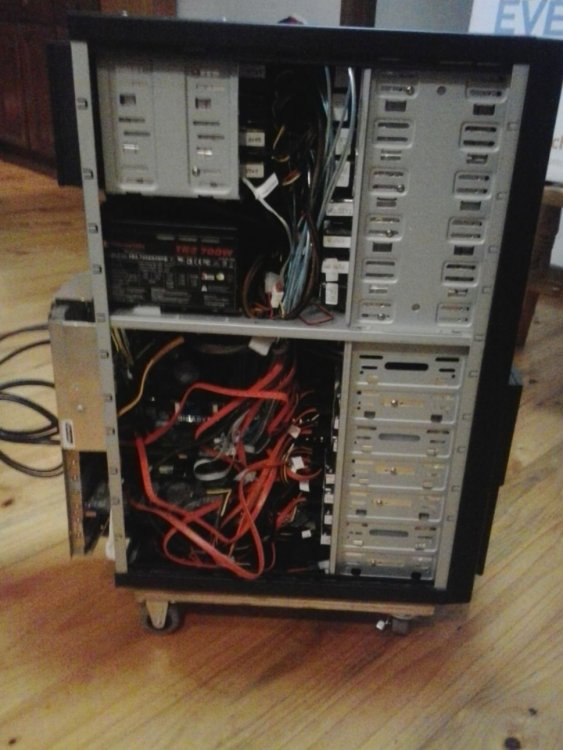
Tom here is STower02 modified from a 13bay duplicator case. I had to add a m/b tray to the case by cutting it down now I have extended it out the back with aluminium angle with screws & pop rivets. it has 5 4:3 cooler master cages (I added the extra drive bay over the power supply). I am running rc16c pro with 12x 2tb up top & I have 6x 2tb in the bottom 2 drive cages. I have figure out how to install 10 hdd into 5 bays & just need to mount a fan in front of them for cooling. Steve
-
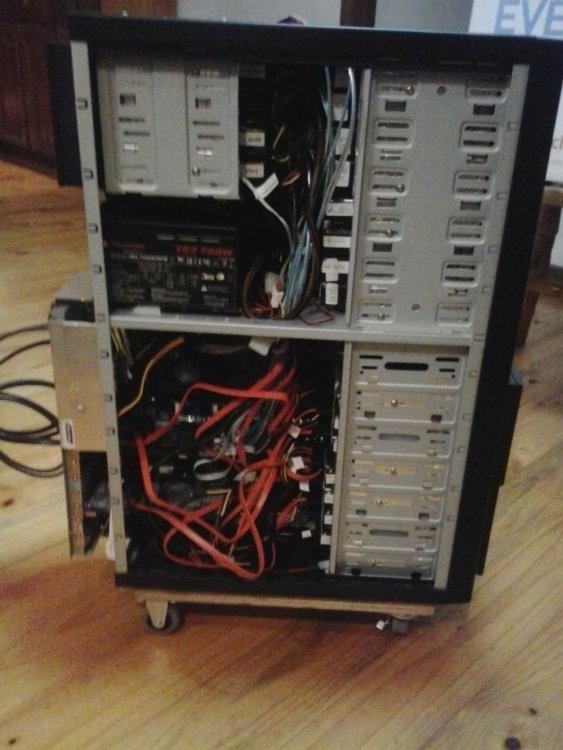
that's great for us noobs with 2 servers (I did buy the 2nd pro as a back up) but the 1st (mostly 8x1.5tb 3x2tb) gave me a few issues quite a while back, now 2 has (15-18 2tb hdd) is bigger. 5rc16c each 4gb ram a supermicro 8way card, 1st thermalake m9 (2x5 vert homemade hdd holder with fans at front into 5 bays & a 4:3 coolermaster with 4 hdd), 2nd modified duplicator 13 way case 4x4:3 cooler master 12 hdd up the top with 700w tr2 p/s & 6hdd in 2x4:3 coolermaster in the bottom 7 bays. case modiied as it had no m/b tray extends out the rear by nearly 60mm. both on wooden trolley with 50mm castors 2 fixed & 2 flexible. steve
-
that's great for us noobs with 2 servers (I did buy the 2nd pro as a back up) but the 1st (mostly 8x1.5tb 3x2tb) gave me a few issues quite a while back, now 2 has (15-18 2tb hdd) is bigger. 5rc16c each 4gb ram a supermicro 8way card, 1st thermalake m9 (2x5 vert homemade hdd holder with fans at front into 5 bays & a 4:3 coolermaster with 4 hdd), 2nd modified duplicator 13 way case 4x4:3 cooler master 12 hdd up the top with 700w tr2 p/s & 6hdd in 2x4:3 coolermaster in the bottom 7 bays. case modiied as it had no m/b tray extends out the rear by nearly 60mm. both on wooden trolley with 50mm castors 2 fixed & 2 flexible. steve