





jortan
Members
-
Joined
-
Last visited
-
I believe the context was a survey of features most wanted by users. I could be wrong but I thought it was suggested that it would be added as the next major feature after ZFS was implemented (in 7.0). I've never known Limetech to promise unreleased features, but glad you have confirmed this here.
-
The wait is frustrating. This feature was telegraphed (though not officially confirmed) to be coming in 7.1 but was passed over. The capability appears to have been skipped in 7.2 as well.
-
I couldn't find any solution for this, using custom network (vlan). Ended up migrating config to linuxserver version of prowlarr container and this issue went away.
-
7.0 is in release candidate stage now. Multiple arrays will probably be a 7.1 feature but nothing is certain. I know its not ideal but perhaps you can use a ZFS pool on place of secondary array.
-
No news was expected, but it is likely the next major feature to be tackled now full ZFS support is done. Unraid 7.0 doesn't even require any array at all now. I think it's reasonable to assume much of the internal plumbing that decouples Unraid from expecting/requiring one and only one array is already done, so the complexity of implementing >1 array is now reduced.
-
I'm not using the binhex template for qBittorrent, but just worked out how to get Dark mode working and though I would share. Should work for this container as well: Theme from: https://github.com/Carve/qbittorrent-webui-cjratliff.com cd /mnt/user/appdata/binhex-qbittorrentvpn git clone https://github.com/Carve/qbittorrent-webui-cjratliff.com This creates the theme located at /mnt/user/appdata/binhex-qbittorrent/qbittorrent-webui-cjratliff.com The path for this inside the container is: /config/qbittorrent-webui-cjratliff.com qBittorrent Tools, Options | Web UI: Restart qBittorrent container and SHIFT+F5 in your browser to force a complete refresh.

-
Great news. I'm just about to migrate my ZFS pool and was planning to use 2 x NVME partitioned as both special VDEV and L2ARC. My NVMEs don't support multiple namespaces so will need to be partitioned. Just wanted to check if this is a supported configuration in 6.13?
-
I recently went through upgrade to 6.12 with existing pool. My disks looked like this: fdisk --list /dev/sdaf Disk /dev/sdaf: 5.46 TiB, 6001175126016 bytes, 11721045168 sectors Disk model: ST6000NM0034 Units: sectors of 1 * 512 = 512 bytes Sector size (logical/physical): 512 bytes / 4096 bytes I/O size (minimum/optimal): 4096 bytes / 4096 bytes Disklabel type: gpt Disk identifier: C92F7A6B-2F0B-EF41-9080-8B71DE0E618A Device Start End Sectors Size Type /dev/sdaf1 2048 11721027583 11721025536 5.5T Solaris /usr & Apple ZFS /dev/sdaf9 11721027584 11721043967 16384 8M Solaris reserved 1 I also had an issue with "unmountable: unsupported or no file system". The trick for me was to stop the array, and export the pool/s by running: zpool export -a Starting the array then mounted the zfs pool correctly. edit: Make sure they are in the same order in your pool as "zpool status" shows. Hope this helps!
-
Agreed, my point was you can see hugepages available with the above command and then adjust if needed without needing an immediate reboot. ie. if you are testing something, a docker stole your hugepages, etc.
-
Check current free hugepages like this: grep -i hugepages /proc/meminfo HugePages_Total: 16384 HugePages_Free: 10216 HugePages_Rsvd: 175 HugePages_Surp: 0 Hugepagesize: 2048 kB It looks like you can also just use this to set aside/adjust allocated memory for hugepages virsh allocpages 2M 8192
-
Once installed you will need to restart Unraid. I think it will automatically attempt to mount any ZFS pools found on startup.
-
It does look like some progress in decoding AX1600i output has been made recently: https://github.com/Jon0/ax1600i
-
The other question is why the executable is being placed in the cpsumon directory, and not in /usr/local/bin as with other users? This means the executable is also not in path. I wonder if these are related (is Unraid automatically chmod +x'ing plugin files placed in /usr/local/bin but not a subfolder?) I don't have corsair psu connected currently so my diagnostics will not be useful.
-
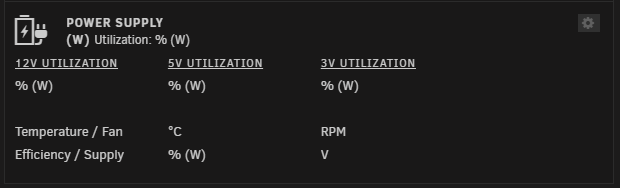
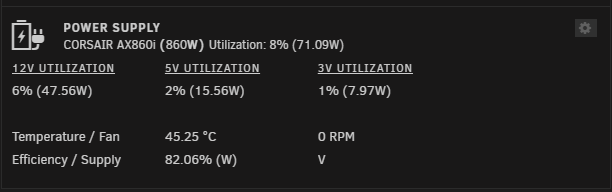
I'm running the latest RC: Unraid Version: 6.12.0-rc6 Plugin: 2023.03.26e It doesn't survive a reboot, so I get this: Until I run: chmod +x /usr/local/bin/cpsumon/cpsumoncli Then it starts working again:
-
So the plugin was installed, but the command cpsumoncli was not found Uninstalling from Apps didn't do anything, and the plugin would still show as installed. Uninstalled from Plugins page And then reinstalled from Apps. Still not availalable in path and dashboard still not working root@servername:~# /usr/local/bin/cpsumon/cpsumoncli -bash: /usr/local/bin/cpsumon/cpsumoncli: Permission denied ls -alh /usr/local/bin/cpsumon/ total 16K drwxr-xr-x 3 root root 80 Mar 27 01:41 ./ drwxr-xr-x 1 root root 100 Mar 27 01:41 ../ -rw-rw-rw- 1 root root 16K Mar 27 01:41 cpsumoncli drwxr-xr-x 2 root root 60 Mar 27 01:41 libcpsumon/ Added executable permission: chmod +x /usr/local/bin/cpsumon/cpsumoncli Now it's working! Not sure if this is a new requirement in the latest RCs? ps: I still can't execute cpsumoncli without specifying the full path: /usr/local/bin/cpsumon/cpsumoncli



