fishface
Members
-
Joined
-
Last visited
Everything posted by fishface
-
I have run extended test, 2 of the 3 drives passed, the 3rd, and already suspect drive, failed at 10% like before, servo failure, so RMA. Brother-in-law, who was here this weekend, was, until very recently, a firmware engineer for the hard drive division at Seagate and then Western Digital, he said there are sort of servo track sectors, and if those sectors start going bad it can impact the servo, and of course the servo could be going faulty as well. The suspect drive started to get sectors errors for the last 98% of the pre-clear, other drives passed.
-
Ok, that is something to look into, thanks. This server currently has no data on it, I'm testing and playing around with it before I fully commit it. I'm running a pre-clear on it, with the array stopped, and so far (165MB/s to 234MB/s) no issues, it's been running for only a few hours so not long in, time will tell. My other rig is a low powered 3 core AMD CPU, this one has a Intel Core i7 2600 @ 3.4GHz, which is a considerable step-up from the old rig. I only run a few dockers so my requirements are quite low. What I have noticed, as I'm running 2 pre-clears at the same time, is that each pre-clear is using around 9% with dd, and CPU used shown in unRAID is ~25-40%, I was a little surprised and the CPU usage as I had read before that increasing CPU has little impact on pre-clear times, but if each dd is using 9% per dd, then increase CPU may impact pre-clear times a little. Either way, these newer to me HGST drive are more less twice as fast as the previous drives, I benchmarked them against one my older 2TB HGST drives, and this is being bourne out in the pre-clear numbers I seeing.
-
Also seems odd, in the diagnostic I ran it says SMART Passed, but only gets 20% through the test and then "Completed: servo/seek failure". Also the disk has a blue square, I cannot see what the blue square signifies in the Main Disk view, hover text/mouse-over text just says "New device" I've started a pre-clear on it. smartctl 7.3 2022-02-28 r5338 [x86_64-linux-5.19.14-Unraid] (local build) Copyright (C) 2002-22, Bruce Allen, Christian Franke, www.smartmontools.org === START OF INFORMATION SECTION === Model Family: HGST Ultrastar 7K6000 Device Model: HGST HUS726060ALE610 Serial Number: Omitted LU WWN Device Id: 5 000cca 242c0fb1c Firmware Version: APGNT517 User Capacity: 6,001,175,126,016 bytes [6.00 TB] Sector Sizes: 512 bytes logical, 4096 bytes physical Rotation Rate: 7200 rpm Form Factor: 3.5 inches Device is: In smartctl database 7.3/5405 ATA Version is: ACS-2, ATA8-ACS T13/1699-D revision 4 SATA Version is: SATA 3.1, 6.0 Gb/s (current: 3.0 Gb/s) Local Time is: Fri Nov 18 08:00:44 2022 PST SMART support is: Available - device has SMART capability. SMART support is: Enabled AAM feature is: Unavailable APM feature is: Disabled Rd look-ahead is: Enabled Write cache is: Enabled DSN feature is: Unavailable ATA Security is: Disabled, NOT FROZEN [SEC1] Wt Cache Reorder: Enabled === START OF READ SMART DATA SECTION === SMART overall-health self-assessment test result: PASSED
-
Ah, yes I forgot about that. Strange how it passes with the other apps, I'm getting the disk replace anyway, but I did copy ~200GB to and it appears fine. I guess unRAID has a better interpretation of the SMART output or something, bit of a puzzle. Of course, there is a chance the drive failed when being physically moved from one host to another, not that it was dropped our anything.
-
I purchased 3 used 6TB hard drives for my second unRAID server. Before setting them up I run a disk diagnostics tool named HDDScan, CrystalDiskInfo and on my Linux Desktop all 3 HGST HUS726060ALE610 drives. All 3 apps gave the same results for the short SMART test, one drive had some UltraDMA CRC Errors, which seems likely down to a suspect cable. I then install the drives in a new trail version of unRAID, I run the short SMART test again, and one of the drive continually fails the test, with the following error "Completed: servo/seek failure". The disk appears to work fine, but would SMART test should I believe and why does unRAID SMART test find this issue? Is it doing different SMART tests to other apps?
-
The manual method worked. I did try another Sandisk Cruzer, like the one that was working, that also failed. One more question, I'm building a new server, and I will use this USB flashdrive with it, I know I can in theory just plug it into the new server and it should all work, I assume I will have to assign parity drive and disk etc, but will it keep all the shares, disk configs and whatnot? I'm about to purchase another unRAID license so I can still use the old rig, makes data migration easier as well. Thanks for your help, much appreciated.
-
My BIOS is legacy, the config file that is created using zip flash backup that I created, after using the USB Flash Creator has "EFI -" which I believe the "-" signifies legacy. BIOS doesn't have Secure Boot, nor UEFI. I want to keep my settings if possible, hence the use of the "Local Zip", using the settings below, I always get "No boot device found", I have tried a 32GB flashdrive, same issue. So, is there another way to transfer my current license to a new flashdrive, as the below is not working for me. Should I run the make_bootable?
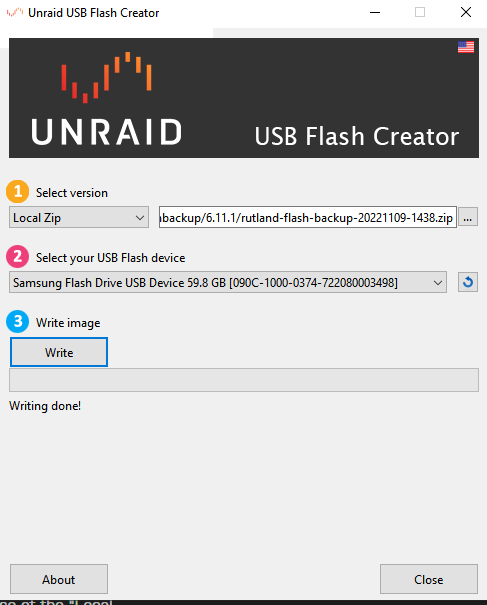
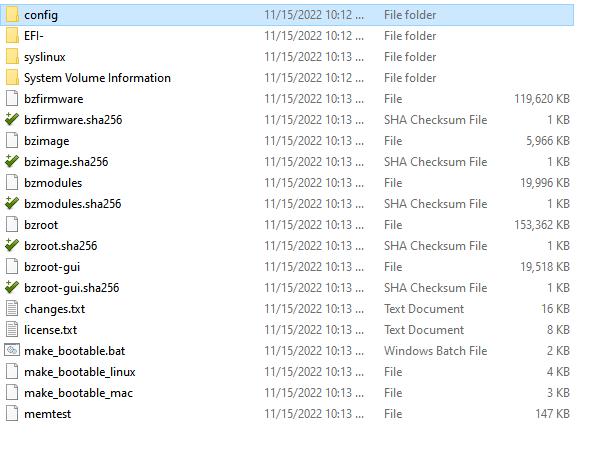
-
When following the guide, there is no option to choose UEFI, it looks exactly like the screenshots in the above guide - I tried it again any way, same result. I have also tried a 32GB flash drive, different brand, same result. If I select "Stable" from the Select Version, I'm then get more options, and UEFI is is checked by default, I can also set static IP, hostname and whatnot, is the way I should create it?
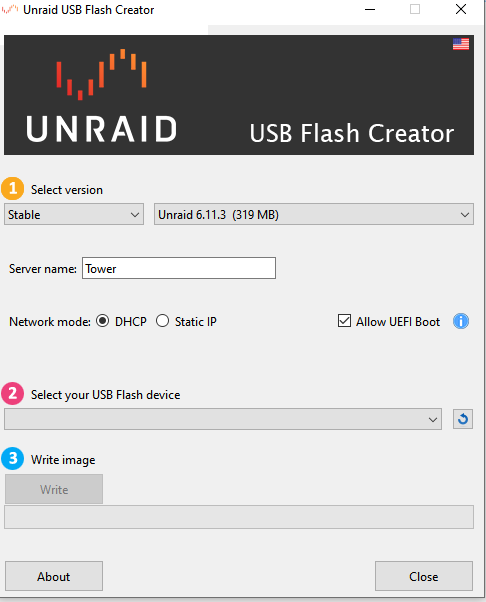
-
I attempted to transfer my license key from my very old 16GB flash drive to a new 64GB Samsung. I followed the guide here: https://wiki.unraid.net/Manual/Changing_The_Flash_Device - I used the USB Creator tool and this section "Using the Flash Creator" All went as expected, I then powered down unRAID, removed the old flashdrive, inserted the new one, but it says "No bootable devices found" I think I can fix this by running the make_bootable, but it doesn't mention in the steps, so do I need to do this? Or is it because I'm using a 64GB flashdrive? I rebooted unRAID with the old flashdrive, and it's all as expected, just the same before I attempted the proceedure.
-
I accidentally created a different share name pointing to the same data as an existing share points to, on the same disk. How do I delete the extra share name? The UI won't allow it as the share is not empty, which is correct, and I don't want to delete the data.
-
Oh, one more question , when it came back up I now have the following on disk 3 domains isos system I guess it picked there as it is empty, but I will soon pulling drive 3 out and replacing it, I'm also out of physical space in the case, can I simply move those directories to another disk? Nothing special to do?
-
Ah, simples! Well, things are looking in a much better place now, and I really appreciate your help here, if I could buy you a few beers I would! I planning on upgrading this to a newer system. it going to be using my old i7 desktop board/RAM etc, the very PC I'm using now, I'll keep the old system though, and do a rsync of anything super important - I'll purchase another license. Once again - thank you.
-
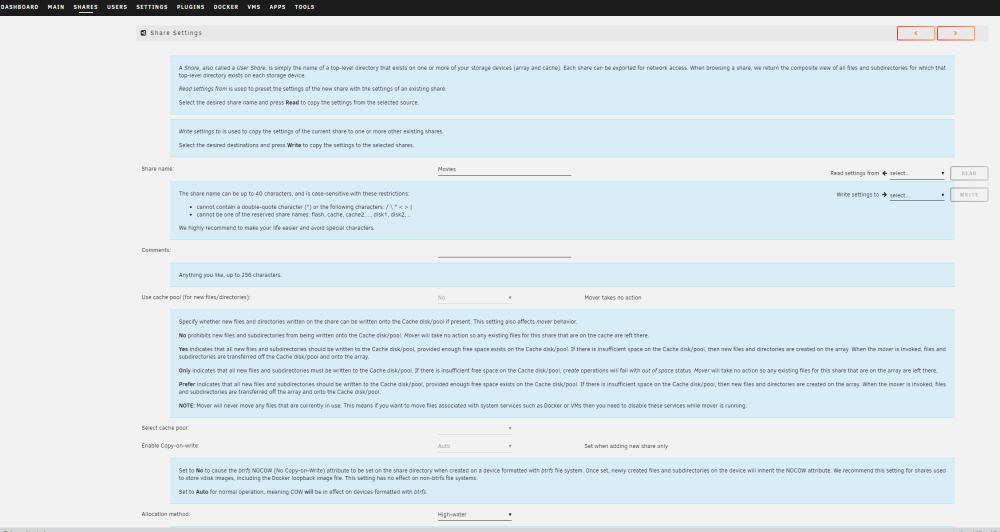
The share settings page - is that normal?
-
Yay! The array started. Some time ago I cleaned all the filters and fans out, and that is where the crc errors crept in, I remember now, I had to re-seat a few sata cables. It's not doing a parity check, so I guess all is ok? I stand corrected, the shares are still there, it's the user account that I will have re-create. Other things are different, I had disk 1, 2 and 5 all assigned to TV Shows, but it looks like it is all one big storage now. Another odd thing, when I click Shares, you initially (just a quick flash) get the UI I'm used, and then it goes to this other version - see screenshot. It looks messed up, especially the far right "Read settings" options
-
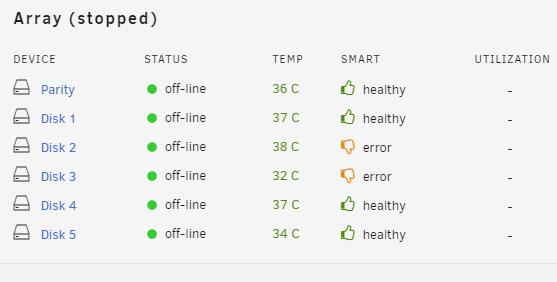
Ok, got it rebooted, it changed the IP (I had a static IP) so gave me a bit of a heart attack for a few seconds. Could be issues with disk2 and 3, even though they recently passed a SMART last week. And of course, it has lost all my shares configs, but I guess I can copy that over from the backup once the other issues have been fixed.

-
Trying again, it says the drive unbootable Forgot the make_bootable
-
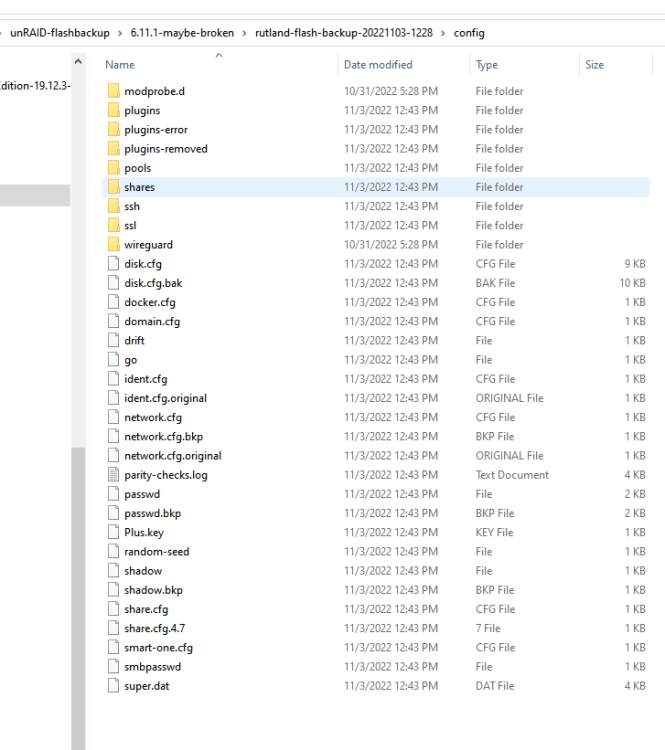
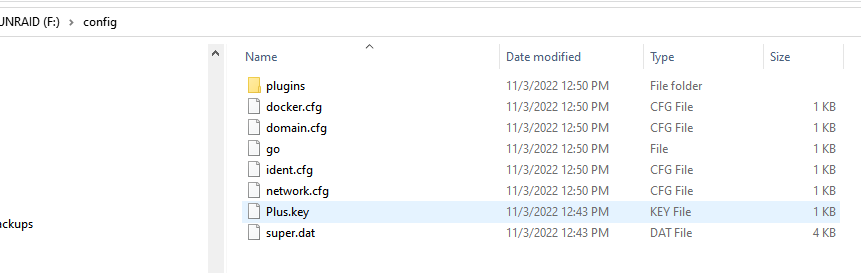
Just checking something, the first screenshot shows the contents of my 6.11.1 broken config directory, the second screenshot is the backup now copied to the original USB thumb drive, with the super.dat and the key.PLUS file copied over from the 6.11.1 broken config directory. My query is this, new USB thumb drive config directory has a lot less content/files - is this expected?
-
Just so I have this correct. Backup flash drive Use the unRAID USB creator tool on the original USB flash drive, using the backup I just made, as I can't use the "Update" plugins as the plugins are disable Reboot etc Or Backup flash drive Use the unRAID USB creator tool on the original USB flash drive, but manually download a new copy of unRAID6.11.1 Reboot etc
-
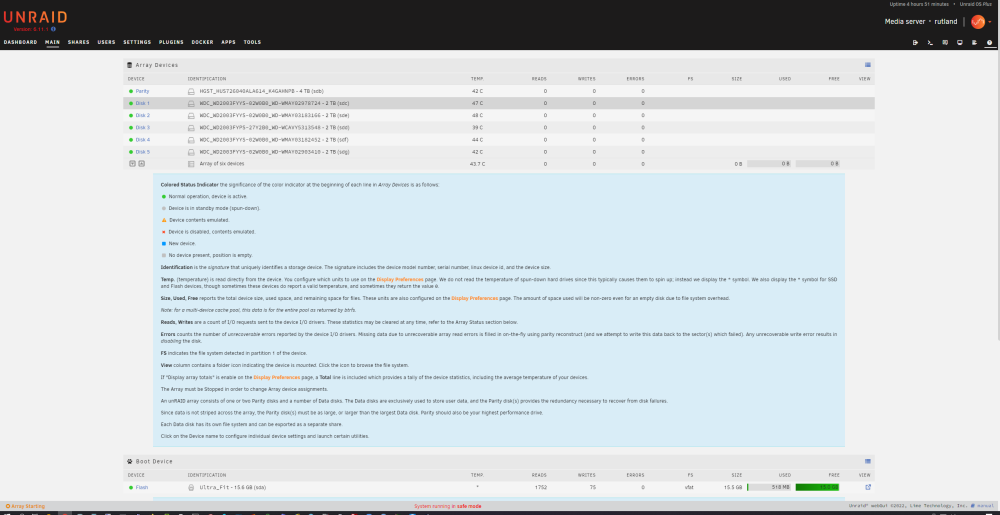
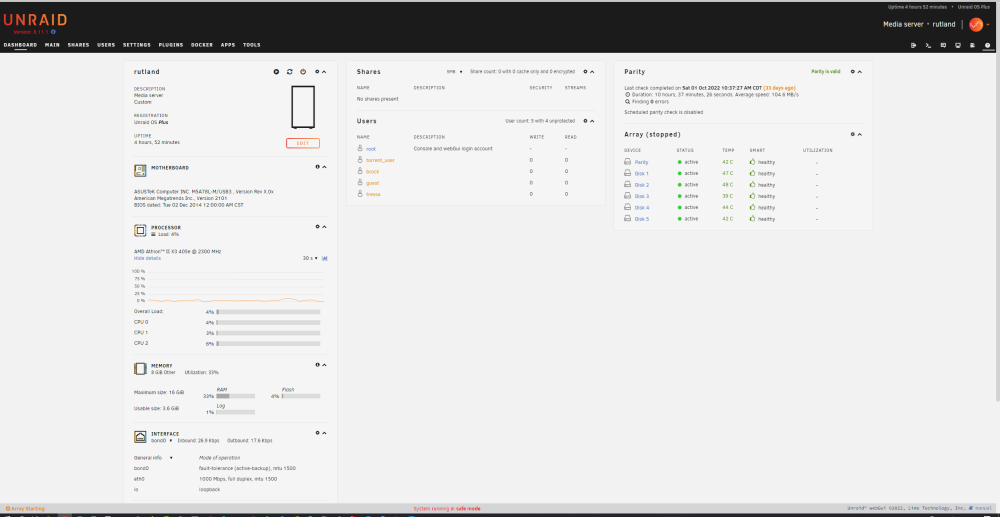
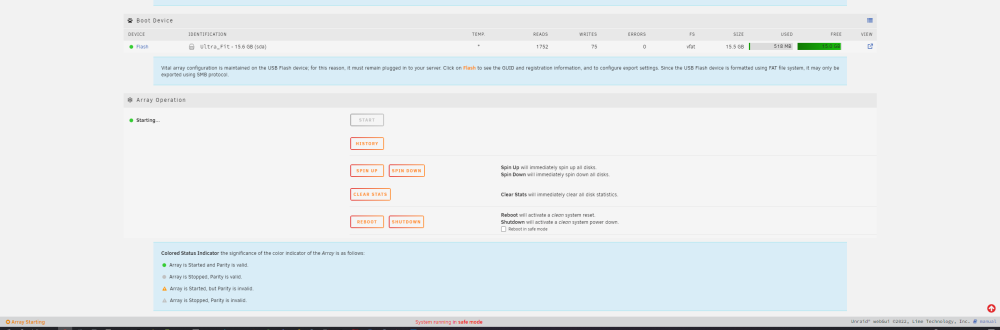
Here we go
-
New diags rutland-diagnostics-20221103-1101.zip
-
Shall I upload a fresh diagnostics? I think the disk are constantly spinning, as the drives temps are on the high side.
-
It's like the UI grabs a first load of info just after boot, and then it is locked/crashed or something, and parts of it don't update.
-
I used Firefox, Google Chrome, and Konqueror, all the do the same, also tried another PC, same result.
-
Did a hard power off, then activated Safe Mode, rebooted.The drives showed as off-line in the window under Array in the Dashboard, which is as one would expect. I disable the SMB Mac option, which I was now able to do, previously it wouldn't stick. I then started the array, and it is still the same, stuck at Starting Array, but the drives in the Dashboard view now show online,but no shares are available in the UI as it states "There are no exportable user shares". Also, if the UI is to be believed, and I'm increasingly not trusting it, the disk are never spinning down, they are all constantly in a green ball state, with zero bytes being moved and nothing happening. So what next?
-
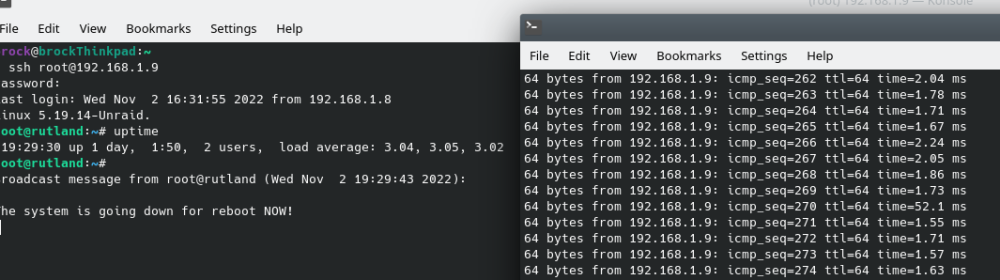
Is there a command line option for that? The UI is acting very strange, as I've pointed out above, every time I've tried "Reboot" or "Shutdown" it does nothing. And...I just clicked on Reboot and checked "Safe mode" and it does nothing, so the UI is messed up. As a side note, had zero issues like this with 6.5.3, in fact no issues at all for years. I see this in the logs Nov 2 16:39:55 rutland nginx: 2022/11/02 16:39:55 [error] 3013#3013: *723526 upstream timed out (110: Connection timed out) while reading response header from upstream, client: 192.168.1.8, server: , request: "POST /webGui/include/Boot.php HTTP/1.1", upstream: "fastcgi://unix:/var/run/php5-fpm.sock", host: "192.168.1.9", referrer: "http://192.168.1.9/Main" This taken 5 mins after I have hit the Reboot, nothing happening. 16:32:03 up 22:53, 1 user, load average: 1.96, 1.56, 1.28 At this point I'm wondering if I should rollback to 6.5.3 on the USB stick backup I did. Screenshot below, shows the live output of the console, while pinging as I hit the Reboot button, and it does not reboot.