





fishface
Members
-
Joined
-
Last visited
Everything posted by fishface
-
I tried to change the mac setting, it was on "Yes", when I try to change it after hitting Apply the waving lines come up but never seems to stop, left it for over a minute. So, I click on Dashboard and then go back to settings and it's still set at Yes, it seems like I'm having UI issues, I tried another browser, same result. Can I manually edit the smb.conf? Also the drive all still have green balls next to them, and I have zero read writes from all the disks, also reporting temps of 43C which is the sort of temps I get when the drives are spinning, so it's like the UI is not refreshing, and the array is still stuck at Starting Array and all the disks are spinning. I left it overnight, wondering if it indeed was misleading, was started doing a parity check and the UI is just misleading me, it was still the same as I left but with one minor difference, in the top right corner the "Parity has completed" pop-up dialog box was shown, it wasn't before, so I do indeed now wonder if it completed the parity check and it's all UI issuses.
-
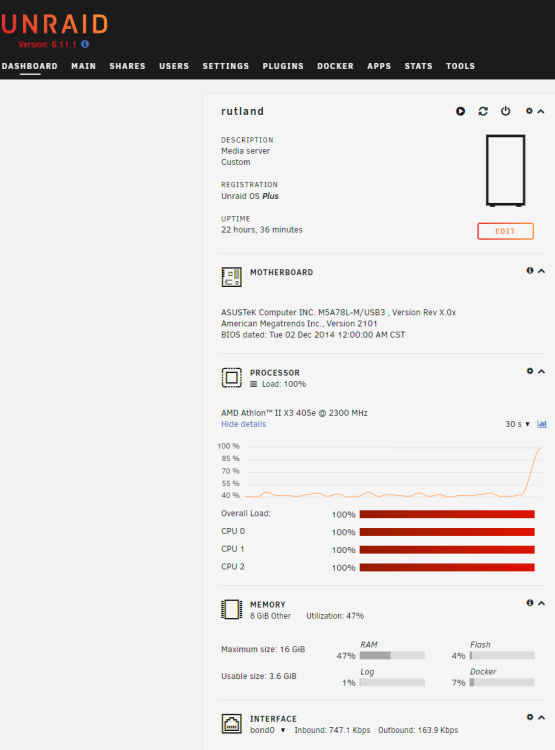
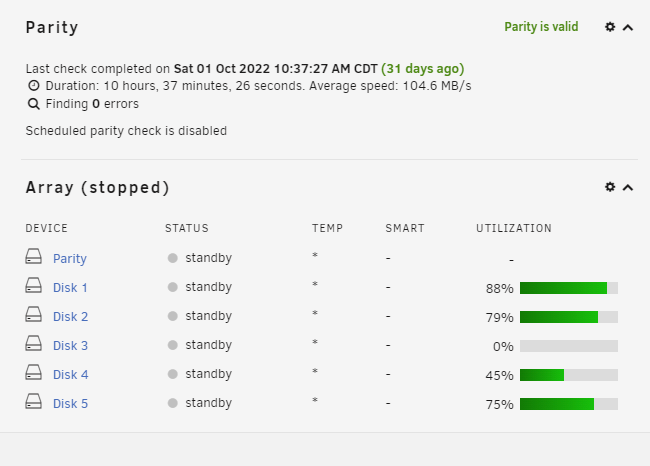
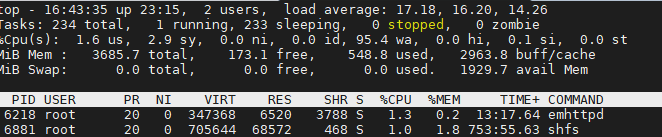
So, got another issue. I think 6.11.1 might be a bit too much for my lower power system, for the first time ever uses unRAID it failed to stop the array, I hit stop the array, as I had changed some disk settings in UI, and it advises to reboot, so I went to stop the array, and it got stuck at "stopping array", left it for 15mins and still nothing. WebUI was still responsive, and it showed all 3 cores pegged at 100% (another first). shfs is stuck 68% and smbd at 28% So what to do? It's now stuck at "stopping array" Also, under the Dashboard, far right under the Parity information, you have Array information, and it states "Array Stopped" but as I have said, in the lower left corner, in the lower bar, it says "Array Stopping", in orange, and next to that "Stopping services..." - it seems confused. I have hit the "Reboot" button, just before I did that I sent continuous pings and it's responding, as soon as I hit reboot the pings stopped, as one would expect, but shows that something is happening, however, it did not reboot has uptime is still at 23hrs. So, what next, hard power off using the physical power button? wait time is very high in top, but the other odd thing is the webUI shows CPUs pegged at 100%, but when usign ssh and htop, there isn't much going on, 2% for shfs, emptd 1% etc. I gave and hard powered off, "Power Off" in UI did nothing, also powerdown -r in command line did nothing. It all came backup, all the drives are online and report "green", it did detect an unlcean shutdown., but is stuck at "Starting array", should I just wait now? rutland-syslog-20221101-1629.zip rutland-diagnostics-20221101-1627.zip rutland-syslog-20221101-2305.zip rutland-diagnostics-20221101-1805.zip
-
I'm replying to my own topic - after 20mins or so it did indeed settle down to its typical 5-11%! Still checking, but circumstantial evidence seems to indicate I may have taken a performance hit, copying some data around and the transfer speed seems to have taken a nose dive, and CPU is at 28-50% while copy this 60GB of data. I recently moved the same data around, yesterday, and it took several hours, but now it says it will take 2.5 days and is going dog slow. It might be that miniDLNA is re-indexing....maybe. I'll see how it goes, and report back.
-
I have just upgraded from 6.5.3 to 6.11.1 and immediately noticed that my lowly old rig is running at around 50% total load, where as previously it would run at 10-15%, rarely saw it going over 50%. I have no active shares, and only one docker running, miniDLNA. I admit it's an old lowly rig, but has been working well. AMD Athlon™ II X3 405e @ 2300 MHz, 8GB RAM, 6 drives in total. Is high CPU use expected after an upgrade and eventually settles down? Or is that my old rig is, well, too old now? If it's considered old, is it straightforward to rollback to 6.5.3? I did backup the flash drive before the upgrade. Thanks
-
This could be a cool feature for unraid. https://blogs.oracle.com/linux/xfs-online-filesystem-checking
-
Sorry my fault. I thought that as the FLAC directory was only set as a share to include a single disk then I would only have to delete the FLAC directory from that single disk.
-
Deleted all the file under flac, selected the flac share vi webGUI and I still did not have the option to remove/delete share. Waited a few more minutes, still no joy. So, decided to stop the array, and in the status message at the bottom it says 'attempting to unmount...' it stays like this for about 10 minutes and seems stuck in a loop. I reboot, and the share flac share is now gone. Parity check in progress, so fixed for now.
-
root@rutland:~# ls -la /mnt/user/flac total 0 drwxrwxrwx 1 nobody users 104 Aug 1 17:26 ./ drwxrwxrwx 1 nobody users 35 Aug 1 09:33 ../ drwxrwxrwx 1 brock 1003 70 Aug 1 16:56 Kruder\ And\ Dorfmeister/ drwxrwxrwx 1 brock 1003 116 Aug 1 16:57 Massive\ Attack/ drwxrwxrwx 1 brock 1003 222 Aug 1 16:57 Muse/ drwxrwxrwx 1 brock 1003 31 Aug 1 16:58 Radiohead/ drwxrwxrwx 1 brock 1003 191 Aug 1 16:58 Talk\ Talk/ Ok, that does explain it a bit, I copied the flac directory to a backup share on disk3 (set to manual allocation) before deleting the flac directory on Disk 4 (which is set to manual allocation). So, do I have to completely delete all occurrences of the flac directory system wide? Or is a rename sufficient? Or delete the flac directory /mnt/user/flac?
-
Well, I thought I had it, I deleted the flac directory entirely, and under shares I still have the same problem, it not accepting a blank name. This is not happening When the share is empty there is a Delete checkbox next to the 'Apply' button on the share's edit page. When you check this box the Apply button label changes to Delete. I know what you are talking about as I saw this on the edit share page when I was creating the shares, but is no where to be seen now. So, I use the other method, I remove flac from /config/share, rm -f flac.cfg, stop/started array, its still there, reboot unRAID its still there, I'm now confused. /boot/config root@rutland:/boot/config# grep -iR flac * root@rutland:/boot/config#
-
Got it thanks.
-
I added a share, now I want to remove it, how do I do this? I tried clearing out the share name and comment fields but it states the share name cannot be empty.
-
Thanks Joe...looks like I'm good to go... :)
-
After my disastrous start using WD15EARS drives, used with XP, no jumper and ran WDAlign, I now have 2 new WD20EARS drives, so just to check I'm on track with things I have posted the preclear results for 1 drive. Conditions. 1) The drive is new from WD 2) Has not been used in any system other than unRAID and preclear.sh 3) I soon as I unpacked it I placed the jumper across pins 7 & 8 4) I then ran preclear.sh smart_finish3419_results_wd20ears_1.txt preclear_results_wd20ears_1.txt

