fishface
Members
-
Joined
-
Last visited
Everything posted by fishface
-
I've got it working, what I did in the end is create a cifs mount in the fstab on my laptop to /Monitored and seems to be working.
-
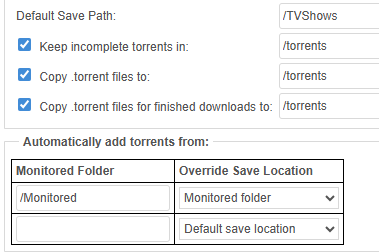
I migrated all by torrents (~1000) from my linux VM to binhex-container, torrents download via the automated RSS feed from the tracker work fine, however I cannot get the Monitored directory feature to work. For the most part I used the automated RSS, but on occasion I like browse a list via my laptop and then select a specific show to download, and I think this is where the issue is. On my laptop (Linux) I have smb mapped to all 3 of the shares, mounted using the username:password form, no problem accessing, the Monitored shares is set at Export/Public. So I browse the site, download the .torrent file and dump in Monitored vi my laptop, the file is download and then disappears, so what is going on here? My container config: /mnt/user/torrents/ /mnt/user/TVShows/ /mnt/user/Monitored Inside the container: drwxrwxrwx 1 nobody users 12288 Oct 26 08:31 torrents drwxrwxrwx 1 nobody users 4096 Oct 14 11:23 TVShows drwxrwxrwx 1 nobody users 6 Oct 26 08:32 Monitored The paths in qbittorrent are set to the above
-
I think you got it, I removed the source IP (192.168.1.10 - my unraid host) from the router port forward rule and after 30s the icon has turned green in qBittorrent. Hopefully it will survive a container reboot this time. Thank you!
-
binhex-qbittorent - cannot get port forward to work. I do not use a VPN, so this a basic setup. I got it to work once, but once I restarted the container it stopped working, I tried a few things but now I'm unsure of where I'm at with, so had a do-over. The icon in qBittorretn shows as "Connection Status Firewlled" I have port 61006 set in qbittorent, UPnP/NAT disabled. I have this for the container 172.17.0.3:61006/TCP <---> 192.168.1.10:61006 172.17.0.3:61006/UDP <--->192.168.1.10:61006 172.17.0.3:8080/TCP <---> 192.168.1.10:8080 My router has this for TCP/UDP App | binhex | EXT port 61006 | INT port 61006 | INT ADDRESSS 192.168.1.10 | SOURCE 192.168.1.10 Should this be working or have I got it all wrong? I currently have a VM running qBittorrent and that works fine, different ports to the above. Also confused as to why docker ps show 0.0.0.0.

-
Maybe I'm being pedantic, but I do not have that option in v6.11.5. Split Level = automatically Split any Level The only option I have out of the 7, with the word "any" is: Automatically split any directory as required So, I guess it's that one, unless I need to upgrade or it's a plugin for this setting.
-
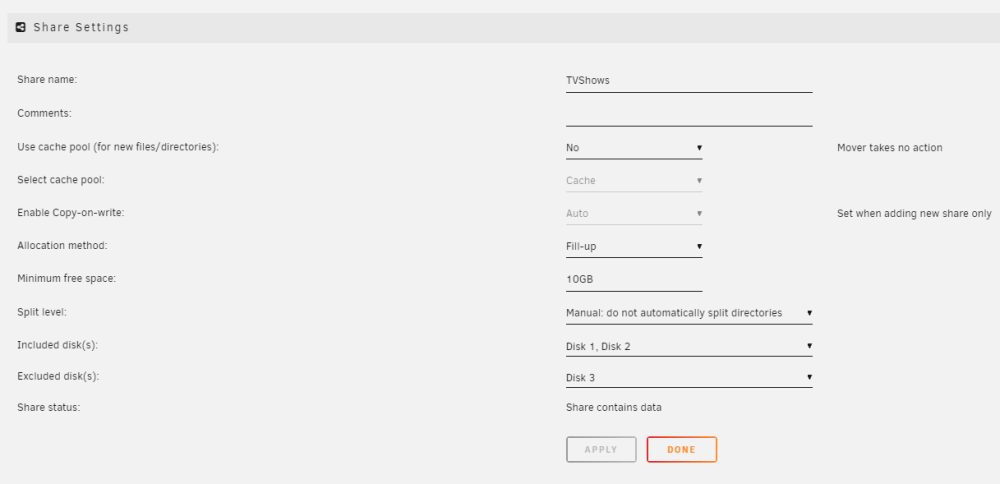
I have Disk 1 and Disk 2, set as a share for TV Shows, allocation method Fill Up, Minimum Free Space = 10GB, and Manual - do not split directories. I want to fill up the first disk, and when it gets to 10GB left, start to automatically use Disk 2 - so do I have this set right? I not sure if I should have the split level set at Automatically split any directory as required for it to switch to disk 2.
-
Support, very promptly, sent me a new key, great customer service from the unraid team.
-
So, I restored from my backup, on a new flash drive, and I'm up and running, but unraid reports. Unraid OS Multiple License Keys Present Purchase key. The guide doesn't mention duplicate keys, and I only have one, but I did do what it suggested below. Please copy the correct key file to the config directory on your USB Flash boot device I did upgrade in August 2023 to a PlusKey, wonder if that has caused an issue? I did notice that I do have a Basic.key and a Trial.key, so I removed those, as that was suggested as a solution in the forums, I rebooted, after doing that is now says "Unraid OS GUID Error" I think I understand some of the issue, the backup has a Plus.key but with the old faulty flash drive, but I did copy the Plus.key to the config directory on the new flash drive, so I cannot see what I did wrong. I have emailed support, so let's see what they say.
-
unraid has been working fine, until today. Clean power down, then added a Asmedia ASM1061 2 port SATA controller as I just need a couple more ports. Rebooted, ASmedia card detected in BIOS, which detected new disk, unraid came online. Logged in, new drive is there, but notice that one of the existing drives was missing. Power-off again, and sure enough, I had dislodged a power cable to the disk, re-connected. Power-on again, but this time it does boot fully, it starts to boot, detects sda1, does a few more things, then I see "Buffer I/O error on dev sda1", repeated a few times, and then later "Cannot mount /dev/sda1", and "device descriptor error read/64, error -71" So is my flash drive failed? I have tried several USB ports, and rebooted at least 5 times, also repeated with the ASmedia un-installled, made no difference. Before I made the changes I did backup the flash drive. Also, when I plug the flash drive into a Windows PC, it does open it. What is the best way to recover from this? Thanks.
-
Apologies, my error, I created the blank file one directory up, now moved to the correct one and all is good - sorry to have wasted your time.
-
Linux cifs mount was posted earlier, windows mapped drive also show the same free space as the cifs mount.
-
Diags attached pitsford-diagnostics-20230822-0951.zip On unraid dev/md1 /mnt/disk1 xfs rw,noatime,nouuid,attr2,inode64,logbufs=8,logbsize=32k,noquota 0 0 /dev/md2 /mnt/disk2 xfs rw,noatime,nouuid,attr2,inode64,logbufs=8,logbsize=32k,noquota 0 0 /dev/md3 /mnt/disk3 xfs rw,noatime,nouuid,attr2,inode64,logbufs=8,logbsize=32k,noquota 0 0 /dev/sdf1 /mnt/cache btrfs rw,noatime,ssd,discard=async,space_cache=v2,subvolid=5,subvol=/ 0 0 shfs /mnt/user0 fuse.shfs rw,nosuid,nodev,noatime,user_id=0,group_id=0,default_permissions,allow_other 0 0 shfs /mnt/user fuse.shfs rw,nosuid,nodev,noatime,user_id=0,group_id=0,default_permissions,allow_other 0 0
-
Did that, well it hung at stopping array for 10mins, so rebooted, and it still shows the same amount of free space, just disk 1.
-
Hmm, neither method worked, how often does it update?
-
I was sort of guessing that might be the case, I'll just touch a file to get it in there as it threw me a bit when looking at CIFS mounts on other hosts. Filesystem Size Used Avail Use% Mounted on //192.168.1.10/TVShows 5.5T 5.2T 331G 95% /mnt/unraid
-
I have a TVShow share which is set to only Disk1 and Disk2, disks are 6TB each Disk 1 has 354GB free and Disk 2 shows as having 5.96TB free. Under Share view, it shows only 354GB (disk 1) should it not be a combined total of disk1 and 2 free space? So 354GB + 5.96TB? Version: 6.11.5


-
I re-downloaded the docker image and it's back up and running.
-
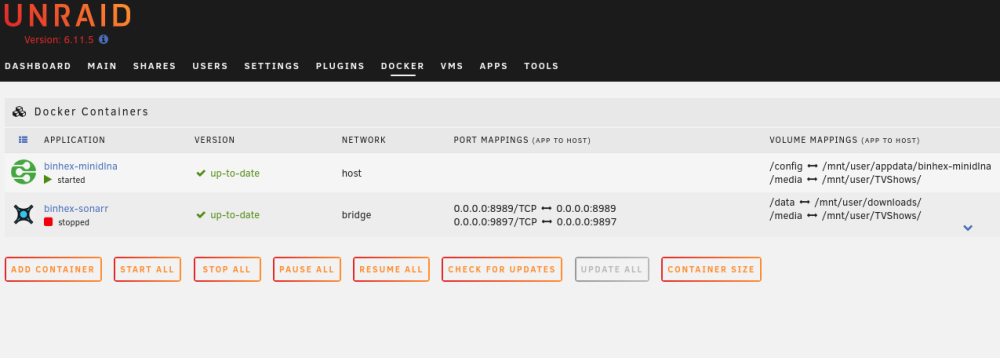
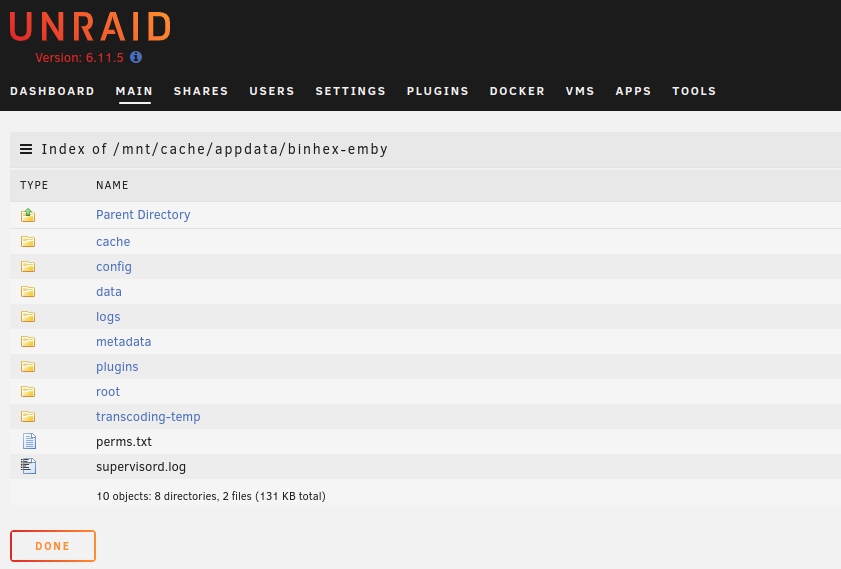
binhex emby docker, been using it for a week or so, default config accept for the /mnt/user/TVShows path. Today, I went to add a new path for /mnt/user/Music, and incorrectly left the container path as "media", it failed when adding it, I realized my error, went to redo but the docker is now completed gone from the docker list in the UI and appears to have gone. Is this expected behavior? And has it really gone and is still there just need to refresh/re-link it? pitsford-diagnostics-20230102-1628.zip
-
I re-copied the file from my local disk to unraid, and rsync ran fine this time, so the file that was unraid must have got corrupted at some point, possible as the file has been moved around a few times during disk issues. I will also run a file system check.
-
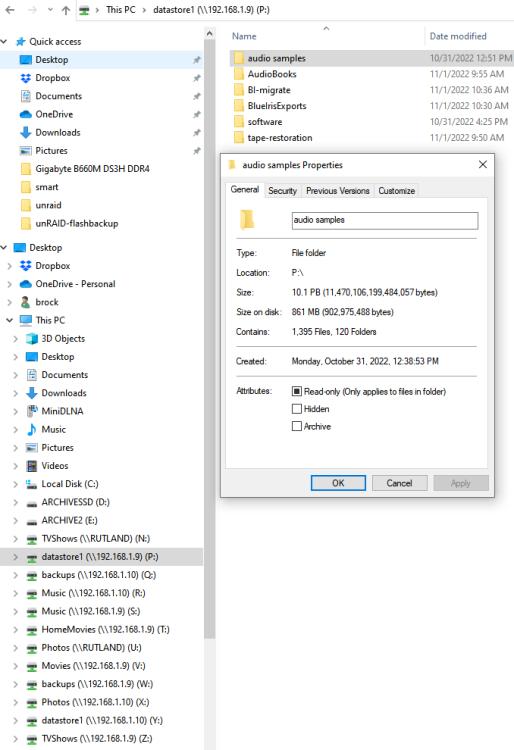
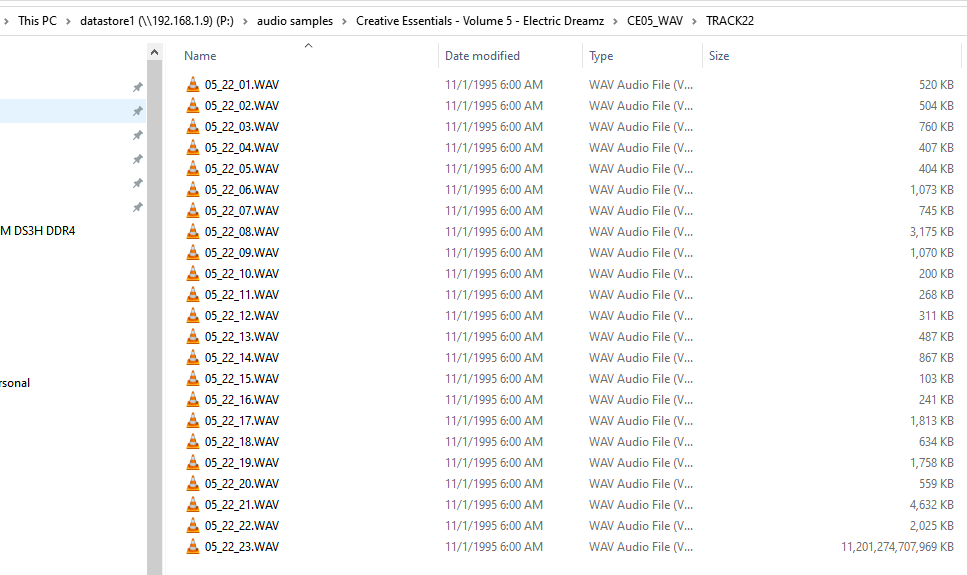
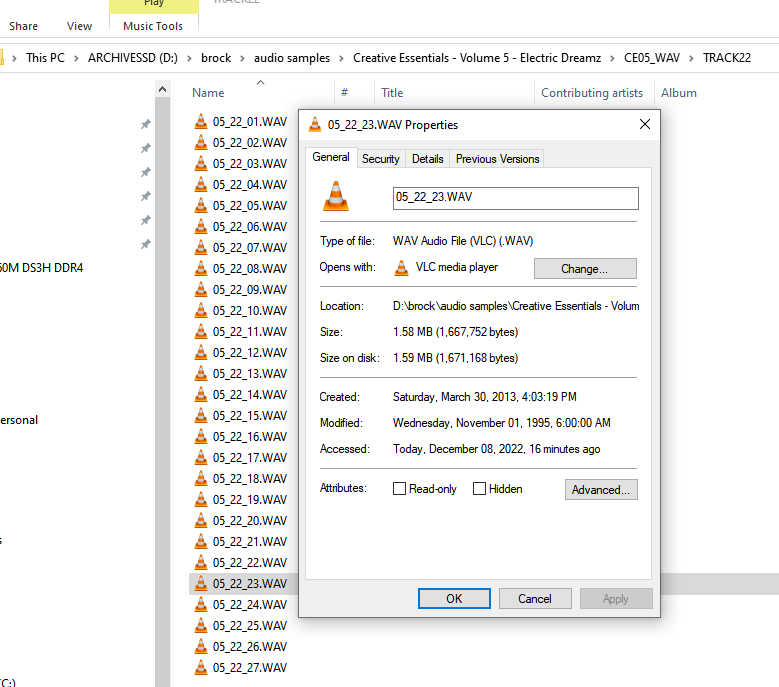
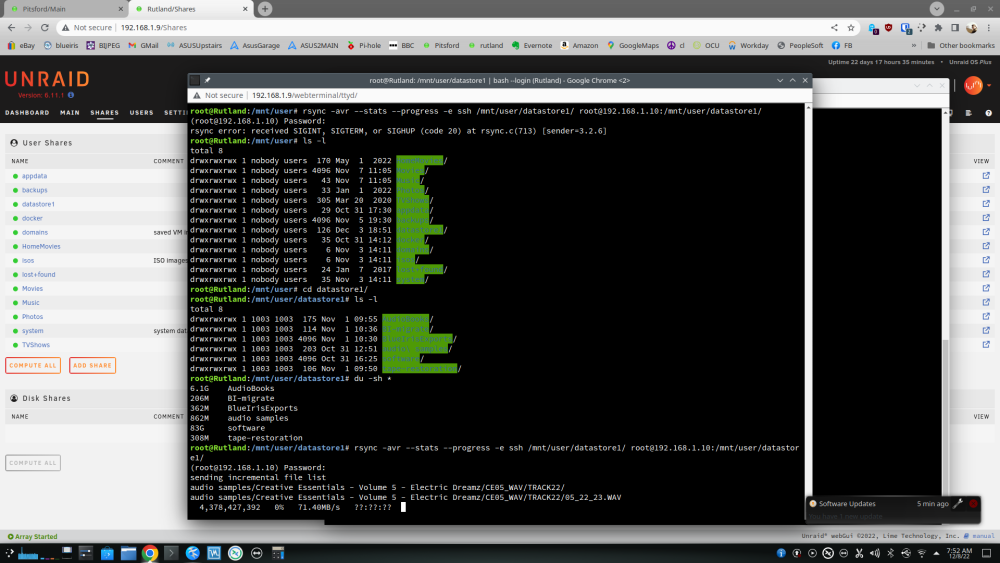
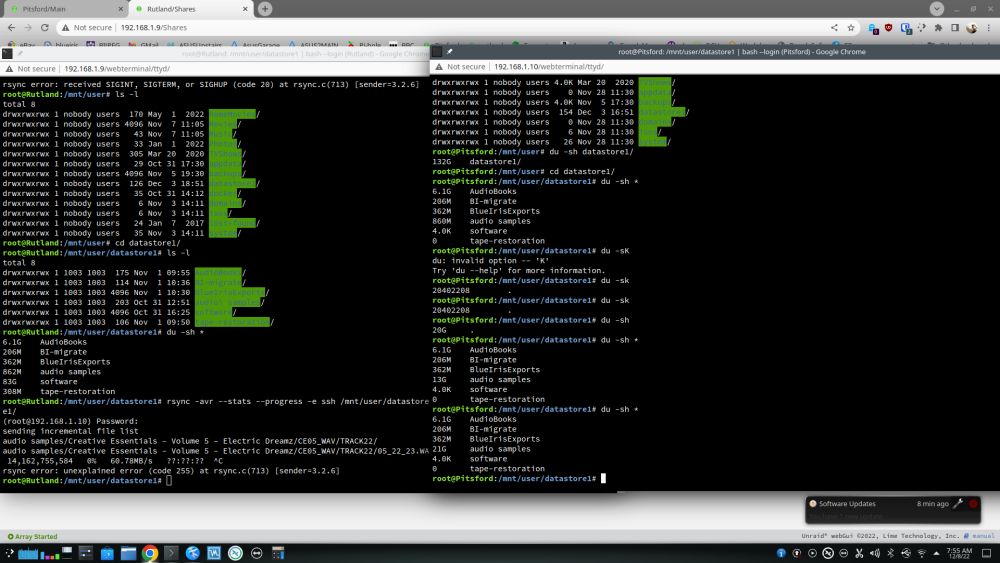
Maybe related to this thread I'm using rsync to sync data from one unraid server to another, all was going well, but then I noticed (by chance) that one of the small .wav it was trying to copy was now "seen" as 11GB in size when in fact it's 1.59MB. I have 3 copies for this wav file, on my local PC it's 1.59MB, browsing the share from this PC to the first unraid server it reports the same file as 11,201,274,707,969KB. The wav file is named 05_22_23.wav - see screenshots. In the dual console screenshot you can see the directory in which this file is in changed, the directory named "audio samples" is 868MB in total, I confirmed this by looking at the local PC copy. But doing another du later gives a different result, it's 21GB in size, so I assume it trying to copy a file that is 11,201,274,707,969KB - TBH, I'm very confused at this. Also, when rsync got to this file you can see that it outputs "??:??:??".
-
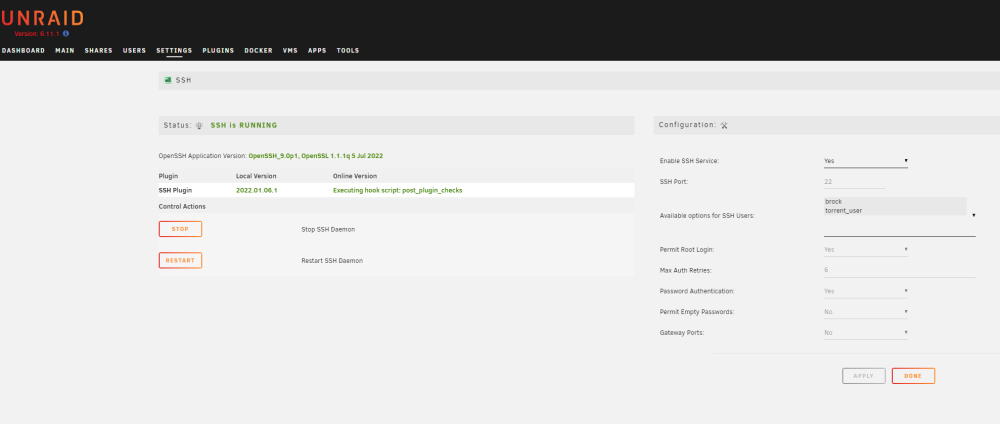
Ha, I feel dumb, I thought I had read all the options! Yes, it's there and setting it to "Yes" makes ssh work perfectly, sorry for taking your time up. Thank you.
-
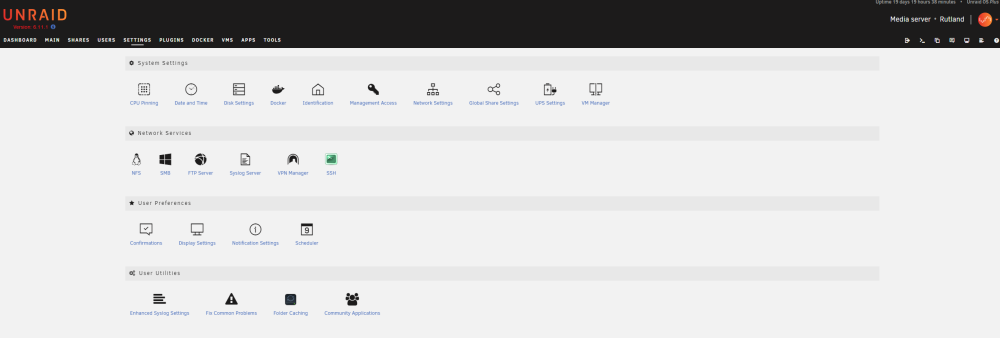
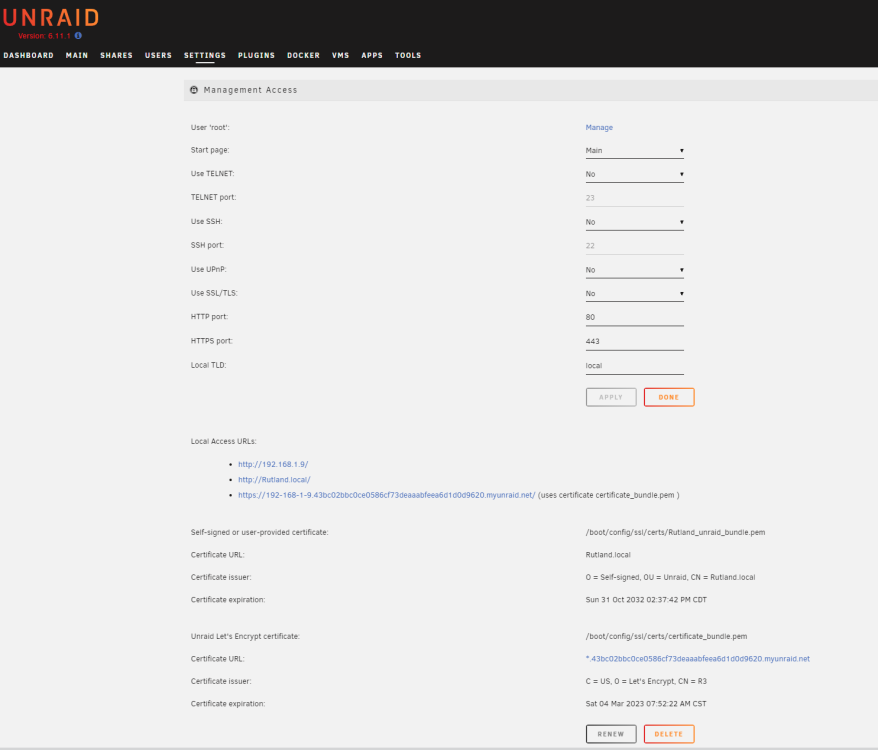
Screenshots and diagnostic with the unraid that was upgraded with the ssh plugin working. I can upload screenshots for the clean installed unraid, but there isn't much to see as the docgyver plugin is not installed and not available. rutland-unraid1-diagnostics-20221205-0959.zip pitsford-unraid2-diagnostics-20221205-1004.zip
-
I have 2 unRAID servers: unRAID1 was upgraded from 6.5.3 to 6.11.1 unRAID2 was a clean fresh install of 6.11.1 - using trial license currently Using the docgyver plugin below I can ssh into the upgraded server but the new I cannot. Status: SSH is RUNNING OpenSSH Application Version: OpenSSH_9.0p1, OpenSSL 1.1.1q 5 Jul 2022 Plugin Local Version Online Version docgyver SSH Plugin 2022.01.06.1 Executing hook script: post_plugin_checks There is no sshd process running on the new build, so went to the plugins and attempted to install the docgyver plugin but it seems to have gone, but is still available on github. After searching the forums it seems that it has been pulled from CA as there have been issues using it with newer versions of unRAID, having said that it works perfectly with my upgraded unRAID. What is the recommend way of getting openSSH server installed?
-
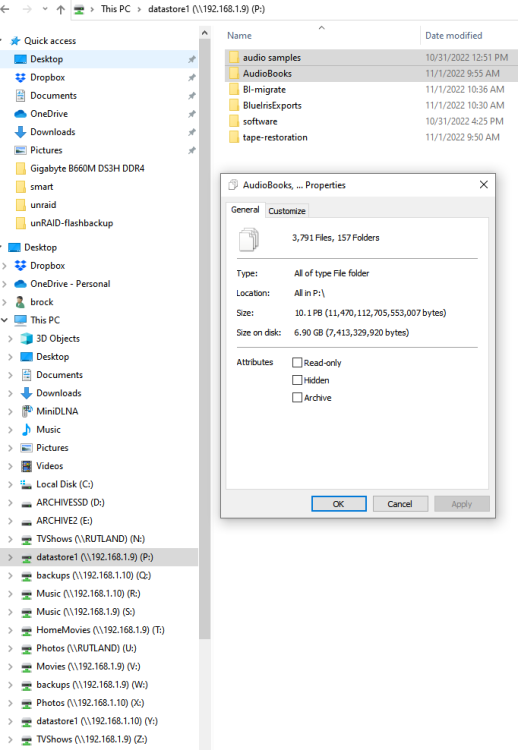
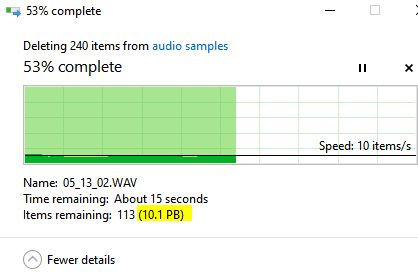
root@unRAID1:~# ls -l /mnt/user total 8 drwxrwxrwx 1 nobody users 170 May 1 2022 HomeMovies/ drwxrwxrwx 1 nobody users 4096 Nov 7 11:05 Movies/ drwxrwxrwx 1 nobody users 43 Nov 7 11:05 Music/ drwxrwxrwx 1 nobody users 33 Jan 1 2022 Photos/ drwxrwxrwx 1 nobody users 305 Mar 20 2020 TVShows/ drwxrwxrwx 1 nobody users 29 Oct 31 17:30 appdata/ drwxrwxrwx 1 nobody users 4096 Nov 5 19:30 backups/ drwxrwxrwx 1 nobody users 126 Dec 3 18:51 datastore1/ drwxrwxrwx 1 nobody users 35 Oct 31 14:12 docker/ drwxrwxrwx 1 nobody users 6 Nov 3 14:11 domains/ drwxrwxrwx 1 nobody users 6 Nov 3 14:11 isos/ drwxrwxrwx 1 nobody users 24 Jan 7 2017 lost+found/ drwxrwxrwx 1 nobody users 35 Nov 3 14:11 system/ root@unRAID2:~# ls -l /mnt/user total 0 drwxrwxrwx 1 nobody users 6 Dec 3 15:26 HomeMovies/ drwxrwxrwx 1 nobody users 6 Dec 3 15:27 Movies/ drwxrwxrwx 1 nobody users 6 Dec 3 15:29 Music/ drwxrwxrwx 1 nobody users 6 Dec 3 15:30 Photos/ drwxrwxrwx 1 nobody users 6 Dec 3 15:31 TVShows/ drwxrwxrwx 1 nobody users 0 Nov 28 11:30 appdata/ drwxrwxrwx 1 nobody users 6 Dec 3 15:22 backups/ drwxrwxrwx 1 nobody users 6 Dec 4 06:03 datastore1/ drwxrwxrwx 1 nobody users 0 Nov 28 11:30 domains/ drwxrwxrwx 1 nobody users 6 Nov 28 11:30 isos/ drwxrwxrwx 1 nobody users 26 Nov 28 11:30 system/ Yes, on both servers. unRAID1 was upgraded from 6.5.3 to 6.11.1 unRAID2 was a clean fresh install of 6.11.1 - using trial license currently The user name for access is the same on all hosts, and is set to read/write access. I vaguely remember running into a similar issue at work years ago, it was SAMBA/Windows causing the issue IIRC, protocol version. root@unRAID1:/mnt/user# du -sh datastore1/AudioBooks/ 6.1G datastore1/AudioBooks/ root@unRAID1:/mnt/user# du -sh datastore1/audio\ samples/ 862M datastore1/audio samples/ root@Rutland:/mnt/user# I should say, it's the "Size" reported by Windows, not the "Size on disk" , which appears to be correct. My plan is to use rsync over ssh when I finally go to copy all the data over, but other users in my household use Windows - I'm also having SSH issues with the new install as opposed to the upgraded one.
-
unRAID Version: 6.11.1 Have my old unRAID1 rig and a new build I'm testing, unRAID2, both are running Version: 6.11.1. The shares have been set-up the same, the old unRAID1, doesn't have a cache drive. I'm running some test copies from mapped drives in Windows, so I'm copying from say unRAID1 datastore1 to unRAID2 datastore1. When I right click folders within the (see screenshot), then use the Properties to get a file count and estimate it incorrectly reports back that the size is 10.1PB, neither of the unRAIDs are 10PB, the size of unRAID1 is 10TB and the new unRAID2 18TB. so what is going on? The problem is it will not copy as it thinks it doesn't have enough space to copy. The 2 folders in the screenshots are ~6.9GB in total.