





AngelEyes
Members
-
Joined
-
Last visited
Everything posted by AngelEyes
-
Thanks, I am looking in to the possibility of corrupt Flash drive and will replace shortly.
-
Hi, I m still having this issue, every time I go through the rest password process it works until reboot then the server seems to forget the password.
-
Same for firefox
-
Hi, thanks for the reply. I'm using Chrome and just tried Edge and have the same issue, even with manual entry of the password. Lastpass has been 100% reliable until now on all passwords so I am not convinced it is the issue although I am happy to be proven wrong.
-
Hi, I have always used a password to login to unraid but since upgrading to 6.10 (now on RC4) it keeps 'forgetting' my password. I use Lastpass to remember my passwords and am sure this is working correctly but after logging out it won't accept the password on login. Twice now I have gone through the password recovery process, put the flash drive in another PC created a new password (saved to lastpass) and all works fine but the next time I want to login it says the password is incorrect. I never had this issue with previous stable versions of unraid, it always logged in just fine. Any ideas? Thank you. Adam
-
Ok, I tried a few more GPU Roms and it seems to be working! I'll make sure all is good before closing the thread.
-
Hey, I'm having a load of problems getting a Windows 10 VM running. I have had AMD cards working in the past but they weren't stable, always seemed to crash and corrupt the VM so I thought I'd start from scratch with an nVidia card but unfortunately I can't get past the black screen issue and for some reason VNC does not work either so I 'm a bit stuck. Things I have tried: Changing the PCIE slot for the physical card With and without GPU Rom (with header removed) Q35 and i440fx Edited VM XML (see below) Adding iommu group items into Flash watched several Spaceinvader one tutorials and followed all steps to best of my ability If anyone can help I would be super grateful, thanks 🤗 kernel /bzimage append initrd=/bzroot vfio-pci.ids=10de:2184,10de:1aeb,10de:1aec,10de:1aed IOMMU group 31: [10de:2184] 02:00.0 VGA compatible controller: NVIDIA Corporation TU116 [GeForce GTX 1660] (rev a1) [10de:1aeb] 02:00.1 Audio device: NVIDIA Corporation TU116 High Definition Audio Controller (rev a1) [10de:1aec] 02:00.2 USB controller: NVIDIA Corporation Device 1aec (rev a1) [10de:1aed] 02:00.3 Serial bus controller [0c80]: NVIDIA Corporation TU116 [GeForce GTX 1650 SUPER] (rev a1) <?xml version='1.0' encoding='UTF-8'?> <domain type='kvm'> <name>Windows 10</name> <uuid>48635d05-0ac0-9a10-1753-856c3fe0d717</uuid> <metadata> <vmtemplate xmlns="unraid" name="Windows 10" icon="windows.png" os="windows10"/> </metadata> <memory unit='KiB'>13107200</memory> <currentMemory unit='KiB'>13107200</currentMemory> <memoryBacking> <nosharepages/> </memoryBacking> <vcpu placement='static'>4</vcpu> <cputune> <vcpupin vcpu='0' cpuset='6'/> <vcpupin vcpu='1' cpuset='7'/> <vcpupin vcpu='2' cpuset='8'/> <vcpupin vcpu='3' cpuset='9'/> </cputune> <os> <type arch='x86_64' machine='pc-q35-4.2'>hvm</type> <loader readonly='yes' type='pflash'>/usr/share/qemu/ovmf-x64/OVMF_CODE-pure-efi.fd</loader> <nvram>/etc/libvirt/qemu/nvram/48635d05-0ac0-9a10-1753-856c3fe0d717_VARS-pure-efi.fd</nvram> </os> <features> <acpi/> <apic/> <hyperv> <relaxed state='on'/> <vapic state='on'/> <spinlocks state='on' retries='8191'/> <vendor_id state='on' value='none'/> </hyperv> </features> <cpu mode='host-passthrough' check='none'> <topology sockets='1' cores='2' threads='2'/> <cache mode='passthrough'/> </cpu> <clock offset='localtime'> <timer name='hypervclock' present='yes'/> <timer name='hpet' present='no'/> </clock> <on_poweroff>destroy</on_poweroff> <on_reboot>restart</on_reboot> <on_crash>restart</on_crash> <devices> <emulator>/usr/local/sbin/qemu</emulator> <disk type='file' device='disk'> <driver name='qemu' type='raw' cache='writeback'/> <source file='/mnt/disks/Crucial/Windows 10/vdisk1.img'/> <target dev='hdc' bus='virtio'/> <boot order='1'/> <address type='pci' domain='0x0000' bus='0x04' slot='0x00' function='0x0'/> </disk> <disk type='file' device='cdrom'> <driver name='qemu' type='raw'/> <source file='/mnt/user/ISOs/Windows.iso'/> <target dev='hda' bus='sata'/> <readonly/> <boot order='2'/> <address type='drive' controller='0' bus='0' target='0' unit='0'/> </disk> <disk type='file' device='cdrom'> <driver name='qemu' type='raw'/> <source file='/mnt/user/ISOs/virtio-win-0.1.173-2.iso'/> <target dev='hdb' bus='sata'/> <readonly/> <address type='drive' controller='0' bus='0' target='0' unit='1'/> </disk> <controller type='usb' index='0' model='ich9-ehci1'> <address type='pci' domain='0x0000' bus='0x00' slot='0x07' function='0x7'/> </controller> <controller type='usb' index='0' model='ich9-uhci1'> <master startport='0'/> <address type='pci' domain='0x0000' bus='0x00' slot='0x07' function='0x0' multifunction='on'/> </controller> <controller type='usb' index='0' model='ich9-uhci2'> <master startport='2'/> <address type='pci' domain='0x0000' bus='0x00' slot='0x07' function='0x1'/> </controller> <controller type='usb' index='0' model='ich9-uhci3'> <master startport='4'/> <address type='pci' domain='0x0000' bus='0x00' slot='0x07' function='0x2'/> </controller> <controller type='pci' index='0' model='pcie-root'/> <controller type='pci' index='1' model='pcie-root-port'> <model name='pcie-root-port'/> <target chassis='1' port='0x8'/> <address type='pci' domain='0x0000' bus='0x00' slot='0x01' function='0x0' multifunction='on'/> </controller> <controller type='pci' index='2' model='pcie-root-port'> <model name='pcie-root-port'/> <target chassis='2' port='0x9'/> <address type='pci' domain='0x0000' bus='0x00' slot='0x01' function='0x1'/> </controller> <controller type='pci' index='3' model='pcie-root-port'> <model name='pcie-root-port'/> <target chassis='3' port='0xa'/> <address type='pci' domain='0x0000' bus='0x00' slot='0x01' function='0x2'/> </controller> <controller type='pci' index='4' model='pcie-root-port'> <model name='pcie-root-port'/> <target chassis='4' port='0xb'/> <address type='pci' domain='0x0000' bus='0x00' slot='0x01' function='0x3'/> </controller> <controller type='pci' index='5' model='pcie-root-port'> <model name='pcie-root-port'/> <target chassis='5' port='0xc'/> <address type='pci' domain='0x0000' bus='0x00' slot='0x01' function='0x4'/> </controller> <controller type='pci' index='6' model='pcie-root-port'> <model name='pcie-root-port'/> <target chassis='6' port='0xd'/> <address type='pci' domain='0x0000' bus='0x00' slot='0x01' function='0x5'/> </controller> <controller type='pci' index='7' model='pcie-root-port'> <model name='pcie-root-port'/> <target chassis='7' port='0xe'/> <address type='pci' domain='0x0000' bus='0x00' slot='0x01' function='0x6'/> </controller> <controller type='pci' index='8' model='pcie-root-port'> <model name='pcie-root-port'/> <target chassis='8' port='0xf'/> <address type='pci' domain='0x0000' bus='0x00' slot='0x01' function='0x7'/> </controller> <controller type='pci' index='9' model='pcie-root-port'> <model name='pcie-root-port'/> <target chassis='9' port='0x10'/> <address type='pci' domain='0x0000' bus='0x00' slot='0x02' function='0x0'/> </controller> <controller type='pci' index='10' model='pcie-to-pci-bridge'> <model name='pcie-pci-bridge'/> <address type='pci' domain='0x0000' bus='0x01' slot='0x00' function='0x0'/> </controller> <controller type='virtio-serial' index='0'> <address type='pci' domain='0x0000' bus='0x02' slot='0x00' function='0x0'/> </controller> <controller type='sata' index='0'> <address type='pci' domain='0x0000' bus='0x00' slot='0x1f' function='0x2'/> </controller> <interface type='bridge'> <mac address='52:54:00:42:45:f2'/> <source bridge='virbr0'/> <model type='virtio'/> <address type='pci' domain='0x0000' bus='0x03' slot='0x00' function='0x0'/> </interface> <serial type='pty'> <target type='isa-serial' port='0'> <model name='isa-serial'/> </target> </serial> <console type='pty'> <target type='serial' port='0'/> </console> <channel type='unix'> <target type='virtio' name='org.qemu.guest_agent.0'/> <address type='virtio-serial' controller='0' bus='0' port='1'/> </channel> <input type='tablet' bus='usb'> <address type='usb' bus='0' port='4'/> </input> <input type='mouse' bus='ps2'/> <input type='keyboard' bus='ps2'/> <hostdev mode='subsystem' type='pci' managed='yes'> <driver name='vfio'/> <source> <address domain='0x0000' bus='0x02' slot='0x00' function='0x0'/> </source> <rom file='/mnt/user/domains/GPU Bios/EVGA.GTX1660Super.6144.190912_2.rom'/> <address type='pci' domain='0x0000' bus='0x05' slot='0x00' function='0x0' multifunction='on'/> </hostdev> <hostdev mode='subsystem' type='pci' managed='yes'> <driver name='vfio'/> <source> <address domain='0x0000' bus='0x02' slot='0x00' function='0x1'/> </source> <address type='pci' domain='0x0000' bus='0x06' slot='0x00' function='0x0' multifunction='on'/> </hostdev> <hostdev mode='subsystem' type='pci' managed='yes'> <driver name='vfio'/> <source> <address domain='0x0000' bus='0x02' slot='0x00' function='0x2'/> </source> <address type='pci' domain='0x0000' bus='0x06' slot='0x00' function='0x1'/> </hostdev> <hostdev mode='subsystem' type='pci' managed='yes'> <driver name='vfio'/> <source> <address domain='0x0000' bus='0x02' slot='0x00' function='0x3'/> </source> <address type='pci' domain='0x0000' bus='0x08' slot='0x00' function='0x0'/> </hostdev> <hostdev mode='subsystem' type='usb' managed='no'> <source> <vendor id='0x0624'/> <product id='0x0249'/> </source> <address type='usb' bus='0' port='1'/> </hostdev> <hostdev mode='subsystem' type='usb' managed='no'> <source> <vendor id='0x1532'/> <product id='0x0037'/> </source> <address type='usb' bus='0' port='2'/> </hostdev> <hostdev mode='subsystem' type='usb' managed='no'> <source> <vendor id='0x1532'/> <product id='0x023f'/> </source> <address type='usb' bus='0' port='3'/> </hostdev> <memballoon model='none'/> </devices> </domain> server-diagnostics-20201104-1227.zip
-
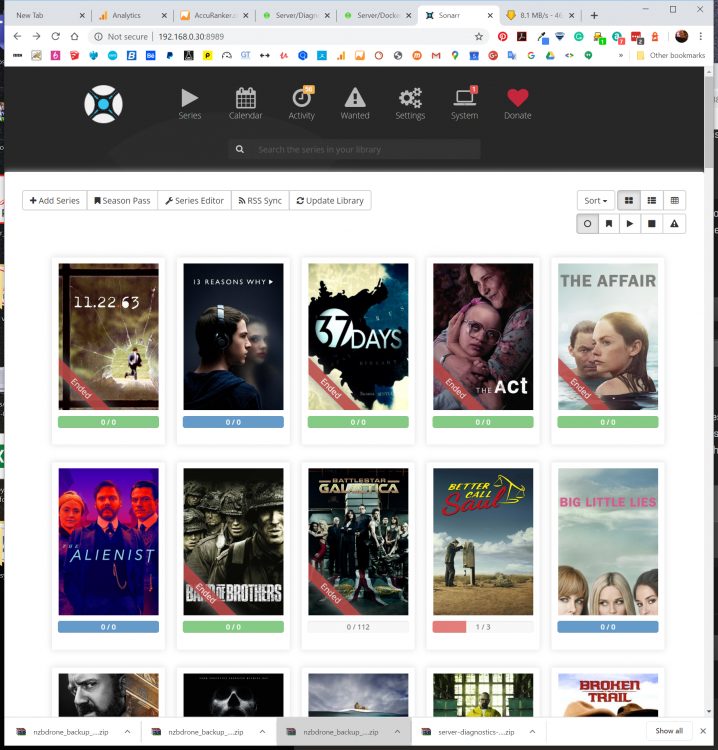
Hi, I hope the is the right place to post? I hope you can help, Sonarr seems to have decided all my series (3000+ episodes) never aired and has thus deleted all my TV media from my server. I have not been using the server much recently and powering down most evenings. Recently I noticed some media was not loading and when i checked, all of the TV media was gone bar a few recently downloaded episodes. It isn't a disc issue as all the content was spread over 12 disks. If you look at the screenshot you can see some series have a blue colour meaning 'not aired' when they clearly have been. Obviously I am gutted and had loads of UHD and BD rips on there too but I'd rather find out what happened before I start thinking about starting my collection again. Thank you. server-diagnostics-20200509-1451.zip
-
Bingo, I must have turned it off when I was trying to figure out the problem (prior to adding the VPN files). Thanks for your swift response. Great dockers!
-
Hi, I am trying to get sabnzbvpn working on a friends server but can't get the webui to load once VPN is ENABLED. I am using PIA and copied the files to the /config/openvpn folder but still no joy. I's probably something obvious, I hope you can help, thank you 😊 supervisord.log
-
I've been trying to find a solution as ImgBurn tends to crash when I use it within a Win10 Vm. Sorry if this is the wrong place to post ? Thank you!
-
After accessing it from my phone and adding some media, for some reason it started working on my VM PC too. Very odd. Thanks for trying to help.
-
Ok, interestingly I can access the server if I login on my phone. The PC I was trying to find the server on is running as a VM on my server. Could that be part of the problem?
-
Unfortunately nothing that simple. I can't help thinking I've missed some basic step?
-
No, its all pretty straightforward setup.
-
Thanks for the speedy reply. I can login ok on the url you mention but it can't see the server?
-
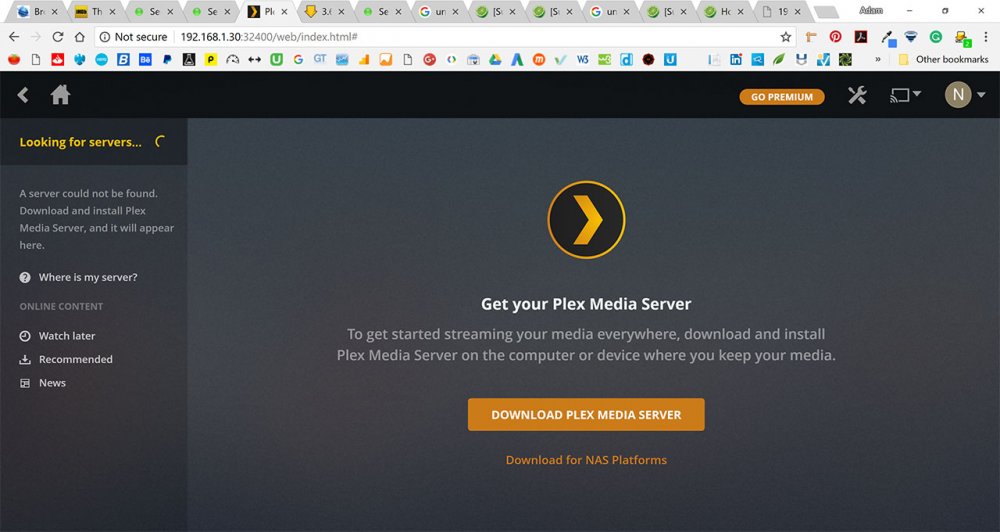
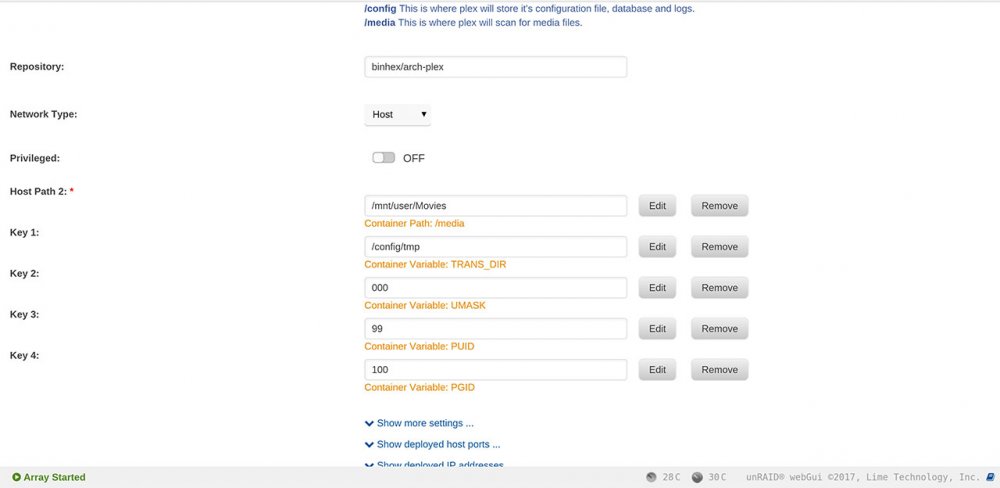
Hi, I've used this docker in the past with no problems but removed it a while back. Now when I install the docker and go to the WebUI and login, I get the "A server could not be found" message. I've searched loads of threads and tried various 'solutions' but can't get it to see my server. Any help would be gratefully received! I tried deleting the Appdata folders but that hasn't helped. Thanks! Adam
-
'Enable Destructive Mode' thanks.
-
Hi, Hope you can help. I am replacing an old SSD with a new one to use for my VMs. I unmounted and removed the old drive and added the new one (different make and model). The new SSD shows up but I have no option to format or mount? Have I missed something simple? Thanks.



