dlandon
Community Developer
-
Joined
-
Last visited
Everything posted by dlandon
-
Not in the diagnostics you posted: Filesystem Size Used Avail Use% Mounted on rootfs 2.9G 314M 2.6G 11% / tmpfs 32M 4.1M 28M 13% /run /dev/sda1 15G 993M 14G 7% /boot overlay 2.9G 314M 2.6G 11% /lib overlay 2.9G 314M 2.6G 11% /usr devtmpfs 8.0M 0 8.0M 0% /dev tmpfs 2.9G 0 2.9G 0% /dev/shm tmpfs 128M 468K 128M 1% /var/log tmpfs 1.0M 0 1.0M 0% /mnt/disks tmpfs 1.0M 0 1.0M 0% /mnt/remotes tmpfs 1.0M 0 1.0M 0% /mnt/addons tmpfs 1.0M 0 1.0M 0% /mnt/rootshare /dev/md1p1 11T 4.0T 7.0T 37% /mnt/disk1 /dev/sdb1 3.7T 991G 2.7T 27% /mnt/download_drive /dev/nvme0n1p1 477G 21G 456G 5% /mnt/unraid_files shfs 11T 4.0T 7.0T 37% /mnt/user0 shfs 11T 4.0T 7.0T 37% /mnt/user /dev/loop2 20G 5.6G 14G 29% /var/lib/docker
-
The notification in the upper right is under the control of your script and is only a notification. If the mount button shows mounted after your script has completed, that's different. It's this code that shows the device is unmounted: /usr/local/emhttp/webGui/scripts/notify -e "Unraid Server Notice" -s "Unassigned Devices" -d "Device unmounted" -i "normal" This displays in the notifications in the upper right of the UI after the disk is unmounted. ls -la /mnt/disks/ Look for the mount point. If it's missing, the device is unmounted.
-
Your diagnostics shows the disk is unmounted. Does the UI show it is mounted?
-
The diagnostics you posted earlier did not show any of that activity. Can you post diagnostics after the unmount issue you are talking about?
-
Change the 'umount $DEVICE' to 'umount $UD_DEVICE' and see if it makes a difference. The $UD_DEVICE is the 'devX' designation of the disk.
-
That suggests a problem with the USB port, cable, or disk.
-
Post diagnostics after all that. Also, try detaching the disk, then re-attaching the disk. This simulates removing the disk and re-installing it. There are different sections of code in the script that get executed.
-
Run it using the lightning icon and see where it errors out. You have a lot of echo's and can see where it is failing,
-
Your device script is showing an error. The unmount $device is working from my testing.
-
Can you take a little closer look and see if you can figure out what is taking all the space? I'm seeing Apparent size: 511.3 KiB.
-
We're going to take a look at this. I believe it may be a bug.
-
PID files should not really take that much space. Post the output of this command: ls -la /run/
-
One of the things you should rethink is the stuff you have in your go file. If it were me, I'd put that in a user script (User Scripts Plugin) and have it run on first array start. Also review what you are doing and see if it is really necessary. Adding stuff to the go file is not recommended.
-
Everyrthing looks right. Is the share showing up in the network shares? If not, go to the device settings and toggle the 'Share' switch off and then back on and see if the share shows in network shares.
-
Thanks. Looks like I gave you the wrong path. Now show the output of this command: cat /etc/samba/unassigned-shares/ZCH0859H.conf and cat /etc/samba/smb-unassigned.conf
-
Give me the output of this command: ls /etc/samba/unassigned.devices/
-
Please don't do that. That is not what that script is for. It just so happens that that script reloads SMB settings and makes the share appear in this case. You should never have to use the command line to get UD to work. Just go to the disk settings and toggle the share switch. That should enbale SMB for that device. I'm not seeing anything yet, but I'm looking.
-
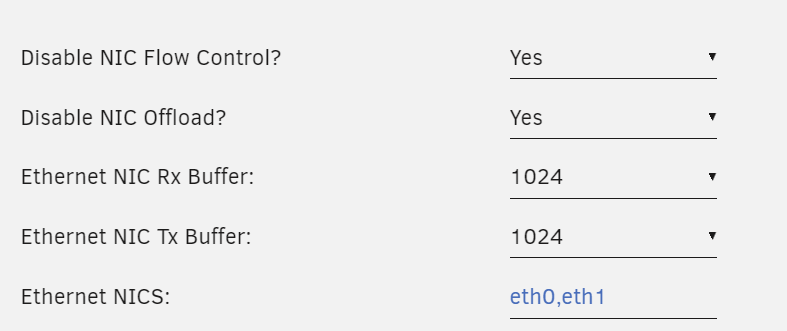
Depends on the NIC. Some have issues and some don't. Just experiment.
-
@bubbl3 Update UD and your disk will then show as mounted. It is actually mounted.
-
I see the problem, but I don't understand how it happens. Give me some time to work on a solution.
-
Give me the output of this command: cat /proc/mounts
-
Post diagnostics.
-
This is not an AD app. It is an extra page in SMB settings that permits making a few adjustments to Unraid's AD.
-
I suggested it because it can sometimes help with network issues. You would need to enable all NICs in your BIOS and have cables for each NIC connected to your router or a switch. Then go to Settings->Network Settings. Click on the Help icon in the upper right side of the GUI for explanation of each field.
-
Start with these: And be sure that "Performance" shows for the CPU Governor on the right side.