





dlandon
Community Developer
-
Joined
-
Last visited
Everything posted by dlandon
-
I'm looking into it.
-
Set Multi Channel to "No" and try. Keep in mind that files of zero length are not put in the recucle bin.
-
Post diagnostics so I can take a closer look.
-
I see what I need to see. Post your diagnostics so I can see more details.
-
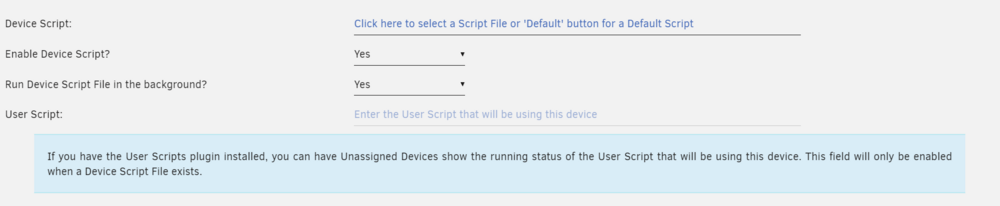
Do this: Click the default button. Click "Save". Now edit the dialog box and remove the default script. Then paste in the desired script. Click "Save".
-
There are two new settings in 7.0.0 that should fix this for you: Go to Settings->Global Settings and set the "Number of fuse File Descriptors:" to 100,000. Go to Settings->NFS and set the "Number of Threads:" to 32. Feel free to tweak these even more if ncessary.
-
Those settings are generic to all UD devices. You also need to go to the Device Settings (three gears icon) and turn on the share switch to share that device.
-
It's a quirk with nvme drives that I have yet to figure out. You should not have to do that to get them to work.
-
Show a screen shot of the issue. Type ctrl-shift-j to bring up the Java Script console and see if there are any errors. Try another Browser.
-
Click on the double arrows icon (arrows in a circle) to get udev to refresh the drives and you should then be able to mount the drives.
-
Yes.
-
This is a brief guide on some best practices to set up NFS on Unraid. There are some special considerations on Unraid because of the mover operation. If NFS is not configured correctly, you can end up with stale file handles. This isn't a bug in Unraid, it's the way Unraid operates. When you need to connect to a remote share, the best way is to use the Unassigned Devices (UD) plugin to mount and manage the remote shares. UD is optimized to deal with NFS mounts in a robust fashion. It is not recommended to mount remote shares with fstab entries on Unraid. The following are some recommendations when setting up NFS: Set up your Unraid shares for Private access and limit access by entering rules. In Unraid, set the rules to: *(async,no_subtree_check,rw,sec=sys,insecure,anongid=100,anonuid=99,no_root_squash) you may want to adjust a little for your situation - like a specific IP address/range, or root_squash. On the client side use these mount parameters: hard,timeo=50,retrans=5,relatime,rsize=1048576,wsize=1048576. When accessing Unraid shares with NFS on 7.0.0, there are some adjustments you can make on Unraid to overcome some NFS issues: Unraid uses shfs that is the file aggregation driver on Array disks. There is an open file limit that might need adjustment if you have a large amount of NFS activity. This can be adjusted in Settings->Global Share Settings. Increase the "Number of fuse File Descriptors" if you have trouble with NFS starting and/or shfs crashes and shares are no longer available. The other setting is the number of threads available to NFS. If you have a lot of NFS file activity, increasing the number of threads for NFS can help with NFS operation. Go to Settings->NFS and increase the number of threads from the default of 8. It is rcommended that you use the Unassigned Devices Plugin (UD) to manage remote NFS shares. If you use fstab, you have to be sure to set up the mount parameters correctly to maintain a robust connection. UD is optimized to manage the remote connection for robustness, and when the Unraid array is started and stopped.
-
If you click on the setting text, you'll see the help text. This is true for all of the Unraid settings pages. You can also click the 'Help' icon in the upper right and it will display all the help text.
-
Update File Activity.
-
Post diagnostics.
-
Thank you, it was a hunch I had about the vfs objects. Now to find a solution that doesn't break SMB on Macs.
-
Can you turn off Macos Interoperability and see if it makes a difference? I'm wanting to be sure the Mac vfs objects aren't interferring with the Recycle Bin.
-
I see that you have Macos interoperability enabled. Are you deleting files on a Mac?
-
Any suggestions on how I can reproduce your issue? Post diagnostics so I can look at testparm output.
-
Verify the Recycle Bin is running. Shares only show in the Recycle Bin when files are deleted on that share. Also keep in mind that the Share Recycle Bin status is updated every 5 minutes. You'll see the deleted files in the log immediately, but the Shares won't show the deleted file for up to 5 minutes.
-
That generally happens when there is an error on the page. Do this: Hit ctrl-shift-j and see if there are Java Script errors. If so, post a screen shot. Go to Tools->PHP Settings and view the PHP log and see if there are PHP Errors/Warnings. Show any errors/warnings in the log.No, it shouldn't. It defaults to 40960. Blank the line (remove the (null)), then enter a value at least double the default value.This is known and will be fixed in the next update of 7.0.There are new settings in Unraid 7.0 that may help this: Go to Settings->Global Share Settings and increase the "Number of fuse File Descriptors:". I would start by doubling the default. Go to Settings->NFS and increase the "Number of Threads:" from the default of 8. These two things will probably help.



