





andyberry
Members
-
Joined
-
Last visited
-
@TekWarren Here are the latest docker container logs (shut down again this morning). I dont see any Out of Memory errors... the pHP failed to set is me trying to disable a memory_limit; previously it was at 1024 with same behaviour. PHP Warning: Failed to set memory limit to 0 bytes (Current memory usage is 2097152 bytes) in Unknown on line 0 2025-08-06 07:00:00 Running [queue-size-job] .................. 16.17ms DONE 2025-08-06 07:00:00 Running [reminder-job] ..................... 7.89ms DONE 2025-08-06 07:00:00 Running [quote-reminder-job] ............... 8.16ms DONE 2025-08-06 07:00:00 Running [recurring-invoice-job] ........... 33.93ms DONE 2025-08-06 07:00:00 Running [invoice-overdue-job] .............. 7.02ms DONE 2025-08-06 07:00:00 Running [Callback] ......................... 6.17ms DONE 2025-08-06 07:00:03 App\Jobs\Ninja\QueueSize ....................... RUNNING 2025-08-06 07:00:03 App\Jobs\Util\ReminderJob ...................... RUNNING 2025-08-06 07:00:03 App\Jobs\Ninja\QueueSize ................... 5.05ms DONE 2025-08-06 07:00:03 App\Jobs\Util\ReminderJob .................. 5.31ms DONE 2025-08-06 07:00:03 App\Jobs\Util\QuoteReminderJob ................. RUNNING 2025-08-06 07:00:03 App\Jobs\Invoice\InvoiceCheckLateWebhook ....... RUNNING 2025-08-06 07:00:03 App\Jobs\Util\QuoteReminderJob ............. 4.22ms DONE 2025-08-06 07:00:03 App\Jobs\Invoice\InvoiceCheckLateWebhook ... 6.43ms DONE PHP Warning: Failed to set memory limit to 0 bytes (Current memory usage is 2097152 bytes) in Unknown on line 0 2025-08-06 07:01:00 Running [subscription-job] ................ 20.79ms FAIL 2025-08-06 00:01:01,547 INFO exited: queue-worker_01 (exit status 0; expected) 2025-08-06 00:01:01,547 INFO exited: queue-worker_00 (exit status 0; expected) 2025-08-06 00:01:01,552 INFO spawned: 'queue-worker_00' with pid 29379 2025-08-06 00:01:01,553 INFO spawned: 'queue-worker_01' with pid 29380 2025-08-06 00:01:01,553 WARN received SIGQUIT indicating exit request 2025-08-06 00:01:01,553 INFO waiting for shutdown, nginx_00, php-fpm, queue-worker_00, queue-worker_01, scheduler to die 2025-08-06 00:01:01,557 WARN stopped: scheduler (terminated by SIGTERM) 2025-08-06 00:01:01,557 WARN stopped: queue-worker_00 (terminated by SIGTERM) 2025-08-06 00:01:01,558 WARN stopped: queue-worker_01 (terminated by SIGTERM) 2025-08-06 00:01:01,619 INFO stopped: php-fpm (exit status 0) 2025-08-06 00:01:01,658 INFO stopped: nginx_00 (exit status 0) 2025-08-06 00:01:01,658 WARN stopped: shutdown (terminated by SIGTERM)
-
Invoice Ninja docker keeps stopping, but no error in the logs. It seems to run perfectly until it doesn't. It has been doing this over every update since I installed it in January. Up time varies, but it seems to just silently stop every 2 or 3 days. Any hints to troubleshoot? maihai/invoiceninja_v5
-
That worked! Thanks so much
-
i'll give it a try! Thanks so much!
-
if i go back to btrfs will that resolve? or just any change mucks it up?
-
Oh yes I did! Was btfrs, moved to xfs.
-
/Storage location is not appearing in the GUI as a backup source. This is new behavior and now none of my existing backup plans are working. If I open the console, storage exists and is populated as expected. It's only non-existent in the WebUI. I am running the latest August 2023 version. I have removed and recreated, totally deleted and recreated the container, but behavior is the same. If I add a new custom mount point, in the docker container settings i get the same behaviour... can see in the console CLI but not in GUI.
-
You nailed it! Thanks @JorgeB 🦸♂️
-
I had 1 of the array drives on the Asmedia card, so moved it to the onboard SATA controller. Cache and unassigned are now on the Asmedia. I don't want to jinx it but I'm at 1:40 / 7% of a parity check without a crash... I will let you know whether it succeeds. Thank you so much for your help. This looks promising. -A
-
Thanks @JorgeB. I guess I'll open the case again and see if anything jumps out at me. I did just update to 6.12 and initiated another parity check. It hung again quickly: Here are my last log entries before everything locked up: Jul 4 07:31:09 Pebbles kernel: fbcon: i915drmfb (fb0) is primary device Jul 4 07:31:09 Pebbles kernel: Console: switching to colour frame buffer device 210x65 Jul 4 07:31:09 Pebbles kernel: i915 0000:00:02.0: [drm] fb0: i915drmfb frame buffer device Jul 4 07:32:03 Pebbles kernel: mdcmd (40): check nocorrect Jul 4 07:32:03 Pebbles kernel: md: recovery thread: check P ... Jul 4 07:32:31 Pebbles flash_backup: adding task: /usr/local/emhttp/plugins/dynamix.my.servers/scripts/UpdateFlashBackup update Jul 4 07:34:12 Pebbles kernel: DMAR: DRHD: handling fault status reg 3 Jul 4 07:34:12 Pebbles kernel: DMAR: [DMA Read NO_PASID] Request device [06:00.0] fault addr 0x0 [fault reason 0x06] PTE Read access is not set
-
Hi @JorgeB, That's correct. I actually did the rebuild twice without problems. 1st when I replaced the parity drive, then a 2nd time after removing a smaller data drive and making a new config for the array. Parity checks hung or crashed the system each time. Its been a while since I've bothered to inspect logs after a parity check, but I thought the beginning and end of the check actually got logged in syslog, so I am surprised to NOT see the start captured. The crash isn't immediate; sometimes it will run for hours before the system becomes inaccessible. I have also tried running the parity check in safe mode with all dockers and VMs stopped. Same results.
-
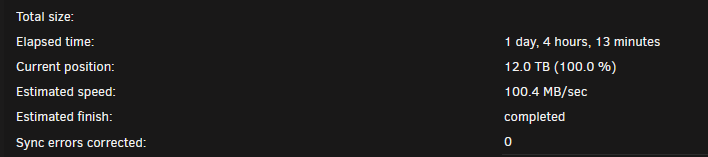
Hi everyone. Long time lurker... My server keeps either hanging or crashing (I don't know which) during parity checks. The system becomes completely locked until I do a power cycle, and of course nothing shows in the logs. I enabled the syslog server to catch the failure, but i don't see the parity check starting at all. Scheduled parity check started July 2 at 1 am, but i see nothing logged until i rebooted July 3 at 16:22. Parity check started automatically again when i rebooted, tried to cancel and everything hung. Hard rebooted, paused then cancelled the check. Manually initiated a check with correction disabled and everything hung up again within a few minutes. I recently upgraded my parity drive to a 12TB. The rebuild went fine, no problems. I don't think this is a PSU issue (everything was perfect prior to the upgrade) but again, I cant see anything in the logs. I've attached my diags, along with the syslog server logs that capture the restarts, if someone could look and give me some pointers? I appreciate it! Thank you so much. pebbles-diagnostics-20230703-1718.zip
-
@steve1977 Did you manage to get your VM unbricked? I did the same thing... updated to Monterey, now hang on an apple logo after a reboot. Not sure if it's related to pass through... I see this in the VM log: 2021-11-02 08:37:47.069+0000: Domain id=11 is tainted: high-privileges 2021-11-02 08:37:47.069+0000: Domain id=11 is tainted: custom-argv 2021-11-02 08:37:47.069+0000: Domain id=11 is tainted: host-cpu char device redirected to /dev/pts/1 (label charserial0) 2021-11-02T08:41:39.167141Z qemu-system-x86_64: terminating on signal 15 from pid 28969 (/usr/sbin/libvirtd)
-
Heyo, Not sure if this is still an issue for anyone, but my Asus RX470 mining edition (detected as RX 570 in Win10 and MACOS) works great in the new Macinabox and also WIN10. Took me a while to find them, but here are settings that work perfectly every time for pass through: Machine: Q35-4.2 BIOS: OVMF ROM BIOS: SAPPHIRE RX470.4096 Have fun
