





commander-flatus
Members
-
Joined
-
Last visited
-
I’m having trouble here, too. My card is an RTX 3050. Here’s my command: docker run -d --name='Stash' --net='bridge' --pids-limit 2048 -e TZ="America/Chicago" -e HOST_OS="Unraid" -e HOST_HOSTNAME="tun" -e HOST_CONTAINERNAME="Stash" -e 'PUID'='99' -e 'PGID'='100' -e 'NVIDIA_VISIBLE_DEVICES'='all' -e 'NVIDIA_DRIVER_CAPABILITIES'=' compute,video,utility' -e 'STASH_HW_TEST_TIMEOUT'='10' -e 'STASH_CACHE'='/cache/' -e 'STASH_METADATA'='/metadata/' -e 'STASH_GENERATED'='/generated/' -e 'STASH_STASH'='/data/' -l net.unraid.docker.managed=dockerman -l net.unraid.docker.webui='http://[IP]:[PORT:9999]' -l net.unraid.docker.icon='…' -p '9999:9999/tcp' -v '/mnt/user/multimedia/n0rp/':'/data':'rw' -v '/mnt/user/appdata/stash/config':'/root/.stash':'rw' -v '/mnt/user/appdata/stash/metadata':'/metadata':'rw' -v '/mnt/user/appdata/stash/cache':'/cache':'rw' -v '/mnt/user/ted/stash/generated/':'/generated':'rw' -v '/mnt/user/appdata/stash/blobs':'/blobs':'rw' 'ghcr.io/feederbox826/stash-s6:hwaccel' Here’s the log, seems it doesn’t recognize the card or has trouble loading drivers? euv: attempting to install with uv-pip 0.2 duv: Running uv pip install from requirements file with target /pip-install/install Using CPython 3.13.13 interpreter at: /usr/local/bin/python × No solution found when resolving dependencies: ╰─▶ Because you require stashapp-tools==0.2.40 and stashapp-tools>=0.2.58, we can conclude that your requirements are unsatisfiable. DEBU[2026-06-09 19:58:17] Running as root, disabling desktop features INFO[2026-06-09 19:58:17] using config file: /root/.stash/config.yml DEBU[2026-06-09 19:58:17] Reading plugin configs from /root/.stash/plugins DEBU[2026-06-09 19:58:18] Reading scraper configs from /root/.stash/scrapers DEBU[2026-06-09 19:58:19] Proxy is valid, using it DEBU[2026-06-09 19:58:19] Proxy is valid, using it DEBU[2026-06-09 19:58:19] Proxy is valid, using it INFO[2026-06-09 19:58:19] Using HTTP proxy DEBU[2026-06-09 19:58:19] using ffmpeg: /usr/bin/ffmpeg DEBU[2026-06-09 19:58:19] using ffprobe: /usr/bin/ffprobe DEBU[2026-06-09 19:58:19] FFMpeg version 7.1.4 detected DEBU[2026-06-09 19:58:19] FFProbe version 7.1.4 detected DEBU[2026-06-09 19:58:19] Serving embedded UI INFO[2026-06-09 19:58:19] stash version: v0.31.1 (4de2351e) - Official Build - 2026-04-13 01:44:30 INFO[2026-06-09 19:58:19] stash is listening on 0.0.0.0:9999 INFO[2026-06-09 19:58:19] stash is running at http://localhost:9999/ DEBU[2026-06-09 19:58:19] Github API request: https://api.github.com/repos/stashapp/stash/releases/latest DEBU[2026-06-09 19:58:19] [InitHWSupport] Codec {H264 NVENC HQ profile h264_nvenc} not supported. Error output: Please use -profile:a or -profile:v, -profile is ambiguous Last message repeated 1 times [AVHWDeviceContext @ 0x5602b07b17c0] Cannot load libcuda.so.1 [AVHWDeviceContext @ 0x5602b07b17c0] Could not dynamically load CUDA [AVFilterGraph @ 0x5602b07b14c0] Error initializing filters Error opening output file -. Error opening output files: Operation not permitted DEBU[2026-06-09 19:58:19] [InitHWSupport] Codec {H264 NVENC h264_nvenc} not supported. Error output: [AVHWDeviceContext @ 0x55c3d9a1f840] Cannot load libcuda.so.1 [AVHWDeviceContext @ 0x55c3d9a1f840] Could not dynamically load CUDA [AVFilterGraph @ 0x55c3d9a1eec0] Error initializing filters Error opening output file -. Error opening output files: Operation not permitted DEBU[2026-06-09 19:58:19] [InitHWSupport] Codec {H264 Intel Quick Sync Video (QSV) h264_qsv} not supported. Error output: Device creation failed: -542398533. Failed to set value 'qsv=hw' for option 'init_hw_device': Generic error in an external library Error parsing global options: Generic error in an external library DEBU[2026-06-09 19:58:19] [InitHWSupport] Codec {H264 Intel Quick Sync Video (QSV) Compatibility profile h264_qsv} not supported. Error output: Device creation failed: -542398533. Failed to set value 'qsv=hw' for option 'init_hw_device': Generic error in an external library Error parsing global options: Generic error in an external library DEBU[2026-06-09 19:58:19] [InitHWSupport] Codec {H264 VAAPI h264_vaapi} not supported. Error output: [AVHWDeviceContext @ 0x5651b334b4c0] No VA display found for device /dev/dri/renderD128. Device creation failed: -22. Failed to set value '/dev/dri/renderD128' for option 'vaapi_device': Invalid argument Error parsing global options: Invalid argument DEBU[2026-06-09 19:58:20] [InitHWSupport] Codec {H264 V4L2M2M h264_v4l2m2m} not supported. Error output: [h264_v4l2m2m @ 0x563abc64cb00] Could not find a valid device [h264_v4l2m2m @ 0x563abc64cb00] can't configure encoder [vost#0:0/h264_v4l2m2m @ 0x563abc64fd40] Error while opening encoder - maybe incorrect parameters such as bit_rate, rate, width or height. [vf#0:0 @ 0x563abc650380] Error sending frames to consumers: Invalid argument [vf#0:0 @ 0x563abc650380] Task finished with error code: -22 (Invalid argument) [vf#0:0 @ 0x563abc650380] Terminating thread with return code -22 (Invalid argument) [vost#0:0/h264_v4l2m2m @ 0x563abc64fd40] Could not open encoder before EOF [vost#0:0/h264_v4l2m2m @ 0x563abc64fd40] Task finished with error code: -22 (Invalid argument) [vost#0:0/h264_v4l2m2m @ 0x563abc64fd40] Terminating thread with return code -22 (Invalid argument) [out#0/null @ 0x563abc64f600] Nothing was written into output file, because at least one of its streams received no packets. DEBU[2026-06-09 19:58:20] [InitHWSupport] Codec {H264 Rockchip MPP (rkmpp) h264_rkmpp} not supported. Error output: Device creation failed: -12. Failed to set value 'rkmpp=rk' for option 'init_hw_device': Cannot allocate memory Error parsing global options: Cannot allocate memory DEBU[2026-06-09 19:58:20] [InitHWSupport] Codec {VP9 Intel Quick Sync Video (QSV) vp9_qsv} not supported. Error output: Device creation failed: -542398533. Failed to set value 'qsv=hw' for option 'init_hw_device': Generic error in an external library Error parsing global options: Generic error in an external library DEBU[2026-06-09 19:58:20] [InitHWSupport] Codec {VP9 VAAPI vp9_vaapi} not supported. Error output: [AVHWDeviceContext @ 0x561d734ed4c0] No VA display found for device /dev/dri/renderD128. Device creation failed: -22. Failed to set value '/dev/dri/renderD128' for option 'vaapi_device': Invalid argument Error parsing global options: Invalid argument DEBU[2026-06-09 19:58:20] [InitHWSupport] Codec {H264 VideoToolbox h264_videotoolbox} not supported. Error output: Unrecognized option 'realtime'. Error splitting the argument list: Option not found INFO[2026-06-09 19:58:20] [InitHWSupport] Supported HW codecs [0]: Greatly appreciate any insight you may have! Thank you for your hard work on this project!
-
Hi everyone. I had this docker working fine and now it crashes on startup. I've attached logs below. Anyone have any ideas? I checked all of my paths and everything looks AOK text error warn system array login [2025-08-30 10:55:40 -0700] [52] [INFO] Starting gunicorn 23.0.0 [2025-08-30 10:55:40 -0700] [52] [INFO] Listening at: http://0.0.0.0:8084 (52) [2025-08-30 10:55:40 -0700] [52] [INFO] Using worker: sync [2025-08-30 10:55:40 -0700] [53] [INFO] Booting worker with pid: 53 [2025-08-30 10:55:40 -0700] [53] [ERROR] Exception in worker process Traceback (most recent call last): File "/usr/local/lib/python3.10/site-packages/gunicorn/arbiter.py", line 608, in spawn_worker worker.init_process() File "/usr/local/lib/python3.10/site-packages/gunicorn/workers/base.py", line 135, in init_process self.load_wsgi() File "/usr/local/lib/python3.10/site-packages/gunicorn/workers/base.py", line 147, in load_wsgi self.wsgi = self.app.wsgi() File "/usr/local/lib/python3.10/site-packages/gunicorn/app/base.py", line 66, in wsgi self.callable = self.load() File "/usr/local/lib/python3.10/site-packages/gunicorn/app/wsgiapp.py", line 57, in load return self.load_wsgiapp() File "/usr/local/lib/python3.10/site-packages/gunicorn/app/wsgiapp.py", line 47, in load_wsgiapp return util.import_app(self.app_uri) File "/usr/local/lib/python3.10/site-packages/gunicorn/util.py", line 370, in import_app mod = importlib.import_module(module) File "/usr/local/lib/python3.10/importlib/__init__.py", line 126, in import_module return bootstrap.gcd_import(name[level:], package, level) File "<frozen importlib._bootstrap>", line 1050, in gcdimport File "<frozen importlib._bootstrap>", line 1027, in findand_load File "<frozen importlib._bootstrap>", line 1006, in findand_load_unlocked File "<frozen importlib._bootstrap>", line 688, in loadunlocked File "<frozen importlib._bootstrap_external>", line 883, in exec_module File "<frozen importlib._bootstrap>", line 241, in callwith_frames_removed File "/app/app.py", line 17, in <module> import backend File "/app/backend.py", line 14, in <module> import book_manager File "/app/book_manager.py", line 9, in <module> import downloader File "/app/downloader.py", line 16, in <module> import cloudflare_bypasser File "/app/cloudflare_bypasser.py", line 13, in <module> from seleniumbase import Driver ImportError: cannot import name 'Driver' from 'seleniumbase' (/usr/local/lib/python3.10/site-packages/seleniumbase/__init__.py) [2025-08-30 10:55:40 -0700] [53] [INFO] Worker exiting (pid: 53) [2025-08-30 10:55:40 -0700] [52] [ERROR] Worker (pid:53) exited with code 3 [2025-08-30 10:55:40 -0700] [52] [ERROR] Shutting down: Master [2025-08-30 10:55:40 -0700] [52] [ERROR] Reason: Worker failed to boot. Changing ownership of /app to appuser:100 Changing ownership of /var/log/cwa-book-downloader to appuser:100 Changing ownership of /tmp/cwa-book-downloader to appuser:100 Test write to /cwa-book-ingest by appuser: true Folder /cwa-book-ingest is writable, no need to change ownership Test write to /cwa-book-ingest by appuser: true Verifying /tmp has enough space Success: /tmp is writable Running command: 'gunicorn -t 300 -b 0.0.0.0:8084 app:app' as 'appuser' in 'prod' mode 2025-08-30 10:55:40,493 - config - INFO - config.py:15 - os: <module 'os' from '/usr/local/lib/python3.10/os.py'> 2025-08-30 10:55:40,493 - config - INFO - config.py:15 - Path: <class 'pathlib.Path'> 2025-08-30 10:55:40,494 - config - INFO - config.py:15 - string_to_bool: <function string_to_bool at 0x14a9b1e7e7a0> 2025-08-30 10:55:40,494 - config - INFO - config.py:15 - CWA_DB: None 2025-08-30 10:55:40,495 - config - INFO - config.py:15 - CWA_DB_PATH: None 2025-08-30 10:55:40,495 - config - INFO - config.py:15 - LOG_ROOT: /var/log 2025-08-30 10:55:40,495 - config - INFO - config.py:15 - LOG_DIR: /var/log/cwa-book-downloader 2025-08-30 10:55:40,495 - config - INFO - config.py:15 - TMP_DIR: /tmp/cwa-book-downloader 2025-08-30 10:55:40,496 - config - INFO - config.py:15 - INGEST_DIR: /cwa-book-ingest 2025-08-30 10:55:40,496 - config - INFO - config.py:15 - STATUS_TIMEOUT: 3600 2025-08-30 10:55:40,496 - config - INFO - config.py:15 - USE_BOOK_TITLE: False 2025-08-30 10:55:40,496 - config - INFO - config.py:15 - MAX_RETRY: 3 2025-08-30 10:55:40,496 - config - INFO - config.py:15 - DEFAULT_SLEEP: 5 2025-08-30 10:55:40,497 - config - INFO - config.py:15 - USE_CF_BYPASS: True 2025-08-30 10:55:40,497 - config - INFO - config.py:15 - HTTP_PROXY: 2025-08-30 10:55:40,497 - config - INFO - config.py:15 - HTTPS_PROXY: 2025-08-30 10:55:40,498 - config - INFO - config.py:15 - AA_DONATOR_KEY: 2025-08-30 10:55:40,498 - config - INFO - config.py:15 - FLASK_HOST: 0.0.0.0 2025-08-30 10:55:40,498 - config - INFO - config.py:15 - FLASK_PORT: 8084 2025-08-30 10:55:40,498 - config - INFO - config.py:15 - DEBUG: False 2025-08-30 10:55:40,498 - config - INFO - config.py:15 - LOG_LEVEL: INFO 2025-08-30 10:55:40,499 - config - INFO - config.py:15 - ENABLE_LOGGING: True 2025-08-30 10:55:40,499 - config - INFO - config.py:15 - MAIN_LOOP_SLEEP_TIME: 5 2025-08-30 10:55:40,499 - config - INFO - config.py:15 - DOCKERMODE: True 2025-08-30 10:55:40,499 - config - INFO - config.py:15 - USE_DOH: False 2025-08-30 10:55:40,500 - config - INFO - config.py:15 - BYPASS_RELEASE_INACTIVE_MIN: 5 2025-08-30 10:55:40,500 - config - INFO - config.py:15 - APP_ENV: prod 2025-08-30 10:55:40,500 - config - INFO - config.py:15 - LOG_FILE: /var/log/cwa-book-downloader/cwa-book-downloader.log 2025-08-30 10:55:40,500 - config - INFO - config.py:15 - USING_TOR: False 2025-08-30 10:55:40,501 - config - INFO - config.py:22 - BASE_DIR: /app 2025-08-30 10:55:40,501 - config - INFO - config.py:31 - STAT TMP_DIR: os.stat_result(st_mode=16877, st_ino=25849, st_dev=127, st_nlink=1, st_uid=99, st_gid=100, st_size=0, st_atime=1755622823, st_mtime=1755622823, st_ctime=1756576538) 2025-08-30 10:55:40,501 - config - INFO - config.py:32 - STAT INGEST_DIR: os.stat_result(st_mode=16895, st_ino=12666373952199551, st_dev=47, st_nlink=1, st_uid=99, st_gid=100, st_size=0, st_atime=1751807727, st_mtime=1756576538, st_ctime=1756576538) 2025-08-30 10:55:40,502 - config - INFO - config.py:33 - CROSS_FILE_SYSTEM: True 2025-08-30 10:55:40,502 - config - INFO - config.py:53 - CUSTOM_DNS: [] 2025-08-30 10:55:40,502 - config - INFO - config.py:59 - DOH_SERVER: 2025-08-30 10:55:40,502 - config - INFO - config.py:67 - PROXIES: {} 2025-08-30 10:55:40,503 - config - INFO - config.py:77 - SUPPORTED_FORMATS: ['epub', 'mobi', 'azw3', 'fb2', 'djvu', 'cbz', 'cbr'] 2025-08-30 10:55:40,624 - network - INFO - network.py:337 - AA_BASE_URL: https://annas-archive.org Press ANY KEY to close this window
-
I have searched and tried some of the proposed fixes but I'm still getting a parity check every time I reboot my system. My last parity check yesterday finished without errors. Thank you. Logs attached. tun-diagnostics-20250513-1802.zip
-
Yes. Appears to be working fine. I’ll never hot swap again.
-
And thank you for the offer to help and the prompt assistance.
-
Ok, I stopped the rebuild, powered down the server, made sure that all the drive trays were firmly seated. When I powered back up all disks mounted. I’m starting to wonder if my SAS backplane or my SAS PCI card need replacement - the card is going on 10 years old - it’s from an old Dell R710 and I have a spare on hand anyway.
-
well i can't scrub disk 2 b/c it's not mounted....
-
should i stop the rebuild?
-
Array was stopped. I pulled out my supermicro trays and put them back in to find the disk that I wanted to swap out.
-
Sorry, I should've thought to attach to the first message. Thank you for your help. I've done a zillion drive swap. This system started out with a few 6TB disks in 2013, I believe. I've never had this happen. There's obviously been other hardware upgrades along the way. tun-diagnostics-20250318-2030.zip
-
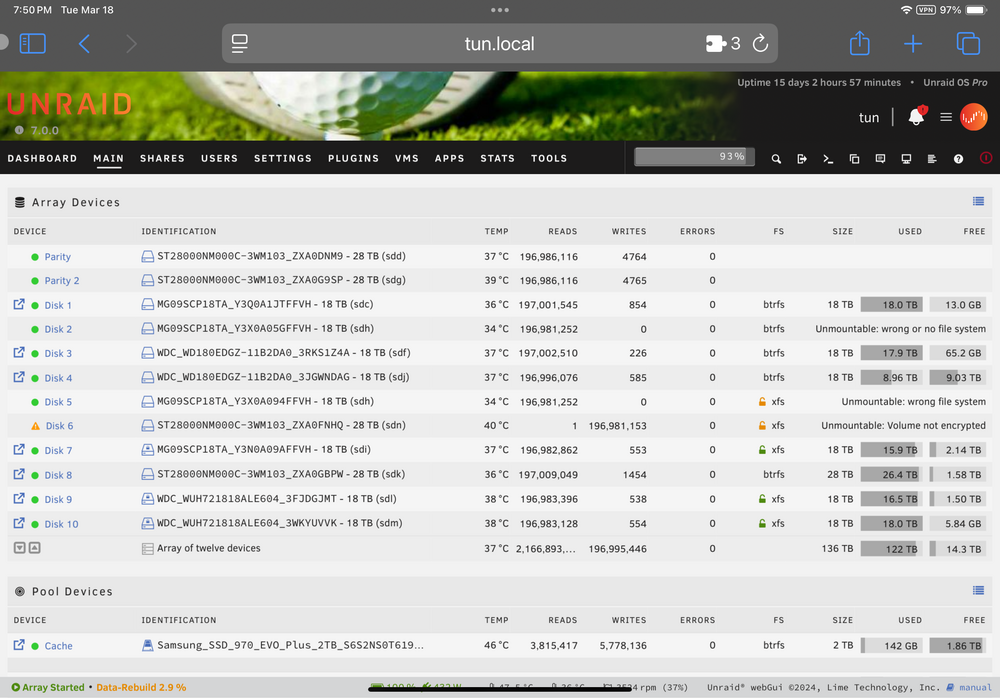
I just swapped out an 18TB for a new 28TB and data rebuild started. I guess I failed to notice the messages about unmountable drives. It seems as though the data rebuild is reading from these drives anyway. See image. can anyone offer suggestions as to what the heck is going on and what I should do?!?!
-
A tracker I use heavily does not support Deluge 2.0 (the tracker is MaN if that matters). I'm trying to migrated to this docker, but I have 500 torrents that need to be moved (with labels and subdirectories). Has anyone done this? Is there an easy way?
-
I removed www.x.net. I still get 502 both inside the network and from the outside when using x.net/nextcloud. I can access it fine from inside the network on 192.168.1.99:1443/nextcloud My ISP does not block ports. My nginx log from swag: 2020/12/16 07:13:20 [error] 455#455: *211 nextcloud could not be resolved (110: Operation timed out), client: 174.235.137.23, server: _, request: "GET /nextcloud/ HTTP/2.0", host: "polydipsia.net" 2020/12/16 07:35:05 [error] 455#455: *276 nextcloud could not be resolved (110: Operation timed out), client: 192.168.1.1, server: _, request: "GET /nextcloud/status.php HTTP/1.1", host: "polydipsia.net:443" 2020/12/16 07:36:49 [error] 455#455: *309 nextcloud could not be resolved (110: Operation timed out), client: 192.168.1.1, server: _, request: "GET /nextcloud/status.php HTTP/1.1", host: "polydipsia.net:443" I'm open to reinstalling nextcloud, there's nothing special in the container. I have a concern there's something wonky in the settings. I'm running the most updated version (19, I believe). Can you point me to a tutorial on networking config with swag and nextcloud using swag's custom networks? This Unraid server has been up for years and I only do light maintenance. From my reading, the default bridge network isn't really recommended anymore (I believe it was at the time). Once again, thank you for the assistance.
-
Thank you for taking time to reply to my question. I tried that. I still get a 502 error when accessing via my custom domian. My SWAG nginx log shows: 2020/12/16 04:38:19 [error] 455#455: *1 nextcloud could not be resolved (110: Operation timed out), client: 192.168.1.1, server: _, request: "GET /nextcloud/ HTTP/2.0", host: "x.net" My nextcloud nginx error log shows: 020/12/16 04:38:37 [error] 375#375: *23 FastCGI sent in stderr: "Primary script unknown" while reading response header from upstream, client: 192.168.1.69, server: _, request: "GET /nextcloud/ocs/v2.php/apps/text/workspace?path=%2F HTTP/1.1", upstream: "fastcgi://127.0.0.1:9000", host: "192.168.1.99:1443", referrer: "https://192.168.1.99:1443/nextcloud/index.php/apps/files/"
-
Can someone help me with this? Previously had Nextcloud working with Letsencrypt. Upgraded to SWAG and changed my local network numbering (went from 192.168.69.x to 192.168.1.x) and now I cannot get SWAG to get from my external domain to the local Nextcloud docker. I use a subfolder config. Here are what I think are the relevant details: First the log error shows: 2020/12/15 19:40:58 [error] 451#451: *12 nextcloud could not be resolved (110: Operation timed out), client: 192.168.1.1, server: _, request: "GET /nextcloud/ HTTP/2.0", host: "x.net" I have my Unifi security gateway mapping port 443 to the local network port 444 for SWAG: I can reach my Nextcloud instance on the local network on port 1443: I have used the default subfolder config in SWAG: ## Version 2020/12/09 # Assuming this container is called "swag", edit your nextcloud container's config # located at /config/www/nextcloud/config/config.php and add the following lines before the ");": # 'trusted_proxies' => ['swag'], # 'overwritewebroot' => '/nextcloud', # 'overwrite.cli.url' => 'https://your-domain.com/nextcloud', # # Also don't forget to add your domain name to the trusted domains array. It should look somewhat like this: # array ( # 0 => '192.168.0.1:444', # This line may look different on your setup, don't modify it. # 1 => 'your-domain.com', # ), # Redirects for DAV clients location = /.well-known/carddav { return 301 $scheme://$host/nextcloud/remote.php/dav; } location = /.well-known/caldav { return 301 $scheme://$host/nextcloud/remote.php/dav; } location /nextcloud { return 301 $scheme://$host/nextcloud/; } location ^~ /nextcloud/ { include /config/nginx/proxy.conf; resolver 127.0.0.11 valid=30s; set $upstream_app nextcloud; set $upstream_port 443; set $upstream_proto https; proxy_pass $upstream_proto://$upstream_app:$upstream_port; rewrite /nextcloud(.*) $1 break; proxy_max_temp_file_size 2048m; proxy_set_header Range $http_range; proxy_set_header If-Range $http_if_range; proxy_redirect off; proxy_ssl_session_reuse off; } Naturally, I appropriately renamed it to nextcloud.subfolder.conf I also edited the Nextcloud config as recommended in the nextcloud.subfolder.conf: <?php $CONFIG = array ( 'memcache.local' => '\\OC\\Memcache\\APCu', 'datadirectory' => '/data', 'instanceid' => 'x', 'passwordsalt' => 'x', 'secret' => 'x', 'trusted_domains' => array ( 0 => '192.168.1.99:1443', 1 => 'www.x.net', 2 => 'x.net', ), 'trusted_proxies' => array ( 0 => 'swag', ), 'overwritewebroot' => '/nextcloud', 'overwrite.cli.url' => 'https://x.net/nextcloud', 'dbtype' => 'mysql', 'version' => '18.0.6.0', 'dbname' => 'nextcloud', 'dbhost' => '192.168.1.99:3306', 'dbport' => '', 'dbtableprefix' => 'oc_', 'dbuser' => 'x', 'dbpassword' => 'x', 'installed' => true, 'maintenance' => false, 'theme' => '', 'loglevel' => 0, 'mysql.utf8mb4' => true, ); In the browser, I keep getting "502 Bad Gateway" The Nextcloud error log shows this: 2020/12/15 19:41:53 [error] 374#374: *156 FastCGI sent in stderr: "Primary script unknown" while reading response header from upstream, client: 192.168.1.69, server: _, request: "GET /nextcloud/ocs/v2.php/apps/text/workspace?path=%2F HTTP/1.1", upstream: "fastcgi://127.0.0.1:9000", host: "192.168.1.99:1443", referrer: "https://192.168.1.99:1443/nextcloud/index.php/apps/files/" I'm starting to lose my mind. Greatly appreciate any assistance. Happy Holidays and thanks!




