





JohnO
Members
-
Joined
-
Last visited
-
Neat!
-
Great stuff! Thanks for taking the leap for us all.
-
(I think the Open VM Tools thread has been hijacked - perhaps the discussion of getting 6.4 for work with ESXi should be a separate thread in the Virtualizing UnRAID section). https://lime-technology.com/forums/forum/46-virtualizing-unraid/
-
I, too, upgraded my drives to XFS before moving to 6.x. I'm on ESXi 6.0.0.
-
I do think you are limited to 8. Remember, though, that the underlying resources not assigned to the VM are also used to support the VM processes if they are available and needed.
-
Also looking forward to an update for 6.2.1. Thanks!
-
So just to confirm -- After I download the plopkexec iso image, and put it on my ESXi server, all I need to do is change the particular virtual machine setting for CD/DVD Drive 1 to use the new ISO image, and no longer use the plpbtmycd.iso file, correct? I've got multiple USB memory sticks in my server -- will it give me a chance to find the correct one, or does this use the USB 1 field, as I currently have it defined with the existing PLOP configuration? Thanks, John
-
I too would love to see some more information on switching from plop to plopkexec. Upgrading from 6.1.9 as a VM to 6.2 would be a great time to try this. Thanks, John.
-
Greetings, Just downloaded the update. It looks good except this error in your test display area: Here's what share free space looks like: snmpwalk -v 2c localhost -c public NET-SNMP-EXTEND-MIB::nsExtendOutLine."sharefree" NET-SNMP-EXTEND-MIB::nsExtendOutLine."sharefree".1 = STRING: /usr/local/emhttp/plugins/snmp/share_free_space.sh: line 16: allocator=\"mostfree\" * 1024: syntax error: operand expected (error token is \"\"mostfree\" * 1024\") Thanks!
-
I tried just deleting and re-installing the plug-in, and behavior didn't change. I did check permissions and they were set as you suggested. I then deleted the SNMP plug-in, upgraded from 6.01 to 6.1, and re-installed the plug-in and now it works! +============================================================================== | Testing SNMP by listing mounts +============================================================================== Looks like snmpd is working... Output: HOST-RESOURCES-MIB::hrFSMountPoint.22 = STRING: "/var/log" HOST-RESOURCES-MIB::hrFSMountPoint.25 = STRING: "/boot" Here's what drive temperatures look like: snmpwalk -v 2c localhost -c public NET-SNMP-EXTEND-MIB::nsExtendOutLine."disktemp" NET-SNMP-EXTEND-MIB::nsExtendOutLine."disktemp".1 = STRING: WDC_WD20EFRX-68EUZN0_WD-WCC4M0927675: 28 NET-SNMP-EXTEND-MIB::nsExtendOutLine."disktemp".2 = STRING: WDC_WD20EFRX-68EUZN0_WD-WCC4M4PJF00N: 29 NET-SNMP-EXTEND-MIB::nsExtendOutLine."disktemp".3 = STRING: WDC_WD20EFRX-68EUZN0_WD-WCC4M3PHD4DE: 29 NET-SNMP-EXTEND-MIB::nsExtendOutLine."disktemp".4 = STRING: WDC_WD20EFRX-68EUZN0_WD-WCC4M0072449: 27 Here's what share free space looks like: snmpwalk -v 2c localhost -c public NET-SNMP-EXTEND-MIB::nsExtendOutLine."sharefree" NET-SNMP-EXTEND-MIB::nsExtendOutLine."sharefree".1 = STRING: Thanks, John
-
Working backwards: That seems to work fine: root@OshTank:~# bash /etc/rc.d/rc.snmpd stop Shutting down snmpd: . DONE root@OshTank:~# bash /etc/rc.d/rc.snmpd start Starting snmpd: /usr/sbin/snmpd -LF w /var/log/snmpd.log -LF w /var/log/snmpd.log -A -p /var/run/snmpd -a -c /usr/local/emhttp/plugins/snmp/snmpd.conf root@OshTank:~# It doesn't find the disk temp stuff if I run it manually: root@OshTank:~# !snmpwalk snmpwalk -v 2c localhost -c public 'NET-SNMP-EXTEND-MIB::nsExtendOutLine."disktemp"' NET-SNMP-EXTEND-MIB::nsExtendOutLine."disktemp" = No Such Instance currently exists at this OID root@OshTank:~# It looks like you are trying to execute the whole statement below as a single command, but that didn't work for me: root@OshTank:~# root@OshTank:~# tail -n 1 /usr/local/emhttp/plugins/snmp/snmpd.conf extend disktemp /usr/local/emhttp/plugins/snmp/drive_temps.sh ==> /usr/local/emhttp/plugins/snmp/snmpd.conf <== disk /mnt/cache tail: cannot open ‘extend’ for reading: No such file or directory tail: cannot open ‘disktemp’ for reading: No such file or directory ==> /usr/local/emhttp/plugins/snmp/drive_temps.sh <== exit 0 root@OshTank:~# Here is some other stuff that might be useful: root@OshTank:/usr/local/emhttp/plugins/snmp# more snmpd.conf rocommunity public syslocation Here syscontact root@tower disk /mnt/disk1 disk /mnt/disk2 disk /mnt/disk3 disk /mnt/disk4 disk /mnt/disk5 disk /mnt/disk6 disk /mnt/disk7 disk /mnt/disk8 disk /mnt/disk9 disk /mnt/disk10 disk /mnt/disk11 disk /mnt/disk12 disk /mnt/disk13 disk /mnt/disk14 disk /mnt/disk15 disk /mnt/disk16 disk /mnt/disk17 disk /mnt/disk18 disk /mnt/disk19 disk /mnt/disk20 disk /mnt/cache root@OshTank:/usr/local/emhttp/plugins/snmp# root@OshTank:/usr/local/emhttp/plugins/snmp# root@OshTank:/usr/local/emhttp/plugins/snmp# cat drive_temps.sh #!/usr/bin/bash MDCMD=/root/mdcmd AWK=/usr/bin/awk CAT=/usr/bin/cat FIND=/usr/bin/find GREP=/usr/bin/grep RM=/usr/bin/rm SED=/usr/bin/sed HDPARM=/usr/sbin/hdparm SMARTCTL=/usr/sbin/smartctl CACHE=/tmp/plugins/snmp/drive_temps.txt mkdir -p $(dirname $CACHE) # Cache the results for 5 minutes at a time, to speed up queries if $FIND $(dirname $CACHE) -mmin -5 -name drive_temps.txt | $GREP -q drive_temps.txt then $CAT $CACHE exit 0 fi $RM -f $CACHE $MDCMD status | $GREP '\(rdevId\|rdevName\).*=.' | while read -r device do read -r name # Double-check the data to make sure it's in sync device_num=$(echo $device | $SED 's#.*\.\(.*\)=.*#\1#') name_num=$(echo $name | $SED 's#.*\.\(.*\)=.*#\1#') if [[ "$device_num" != "$name_num" ]] then echo 'ERROR! Couldn'"'"'t parse mdcmd output. Command was:' echo 'mdcmd status | $GREP '"'"'\(rdevId\|rdevName\).*=.'"'"' | while read -r device' fi device=$(echo $device | $SED 's#.*=#/dev/#') name=$(echo $name | $SED 's/.*=//') if ! $HDPARM -C $device 2>&1 | $GREP -cq standby then temp=$($SMARTCTL -A $device | $GREP -m 1 -i Temperature_Celsius | $AWK '{print $10}') fi # For debugging # echo "$name = $device, $temp" echo "$name: $temp" >> $CACHE done $CAT $CACHE exit 0 root@OshTank:/usr/local/emhttp/plugins/snmp# Thanks for your help! John
-
That worked: root@OshTank:~# /usr/local/emhttp/plugins/snmp/drive_temps.sh WDC_WD20EFRX-68EUZN0_WD-WCC4M0927675: 28 WDC_WD20EFRX-68EUZN0_WD-WCC4M4PJF00N: 28 WDC_WD20EFRX-68EUZN0_WD-WCC4M3PHD4DE: 29 WDC_WD20EFRX-68EUZN0_WD-WCC4M0072449: 27 root@OshTank:~#
-
Hmm... On the plus side, this plug-in architecture works great! Here's the fresh output - no real change: +============================================================================== | Testing SNMP by listing mounts +============================================================================== Looks like snmpd is working... Output: HOST-RESOURCES-MIB::hrFSMountPoint.1 = STRING: "/mnt/disk1" HOST-RESOURCES-MIB::hrFSMountPoint.2 = STRING: "/mnt/disk2" HOST-RESOURCES-MIB::hrFSMountPoint.3 = STRING: "/mnt/disk3" HOST-RESOURCES-MIB::hrFSMountPoint.22 = STRING: "/var/log" HOST-RESOURCES-MIB::hrFSMountPoint.25 = STRING: "/boot" Here's what drive temperatures look like: NET-SNMP-EXTEND-MIB::nsExtendOutLine."disktemp" = No Such Instance currently exists at this OID ----------------------------------------------------------- snmp has been installed. Copyright 2015, David Coppit Version: 2015.08.25 ----------------------------------------------------------- plugin: updated unRAID can see the temps - as shown in the screen shot below. To complicate things - My unRAID system is a virtual guest on VMware ESXi. The disk controller is "passed through" to the VM, and is dedicated to the VM, as are all the attached disks. Thanks, John
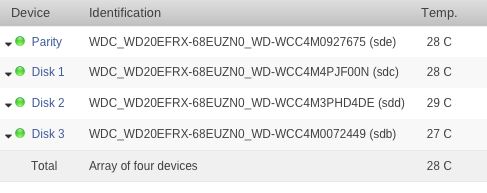
-
Nice. I just updated the plug-in, but I'm not seeing temperatures, either in your installation test, or from my SNMP monitoring server. Here's the snippet from your installation: +============================================================================== | Testing SNMP by listing mounts +============================================================================== Looks like snmpd is working... Output: HOST-RESOURCES-MIB::hrFSMountPoint.1 = STRING: "/mnt/disk1" HOST-RESOURCES-MIB::hrFSMountPoint.2 = STRING: "/mnt/disk2" HOST-RESOURCES-MIB::hrFSMountPoint.3 = STRING: "/mnt/disk3" HOST-RESOURCES-MIB::hrFSMountPoint.22 = STRING: "/var/log" HOST-RESOURCES-MIB::hrFSMountPoint.25 = STRING: "/boot" Here's what drive temperatures look like: NET-SNMP-EXTEND-MIB::nsExtendOutLine."disktemp" = No Such Instance currently exists at this OID ----------------------------------------------------------- snmp has been installed. Copyright 2015, David Coppit Version: 2015.08.24 ----------------------------------------------------------- Thanks, John
-
On installation it does a self-test. Uninstall and reinstall to double-check it. Installed and feeding data to MRTG (old school, I know). Now to see what OIDs are good to watch!
