





mikedpitt420
Members
-
Joined
-
Last visited
Everything posted by mikedpitt420
-
Yes, the red X after the preclear next to the drive, that when you hover over it says "Clear Drive Stats".
-
Clear the stats from the drive, and you can preclear again.
-
No that's what I was after. Thanks very much! I guess I just misread or botched the replacement process. I keep a precleared warm spare for myself and this was for someone else, so I honestly haven't been through this actual process in a while. I was just curious as to expected behavior in each scenario. That makes it perfectly clear. So in the future, do not remove the bad drive from the array, add the new one and preclear, and reassign. The only question I would still have is, when a drive is failing and you try to watch video stored on it, it tends to buffer and skip. Which would be expected. Removing the failing drive first at least corrects that error while waiting for another drive. I guess the only way to achieve that would be doing it how I did, and just forcing a preclear via the command line? Thanks very much again for the quick response.
-
That's what I would expect as well, but it's not what happened. The drive failed, the array was stopped and the drive was removed, and the array restarted. All the data was visible. The new drive was added and the machine was rebooted. Listing the drives available for preclear showed no available drives, via the CLI or the unRAID UI. If the array was stopped, I was able to assign the new drive to the array. However, the only way I was able to clear this drive was preclear_disk.sh /dev/sdc So the script did not show the drive as available for a preclear, but it started anyway via the command line. The reason I was reporting it here, was because with the addition of this plugin, this was the last reason I had to regularly use the CLI and I thought that's a huge leap forward for less than experienced users who were possibly unfamiliar with the command line. So either this is expected behavior and unRAID does somehow claim the drive when there is a failed drive in the array, or there is a bug in the preclear script or plugin, that says a drive is not unavailable for preclear when indeed it is.
-
So is that correct? If there is a failed drive in the array, unRAID "claims it" and you are not able to preclear the drive normally? This doesn't seem like what would be expected behavior unless I'm really missing something. Since unRAID places a fairly high value on pre-clearing drives before they're added to the array (which is one of the nicest features imho) you'd think that it would want you to pre-clear any drive added. Is this a bug in the preclear script or is that actually expected behavior?
-
So you're saying it's not possible to preclear a drive with another drive missing from the array?
-
This is in response to fantax's post above. I have been helping him with his new unRAID system. He had a drive die. The array was stopped, the drive was removed from the array, and the array was started again. This seemed to work just fine, and the data on the missing drive was still accessible. He then replaced the drive. The new drive took the assignment of /dev/sdc . This was not shown under the unassigned devices plugin, so the option to preclear it wasn't there either. Stopping the array gives him the option of being able to assign it to the array and begin a parity rebuild of the data, but nothing from the preclear script, or plugin was reported. From the CLI, doing a "preclear_disk.sh -l" produced no results, it did not show the new drive. However, doing a "preclear_disk.sh /dev/sdc" began the preclear process just fine. He's running unRAID 6.1.3 . He has 5 drives attached to his motherboard, and 3 drives attached to an IBM M1015 flashed to IT mode. The drive in question is one of the ones connected to the controller card. I wasn't exactly sure where to post this, but it seems as though both this plugin, and the preclear script, were unable to see this new drive for whatever reason. Any help would be greatly appreciated.
-
I'm still unable to get the temp sensors plugin working after getting PERL installed. Any other options until lmsensors.org is back up?
-
Is it possible to change the default webserver to chorus or chorus2? There's a streaming option, like yatse, as well as a whole "tool box" of JSON commands you can send to your kodi box. Apologies if I don't quite wrap my head around why doing a clean library or update from the headless box itself would cause everything to vanish. Wouldn't the "initial" scan to create a DB be done on the docker kodi ? So I guess I don't understand why updating it there would cause an issue.
-
I would pull your flash drive and check to make sure it's not on it's way out if that were me. Sounds as though something didn't install correctly in the first place. But I'm no expert.
-
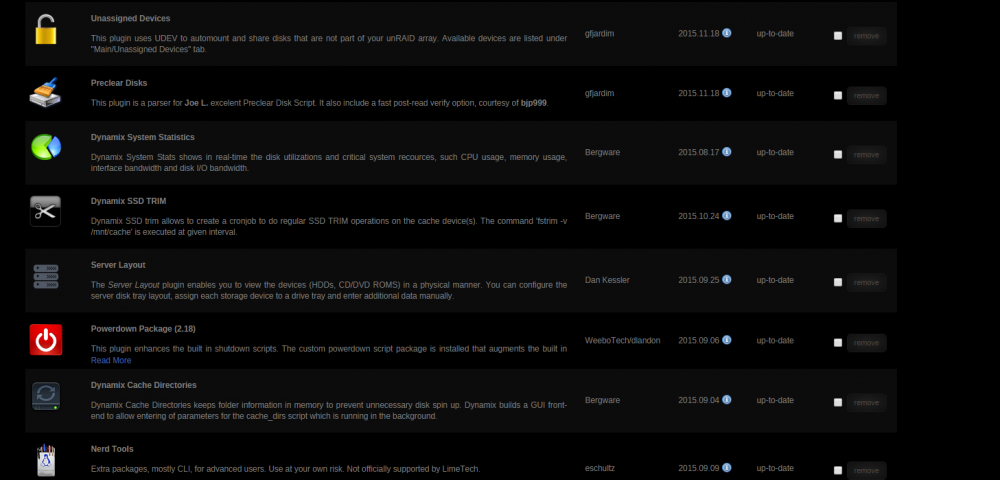
Maybe a reboot, or a hard browser refresh? (Ctrl-F5) ? You don't have this listed in your plugins? "Dynamix Cache Directories"?
-
Refused for me as well.
-
Installed PERL, hit detect, blank screen for a second, still detects nothing
-
I have installed system temp, and click detect, and nothing happens. What am I missing?
-
Thanks very much.
-
Am I blind? Where is the actual plugin itself? Or do I have to actually download sensor-detect (lmsensors.org appears down). Is there an actual plugin or do I manually have to set this up with a .conf file?
-
he's already changed it, of course.
-
He did not. Wow, that was probably the last thing that would have dawned on me. Thanks very much.
-
After the tmux session that I could see finished, the GUI was still exhibiting the same issues. He had to perform a reboot, and adding the drives to the array took much longer than expected for precleared drives, so at least one or two of the drives if not all of them never seemed to finish. Is the output of this command still relevant after a reboot? The GUI is now fine, responsive, etc.
-
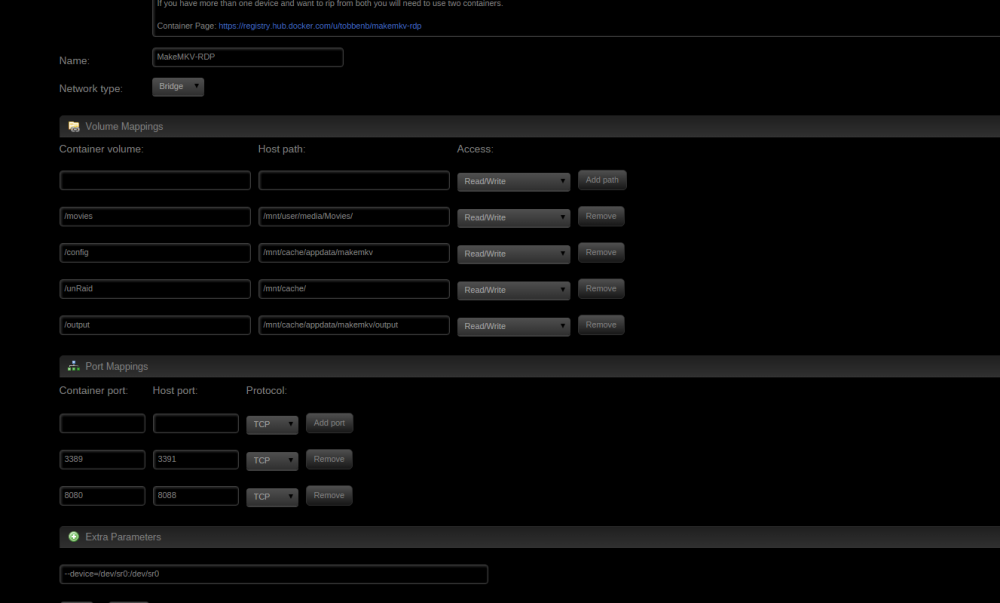
This docker fails to start for me. I have more then 10GB available in my image, and all other dockers are running just fine. Attached is a copy of my settings. There is also no setting.conf or any other files where I mapped the config folder to. I also get dae9c26d16de67a73dc8a5856b290fab78ee27a2a2c42990ad0037f37253b453 Error response from daemon: Cannot start container dae9c26d16de67a73dc8a5856b290fab78ee27a2a2c42990ad0037f37253b453: error gathering device information while adding custom device "/dev/sr0": lstat /dev/sr0: no such file or directory EDIT: by removing the "extra parameters" settings referencing sr0= , I managed to get the docker to start. Should I have removed this line? Should it be something else entirely? Is this solely for passing an otical drive to this program? Also, I cannot paste the key into the MakeMKV GUI when you hit "register". And there is no settings.conf file in the /config folder. Will it still work? EDIT: Just creating a file called settings.conf in your config (666 perms and chowned to nobody:users) and adding that string seems to do the trick.
-
I am helping a friend build a new system. There was initially no disk.cfg as there was no array ever, which made the preclear plugin throw an error about there not being one. After creating the array, starting, then stopping again, I was able to get to start a preclear. He is on unRAID 6.1.3, no controller (all drives plugged directly into mobo) and started preclearing 5 x 4TB WD Purples. Status reported fine on all drives through the preclear plugin, until step 10, where status stopped showing in the UI, and the plugin information just hung at "Retrieving Information" with the UI throwing all kinds of odd errors and becomes largely unresponsive and almost unusable (icons missing, other odd behavior): Warning: readlink(): No such file or directory in /usr/local/emhttp/plugins/dynamix/include/local_prepend.php on line 18 Warning: readlink(): No such file or directory in /usr/local/emhttp/plugins/dynamix/include/local_prepend.php on line 18 43% core 0 / 1 Warning: readlink(): No such file or directory in /usr/local/emhttp/plugins/dynamix/include/local_prepend.php on line 18 3714 MHz eth0 Warning: readlink(): No such file or directory in /usr/local/emhttp/plugins/dynamix/include/local_prepend.php on line 18 1000Mb/s - full duplex *I also checked the tmux session just to make sure that 43% at the end of one of the lines wasn't garbled information from a tmux screen, and it's not. Dropping into the only active tmux session showed only one screen, of one drive at ~ 25% done with post read (still moving). I will report back as to whether the GUI un-hangs after it completes, or a reboot was required.
-
I'm pretty sure that's the mot commonly used one. I was just wondering about the docker "seeing" the USB device. So that shouldn't be an issue? In any event, I could use a KVM ubuntu machine and definitely pass in the USB devices. I would think this would be an easier solution.
-
Is it possible to pass a USB ZWave controller like this: http://www.ebay.com/itm/like/261954054474?lpid=82&chn=ps to the OpenHAB docker?
-
Awesome, will do. I kind of figured it was either the unRAID ver. or the fact that I installed and possibly pressed a button on the plugin, with an instance already running in screen. I'm in the process of upgrading as we speak. Thanks
-
I believe this plugin hung my system using unRAID 6.0 b12. I read someone through this forum saying that they installed this during a preclear and it immediately picked up on the screen session instance of preclear_disk.sh and began reporting stats. I performed this same operation, and while the plg installed and did begin to report stats and show up in settings, etc. after another 10 - 15 minutes the unRAID GUI became unresponsive. I could SSH into it, use dockers, it was only the unRAID GUI that was unavailable. After this, I was unable to stop the array through either the GUI not the command line. I'm not sure if this is because of the fact that I installed during an already running preclear, but this was the only other thing changed on my system that could have been causing it to hang, I would think anyway. It's been fine several reboots since, and has not hung at all and the plugin is still installed but not doing any more preclearing at the moment. This system GUI hasn't become unresponsive since I've been on b12 even once until I installed this plugin. I'm in the process right now of rebuilding parity on this new drive, and upgrading to unRAID 6.0 and report back if it still happens to hang. Would it have something to do with the fact that I only have Dynamix ver. 2015.01.21 possibly?


