





B_Sinn3d
Members
-
Joined
-
Last visited
-
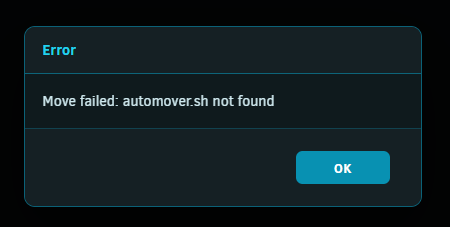
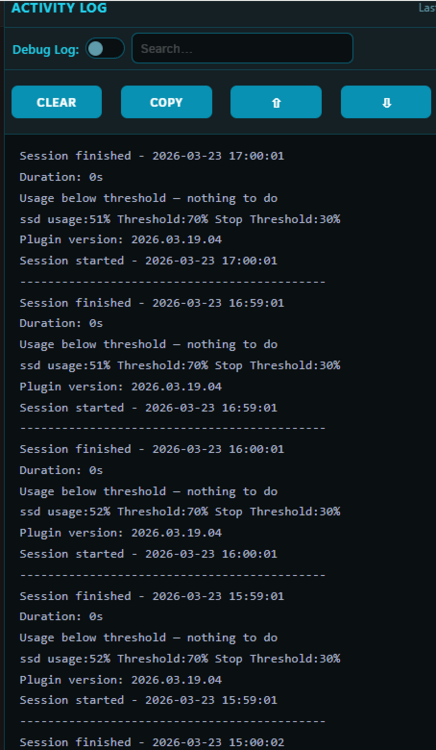
I am getting below message when I run automover. Anyone know what is wrong here? It was running fine until 3/23. I must have updated it at that time and 3/22 update broke it for me. Plugin version: 2026.03.19.04 was working fine. I tried removing and reinstalling but same issue. Anyone have any ideas?
-
Ok, I deleted the pool.cfg from /config/pools/. I was able to recreate pool after reboot. Thanks,
-
I downloaded the 7.3 beta on backup server to test out the internal boot. I moved all data from ZFS nvme pool, stopped the array, deleted/removed pool. I don't think it worked as after reboot it is still booting from flash. I formatted my zfs pool and realized it was set to auto. I stopped the array, change it back to zfs and reformatted. I stopped the array again and now I am unable to start the array or do anything with that pool unable to change file system, erase pool, new config is not working and array won't start. attaching Diags. debo-r720xd-diagnostics-20260320-1521.zip
-
I appreciate the responses. I have added below and will test stopping/starting once Parity is done rebuilding from me shrinking array...Thanks again! SHARE="/mnt/user/Backup" echo "Waiting for user shares to be mounted..." while ! mountpoint -q /mnt/user; do sleep 5 done echo "/mnt/user is mounted." while [ ! -d "$SHARE" ]; do sleep 5 done echo "$SHARE is ready. Continuing..."
-
Hi JorgeB, Thank you for taking the time to help. What do you mean the folder existed before the last array start? That is one of my Shares. Are you saying something is creating that directory before Unraid mounts the shares? hmmm...I do have some user_scripts that write logs to that directory. Here is example of one of my user scripts that runs every 5 minutes. Could it be creating the log_dir before shares are mounted? # ----------------------------- # Logging setup # ----------------------------- LOG_DIR="/mnt/user/Backup/logs/CPU_Governor_Logs" LOG_FILE="${LOG_DIR}/cpu-governor-$(date +%Y-%m-%d).log" RETENTION_DAYS=7 mkdir -p "$LOG_DIR" find "$LOG_DIR" -type f -name "cpu-governor-*.log" -mtime +"$RETENTION_DAYS" -delete
-
About a week or two ago, I started having issues when stopping/starting my array. When it starts array mounts normally but it seems like I am missing shares and VMs won't start and logs are getting spammed with below for all shares. I have been getting a random read error on my only SAS drive so I figured I would just remove it this morning and use in my backup server (SMART comes back fine, not cable issue). I used the procedure to remove the drive and when starting the array I am seeing this issue again. Normally a reboot will fix it but want to figure out what is causing it and not able to figure that out. So I looking for help. emhttpd: error: malloc_share_locations, 8629: Operation not supported (95): getxattr: /mnt/user Thanks, debo-server-diagnostics-20260227-0853.zip
-
Not sure if anyone else had this issue but after installing this plugin, almost all my user script schedules are off. I ended up uninstalling and updating to correct schedules. Nice concept though. NOTE: by off, I don't mean disabled. It appears that the scripts and schedules all got mixed up.
-
Battlefield 6 beta just opened up and apparently they are now requiring Secure Boot enabled for Windows. In my Google-Fu, I haven't really found a well documented way to enable Secure Boot in Windows 11 VM on unRaid. Has anyone got Secure Boot enabled and if so, any guides that exist out there that can help? I really like have my gaming VM on my server jut to cut down on another box since I really only game 4-5 hours a week. Here is my XML if I need to make any tweaks there. <?xml version='1.0' encoding='UTF-8'?> <domain type='kvm' id='6'> <name>debo-pc</name> <uuid>8f4c2bce-bc57-2dd9-f84f-0b8f54c354f3</uuid> <metadata> <vmtemplate xmlns="unraid" name="Windows 11" icon="windows11.png" os="windowstpm" webui=""/> </metadata> <memory unit='KiB'>16777216</memory> <currentMemory unit='KiB'>16777216</currentMemory> <memoryBacking> <nosharepages/> </memoryBacking> <vcpu placement='static'>16</vcpu> <cputune> <vcpupin vcpu='0' cpuset='8'/> <vcpupin vcpu='1' cpuset='24'/> <vcpupin vcpu='2' cpuset='9'/> <vcpupin vcpu='3' cpuset='25'/> <vcpupin vcpu='4' cpuset='10'/> <vcpupin vcpu='5' cpuset='26'/> <vcpupin vcpu='6' cpuset='11'/> <vcpupin vcpu='7' cpuset='27'/> <vcpupin vcpu='8' cpuset='12'/> <vcpupin vcpu='9' cpuset='28'/> <vcpupin vcpu='10' cpuset='13'/> <vcpupin vcpu='11' cpuset='29'/> <vcpupin vcpu='12' cpuset='14'/> <vcpupin vcpu='13' cpuset='30'/> <vcpupin vcpu='14' cpuset='15'/> <vcpupin vcpu='15' cpuset='31'/> </cputune> <resource> <partition>/machine</partition> </resource> <os> <type arch='x86_64' machine='pc-q35-7.2'>hvm</type> <loader readonly='yes' type='pflash'>/usr/share/qemu/ovmf-x64/OVMF_CODE-pure-efi-tpm.fd</loader> <nvram>/etc/libvirt/qemu/nvram/8f4c2bce-bc57-2dd9-f84f-0b8f54c354f3_VARS-pure-efi-tpm.fd</nvram> </os> <features> <acpi/> <apic/> <hyperv mode='custom'> <relaxed state='on'/> <vapic state='on'/> <spinlocks state='on' retries='8191'/> <vpindex state='on'/> <synic state='on'/> <stimer state='on'/> <vendor_id state='on' value='none'/> </hyperv> </features> <cpu mode='host-passthrough' check='none' migratable='on'> <topology sockets='1' dies='1' clusters='1' cores='8' threads='2'/> <cache mode='passthrough'/> <feature policy='require' name='topoext'/> <feature policy='disable' name='arch-capabilities'/> </cpu> <clock offset='localtime'> <timer name='hpet' present='no'/> <timer name='hypervclock' present='yes'/> </clock> <on_poweroff>destroy</on_poweroff> <on_reboot>restart</on_reboot> <on_crash>restart</on_crash> <devices> <emulator>/usr/local/sbin/qemu</emulator> <disk type='file' device='disk'> <driver name='qemu' type='raw' cache='writeback' discard='ignore'/> <source file='/mnt/cache/domains/debo-pc/vdisk1.img' index='3'/> <backingStore/> <target dev='hdc' bus='virtio'/> <boot order='1'/> <alias name='virtio-disk2'/> <address type='pci' domain='0x0000' bus='0x04' slot='0x00' function='0x0'/> </disk> <disk type='block' device='disk'> <driver name='qemu' type='raw' cache='writeback' discard='ignore'/> <source dev='/dev/disk/by-id/ata-Samsung_SSD_860_EVO_1TB_S599NE0MA86416V' index='2'/> <backingStore/> <target dev='hdd' bus='virtio'/> <alias name='virtio-disk3'/> <address type='pci' domain='0x0000' bus='0x05' slot='0x00' function='0x0'/> </disk> <disk type='file' device='cdrom'> <driver name='qemu' type='raw'/> <source file='/mnt/cache/ISO Library Share/virtio-win-0.1.262-2.iso' index='1'/> <backingStore/> <target dev='hdb' bus='sata'/> <readonly/> <alias name='sata0-0-1'/> <address type='drive' controller='0' bus='0' target='0' unit='1'/> </disk> <controller type='usb' index='0' model='qemu-xhci' ports='15'> <alias name='usb'/> <address type='pci' domain='0x0000' bus='0x00' slot='0x07' function='0x0'/> </controller> <controller type='pci' index='0' model='pcie-root'> <alias name='pcie.0'/> </controller> <controller type='pci' index='1' model='pcie-root-port'> <model name='pcie-root-port'/> <target chassis='1' port='0x10'/> <alias name='pci.1'/> <address type='pci' domain='0x0000' bus='0x00' slot='0x02' function='0x0' multifunction='on'/> </controller> <controller type='pci' index='2' model='pcie-root-port'> <model name='pcie-root-port'/> <target chassis='2' port='0x11'/> <alias name='pci.2'/> <address type='pci' domain='0x0000' bus='0x00' slot='0x02' function='0x1'/> </controller> <controller type='pci' index='3' model='pcie-root-port'> <model name='pcie-root-port'/> <target chassis='3' port='0x12'/> <alias name='pci.3'/> <address type='pci' domain='0x0000' bus='0x00' slot='0x02' function='0x2'/> </controller> <controller type='pci' index='4' model='pcie-root-port'> <model name='pcie-root-port'/> <target chassis='4' port='0x13'/> <alias name='pci.4'/> <address type='pci' domain='0x0000' bus='0x00' slot='0x02' function='0x3'/> </controller> <controller type='pci' index='5' model='pcie-root-port'> <model name='pcie-root-port'/> <target chassis='5' port='0x14'/> <alias name='pci.5'/> <address type='pci' domain='0x0000' bus='0x00' slot='0x02' function='0x4'/> </controller> <controller type='pci' index='6' model='pcie-root-port'> <model name='pcie-root-port'/> <target chassis='6' port='0x15'/> <alias name='pci.6'/> <address type='pci' domain='0x0000' bus='0x00' slot='0x02' function='0x5'/> </controller> <controller type='pci' index='7' model='pcie-root-port'> <model name='pcie-root-port'/> <target chassis='7' port='0x8'/> <alias name='pci.7'/> <address type='pci' domain='0x0000' bus='0x00' slot='0x01' function='0x0' multifunction='on'/> </controller> <controller type='pci' index='8' model='pcie-root-port'> <model name='pcie-root-port'/> <target chassis='8' port='0x9'/> <alias name='pci.8'/> <address type='pci' domain='0x0000' bus='0x00' slot='0x01' function='0x1'/> </controller> <controller type='pci' index='9' model='pcie-root-port'> <model name='pcie-root-port'/> <target chassis='9' port='0xa'/> <alias name='pci.9'/> <address type='pci' domain='0x0000' bus='0x00' slot='0x01' function='0x2'/> </controller> <controller type='pci' index='10' model='pcie-to-pci-bridge'> <model name='pcie-pci-bridge'/> <alias name='pci.10'/> <address type='pci' domain='0x0000' bus='0x01' slot='0x00' function='0x0'/> </controller> <controller type='virtio-serial' index='0'> <alias name='virtio-serial0'/> <address type='pci' domain='0x0000' bus='0x02' slot='0x00' function='0x0'/> </controller> <controller type='sata' index='0'> <alias name='ide'/> <address type='pci' domain='0x0000' bus='0x00' slot='0x1f' function='0x2'/> </controller> <interface type='bridge'> <mac address='52:54:00:xx:xx:xx'/> <source bridge='br0'/> <target dev='vnet4'/> <model type='virtio-net'/> <alias name='net0'/> <address type='pci' domain='0x0000' bus='0x03' slot='0x00' function='0x0'/> </interface> <serial type='pty'> <source path='/dev/pts/0'/> <target type='isa-serial' port='0'> <model name='isa-serial'/> </target> <alias name='serial0'/> </serial> <console type='pty' tty='/dev/pts/0'> <source path='/dev/pts/0'/> <target type='serial' port='0'/> <alias name='serial0'/> </console> <channel type='unix'> <source mode='bind' path='/run/libvirt/qemu/channel/6-debo-pc/org.qemu.guest_agent.0'/> <target type='virtio' name='org.qemu.guest_agent.0' state='connected'/> <alias name='channel0'/> <address type='virtio-serial' controller='0' bus='0' port='1'/> </channel> <input type='mouse' bus='ps2'> <alias name='input0'/> </input> <input type='keyboard' bus='ps2'> <alias name='input1'/> </input> <tpm model='tpm-tis'> <backend type='emulator' version='2.0' persistent_state='yes'/> <alias name='tpm0'/> </tpm> <audio id='1' type='none'/> <hostdev mode='subsystem' type='pci' managed='yes'> <driver name='vfio'/> <source> <address domain='0x0000' bus='0x31' slot='0x00' function='0x0'/> </source> <alias name='hostdev0'/> <address type='pci' domain='0x0000' bus='0x06' slot='0x00' function='0x0'/> </hostdev> <hostdev mode='subsystem' type='pci' managed='yes'> <driver name='vfio'/> <source> <address domain='0x0000' bus='0x31' slot='0x00' function='0x1'/> </source> <alias name='hostdev1'/> <address type='pci' domain='0x0000' bus='0x07' slot='0x00' function='0x0'/> </hostdev> <hostdev mode='subsystem' type='pci' managed='yes'> <driver name='vfio'/> <source> <address domain='0x0000' bus='0x2e' slot='0x00' function='0x1'/> </source> <alias name='hostdev2'/> <address type='pci' domain='0x0000' bus='0x08' slot='0x00' function='0x0'/> </hostdev> <hostdev mode='subsystem' type='pci' managed='yes'> <driver name='vfio'/> <source> <address domain='0x0000' bus='0x2e' slot='0x00' function='0x3'/> </source> <alias name='hostdev3'/> <address type='pci' domain='0x0000' bus='0x09' slot='0x00' function='0x0'/> </hostdev> <watchdog model='itco' action='reset'> <alias name='watchdog0'/> </watchdog> <memballoon model='none'/> </devices> <seclabel type='dynamic' model='dac' relabel='yes'> <label>+0:+100</label> <imagelabel>+0:+100</imagelabel> </seclabel> </domain>
-
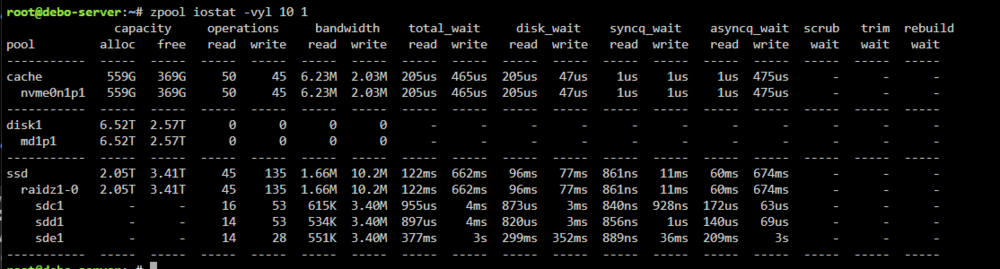
I guessing this proves that Teamgroup SSD is the problem here? 3s wait vs 4ms for other two SSDs.
-
I recently created a ZFS pool with 3 2TB SSDs to use for appdata, torrents and general cache. 2 MX500 and 1 cheaper teamgroup T-Force SSD. I created the pool in Raidz1, which seems like the best bang for both read/write speeds and data loss prevention. I have appdata and torrent going to that cache and I have noticed that whenever there is any writing to that cache pool my CPU threads spike to 100% and dockers, webgui become unresponsive. I can see using TOP that WA is spiking to over 20% which indicates I have high IO waits happening. I ran a couple of tests to confirm. I took a large ISO directory from NVME storage and copied to a couple of different shares that all have different primary storage. Writing to that pool has terrible throughput (30 MB/s) once cache fills, I have 48GB allocated for ZFS cache. Writing to Array (no issues) Wait IO ~5% Throughput ~110 MB/s Writing to ZFS SSD Pool (system sometimes will go unresponsive) Wait IO ~20% CPU spikes Throughput ~30 MB/s Writing to ZFS SSD Pool - non-compressed (system sometimes will go unresponsive) Wait IO ~22% CPU spikes - sometimes drops to below 5% Throughput ~35 MB/s Writing from ZFS SSD Pool Wait IO <5% Throughput 900 MB/s So issue definitely seems like writing to my ZFS pool, I can write FROM the SSD pool to NVME and getting 900 MB/s so reads seem to be normal. Could it be an issue with that cheaper T-Force SSD. What else could the issue be? Should I go to Raid0 and risk losing a disk for speed? Attaching Diags... debo-server-diagnostics-20250721-1402.zip
-
I ended up just plopping in another image (below). Just add below to Icon URL field when in advanced view. https://avatars.githubusercontent.com/u/166754869?s=200&v=4
-
FYI, extended smart passed. I will follow the below procedure to put it back into the array. https://docs.unraid.net/unraid-os/manual/storage-management/#rebuilding-a-drive-onto-itself WDC_WD120EDAZ-11F3RA0_5PK2AWJB-20240214-1032.txt
-
Thanks itimpi! I will power off, reseat the cable(s) and power back on. Here is the last SMART report for that disk from Feb 3rd. WDC_WD120EDAZ-11F3RA0_5PK2AWJB-2023-08-31 disk3 (sdb).txt
-
This morning I woke up and one of my disks (3) was disabled with Read/Write errors. It connected to LSI 9201 so I don't think it is cable since other drives that are on same SAS cable are OK. Should I replace it or is something else going on here? Posting Diags... Feb 13 01:04:28 debo-server kernel: sd 1:0:0:0: [sdk] tag#22 UNKNOWN(0x2003) Result: hostbyte=0x00 driverbyte=DRIVER_OK cmd_age=29s Feb 13 01:04:28 debo-server kernel: sd 1:0:0:0: [sdk] tag#22 Sense Key : 0x5 [current] Feb 13 01:04:28 debo-server kernel: sd 1:0:0:0: [sdk] tag#22 ASC=0x21 ASCQ=0x4 Feb 13 01:04:28 debo-server kernel: sd 1:0:0:0: [sdk] tag#22 CDB: opcode=0x88 88 00 00 00 00 02 05 02 f4 f0 00 00 01 00 00 00 Feb 13 01:04:28 debo-server kernel: I/O error, dev sdk, sector 8674014448 op 0x0:(READ) flags 0x0 phys_seg 32 prio class 2 Feb 13 01:04:28 debo-server kernel: md: disk3 read error, sector=8674014384 Feb 13 01:04:28 debo-server kernel: md: disk3 read error, sector=8674014392 Feb 13 01:04:28 debo-server kernel: md: disk3 read error, sector=8674014400 Feb 13 01:04:28 debo-server kernel: md: disk3 read error, sector=8674014408 Feb 13 01:04:28 debo-server kernel: md: disk3 read error, sector=8674014416 Feb 13 01:04:28 debo-server kernel: md: disk3 read error, sector=8674014424 Feb 13 01:04:28 debo-server kernel: md: disk3 read error, sector=8674014432 Feb 13 01:04:28 debo-server kernel: md: disk3 read error, sector=8674014440 Feb 13 01:04:28 debo-server kernel: md: disk3 read error, sector=8674014448 Feb 13 01:04:28 debo-server kernel: md: disk3 read error, sector=8674014456 Feb 13 01:04:28 debo-server kernel: md: disk3 read error, sector=8674014464 Feb 13 01:04:28 debo-server kernel: md: disk3 read error, sector=8674014472 Feb 13 01:04:28 debo-server kernel: md: disk3 read error, sector=8674014480 Feb 13 01:04:28 debo-server kernel: md: disk3 read error, sector=8674014488 Feb 13 01:04:28 debo-server kernel: md: disk3 read error, sector=8674014496 Feb 13 01:04:28 debo-server kernel: md: disk3 read error, sector=8674014504 Feb 13 01:04:28 debo-server kernel: md: disk3 read error, sector=8674014512 Feb 13 01:04:28 debo-server kernel: md: disk3 read error, sector=8674014520 Feb 13 01:04:28 debo-server kernel: md: disk3 read error, sector=8674014528 Feb 13 01:04:28 debo-server kernel: md: disk3 read error, sector=8674014536 Feb 13 01:04:28 debo-server kernel: md: disk3 read error, sector=8674014544 Feb 13 01:04:28 debo-server kernel: md: disk3 read error, sector=8674014552 Feb 13 01:04:28 debo-server kernel: md: disk3 read error, sector=8674014560 Feb 13 01:04:28 debo-server kernel: md: disk3 read error, sector=8674014568 Feb 13 01:04:28 debo-server kernel: md: disk3 read error, sector=8674014576 Feb 13 01:04:28 debo-server kernel: md: disk3 read error, sector=8674014584 Feb 13 01:04:28 debo-server kernel: md: disk3 read error, sector=8674014592 Feb 13 01:04:28 debo-server kernel: md: disk3 read error, sector=8674014600 Feb 13 01:04:28 debo-server kernel: md: disk3 read error, sector=8674014608 Feb 13 01:04:28 debo-server kernel: md: disk3 read error, sector=8674014616 Feb 13 01:04:28 debo-server kernel: md: disk3 read error, sector=8674014624 Feb 13 01:04:28 debo-server kernel: md: disk3 read error, sector=8674014632 Feb 13 01:04:28 debo-server kernel: ata1: EH complete Feb 13 01:04:28 debo-server kernel: sd 1:0:0:0: rejecting I/O to offline device Feb 13 01:04:28 debo-server kernel: ata1.00: detaching (SCSI 1:0:0:0) Feb 13 01:04:28 debo-server kernel: program smartctl is using a deprecated SCSI ioctl, please convert it to SG_IO Feb 13 01:04:28 debo-server kernel: program smartctl is using a deprecated SCSI ioctl, please convert it to SG_IO Feb 13 01:04:28 debo-server kernel: program smartctl is using a deprecated SCSI ioctl, please convert it to SG_IO Feb 13 01:04:28 debo-server kernel: program smartctl is using a deprecated SCSI ioctl, please convert it to SG_IO Feb 13 01:04:28 debo-server kernel: program smartctl is using a deprecated SCSI ioctl, please convert it to SG_IO Feb 13 01:04:28 debo-server kernel: program smartctl is using a deprecated SCSI ioctl, please convert it to SG_IO Feb 13 01:04:28 debo-server kernel: program smartctl is using a deprecated SCSI ioctl, please convert it to SG_IO Feb 13 01:04:28 debo-server kernel: program smartctl is using a deprecated SCSI ioctl, please convert it to SG_IO Feb 13 01:04:28 debo-server kernel: sd 1:0:0:0: [sdk] Synchronizing SCSI cache Feb 13 01:04:28 debo-server kernel: sd 1:0:0:0: [sdk] Synchronize Cache(10) failed: Result: hostbyte=0x04 driverbyte=DRIVER_OK Feb 13 01:04:29 debo-server emhttpd: read SMART /dev/sde Feb 13 01:04:29 debo-server emhttpd: read SMART /dev/sdf Feb 13 01:04:29 debo-server emhttpd: read SMART /dev/sdl Feb 13 01:04:42 debo-server kernel: md: disk3 write error, sector=8674014384 Feb 13 01:04:42 debo-server kernel: md: disk3 write error, sector=8674014392 Feb 13 01:04:42 debo-server kernel: md: disk3 write error, sector=8674014400 Feb 13 01:04:42 debo-server kernel: md: disk3 write error, sector=8674014408 Feb 13 01:04:42 debo-server kernel: md: disk3 write error, sector=8674014416 Feb 13 01:04:42 debo-server kernel: md: disk3 write error, sector=8674014424 Feb 13 01:04:42 debo-server kernel: md: disk3 write error, sector=8674014432 Feb 13 01:04:42 debo-server kernel: md: disk3 write error, sector=8674014440 Feb 13 01:04:42 debo-server kernel: md: disk3 write error, sector=8674014448 Feb 13 01:04:42 debo-server kernel: md: disk3 write error, sector=8674014456 Feb 13 01:04:42 debo-server kernel: md: disk3 write error, sector=8674014464 Feb 13 01:04:42 debo-server kernel: md: disk3 write error, sector=8674014472 Feb 13 01:04:42 debo-server kernel: md: disk3 write error, sector=8674014480 Feb 13 01:04:42 debo-server kernel: md: disk3 write error, sector=8674014488 Feb 13 01:04:42 debo-server kernel: md: disk3 write error, sector=8674014496 Feb 13 01:04:42 debo-server kernel: md: disk3 write error, sector=8674014504 Feb 13 01:04:42 debo-server kernel: md: disk3 write error, sector=8674014512 Feb 13 01:04:42 debo-server kernel: md: disk3 write error, sector=8674014520 Feb 13 01:04:42 debo-server kernel: md: disk3 write error, sector=8674014528 Feb 13 01:04:42 debo-server kernel: md: disk3 write error, sector=8674014536 Feb 13 01:04:42 debo-server kernel: md: disk3 write error, sector=8674014544 Feb 13 01:04:42 debo-server kernel: md: disk3 write error, sector=8674014552 Feb 13 01:04:42 debo-server kernel: md: disk3 write error, sector=8674014560 Feb 13 01:04:42 debo-server kernel: md: disk3 write error, sector=8674014568 Feb 13 01:04:42 debo-server kernel: md: disk3 write error, sector=8674014576 Feb 13 01:04:42 debo-server kernel: md: disk3 write error, sector=8674014584 Feb 13 01:04:42 debo-server kernel: md: disk3 write error, sector=8674014592 Feb 13 01:04:42 debo-server kernel: md: disk3 write error, sector=8674014600 Feb 13 01:04:42 debo-server kernel: md: disk3 write error, sector=8674014608 Feb 13 01:04:42 debo-server kernel: md: disk3 write error, sector=8674014616 Feb 13 01:04:42 debo-server kernel: md: disk3 write error, sector=8674014624 Feb 13 01:04:42 debo-server kernel: md: disk3 write error, sector=8674014632 debo-server-diagnostics-20240213-0928.zip
-
I usually see that when my disks are spun down and something is trying to access multiple disks all at once (plex...etc). it spikes CPU until disks are all spun up and it get the data it is looking for. I have a script that keeps them spun up during the day, then I let them spin down at night when nobody is using it. suggestion: set spin down delay to "never".



