





Shunz
Members
-
Joined
-
Last visited
-
Thanks!! I had the same problem too, since a few days ago over the weekend. Sadly, I spend a good deal of time figuring out how to delete the config and db files, since the appdata (especially the machinaris folders) permissions were locked by unraid (and I'm too lazy to figure out the commands). My binhex Krusader refused to rename or delete the files, until I googled that I needed to edit Krusader's docker values of PGID and PUID to 0 (zero = root) to run krusader as root. Sheesh
-
Thanks! I was hoping to avoid reinstalling the containers, since I'll need to dig through and make sure I have the paths and variables (eg Nvidia devices) added correctly. And the Linuxserver.io plex docker looks a little different in the apps list. Oh well. Sent from my SM-N9860 using Tapatalk
-
Is it possible to use the /Library folder from another repository? - Can I even overwrite the entire library folder with another? (eg overwrite the entire /Libary from my linuxserver.io installation over to binhex's folder) I messed up my Docker image (it became full, and I had to delete it), and I'm having difficulty trying to reinstall the plex from the linuxserver.io repository that I previously had. I had success copying the repository settings from SpaceInvader One's video, but I'm now considering switching to the BinHex Plex Pass repository.
-
Docker service failed to start, even after reboot 1) Docker image could be full? (it shows 100% in the Dashboard-Memory area) 2) I suspect it could be due to my Machinaris Chia container - plotman was trying to move a 100gb plot file into a destination that was already full Posting my diagnostics file here. I believe the solution is to delete the docker vdisk file, and create a new one? But before that... I'm wondering if there's a way to access the container in docker.img and manually delete the container or junk files, so as to make the docker image "not full". I'm just concerned whether I need to re-configure my docker container mappings again if I re-create a new image. (e.g. and that setting in plex that enables GPU transcoding) I've tried selecting the service start to "no" and adjusting to a larger image size, but that didn't work. unraid-diagnostics-20211219-0535.zip
-
Hi guy.davis! Plotman seemed to make the Docker container go full (the docker service now fails to start - requiring a docker image deletion and container re-adding) when it tried to send a completed plot to a destination (defined under locations in dst) that is already too full. Is there any way to prevent this, other than 1) un-selecting full drives from the dst list, or, 2) archiving? I think another incident is bound to happen, but this feels easy enough to occur that I don't think I'm the first to experience it... (edit - corrected my own drunk 5am writing)
-
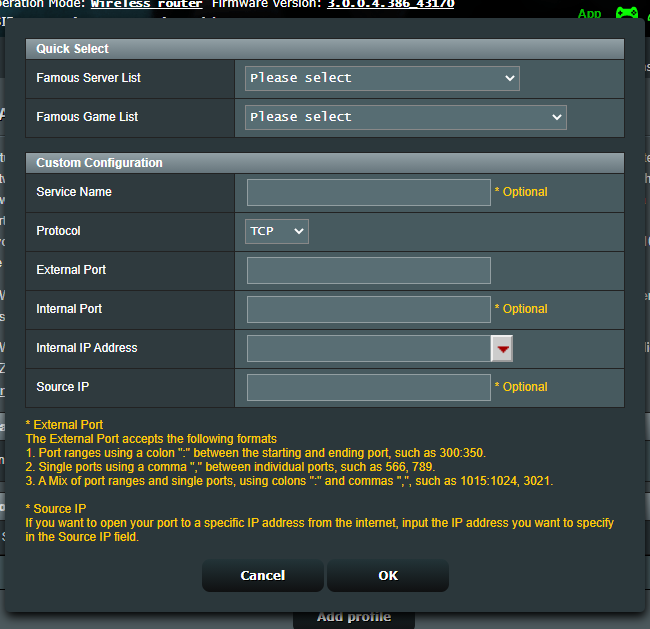
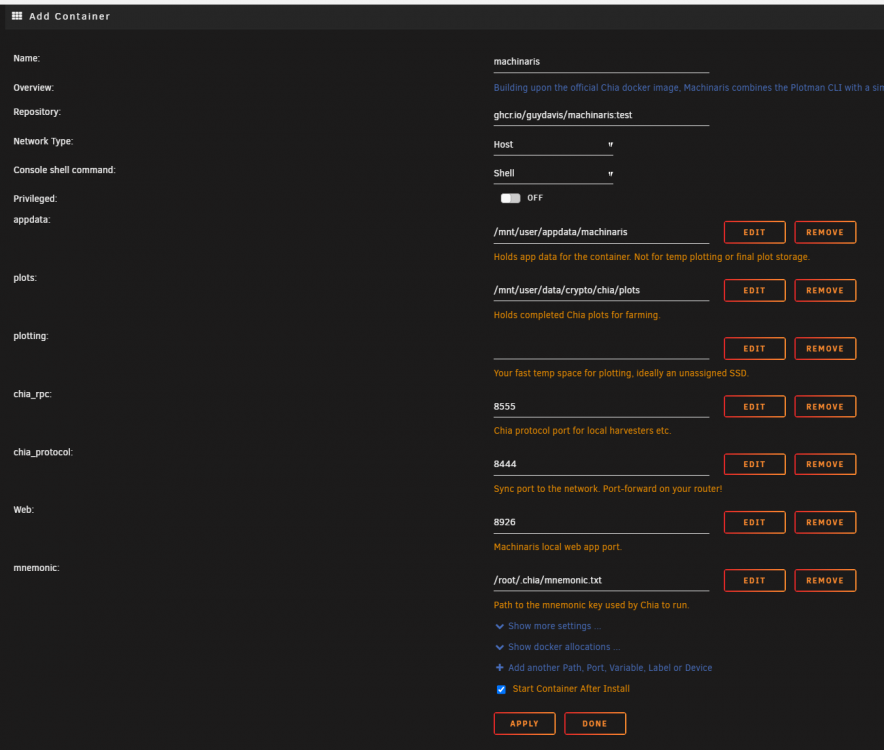
Thanks so much for this! I'm still a little hesitant about going full CLI, since I'll need to sit for a few hours at a go to experiment. Some questions during installation of the app: 1) Plot path - During the add-container settings page, there seems to be only 1 folder selection for the plots. Are there eventually more disk destination options via plotman (for a whole bunch of unassigned devices)? - I'm still wondering if I should place my plots in the protected array... Technically, plots aren't precious data (we can simply re-plot), so, unassigned devices should be better from a performance point of view, both for the array and the plots/farmer 2) Port Forwarding (router settings - see attached image) Noob question here, but I thought I should ask, to be sure... a) Protocol - TCP? (or udp/both) b) External Port - 8444 c) Internal Port - leave blank? d) Internal IP Address - IP of unraid server e) Source IP - leave blank 3) Farmer/Harvester I'm currently using my main windows gaming PC as my farmer... I intend to eventually use the unraid system as the farmer (makes more sense this way - its permanently online and connected), while my PC becomes a harvester and plotter. I guess I should change the config settings of my Chia Windows to make it into a harvester? 4) Add container settings We can leave all the settings untouched? Except the following: - plots directory - plotting directory - mnemonic, no change needed, but i'm aware i do need to key in my mnemonic phrase into that text file
-
Pointing to Machinaris's docker - for GUI users like myself who are a little lazy at the moment to experiment with CLI (command line interface)
-
Ah, so it is possible to have an amazing plotting speed (high terabytes per day) simply by using a whole bunch of cheap HDDs in parallel! (assuming a CPU with enough grunt)
-
Thanks! I'm glad there's now a Chia docker and healthy discourse at the Partition Pixel thread. Oh gosh, SSD and HDD supplies will be so reckd these 2 years
-
I currently only have a few plots on the unraid array. It keeps that disk continously spun up - which I'm not exactly excited about; I'll definitely have some drives dedicated to Chia plots, or keep chia plots off the array. The other concern is whether having Chia plots on the unraid Array causes timeouts. Chia requires the plots/proofs (sorry - i haven't gotten my terms correctly yet) to be verified within SECONDS, and there has been news that NAS storage was causing verifications to timeout.
-
Regarding #2, Have you tried creating a 2nd cache pool for Chia purposes? I wonder if a non-redundant pool makes for faster plotting speeds (or allow for more parallel plotting)
-
Gonna be exploring Chia farming, of which I believe interested unraid-dabbling folks are extremely primed to be exploring! Several thoughts: 1) Storage (Farm) Locations: Should the Chia farm plots be stored on the unraid array, or should they be on unassigned devices? Benefits of being on unassigned devices - Reduce spin-up and wear on the array drives - These farm plots aren't exactly critical data - if the drives are lost, just build those plots again Edit - Specific Chia-only shares can be set to include specific disks, and exclude non-desired drives. This makes the spin-up point above moot, though I'm still undecided between chia storage on array, or on unassigned disks. 2) Plotting Locations: Chia plotting should be done on fast SSDs with high endurance. What about plotting on unraid BTRFS pools? E.g. a 2nd speedier non-redundant cache pool. 3) I'll probably plot on my Desktop PC, and store Farm Plots on unassigned devices. I have 2 high endurance SM863/SM963A SSDs as my cache pool, so, I hope to start farming on the unraid system as well. Waiting for a proper docker for unraid...!
-
here Oh crap, I've been planning to purchase extra RAM since last year so that I could comfortably transcode to RAM. So I've finally just purchased an extra 16GB of RAM - before reading this. Bummer

