





SkyHead
Members
-
Joined
-
Last visited
Everything posted by SkyHead
-
I'm having a problem where sonarr grabs the file prematurely and I dont get the entire file loaded to my sonarr and plex container. How do I avoid this?
-
Same nework is no problem
-
How do you manage your media with Sonarr\Radarr if you got them?
-
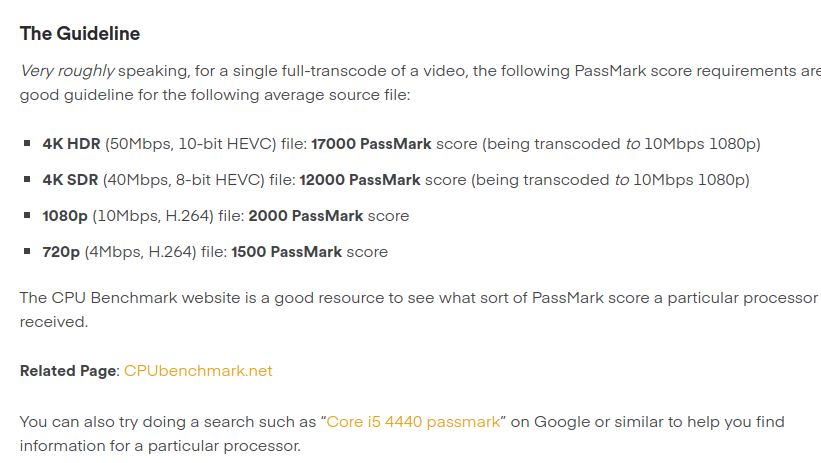
I like where your going with this, in this image it says to transcode a 4K HEVC to 1080 10mbps it takes 17000 PassMark Score, and with a i7-12700K I get about 34000 PassMark score. So that gives two streams, which Is good for me. However, when using QuickSync technology from integrated CPU and I am using an AppleTV on a remote location - will I be able to direct play so that I get all in original quality? How will this affect the CPU? Will it be easier for it to play the movie from Plex? Will the i7-12700F not work? Will I be able to also use my Nvidia 1660 SUPER for additional power? How about RAM - how effective is it in transcoding? Will an cache disk still help?
-
MoBO : ASUSTeK Computer INC. P8Z68-V PRO , Version Rev 1.xx CPU : Intel® Core™ i7-2600K CPU @ 3.40GHz RAM: 16GB DDR3 GFX Card: NVIDIA GeForce GTX 1660 SUPER I am currently looking into upgrading my server abit. First abit about what I want from the server and that is to be able to have maybe 2 or 3 4k direct streams, and if not maybe be able to handle 5-6 1080p transcoded from 4K files. I know there is a difference in 4K files and I'm hoping to get 1 or 2 remux streams from the server. Mostly it will be transcoded but I want that opportunity if it should come. First off, I need to upgrade the GFX card, which gfx cards are good for PLex media Streams? (budget around 600$, but smaller is better). - Also, do I Need upgrade my cpu and ram? This is getting old and I can get some cheap LGA1151 CPUs type of i7-6700 or something similar. - Will a SSD cache help? I currently have WDC Red and Seagate IronWolf 8-12TB disks. Will these be a bottleneck for direct streaming? Is there any cheap MoBos with lots of SATA ports? Maybe one with LGA1151 But am open for others I want the streams to come outside my network, what kind of bandwith am I looking at for a remux? I got 500/500mbit
-
Ok - ty .. It seems rolling back wont help, you can play the files but the colors are messed up
-
The docker works now, getting errors in plex.. Guess its time to move on to their forum.. Thank you for all help
-
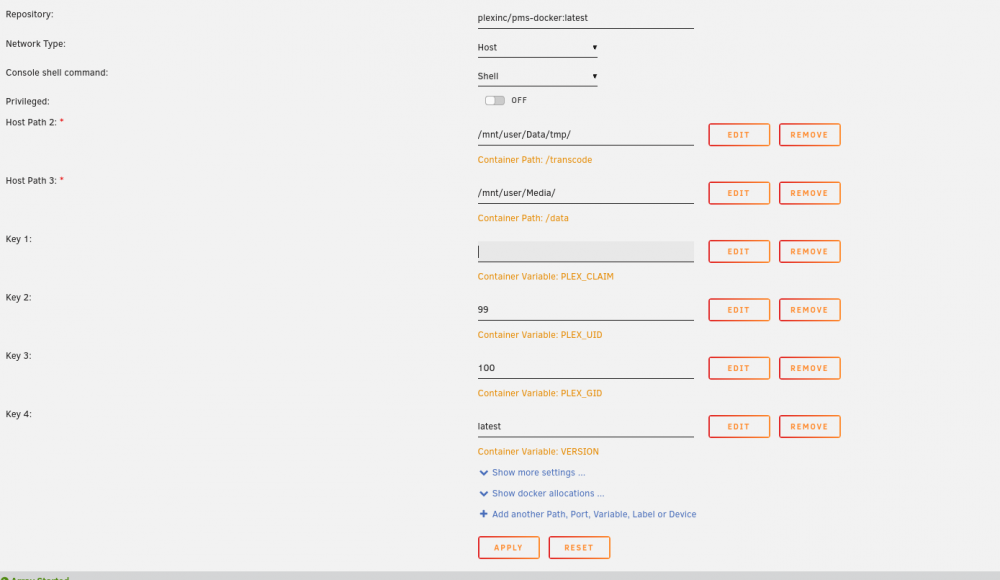
Stopping container: Plex-Media-Server Successfully stopped container 'Plex-Media-Server' Removing container: Plex-Media-Server Successfully removed container 'Plex-Media-Server' Command: root@localhost:# /usr/local/emhttp/plugins/dynamix.docker.manager/scripts/docker run -d --name='Plex-Media-Server' --net='host' -e TZ="Europe/Berlin" -e HOST_OS="Unraid" -e 'PLEX_CLAIM'='' -e 'PLEX_UID'='99' -e 'PLEX_GID'='100' -e 'VERSION'='1.25.4.5487-648a8f9f9' -v '/mnt/user/Data/tmp/':'/transcode':'rw' -v '/mnt/user/Media/':'/data':'rw' -v '/mnt/user/appdata/Plex-Media-Server':'/config':'rw' 'plexinc/pms-docker:1.25.4.5487-648a8f9f9' b023ccef3a454506eba051ef111bb9d1045cba5d35e7cecdc9c146019af8602a The command finished successfully! I removed the plex Claim Uptime: 3 minutes (unhealthy) Created: 3 minutes ago
-
More and more people are having this error. But there is no fix yet except rolling back docker version. When I add that I cant open WebUI for plex. (tried rebooting)
-
Yes I have searched and there is no info on how I actually change version. That is an docker issue(I think?), so I*d try my luck here aswell
-
Hi - I*m trying to rollback official PMS docker to version TAG 1.25.4.5487-648a8f9f9 linux/amd64 251.13 MB There are some problem with some video files not able to view them on Plex, so I Need to rollback. I've added tag to plexinc/pms-docker:1.25.4.5487-648a8f9f9 But I cant reach the PlexMediaServer when I have that added. Where do I put the version tag to the official PMS docker so that I get rolled back to that version and make sure plexpass doesnt update my PlexMediaServer? Plex Web Player Version : Version 4.76.1 PlexMediaServer : Version 1.27.1.5916 unRAID 6 9 2
-
Sorry - I can't remember what I did to solve this issue.
-
Yes I was indeed speaking about that method and Plex, sorry I see I wasn't clear on what software I Used. I was thinking of the nvidia plugin and forgot to mention plex I got both things working now Thank you
-
There is a method to use your RAMA to temporarily store video files in ram instead of hdd - does it work with this aswell? I dont get anything on watch nvidia-smi but I will test later today.. But will it work?
-
Can I use both this and RAM?
-
I am trying to claim my server from www.plex.tv/claim code with the official PlexMediaServer docker But all I get is this Not authorized You do not have access to this server Is there some permissions thats wrong? Or is it solely a Plex Server Media prolem? Or the docker? I run unraid 6.9.2 Plex-Media-Server latest update that is available Wed 20 Oct CEST 20:37
-
Accepted connection from 192.168.1.6, port 42266 [ 5] local 192.168.1.15 port 5201 connected to 192.168.1.6 port 42268 [ ID] Interval Transfer Bandwidth [ 5] 0.00-1.00 sec 25.5 MBytes 214 Mbits/sec [ 5] 1.00-2.00 sec 29.5 MBytes 247 Mbits/sec [ 5] 2.00-3.00 sec 29.9 MBytes 251 Mbits/sec [ 5] 3.00-4.00 sec 30.0 MBytes 251 Mbits/sec [ 5] 4.00-5.00 sec 30.5 MBytes 256 Mbits/sec [ 5] 5.00-6.00 sec 29.5 MBytes 248 Mbits/sec [ 5] 6.00-7.00 sec 30.8 MBytes 259 Mbits/sec [ 5] 7.00-8.00 sec 30.4 MBytes 255 Mbits/sec [ 5] 8.00-9.00 sec 30.2 MBytes 253 Mbits/sec [ 5] 9.00-10.00 sec 31.2 MBytes 262 Mbits/sec [ 5] 10.00-10.01 sec 291 KBytes 271 Mbits/sec - - - - - - - - - - - - - - - - - - - - - - - - - [ ID] Interval Transfer Bandwidth [ 5] 0.00-10.01 sec 0.00 Bytes 0.00 bits/sec sender [ 5] 0.00-10.01 sec 298 MBytes 250 Mbits/sec receiver thats iperf3 results on wi-fi then on wired Connecting to host 192.168.1.15, port 5201 [ 5] local 192.168.1.16 port 38952 connected to 192.168.1.15 port 5201 [ ID] Interval Transfer Bitrate Retr Cwnd [ 5] 0.00-1.00 sec 113 MBytes 951 Mbits/sec 0 284 KBytes [ 5] 1.00-2.00 sec 112 MBytes 942 Mbits/sec 0 311 KBytes [ 5] 2.00-3.00 sec 112 MBytes 942 Mbits/sec 0 311 KBytes [ 5] 3.00-4.00 sec 112 MBytes 939 Mbits/sec 0 311 KBytes [ 5] 4.00-5.00 sec 111 MBytes 934 Mbits/sec 0 325 KBytes [ 5] 5.00-6.00 sec 112 MBytes 942 Mbits/sec 0 325 KBytes [ 5] 6.00-7.00 sec 112 MBytes 940 Mbits/sec 0 325 KBytes [ 5] 7.00-8.00 sec 112 MBytes 942 Mbits/sec 0 325 KBytes [ 5] 8.00-9.00 sec 113 MBytes 945 Mbits/sec 0 325 KBytes [ 5] 9.00-10.00 sec 112 MBytes 939 Mbits/sec 0 325 KBytes - - - - - - - - - - - - - - - - - - - - - - - - - [ ID] Interval Transfer Bitrate Retr [ 5] 0.00-10.00 sec 1.10 GBytes 942 Mbits/sec 0 sender [ 5] 0.00-10.00 sec 1.09 GBytes 940 Mbits/sec receiver which I get 40-50mb/s out of.. But 250Mbit/s should give more than 14mb/s, isn't divided by 8 to find mb/s? I am on Linux Manjaro 20.0.1 skynets-diagnostics-20200525-1604.zip
-
Even if I only have one single session it doesnt increase my write/read speed This is diagnostic when I only have one read/write session (There is also one plex but its paused) skynets-diagnostics-20200525-0016.zip I ran a diskspeed.sh script and it returned this : Warning: Files in the array are open. Please refer to /tmp/lsof.txt for a list /dev/sdb (Disk 6): 139 MB/sec avg /dev/sdc (Disk 5): 144 MB/sec avg /dev/sdd (Disk 3): 124 MB/sec avg /dev/sde (Disk 2): 102 MB/sec avg /dev/sdf (Disk 4): 117 MB/sec avg /dev/sdg (Disk 1): 102 MB/sec avg /dev/sdh (Disk 8): 163 MB/sec avg /dev/sdi (Disk 7): 192 MB/sec avg /dev/sdj (Cache): 121 MB/sec avg /dev/sdk (Parity): 192 MB/sec avg I also set Samba extra configuration" on Settings -> SMB: max protocol = SMB2_02 Still no luck I also tried 2-Go to Settings -> Global Share Settings -> Tunable (enable direct IO): set to Yes and rebooted both client pc and server Which doesnt seem to affect my slow speed
-
Even if I only have one single session it doesnt increase my write/read speed
-
I am using unRAID 6.8.3 nvidia build Too start off I did an speedtest on the server : However when I transfer files with /ethernet & wlan from my laptop computer to one place on the server too antoher I dont get speeds above 13-14mb/s (the wifi is ac network so shoulnd't be the reason). If I transfer from my laptop to the server I get maybe 20mb/s.. This is my laptops speedtest which I use to transfer files I have 1000mbit port and its in use afaik because it hows on the Dashboard page. Here is my server diagnostics What steps should I take to get better speeds? Same problem is with NZBGet and my nzb's.. Ive tested the same files on my laptop and it goes alot faster (With SABnzbd) So the NZBGet problem was solved by switching to SABnzbd but I dont know why thats necessary, but my internal transfers are still only 13-14mb/s skynets-diagnostics-20200523-2035.zip
-
11-04 11:11:55 ERROR[o.core.downloaders.deluge] Config properties are not filled in correctly, port is missing. 11-04 11:13:12 ERROR[o.core.downloaders.deluge] Config properties are not filled in correctly, port is missing. I get this error when trying to connect couchpotato to deluge. I have added myusername:mypassword:10 in deluge auth file. I have tried with several ports, etc in my couchpotato settings. 58846 being the default one. My container is set to 172.17.0.3:5050/TCP192.168.1.1x:5050 What port is missing?
-
Got it working by using DestDir in NZBGet - thanks for poiting me in the right direction
-
Radarr is for Movies, but I get your point. Which docker do you use for downloads? I use NZBGet. Would I go about this in docker settings or in the app itself? Edit: I have a share for Usenet where it puts it in /Usenet. First /Usenet/intermediate/ and then /Usenet/completed
-
Its OK.. But now couchpotato picks up radarr downloads aswell.. How can I seperate them?
-
Wnere do I set post proccessing? I have radarr category as Movies, the same with Couchpotato. I only just started using Couchpotato for 4K Movies that goes in a seperate folder (The reason I dont use radarr is because I want a full hd AND a 4k version of the movie).. The movie shows up in radarrs activity when I download it from couchpotato. I have set /downloads to /mnt/user/Usenet and /movies to /mnt/user/4K Movies, so it downloads the movie fine but its stuck in my completed folder, I have also set the library pointed to /movies I use NZBGet for download

