





reluctantflux
Members
-
Joined
-
Last visited
-
No, unfortunately, I found no way to get it to work. After a frustrating two weeks with new hardware, I decided to move on from Unraid, and am now just running a regular Windows machine.
-
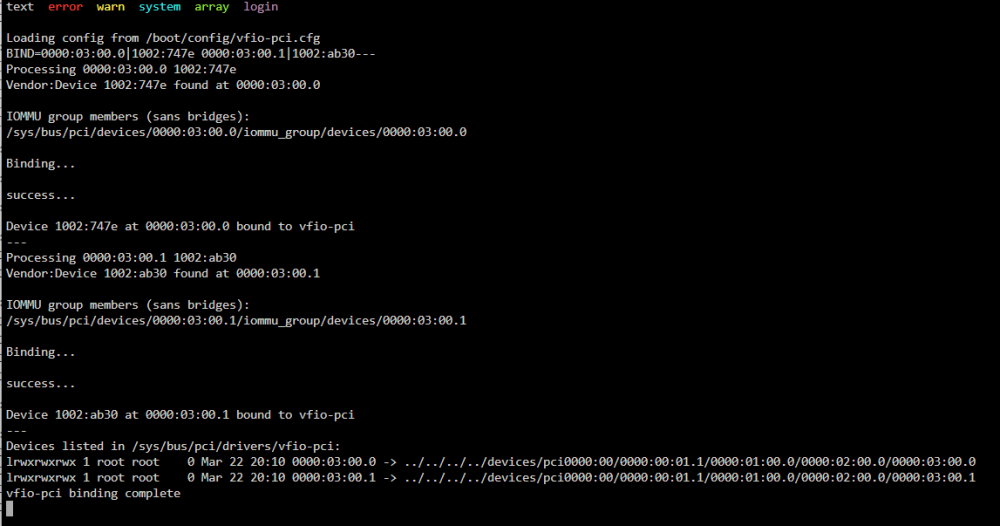
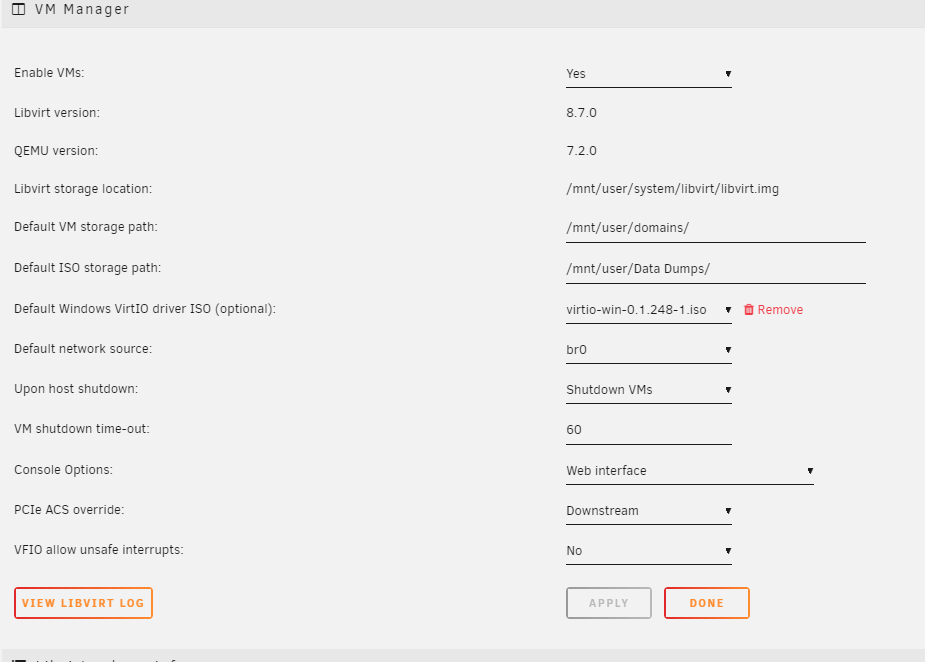
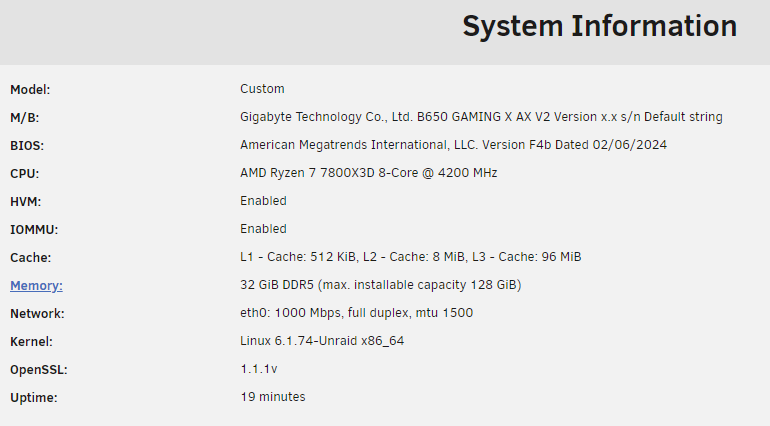
Hi Unraid family, After rocking Unraid solidly for 10 years, I decided it was time for an upgrade. Here's the new specs. Gigabyte B650 Gaming x AX v2 motherboard AMD Ryzen 7 7800x3D processor Powercolor Hellbound AMD RX 7800 XT GPU Unraid Pro 6.12.8 VM Running Windows 11. Getting the dreaded error code 43 on my display adapter. Configured Bios to enable IOMMU and other Virtualization technologies. Set onboard GPU to be primary display. Booted up Unraid, and HVM and IOMMU are both showing as enabled in System Information. I set Settings->VM Manager->PCIe ACS override to Downstream (these settings are new to me, but that's what I had read to do) I went into Tools-> System Devices, and bound my Vid Card GPU and Sound device to VFIO at boot. After reboot, you can see the mapping from the VFIO-PCI Log (another new process for me, but much smoother than manually editing config files.) I've also installed the AMD Vendor Reset plugin (although I can't seem to find any settings for it. Does it just do its thing when needed, or do I need to configure/use it?) Here's my VM XML. I've tried some various things I've read online, such as "hiding VM detection", adding the ROM from Tech Powerup website, booting with the GPU as a secondary vid card after VNC. <?xml version='1.0' encoding='UTF-8'?> <domain type='kvm' id='3'> <name>Gaming</name> <uuid>41084df0-d3cc-5378-9063-adcd5b3acc05</uuid> <metadata> <vmtemplate xmlns="unraid" name="Windows 11" icon="windows11.png" os="windowstpm"/> </metadata> <memory unit='KiB'>16777216</memory> <currentMemory unit='KiB'>16777216</currentMemory> <memoryBacking> <nosharepages/> </memoryBacking> <vcpu placement='static'>14</vcpu> <cputune> <vcpupin vcpu='0' cpuset='1'/> <vcpupin vcpu='1' cpuset='9'/> <vcpupin vcpu='2' cpuset='2'/> <vcpupin vcpu='3' cpuset='10'/> <vcpupin vcpu='4' cpuset='3'/> <vcpupin vcpu='5' cpuset='11'/> <vcpupin vcpu='6' cpuset='4'/> <vcpupin vcpu='7' cpuset='12'/> <vcpupin vcpu='8' cpuset='5'/> <vcpupin vcpu='9' cpuset='13'/> <vcpupin vcpu='10' cpuset='6'/> <vcpupin vcpu='11' cpuset='14'/> <vcpupin vcpu='12' cpuset='7'/> <vcpupin vcpu='13' cpuset='15'/> </cputune> <resource> <partition>/machine</partition> </resource> <os> <type arch='x86_64' machine='pc-q35-7.2'>hvm</type> <loader readonly='yes' type='pflash'>/usr/share/qemu/ovmf-x64/OVMF_CODE-pure-efi-tpm.fd</loader> <nvram>/etc/libvirt/qemu/nvram/41084df0-d3cc-5378-9063-adcd5b3acc05_VARS-pure-efi-tpm.fd</nvram> <smbios mode='host'/> </os> <features> <acpi/> <apic/> <hyperv mode='custom'> <relaxed state='on'/> <vapic state='on'/> <spinlocks state='on' retries='8191'/> <vendor_id state='on' value='none'/> </hyperv> <kvm> <hidden state='on'/> </kvm> <vmport state='off'/> <ioapic driver='kvm'/> </features> <cpu mode='host-passthrough' check='none' migratable='on'> <topology sockets='1' dies='1' cores='7' threads='2'/> <cache mode='passthrough'/> <feature policy='require' name='topoext'/> </cpu> <clock offset='localtime'> <timer name='hypervclock' present='yes'/> <timer name='hpet' present='no'/> </clock> <on_poweroff>destroy</on_poweroff> <on_reboot>restart</on_reboot> <on_crash>restart</on_crash> <devices> <emulator>/usr/local/sbin/qemu</emulator> <disk type='file' device='disk'> <driver name='qemu' type='raw' cache='writeback'/> <source file='/mnt/user/domains/Gaming/vdisk1.img' index='3'/> <backingStore/> <target dev='hdc' bus='virtio'/> <serial>vdisk1</serial> <boot order='1'/> <alias name='virtio-disk2'/> <address type='pci' domain='0x0000' bus='0x03' slot='0x00' function='0x0'/> </disk> <disk type='file' device='cdrom'> <driver name='qemu' type='raw'/> <source file='/mnt/user/Data Dumps/SW_DVD9_Win_Pro_11_22H2.13_64BIT_English_Pro_Ent_EDU_N_MLF_X23-59340.ISO' index='2'/> <backingStore/> <target dev='hda' bus='sata'/> <readonly/> <boot order='2'/> <alias name='sata0-0-0'/> <address type='drive' controller='0' bus='0' target='0' unit='0'/> </disk> <disk type='file' device='cdrom'> <driver name='qemu' type='raw'/> <source file='/mnt/user/Data Dumps/virtio-win-0.1.248-1.iso' index='1'/> <backingStore/> <target dev='hdb' bus='sata'/> <readonly/> <alias name='sata0-0-1'/> <address type='drive' controller='0' bus='0' target='0' unit='1'/> </disk> <controller type='pci' index='0' model='pcie-root'> <alias name='pcie.0'/> </controller> <controller type='pci' index='1' model='pcie-root-port'> <model name='pcie-root-port'/> <target chassis='1' port='0x8'/> <alias name='pci.1'/> <address type='pci' domain='0x0000' bus='0x00' slot='0x01' function='0x0' multifunction='on'/> </controller> <controller type='pci' index='2' model='pcie-root-port'> <model name='pcie-root-port'/> <target chassis='2' port='0x9'/> <alias name='pci.2'/> <address type='pci' domain='0x0000' bus='0x00' slot='0x01' function='0x1'/> </controller> <controller type='pci' index='3' model='pcie-root-port'> <model name='pcie-root-port'/> <target chassis='3' port='0xa'/> <alias name='pci.3'/> <address type='pci' domain='0x0000' bus='0x00' slot='0x01' function='0x2'/> </controller> <controller type='pci' index='4' model='pcie-root-port'> <model name='pcie-root-port'/> <target chassis='4' port='0x13'/> <alias name='pci.4'/> <address type='pci' domain='0x0000' bus='0x00' slot='0x02' function='0x3'/> </controller> <controller type='pci' index='5' model='pcie-root-port'> <model name='pcie-root-port'/> <target chassis='5' port='0x14'/> <alias name='pci.5'/> <address type='pci' domain='0x0000' bus='0x00' slot='0x02' function='0x4'/> </controller> <controller type='pci' index='6' model='pcie-root-port'> <model name='pcie-root-port'/> <target chassis='6' port='0x15'/> <alias name='pci.6'/> <address type='pci' domain='0x0000' bus='0x00' slot='0x02' function='0x5'/> </controller> <controller type='virtio-serial' index='0'> <alias name='virtio-serial0'/> <address type='pci' domain='0x0000' bus='0x02' slot='0x00' function='0x0'/> </controller> <controller type='sata' index='0'> <alias name='ide'/> <address type='pci' domain='0x0000' bus='0x00' slot='0x1f' function='0x2'/> </controller> <controller type='usb' index='0' model='ich9-ehci1'> <alias name='usb'/> <address type='pci' domain='0x0000' bus='0x00' slot='0x07' function='0x7'/> </controller> <controller type='usb' index='0' model='ich9-uhci1'> <alias name='usb'/> <master startport='0'/> <address type='pci' domain='0x0000' bus='0x00' slot='0x07' function='0x0' multifunction='on'/> </controller> <controller type='usb' index='0' model='ich9-uhci2'> <alias name='usb'/> <master startport='2'/> <address type='pci' domain='0x0000' bus='0x00' slot='0x07' function='0x1'/> </controller> <controller type='usb' index='0' model='ich9-uhci3'> <alias name='usb'/> <master startport='4'/> <address type='pci' domain='0x0000' bus='0x00' slot='0x07' function='0x2'/> </controller> <interface type='bridge'> <mac address='52:54:00:d7:55:44'/> <source bridge='br0'/> <target dev='vnet2'/> <model type='virtio-net'/> <alias name='net0'/> <address type='pci' domain='0x0000' bus='0x01' slot='0x00' function='0x0'/> </interface> <serial type='pty'> <source path='/dev/pts/0'/> <target type='isa-serial' port='0'> <model name='isa-serial'/> </target> <alias name='serial0'/> </serial> <console type='pty' tty='/dev/pts/0'> <source path='/dev/pts/0'/> <target type='serial' port='0'/> <alias name='serial0'/> </console> <channel type='unix'> <source mode='bind' path='/var/lib/libvirt/qemu/channel/target/domain-3-Gaming/org.qemu.guest_agent.0'/> <target type='virtio' name='org.qemu.guest_agent.0' state='connected'/> <alias name='channel0'/> <address type='virtio-serial' controller='0' bus='0' port='1'/> </channel> <input type='tablet' bus='usb'> <alias name='input0'/> <address type='usb' bus='0' port='1'/> </input> <input type='mouse' bus='ps2'> <alias name='input1'/> </input> <input type='keyboard' bus='ps2'> <alias name='input2'/> </input> <tpm model='tpm-tis'> <backend type='emulator' version='2.0' persistent_state='yes'/> <alias name='tpm0'/> </tpm> <audio id='1' type='none'/> <hostdev mode='subsystem' type='pci' managed='yes'> <driver name='vfio'/> <source> <address domain='0x0000' bus='0x03' slot='0x00' function='0x0'/> </source> <alias name='hostdev0'/> <rom file='/mnt/user/domains/Powercolor.RX7800XT.16384.230808.rom'/> <address type='pci' domain='0x0000' bus='0x04' slot='0x00' function='0x0'/> </hostdev> <hostdev mode='subsystem' type='pci' managed='yes'> <driver name='vfio'/> <source> <address domain='0x0000' bus='0x03' slot='0x00' function='0x1'/> </source> <alias name='hostdev1'/> <address type='pci' domain='0x0000' bus='0x05' slot='0x00' function='0x0'/> </hostdev> <memballoon model='none'/> </devices> <seclabel type='dynamic' model='dac' relabel='yes'> <label>+0:+100</label> <imagelabel>+0:+100</imagelabel> </seclabel> </domain> And here's the logs from the VM. text error warn system array login -device '{"driver":"isa-serial","chardev":"charserial0","id":"serial0","index":0}' \ -chardev socket,id=charchannel0,fd=34,server=on,wait=off \ -device '{"driver":"virtserialport","bus":"virtio-serial0.0","nr":1,"chardev":"charchannel0","id":"channel0","name":"org.qemu.guest_agent.0"}' \ -chardev socket,id=chrtpm,path=/run/libvirt/qemu/swtpm/2-Gaming-swtpm.sock \ -tpmdev emulator,id=tpm-tpm0,chardev=chrtpm \ -device '{"driver":"tpm-tis","tpmdev":"tpm-tpm0","id":"tpm0"}' \ -device '{"driver":"usb-tablet","id":"input0","bus":"usb.0","port":"1"}' \ -audiodev '{"id":"audio1","driver":"none"}' \ -device '{"driver":"vfio-pci","host":"0000:03:00.0","id":"hostdev0","bus":"pci.4","addr":"0x0"}' \ -device '{"driver":"vfio-pci","host":"0000:03:00.1","id":"hostdev1","bus":"pci.5","addr":"0x0"}' \ -sandbox on,obsolete=deny,elevateprivileges=deny,spawn=deny,resourcecontrol=deny \ -msg timestamp=on char device redirected to /dev/pts/0 (label charserial0) 2024-03-22T20:15:54.848581Z qemu-system-x86_64: terminating on signal 15 from pid 17068 (/usr/sbin/libvirtd) 2024-03-22 20:15:55.249+0000: shutting down, reason=destroyed 2024-03-22 20:16:22.078+0000: Starting external device: TPM Emulator /usr/bin/swtpm socket --ctrl type=unixio,path=/run/libvirt/qemu/swtpm/3-Gaming-swtpm.sock,mode=0600 --tpmstate dir=/var/lib/libvirt/swtpm/41084df0-d3cc-5378-9063-adcd5b3acc05/tpm2,mode=0600 --log file=/var/log/swtpm/libvirt/qemu/Gaming-swtpm.log --terminate --tpm2 2024-03-22 20:16:22.101+0000: starting up libvirt version: 8.7.0, qemu version: 7.2.0, kernel: 6.1.74-Unraid, hostname: Tower LC_ALL=C \ PATH=/bin:/sbin:/usr/bin:/usr/sbin \ HOME=/var/lib/libvirt/qemu/domain-3-Gaming \ XDG_DATA_HOME=/var/lib/libvirt/qemu/domain-3-Gaming/.local/share \ XDG_CACHE_HOME=/var/lib/libvirt/qemu/domain-3-Gaming/.cache \ XDG_CONFIG_HOME=/var/lib/libvirt/qemu/domain-3-Gaming/.config \ /usr/local/sbin/qemu \ -name guest=Gaming,debug-threads=on \ -S \ -object '{"qom-type":"secret","id":"masterKey0","format":"raw","file":"/var/lib/libvirt/qemu/domain-3-Gaming/master-key.aes"}' \ -blockdev '{"driver":"file","filename":"/usr/share/qemu/ovmf-x64/OVMF_CODE-pure-efi-tpm.fd","node-name":"libvirt-pflash0-storage","auto-read-only":true,"discard":"unmap"}' \ -blockdev '{"node-name":"libvirt-pflash0-format","read-only":true,"driver":"raw","file":"libvirt-pflash0-storage"}' \ -blockdev '{"driver":"file","filename":"/etc/libvirt/qemu/nvram/41084df0-d3cc-5378-9063-adcd5b3acc05_VARS-pure-efi-tpm.fd","node-name":"libvirt-pflash1-storage","auto-read-only":true,"discard":"unmap"}' \ -blockdev '{"node-name":"libvirt-pflash1-format","read-only":false,"driver":"raw","file":"libvirt-pflash1-storage"}' \ -machine pc-q35-7.2,usb=off,vmport=off,kernel_irqchip=on,dump-guest-core=off,mem-merge=off,memory-backend=pc.ram,pflash0=libvirt-pflash0-format,pflash1=libvirt-pflash1-format \ -accel kvm \ -cpu host,migratable=on,topoext=on,hv-time=on,hv-relaxed=on,hv-vapic=on,hv-spinlocks=0x1fff,hv-vendor-id=none,kvm=off,host-cache-info=on,l3-cache=off \ -m 16384 \ -object '{"qom-type":"memory-backend-ram","id":"pc.ram","size":17179869184}' \ -overcommit mem-lock=off \ -smp 14,sockets=1,dies=1,cores=7,threads=2 \ -uuid 41084df0-d3cc-5378-9063-adcd5b3acc05 \ -smbios 'type=0,vendor=American Megatrends International,, LLC.,version=F4b,date=02/06/2024,release=5.32' \ -smbios 'type=1,manufacturer=Gigabyte Technology Co.,, Ltd.,product=B650 GAMING X AX V2,version=Default string,serial=Default string,sku=Default string,family=B650 MB' \ -smbios 'type=2,manufacturer=Gigabyte Technology Co.,, Ltd.,product=B650 GAMING X AX V2,version=x.x,serial=Default string,asset=Default string,location=Default string' \ -smbios 'type=3,manufacturer=Default string,version=Default string,serial=Default string,asset=Default string,sku=Default string' \ -smbios 'type=11,value=Default string' \ -display none \ -no-user-config \ -nodefaults \ -chardev socket,id=charmonitor,fd=35,server=on,wait=off \ -mon chardev=charmonitor,id=monitor,mode=control \ -rtc base=localtime \ -no-hpet \ -no-shutdown \ -boot strict=on \ -device '{"driver":"pcie-root-port","port":8,"chassis":1,"id":"pci.1","bus":"pcie.0","multifunction":true,"addr":"0x1"}' \ -device '{"driver":"pcie-root-port","port":9,"chassis":2,"id":"pci.2","bus":"pcie.0","addr":"0x1.0x1"}' \ -device '{"driver":"pcie-root-port","port":10,"chassis":3,"id":"pci.3","bus":"pcie.0","addr":"0x1.0x2"}' \ -device '{"driver":"pcie-root-port","port":19,"chassis":4,"id":"pci.4","bus":"pcie.0","addr":"0x2.0x3"}' \ -device '{"driver":"pcie-root-port","port":20,"chassis":5,"id":"pci.5","bus":"pcie.0","addr":"0x2.0x4"}' \ -device '{"driver":"pcie-root-port","port":21,"chassis":6,"id":"pci.6","bus":"pcie.0","addr":"0x2.0x5"}' \ -device '{"driver":"ich9-usb-ehci1","id":"usb","bus":"pcie.0","addr":"0x7.0x7"}' \ -device '{"driver":"ich9-usb-uhci1","masterbus":"usb.0","firstport":0,"bus":"pcie.0","multifunction":true,"addr":"0x7"}' \ -device '{"driver":"ich9-usb-uhci2","masterbus":"usb.0","firstport":2,"bus":"pcie.0","addr":"0x7.0x1"}' \ -device '{"driver":"ich9-usb-uhci3","masterbus":"usb.0","firstport":4,"bus":"pcie.0","addr":"0x7.0x2"}' \ -device '{"driver":"virtio-serial-pci","id":"virtio-serial0","bus":"pci.2","addr":"0x0"}' \ -blockdev '{"driver":"file","filename":"/mnt/user/domains/Gaming/vdisk1.img","node-name":"libvirt-3-storage","cache":{"direct":false,"no-flush":false},"auto-read-only":true,"discard":"unmap"}' \ -blockdev '{"node-name":"libvirt-3-format","read-only":false,"cache":{"direct":false,"no-flush":false},"driver":"raw","file":"libvirt-3-storage"}' \ -device '{"driver":"virtio-blk-pci","bus":"pci.3","addr":"0x0","drive":"libvirt-3-format","id":"virtio-disk2","bootindex":1,"write-cache":"on","serial":"vdisk1"}' \ -blockdev '{"driver":"file","filename":"/mnt/user/Data Dumps/SW_DVD9_Win_Pro_11_22H2.13_64BIT_English_Pro_Ent_EDU_N_MLF_X23-59340.ISO","node-name":"libvirt-2-storage","auto-read-only":true,"discard":"unmap"}' \ -blockdev '{"node-name":"libvirt-2-format","read-only":true,"driver":"raw","file":"libvirt-2-storage"}' \ -device '{"driver":"ide-cd","bus":"ide.0","drive":"libvirt-2-format","id":"sata0-0-0","bootindex":2}' \ -blockdev '{"driver":"file","filename":"/mnt/user/Data Dumps/virtio-win-0.1.248-1.iso","node-name":"libvirt-1-storage","auto-read-only":true,"discard":"unmap"}' \ -blockdev '{"node-name":"libvirt-1-format","read-only":true,"driver":"raw","file":"libvirt-1-storage"}' \ -device '{"driver":"ide-cd","bus":"ide.1","drive":"libvirt-1-format","id":"sata0-0-1"}' \ -netdev tap,fd=36,id=hostnet0 \ -device '{"driver":"virtio-net","netdev":"hostnet0","id":"net0","mac":"52:54:00:d7:55:44","bus":"pci.1","addr":"0x0"}' \ -chardev pty,id=charserial0 \ -device '{"driver":"isa-serial","chardev":"charserial0","id":"serial0","index":0}' \ -chardev socket,id=charchannel0,fd=34,server=on,wait=off \ -device '{"driver":"virtserialport","bus":"virtio-serial0.0","nr":1,"chardev":"charchannel0","id":"channel0","name":"org.qemu.guest_agent.0"}' \ -chardev socket,id=chrtpm,path=/run/libvirt/qemu/swtpm/3-Gaming-swtpm.sock \ -tpmdev emulator,id=tpm-tpm0,chardev=chrtpm \ -device '{"driver":"tpm-tis","tpmdev":"tpm-tpm0","id":"tpm0"}' \ -device '{"driver":"usb-tablet","id":"input0","bus":"usb.0","port":"1"}' \ -audiodev '{"id":"audio1","driver":"none"}' \ -device '{"driver":"vfio-pci","host":"0000:03:00.0","id":"hostdev0","bus":"pci.4","addr":"0x0","romfile":"/mnt/user/domains/Powercolor.RX7800XT.16384.230808.rom"}' \ -device '{"driver":"vfio-pci","host":"0000:03:00.1","id":"hostdev1","bus":"pci.5","addr":"0x0"}' \ -sandbox on,obsolete=deny,elevateprivileges=deny,spawn=deny,resourcecontrol=deny \ -msg timestamp=on char device redirected to /dev/pts/0 (label charserial0) Thank you for any help and guidance!


-
Hey, I know this is old, but this fixed my issue on my new gigabyte mobo, where I couldn't get my decade old unraid usb to be recognized as a boot device on new hardware. Removing the - from EFI- folder allowed my system to boot up on my new hardware, and I was off to the races. Thanks!
-
Upon initial install, I'm getting a "you do not have permission to access this server" message. I've installed Plex from other containers in the past, but their appdata and containers have been deleted for a while now. Not sure what's up. Nevermind. Was doing initial setup through VPN. I guess it doesn't like that.
-
I was concerned about creating a cache pool, but you guys are easing my mind on it. I have a 500GB Samsung PRO Evo 4, a 120GB Corsair, and a 120GB Silicon Power. Would this limit me to a cache pool of only 240GB?
-
Cool, I'm looking to get rid of my main HTPC VM, and go with a straight up Nvidia Shield Android TV front end with Kodi. Then put my Windows 7 Server WMC VM on with my gaming rig VM SSD, and point recordedTV to a separate SSD (previously occupied by HTPC VM), as that's where the high data write will happen. I don't think putting the tiny 25GB Win7 with my gaming rig is going to affect anything on gaming or tv performance as long as the Recorded TV virtual disk is on a separate SSD. Thanks for the input guys! Any recommendations on qcow2 vs raw for the Recorded TV virtual disk?
-
Hey, just curious on how people are setting up their VM's in regard to the image files. I currently have two SSD's out of my array, mounted with SNAP, and I have one VM per SSD. Is anyone running multiple VM's off of a single SSD? How is the performance? Is anyone running VM's off of their array? I would think this would be a major degradation in performance with having to keep parity, and obviously, working off HDD since SSD's aren't supported in the array yet..
-
My diagram is wrong. Every single USB port on my board uses the 00:14.0 Intel controller besides the 2 ASMedia ports. Ugh. Guess I'm getting a USB controller card.
-
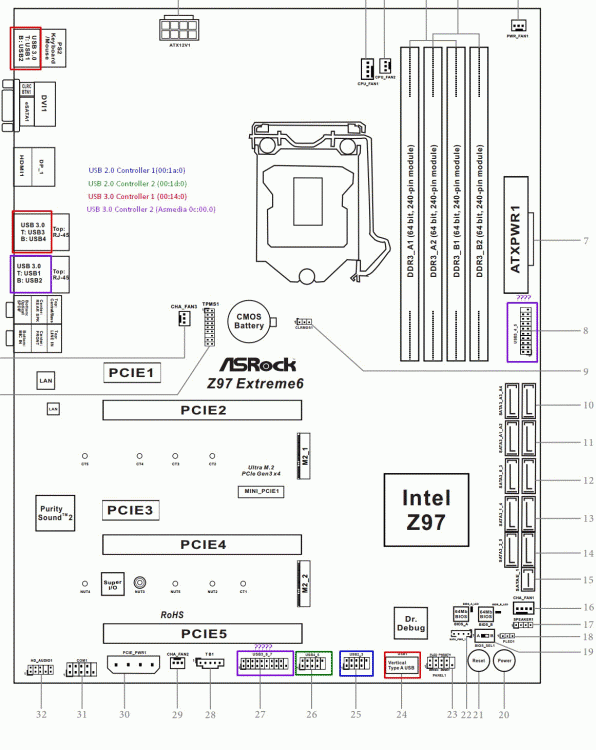
Ok, so I think this might be the layout for our ASRock Xtreme 6 motherboards. Each internal USB 2.0 mainboard header has its own controller (00:1a.0 and 00:1d.0). The onboard port, and 4 left USB 3.0 ports are the Intel 3.0 USB controller (00:14.0). And the right two, and then 2 internal 20-pin USB 3.0 headers are the ASMedia controller (0c:00.0). Only reason I think the internal 20-pin ports work off the ASMedia instead of Intel is because "6 ports Asmedia and 5 ports Intel" makes more sense than "2 ports Asmedia and 9 ports Intel". I'll confirm this once some parts I just ordered arrive.
-
root@Tower:~# lspci | grep USB 00:14.0 USB controller: Intel Corporation Device 8cb1 00:1a.0 USB controller: Intel Corporation Device 8cad 00:1d.0 USB controller: Intel Corporation Device 8ca6 0c:00.0 USB controller: ASMedia Technology Inc. Device 1142 So you are using the intel controller. Crud, I was really hoping to avoid that. Aren't the four rear USB ports and the internal port all on that controller? That's a lot of ports for me to forward through when I only need one of them for my USB active extender, and that only leaves me with 2 for other machines. Maybe I did my testing wrong.
-
So you're passing through the ASMedia controller, and not the intel one, correct? Can you show me your "Universal Serial Bus Controllers" section of Device Manager? I'm curious on if you have different host controllers showing than me. Also, I read this could be an issue with the Bios, having the USB 3.0 supporting legacy devices.
-
Only itself in the group. ### Group 28 ### 0c:00.0 USB controller: ASMedia Technology Inc. Device 1142 Maybe I just need to try harder with the drivers, but I did try a bunch of different ones the last time I tried.
-
htpcnewbie and I have the same motherboard, and I came across having the same issues as they were. It is not a Win7 issue, as the same thing happens in Win8. Basically, the controller shows up in device manager, but it has a yellow exclamation because it has failed to start. We have the ASRock Xtreme6 LGA1150 motherboard. Here's a few commands with their outputs: root@Tower:~# lspci | grep ASMedia 05:00.0 PCI bridge: ASMedia Technology Inc. Device 1184 06:01.0 PCI bridge: ASMedia Technology Inc. Device 1184 06:03.0 PCI bridge: ASMedia Technology Inc. Device 1184 06:05.0 PCI bridge: ASMedia Technology Inc. Device 1184 06:07.0 PCI bridge: ASMedia Technology Inc. Device 1184 08:00.0 SATA controller: ASMedia Technology Inc. ASM1062 Serial ATA Controller (rev 02) 0a:00.0 SATA controller: ASMedia Technology Inc. ASM1062 Serial ATA Controller (rev 02) 0c:00.0 USB controller: ASMedia Technology Inc. Device 1142 root@Tower:~# lsusb Bus 002 Device 002: ID 8087:8001 Intel Corp. Bus 002 Device 001: ID 1d6b:0002 Linux Foundation 2.0 root hub Bus 006 Device 001: ID 1d6b:0003 Linux Foundation 3.0 root hub Bus 005 Device 007: ID 04f2:0841 Chicony Electronics Co., Ltd HP Multimedia Keyboard Bus 005 Device 016: ID 1532:0101 Razer USA, Ltd Copperhead Mouse Bus 005 Device 008: ID 046d:0a1f Logitech, Inc. G930 Bus 005 Device 006: ID 05e3:0606 Genesys Logic, Inc. USB 2.0 Hub / D-Link DUB-H4 USB 2.0 Hub Bus 005 Device 013: ID 0cf3:3002 Atheros Communications, Inc. AR3011 Bluetooth Bus 005 Device 011: ID 046d:c50e Logitech, Inc. Cordless Mouse Receiver Bus 005 Device 005: ID 05e3:0606 Genesys Logic, Inc. USB 2.0 Hub / D-Link DUB-H4 USB 2.0 Hub Bus 005 Device 004: ID 1a40:0101 Terminus Technology Inc. Hub Bus 005 Device 003: ID 1a40:0101 Terminus Technology Inc. Hub Bus 005 Device 002: ID 1a40:0101 Terminus Technology Inc. Hub Bus 005 Device 001: ID 1d6b:0002 Linux Foundation 2.0 root hub Bus 001 Device 002: ID 8087:8009 Intel Corp. Bus 001 Device 001: ID 1d6b:0002 Linux Foundation 2.0 root hub Bus 004 Device 002: ID 174c:3074 ASMedia Technology Inc. Bus 004 Device 001: ID 1d6b:0003 Linux Foundation 3.0 root hub Bus 003 Device 010: ID 046d:c52b Logitech, Inc. Unifying Receiver Bus 003 Device 004: ID 045e:006d Microsoft Corp. eHome Remote Control Keyboard keys Bus 003 Device 003: ID 174c:2074 ASMedia Technology Inc. Bus 003 Device 002: ID 0781:5580 SanDisk Corp. SDCZ80 Flash Drive Bus 003 Device 001: ID 1d6b:0002 Linux Foundation 2.0 root hub root@Tower:~# readlink /sys/bus/usb/devices/usb5 ../../../devices/pci0000:00/0000:00:1c.6/0000:0c:00.0/usb5 root@Tower:~#



