






gurulee
Members
-
Joined
-
Last visited
Everything posted by gurulee
-
Plex on Unraid invisible to app.plex.tv and modern apps — RCA + fix (linuxserver/plex) Symptom: - Plex Media Server running in Docker on Unraid (linuxserver/plex, ipvlan on a tagged VLAN). - Server was reachable just fine for some clients (Samsung TV native app, Plexamp Android, LAN clients using cached direct IPs) , but completely invisible to others: - app.plex.tv in any browser (showed "No content available" or "Unable to connect to '<server>' securely") - Google TV / Fire TV native Plex apps - Several remote users on TV / streaming-stick clients - Restarting the Plex container restored access for ~15–30 minutes, then it disappeared again. - Direct hits to the server's plex.direct HTTPS URL worked perfectly. TLS cert was valid. LAN access on http://<server-ip>:32400/web worked. The intermittent "works for 15–30 min after restart" pattern strongly resembled a firewall state-table eviction problem, which sent me down a long wrong rabbit hole. Things I (incorrectly) suspected first: - DNS rebind protection / Unbound stripping plex.direct - NAT reflection / hairpin NAT - VLAN firewall rules - Custom server access URL - Container DNS - OPNsense pf state engine reaping idle WebSockets (I changed Firewall Optimization from Normal to Conservative — this was not the fix) All of those were red herrings. Actual root cause: PMS was not publishing HTTPS endpoints to plex.tv's /api/v2/resources discovery catalog. The catalog was advertising only plain http:// URIs for my server. Modern Plex clients (app.plex.tv browser, Google TV apps, etc.) run in an HTTPS context and refuse to fall back to plain HTTP due to mixed-content rules — so to them the server looks unreachable. Older / cached-connection clients bypass v2 and kept working, which made it look like a client-specific problem. The chain that produced the broken state: 1. secureConnections="0" (Disabled) in Preferences.xml — easy to miss because the WebUI dropdown order is Disabled / Preferred / Required, and "Disabled" looked like Preferred at a glance. With this set to Disabled, PMS will not publish HTTPS endpoints to plex.tv at all, regardless of cert validity. 2. PMS rewrites Preferences.xml on every startup, so sed edits to flip the value were silently clobbered. 3. Even after fixing it to Required via the WebUI, internal publish state was stuck — MyPlex: attempted a reachability check but we're not yet mapped kept appearing in logs and v2 still showed HTTP only. 4. PLEX_CLAIM is not a re-claim mechanism on linuxserver/plex. It's only honored on first start when PlexOnlineToken is empty in Preferences.xml. Setting it on an already-claimed server is silently ignored. 5. Even after a forced re-registration that pulled a brand-new cert, plex.tv still had the old HTTP-only connection list cached. PMS only pushes a fresh connection list when something explicitly triggers it. Diagnostic command (the one that finally pinpointed it) This compares what plex.tv is telling clients about your server. Run on the Unraid host: ``` cd "/mnt/user/appdata/plex/Library/Application Support/Plex Media Server" TOKEN=$(grep -oP 'PlexOnlineToken="\K[^"]+' Preferences.xml) curl -s "https://plex.tv/api/v2/resources?X-Plex-Token=$TOKEN&includeHttps=1" \ -H "Accept: application/json" \ -H "X-Plex-Client-Identifier: diag-test" \ | jq '.[] | select(.name=="YOUR_SERVER_NAME") | .connections' ``` Note: the v2 endpoint requires an X-Plex-Client-Identifier header or it returns 400. v1 doesn't. If you see only "protocol": "http" entries and no https://*.plex.direct:32400 URIs — this is your problem. A working server returns both an HTTPS LAN and an HTTPS WAN plex.direct URI. Fix (verified working, preserves MachineIdentifier so shares/library state are intact) 1. In the Plex WebUI: Settings → Server → Network → set Secure connections to Required (or at least Preferred). Save. 2. Stop the Plex container in the Unraid WebUI. 3. From a terminal on the Unraid host: PMS="/mnt/user/appdata/plex/Library/Application Support/Plex Media Server" ``` cd "$PMS" cp Preferences.xml "Preferences.xml.bak-$(date +%Y%m%d-%H%M%S)" sed -i 's/ PlexOnlineToken="[^"]*"//g; s/ PlexOnlineUsername="[^"]*"//g; s/ PlexOnlineMail="[^"]*"//g; s/ PlexOnlineHome="[^"]*"//g' Preferences.xml rm -f Cache/cert-v2.p12 ``` 4. Get a fresh claim token from https://plex.tv/claim (4-minute lifetime). 5. Edit the Plex container template in Unraid and add an env var PLEX_CLAIM=claim-xxxxxxxxxxxx. Apply (container starts). 6. Wait ~60 seconds for PMS to re-claim and pull a fresh cert. Then remove the PLEX_CLAIM env var from the template — it's one-shot and a stale claim token sitting in your template is a footgun on future restarts. 7. In the Plex WebUI: Settings → Server → Remote Access → Disable, then Enable. This is what actually triggers PMS to push a fresh connection list (HTTPS endpoints) up to plex.tv — without this step, the v2 catalog stays stale. 8. Re-run the diagnostic curl above and confirm the connections array now contains https://...plex.direct:32400 URIs for both LAN and WAN. 9. Test app.plex.tv in a browser. Remote users seeing stale state should sign out/in. Things worth knowing: - secureConnections="0" = "do not publish HTTPS to plex.tv", full stop. The local cert can be perfect; doesn't matter. - PMS rewrites Preferences.xml on every startup. Editing XML by hand for most settings is futile — PMS will clobber it. The token-strip step in this procedure works because PMS will accept a fresh token rather than overwrite the missing one. - PLEX_CLAIM on linuxserver/plex only fires on first start with an empty token. To force re-claim you must strip the token attrs AND delete Cache/cert-v2.p12. - Changing publish-related settings does not auto-republish. PMS only pushes a new connection list to plex.tv on specific triggers — the Remote Access OFF→ON toggle is the most reliable one. PublishServerOnPlexOnlineKey=false → =true appears in Plex Media Server.log when it fires. - mappingState="mapped" in /myplex/account only means plex.tv knows your public IP/port. It does NOT mean HTTPS endpoints are published. Two separate pieces of state. - NAT: PMP, timed out log warnings are noise if you don't run NAT-PMP/UPnP (e.g., manual port-forward on OPNsense/pfSense). - [CERT] TLS connection ... unrecognized plex.direct SNI name warnings = clients still using a cached old cert hash. They self-resolve as clients refresh from the v2 catalog. - Compare your server's v2 output to a friend's working server early. If yours shows only HTTP URIs and theirs shows HTTPS plex.direct URIs, you've found the bug in minutes instead of days. Hope this saves someone a couple of days. The "works for 15 minutes after a restart" pattern is incredibly misleading — it screams "firewall state eviction" but in my case it was actually plex.tv's discovery catalog falling back to stale data after each restart.
-
I finally let go of version 7.1.4, which has been incredibly stable, and upgraded to 7.2.5. The only issue I ran into was: I wanted to share this in case someone else runs into the same issue.
-
-
UPDATE: Under Plex > Settings > Networking > Custom server access URL - I removed my only value: https://plex.myserver.com:32400 , saved the change, then restarted Plex docker. Removed plex.direct from Opnsense > Settings > Administration > Alternate hostnames field (Alternate Hostnames for DNS Rebinding and HTTP_REFERER Checks). Disabled plex.direct entry under Opnsense > Unbound DNS > Query forwarding that forced it to 1.1.1.1:853 Retained plex.direct entry under Unbound > Advanced > Private domains. I tested the Plex app on two of my internal Google TV's and also the webUI from a laptop, everything is working again. But time will tell---I'll report back in a few hours.
-
At this point there are only a few realistic causes left, and they all revolve around Plex losing its advertised connection state in Plex’s cloud, not looking like my local config. The most likely causes I thought, based on everything I’ve already done (above), were: Hairpin NAT / DNS self-check failure IPv6 AAAA record present Docker bridge mode idle timeout Server token desync after restore RESULTS: I ruled out #1 with: @localhost:~$ curl http://<myplexurl>:32400<html><head><script>window.location = window.location.href.match(/(^.+\/)[^\/]*$/)[1] + 'web/index.html';</script><title>Unauthorized</title></head><body><h1>401 Unauthorized</h1></body></html>userland@localhost:~$ I ruled out #2 confirming no IPv6 records: dig AAAA <myplexurl> I ruled out #3 with: br0.4 = ipvlan network Container gets its own IP on my LAN Docker NAT is NOT used.NetworkSettings.IPAddress is empty → expected I ruled out #3 with: docker network inspect br0 I ruled out #4 by confirming “owned” and “presence” values =1 with: curl -s -H "X-Plex-Token: $TOKEN" https://plex.tv/api/resources.xml | grep -i "<Device" This does not appear to be a misconfiguration anymore — everything points to Plex’s cloud trust state or IPv6 behavior. Current outstanding issue: Plex cloud occasionally “forgets” the server Saving Network settings forces a re-announce Some (not all) local and remote users temporarily regain access
-
My laptop webUI can connect directly and locally via 32400, but the Plex app on my Onn Google TV and Fire TV device no longer have the option to specify local IP:port. Whether Plex remote access is disabled or not, same outcome on aforementioned select few devices. I was running Plex behind Swag nginx for over a year, but after this issue surfaced, I reverted to native Plex remote access via 32400 (no relay, no nginx) Since the issue resolves itself for approx. 15min after restarting the Plex docker and/or making a minor edit to the Plex > Settings > Network > custom URL field, it tells me the issue is related to my server registering with Plex.tv and timing out... Mobile phones and one Samsung TV with a native Plex app on my WLAN vLAN continue to work fine. These route to my docker vLAN (bri0.4) via Opnsense...go figure. I do not see any traffic being dropped from other problematic devices between firewall WLAN and Docker vLAN's. My most recent findings and detailed troubleshooting: https://forums.plex.tv/t/plex-server-becomes-partially-unavailable/932821/25
-
I'm reposting my updates from a couple weeks ago, which I think provides insightful information: So I switched back to Plex native Port 32400 without relay and no nginx as a test… 1. Changed opnsense nat rules and updated my unbound DNS Plex override record. 2. Removes Plex settings custom network URL 3. Enabled Plex settings Remote access and enabled manual specify of Port 32400 4. Renamed nginx Plex subdomain conf file to.bak 5. Rebooted and reinstalled Plex app on Google TV ONN boxes ==== Results: * Google TV ONN boxes still experiencing the same issue explained above (internal). * Plex webUI on multiple laptops and phone experience same issue explained above (internal and external). * Plex app on Android phone continues to work fine without issue. * External/ remote users using Plex app on various devices continue to work fine without issue. ==== Some debugging I proceeded to do: ` # Stop Plex docker stop plex # Remove claim file docker exec plex rm -f “/config/Library/Application Support/Plex Media Server/plexmediaserver.pid” # Edit Preferences.xml to remove stale data docker start plex sleep 5 # Get a new claim token from https://plex.tv/claim # Then update your docker with PLEX_CLAIM environment variable # Test if Plex container can reach plex.tv docker exec plex curl -v https://plex.tv ` # Test DNS resolution ` docker exec plex nslookup plex.tv ` # Test specific plex.tv endpoints ` docker exec plex curl -v https://plex.tv/api/v2/ping ` # Verify what IP and URL is configured ` docker exec plex cat “/config/Library/Application Support/Plex Media Server/Preferences.xml” | grep -oP ‘(PublicAddress|customConnections|ManualPortMappingMode|PublishServerOnPlexOnlineKey)=“[^”]*"’ ` # Verify what IP and URL is configured ` docker exec plex cat “/config/Library/Application Support/Plex Media Server/Preferences.xml” | grep -oP ‘(PublicAddress|customConnections|ManualPortMappingMode|PublishServerOnPlexOnlineKey)=“[^”]*"’ ` #Verify what is plex.tv has registered ` TOKEN=$(docker exec plex cat “/config/Library/Application Support/Plex Media Server/Preferences.xml” | grep -oP ‘PlexOnlineToken=“[^”]*"’ | cut -d’"’ -f2) ` # Check the full resources response ` curl -s -H “X-Plex-Token: $TOKEN” “https://plex.tv/api/v2/resources?includeHttps=1&includeRelay=1” > full-resources.json ` # Show full output ` cat full-resources.json ` # Also check your actual connections ` curl -s -H “X-Plex-Token: $TOKEN” “https://plex.tv/api/servers/f8d260306fee327d916a<removed>” ` # Verify token works ` curl -s -H “X-Plex-Token: $TOKEN” “https://plex.tv/api/v2/user” | grep -o ‘“username”:“[^”]*"’ ` # Check server registration from plex.tv’s perspective ` curl -s -H “X-Plex-Token: $TOKEN” “https://plex.tv/pms/servers.xml” ` # Restart Plex to force re-registration ` docker restart plex # Wait 30 seconds sleep 30 # Check again TOKEN=$(docker exec plex cat “/config/Library/Application Support/Plex Media Server/Preferences.xml” | grep -oP ‘PlexOnlineToken=“[^”]*"’ | cut -d’"’ -f2) curl -s -H “X-Plex-Token: $TOKEN” “https://plex.tv/api/v2/resources?includeHttps=1” | grep -c ‘“provides”:“server”’ ` # Check IP, domain and presence TOKEN=$(docker exec plex cat “/config/Library/Application Support/Plex Media Server/Preferences.xml” | grep -oP ‘PlexOnlineToken=“[^”]*"’ | cut -d’"’ -f2) echo “Token (first 20 chars): ${TOKEN:0:20}…” # v1 Resources API curl -s -H “X-Plex-Token: $TOKEN” “https://plex.tv/api/resources?includeHttps=1&includeRelay=1” # Classic servers endpoint curl -s -H “X-Plex-Token: $TOKEN” “https://plex.tv/pms/servers.xml” #Monitor Plex visibility script TOKEN=$(docker exec plex cat “/config/Library/Application Support/Plex Media Server/Preferences.xml” | grep -oP ‘PlexOnlineToken=“[^”]*"’ | cut -d’"’ -f2) while true; do echo “=== $(date +%H:%M:%S) ===” # Check plex.tv visibility SERVERS=$(curl -s -H “X-Plex-Token: $TOKEN” “https://plex.tv/api/resources?includeHttps=1” | grep -c ‘name=“myserver”’) echo “myserver visible on plex.tv: $SERVERS” # Check local from inside container docker exec plex curl -s -m 2 http://localhost:32400/identity > /dev/null 2>&1 && echo “✓ Local OK” || echo “✗ Local FAIL” echo “ ` sleep 300 done ### The output from the above commands did not reveal any issues and had expected working output. What am I missing y'all?
-
I had a rather lengthy update a couple week ago here with several CLI cmds, scripts, and diagnostic checks.... somehow that update is no longer showing in this thread...
-
As a test, I have since switched from hosting Plex behind Swag Nginx on port 443 back to the native port 32400 using Plex remote access settings and no relay. The issue still persists only on my Onn Google TV streaming boxes internally...
-
This was not the solution and I am not sure how @MowMdown reply was marked as the solution actually... This issue persists on my Onn Google TV streaming boxes. I'm beginning to think it may be certificate related...
-
@MowMdown I do not need to use a custom network name for my dockers available behind Swag Nginx since I have those designated dockers with Swag Nginx on the same bri0.4. In this configuration, my dockers are available to Swag via docker name or IP address. Also, all the dockers (except Plex) are available both internally and externally via Swag just fine. As I explained above, Plex is available to all my remote users and its internally available on my Android phone with the Plex app. However, just my Onn Google TV streaming boxes lost my Plex server and cannot seem to find it anymore.
-
Yes, otherwise Plex would not be accessible and working fine remotely. My Plex and Swag dockers are on br0.4
-
This is my swag nginx plex.subdomain.conf , anyone see any miss configuration? ## Version 2025/10/24 server { listen 443 ssl; listen [::]:443 ssl; server_name plex.*; include /config/nginx/ssl.conf; client_max_body_size 0; proxy_redirect off; proxy_buffering off; location / { include /config/nginx/resolver.conf; set $upstream_app plex; set $upstream_port 32400; set $upstream_proto http; proxy_pass $upstream_proto://$upstream_app:$upstream_port; # Plex specific headers proxy_set_header X-Plex-Client-Identifier $http_x_plex_client_identifier; proxy_set_header X-Plex-Device $http_x_plex_device; proxy_set_header X-Plex-Device-Name $http_x_plex_device_name; proxy_set_header X-Plex-Platform $http_x_plex_platform; proxy_set_header X-Plex-Platform-Version $http_x_plex_platform_version; proxy_set_header X-Plex-Product $http_x_plex_product; proxy_set_header X-Plex-Token $http_x_plex_token; proxy_set_header X-Plex-Version $http_x_plex_version; proxy_set_header X-Plex-Nocache $http_x_plex_nocache; proxy_set_header X-Plex-Provides $http_x_plex_provides; proxy_set_header X-Plex-Device-Vendor $http_x_plex_device_vendor; proxy_set_header X-Plex-Model $http_x_plex_model; # Standard proxy headers proxy_set_header Host $host; proxy_set_header X-Real-IP $remote_addr; proxy_set_header X-Forwarded-For $proxy_add_x_forwarded_for; proxy_set_header X-Forwarded-Proto $scheme; proxy_set_header Accept $http_accept; # WebSocket support (conditional Connection header) proxy_http_version 1.1; proxy_set_header Upgrade $http_upgrade; proxy_set_header Connection $http_connection; # Extended timeouts to prevent disconnections proxy_read_timeout 3600s; proxy_connect_timeout 3600s; proxy_send_timeout 3600s; send_timeout 3600s; proxy_buffering off; } location /library/streams/ { set $upstream_app plex; set $upstream_port 32400; set $upstream_proto http; proxy_pass $upstream_proto://$upstream_app:$upstream_port; # Forward necessary headers for streaming and auth proxy_set_header Host $host; proxy_set_header X-Real-IP $remote_addr; proxy_set_header X-Forwarded-For $proxy_add_x_forwarded_for; proxy_set_header X-Forwarded-Proto $scheme; proxy_set_header Accept $http_accept; # WebSocket support proxy_http_version 1.1; proxy_set_header Upgrade $http_upgrade; proxy_set_header Connection $http_connection; proxy_read_timeout 3600s; proxy_connect_timeout 3600s; proxy_send_timeout 3600s; send_timeout 3600s; proxy_buffering off; } }
-
The more I think about when this issue started happening, I keep landing around the time I upgraded from unraid 6.12.15 to 7.1.4.
-
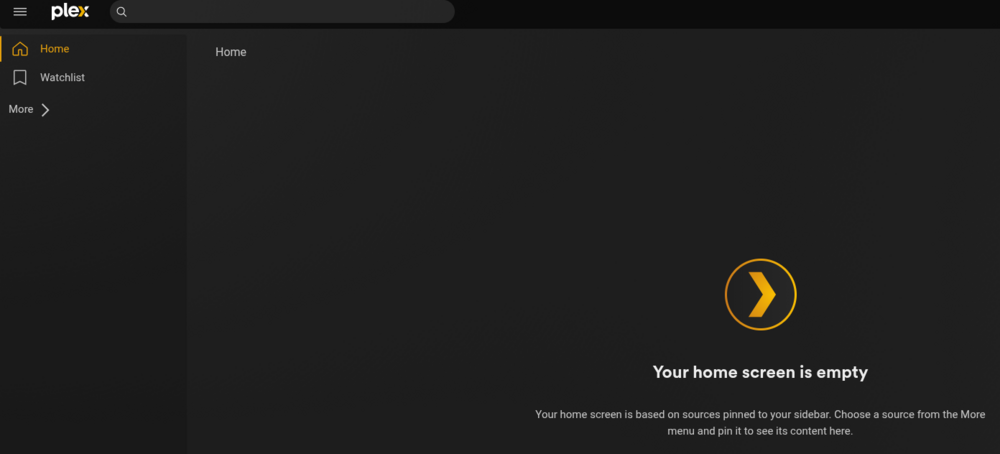
Interesting....after my last update, I noticed you had two Plex Server > Network custom URL's listed. So I went ahead and added http://plex.mydomain.com as well.... When I went back to the webUI of Plex and refreshed on two different clients, my server and libraries showed up again.... But again, after ~15min, they disappeared after refreshing browser. When I click "More >", I see my other friends' remote servers and shared libraries---not mine.
-
Yo, thanks for the reply and insight. I also use Cloudflare for DNS Authority with their proxy disabled. I use Swag-nginx docker for reverse-proxy.
-
UPDATE: In my browser dev tools > network, I see this as pending for a long time: wss://110-175-138-164.<myPlexServerHash>.plex.direct:32400 Which is a pending WebSocket connection and may be my smoking gun… My Analysis: The above wss URL is pointing to an external IP instead of the internal IP of my nginx reverse-proxy server. The WebSocket connection is stuck in “pending” state, which means the client is trying to establish a secure WebSocket connection to my Plex server via the plex.direct domain public address. My Plex server settings were already configured in this manner for several months and before this issue started occurring: Remote Access: Disabled Custom server access URLs to: https://plex[.]]MyDomain[.]com:443 Secure connections to: Preferred (not Required) Disabled “Enable Relay” option I started with fixing the DNS resolution for my servers <myPlexServersHash>.plex.direct domain so that it points to my nginx internally, then the WebSocket connections should work through my nginx reverse proxy. After adding an Opnsense Unbound DNS Override record for <myPlexServersHash>.plex.direct to point to my nginx docker IP, I now see it is resolving to my nginx when doing nslookup from various clients. I then restarted the Plex docker and tested again… The Plex webUI now showed my server and libraries again, which I had to re-pin all my libraries again, and the same resolved the issue for my Google TV (onn) Plex app. AFTER 15min, the Plex webUI client issue returned after refreshing the browser on several internal devices and I no longer see my Plex server and libraries. However, the Plex app on my Google TV (onn) box NOW continues to work and maintain my server with pinned libraries—even after re-opening the app and turning off/on the onn box after 30min After 30 minutes, my Google TVs lose my server and libraries again. What's different is though, when I click more on the left side but it does not expand to my libraries. This was not the case prior to adding the DNS override for my servers plex.direct address Still no resolution... Any thoughts from the community?
-
New Analysis - This is NOT an nginx timeout issue Since the problem: Still happens at exactly 15 minutes (not 5 minutes from the old 300s timeout) Affects only WebUI and Google TV when they reconnect Does NOT affect active streaming (media continues playing) Does NOT affect Samsung TV or friends’ devices Does NOT affect Android Plex app (only Android WebUI) This points to Plex’s authentication token/claim system, not nginx. Root Cause: Plex.direct Certificate/Token Claims The 15-minute mark is likely tied to Plex’s server claim token or plex.direct DNS/certificate refresh cycle. Here’s what I think is happening: The Pattern Suggests: When Plex restarts, it generates a fresh claim/token Certain clients (WebUI, Google TV app) receive this token After 15 minutes, these clients try to re-validate the server using plex.direct domains This validation fails because of your reverse proxy setup Clients that maintain persistent connections (Samsung TV, active streams) don’t re-validate as aggressively I feel like I’m getting warmer, stay tuned…
-
Update: I re-checked nginx timeout settings and changed these in my Plex nginx config (plex.subdomain.conf): proxy_read_timeout 3600; proxy_connect_timeout 3600; proxy_send_timeout 3600; send_timeout 3600; === I changed WebSocket support : proxy_http_version 1.1; proxy_set_header Upgrade $http_upgrade; proxy_set_header Connection “upgrade”; === Summary: Changed connection header by changing to $http_connection which properly handles both normal and WebSocket connections. Increased all timeouts to 3600s (1 hour) in the main location block. Added send_timeout to main location. Removed conflicting/duplicate Connection headers After restarting the Plex docker, the Plex app on my Google TV box successfully reconnected to my Plex again and showed server and libraries. I started playing media too. Also my Android phone webUI did the same. After 15 minutes: Android phone: But after 15min the issue returned when I refreshed browser. (tested multiple browsers). But Plex app continues to work fine ⁉️ Google TV (onn): Media continues to play (started before 15min mark), but once I exit Plex app and reopen, my Plex server is no longer available and home screen pinned libraries gone: Samsung TV native Plex app and Remote friends: Continue to NOT be affected by this issue... === Example:
-
I am noticing my Plex server was no longer available on two different ONN Google boxes internally. Then I noticed it disappeared on some internal and external WebUI clients. Essentially the Plex home screen showed no content and my Plex server was no longer available in the list. Even after re-logging in to Plex and reinstalled the Plex app on those devices, it did not resolve the issue… However, my Samsung TV Plex app, Android Plex app, and my remote friends still able to access/see my Plex libraries w/o an issue… When I restart my Plex docker, it momentarily resolved the issue for a 15min, but the issue would then return… ==== My Plex server was on version 1.42.2.10156 using repository lscr.io/linuxserver/plex:version-1.42.2.10156-f737b826c While troubleshooting, I changed my Plex docker repo back to linuxserver/plex:latest and it pulled down version 1.42.1.10060. For context, my Plex server is using a custom URL for remote-access (no relay) and its behind nginx over port 443. The same issue occurs after downgrading my Plex server ver., When I restart my Plex docker, it momentarily resolved the issue for a 15min, but the issue would then return… Here’s an update but no resolution yet: So far I ruled OUT the following to NOT be the cause of the issue: DNS rebind protection (added plex.direct my fqdn to unbound DNS private domains) NAT reflection (tested enabled and disabled) Nginx plex.subdomain.conf configuration (verified header requirements) Fail2ban (tested while disabling all jails) Reinstall of Plex app on Google TV box (onn) The issue for me is only affecting my account when accessing the Plex webUI from multiple devices on internal and external connections, and also Plex app on my Google TV streaming box (onn). HOWEVER, it is not affecting my Samsung TV Plex app,my Android phone Plex app, or remote friends I’ve shared libraries to using the Plex app on various devices. (Head banging against the wall) I restarted the Plex docker again and refreshed my Plex webUI, now I see my server again and shared libraries as expected. But as I stated above, this does not retain and my server disappears after a few minutes. The only difference this time since restarting Plex is, the added plex.direct to my private domain list in unbound DNS… AFTER EXACTLY 15 MIN THE ISSUE RETURNS Has anyone else experienced an issue like this and can offer insight? Reddit: https://www.reddit.com/r/PleX/s/7Z3oZeLaSH Plex forum: https://forums.plex.tv/t/plex-server-becomes-intermittently-unavailable/932821
-
How to fix date 'date added' for movies in Plex webUI after moving all my movies to a different host path? What I changed: Old docker host path for movies: /mnt/user/media/movies New docker host path for movies: /mnt/user/data/media/movies (I did not change the docker container path or the path in Plex, it has always been: '/movies' After moving all my movies files using the 'mv' command via Unraid CLI, updating the host path as noted above, and restarting the Plex docker; I noticed all my movies show a "date added" value of the day I moved the data. In this case it shows added "2 days ago" or 9/28/25 if I hover over it. As a result, this changed my "continue watching" section on the home screen and skewed sorting in general. I am working on a PHP script to fix this by updating the "date added" value either from the actual file created timestamp or from another field in the Plex DB. I started this post on the Plex forums below and shared the script. But I need help determining the right field to update so the Plex webUI "date added" is restored to the correct value. https://forums.plex.tv/t/change-movies-date-added-to-file-creation-date/931969
-
I'm excited to see a new version of this plug-in that supports unraid 7.x. I've missed it since upgrading and I will definitely check it out again. This plug-in fills a significant void when hosting many dockers, as it becomes unwieldy to manage them all with the stock native unraid UI.
-
I finally RESOLVED my Swag dashboard issue with repeated '504 Gateway Time-out'. I simply had to increase the timeout in my 'dashboard.subdomain.conf' file. I do wish this mod was faster at reloading, typically takes ~2 minutes to load every time. proxy_read_timeout 300s; proxy_send_timeout 300s; proxy_connect_timeout 300s;
-
I am excited to announce I just upgraded (15 min ago) from 6.12.15 to 7.1.4 on my x86 HP Z800 with no known issues as of yet. I had multiple cache pools, custom bri vLAN docker and VM subnets, and Nvidia GPU integrations. It might also be worth noting, I had stopped all my dockers, VM's, and the docker service prior to upgrading.
-
After resetting my password and forcing all existing sessions to be logged off, I had to reclaim my server again as well. This is the last thing Plex needs right now. I'm one step closer to moving completely off Plex for Jellyfin.


