






gurulee
Members
-
Joined
-
Last visited
Everything posted by gurulee
-
Docker problem preventing new docker installs was related to no space left in log path. Suppressing the log spamming from the home-assistant integration with the above noted script will prevent reoccurrence.
-
This was the resolution for these repeated and expected ssh log messages from the home-assistant integration: https://github.com/domalab/ha-unraid/wiki/Troubleshooting#ssh-session-log-spam
-
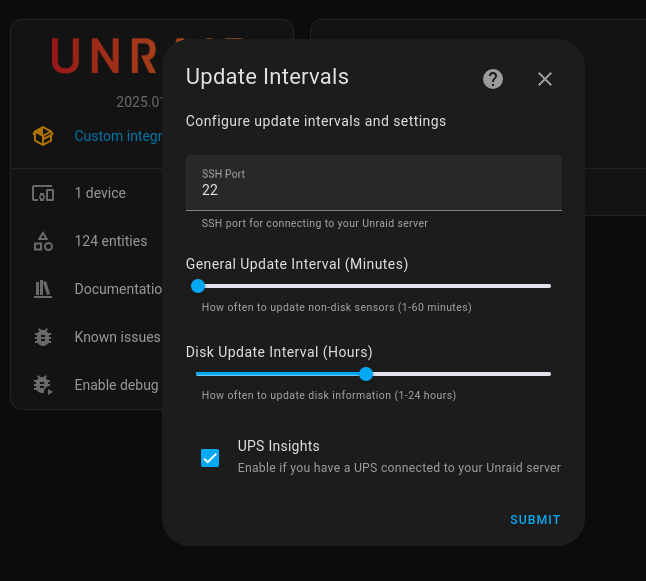
That is my Home-Assistant system using the below integration to monitor my unRAID server: https://github.com/domalab/ha-unraid/wiki It configured on the Home-Assistant side like this:
-
@trurl thank you for the quick reply and guidance. I am attaching my diagnostic here for review. 🙂 🙏
-
I found this from the Fix Common Problems plugin: I will check my syslog as I am trying to avoid a reboot. I see no syslog messages loading: Can I increase the size of /var/log or adjust retention...?
-
I'm running unRAID 6.12.14 Can someone help me narrow this issue down preventing installation of new dockers? I check my array, cache pools, and USB boot device; there is plenty of space on all.
-
I suspected the 'CA Auto Update Applications' plugin since it auto-updates my dockers and the scheduled time of the docker updates coincided with the errors in the unRAID logs, and when the issue started. I will grab/post diagnostics if it happens again.
-
@trurl I suspect the issue was caused by the 'CA Auto Update Applications' plugin, which auto-updates my dockers as well. See my edited post above.
-
I was affected by this issue as well... I just got alerted to several of my Dockers stopped after the CA Update plugin. My unRAID is at 6.12.14 and had 33 days of uptime when it occurred. Digging into more, I see this error in my logs: unraid pam_elogind(sshd:session): Failed to create session: No space left on device The issue started shortly after the unRAID plugin 'CA Auto Update Applications' was scheduled to run and update my Dockers. My troubleshooting steps: I verified there was no storage space issues on the array, cache pools, or flash drive. I stopped all dockers and then array. When I started the array, the issue returned and then all dockers could not start. I then stopped the array and rebooted unRAID. Upon starting up the array again, all dockers started normally without error. As a precaution, I disabled auto updating of my dockers using the 'CA Auto Update Applications' plugin. I'm not sure what caused this.... Any ideas team?
-
What's up everyone! Just wanted to share that I upgraded smoothly from 6.12.13 to 6.12.14 two days ago with no noticeable issues.
-
Thank you! This worked perfectly once I unlocked the Dockers page with the "lock" icon next to the red out of order icon.
-
UPDATE: It's going on 3 weeks without the issue returning since disabling bonding. 👍😎🙏
-
This post was helpful thank all!
-
I finally got around to disabling the bonding between eth0 and eth1, which is connected to my Cisco switch using link aggregation LAG ports. Let's see if the issue reoccurs over the next week or so.
-
I use bond0 for my dual nic primarily for redundancy. I will temp disable bond to see if that has any affect...
-
No it is not, I noted this previously in the description of this thread: " I just cannot get to the web services running on any of them when the issues occurs, including the unraid webUI on br0." Any ideas?
-
Strange, I continue to experience dockers becoming unaccessible randomly every few days for approx 5min. and then they come back up. Uptime Kuma reports this for the docker monitors, example: UptimeKuma Alert: Nextcloud (docker): [🔴 Down] Knex: Timeout acquiring a connection. The pool is probably full. Are you missing a .transacting(trx) call? Time (America/New_York): 2024-11-11 22:05:36
-
I'm tracking this intermittent issue with Uptime Kuma and PRTG. Looking into enabling more logging options to narrow down root cause.. M
-
What about the anonymized diag file under tools, would that reveal anything to help narrow the root cause down?
-
I appreciate the advice. With the amount of dockers and their needed availability, I hoping I can take a different troubleshooting path first. For example, generating necessary system logs for Unraid support to analyze. What is the official Unraid support process?
-
Anyone, may I have some guidance on next steps to get support on this outstanding and repeat issue?
-
I have not been able to catch this when it occurs, but Uptime Kuma intermittently reports this for about 2-3min every ~7 days with docker monitor: Knex: Timeout acquiring a connection. The pool is probably full. Are you missing a .transacting(trx) call? Also at this time my PRTG HTTPS monitors for the same dockers show timeouts causing downtime as well. Any guidance would be appreciated.
-
Continued stability and reoccurrence of issue since upgrading to 6.12.13 5 days ago.
-
So far so good... 48 hours and still stable. I'm monitoring at the dockers level with Uptime Kuma and the HTTP services of unraid Mgmt int and dockers with PRTG. 🤞🙏🙌
-
That is apparent and agreed. Is there a way to log more debug level? So can someone advise me next steps to narrow the cause of this issue down? Essentially all the HTTP / HTTPS / webui become inaccessible to unraid Mgmt int on br0 and all dockers on br0.4 and br0.5 intermittently for approx 3-5min. All the while I can still ping all of the interfaces during the issue. Issue seems intermittent and no pattern.


