





iZeus83
Members
-
Joined
-
Last visited
-
Hi, Me too, I tried this method virtio but not success, only see one share.
-
Maybe it's like you said complicated. Binhex did a great job with those dockers so then I think that for the moment I will continue using the windows application until I know how to create a docker with VPN conection. Thanks for all.
-
Greetings, Its good to see that this docker its on finally on apps from unraid. Im trying to search about using PIA VPN with this docker or amule app to port forwarding but I'm confused. Need to open ports TCP and UPD for ed2k servers and KAD to obatin highID but I don't know how to do because those ports are closed. I'm using only the endpoint Netherland from PIA and not Wireguard or Mullav. ¿Please can you help me with that?. Thanks.
-
Got it working now, I added those parameters in "Extra parameters". -e PUID=99 -e PGID=100 -v /mnt/cache/appdata/amule:/home/amule/.aMule Many thanks to support @trurl and @itimpi
-
Thanks for quickly reply to both. It seems on docker owner website he put this reference: "Container images are configured using parameters passed at runtime. These parameters are separated by a colon and indicate <external>:<internal> respectively" I want to put the config folder on cache drive so I think the correct command line is this: docker run -h --name ngosang/amule -v /mnt/cache/appdata/amule:/home/amule/.aMule But still not luck, cache drive did not create config folder and there're no files in there. This is the output: Creating group amule with GID 1000 ... Creating user amule with UID 1000 ... Directory /incoming does not exists. Creating ... Directory /temp does not exists. Creating ... /home/amule/.aMule directory NOT found. Creating directory ... /home/amule/.aMule/amule.conf file NOT found. Generating new default configuration ... /home/amule/.aMule/amule.conf successfullly generated. Maybe the problem comes from the permissions according to its documentation: When using volumes (-v flags) permissions issues can arise between the host OS and the container, we avoid this issue by allowing you to specify the user PUID and group PGID. Ensure any volume directories on the host are owned by the same user you specify and any permissions issues will vanish like magic.
-
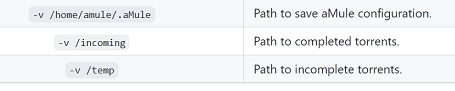
Greetings, I have added a docker container to use amule from a github address. I have almost everything set up and working. The thing is that the configuration is saved in its own container and there is no way to tell it to save the configuration to the cache drive like the other containers. From the unraid console I use the following command to redirect the configuration to /config path: ------------------------ root@ASROCK:~# docker run -h --name ngosang/amule -v /config:/home/amule/.aMule Creating group amule with GID 1000 ... Creating user amule with UID 1000 ... Directory /incoming does not exists. Creating ... Directory /temp does not exists. Creating ... /home/amule/.aMule directory NOT found. Creating directory ... /home/amule/.aMule/amule.conf file NOT found. Generating new default configuration ... /home/amule/.aMule/amule.conf successfullly generated. Remote GUI password: mZSX0Rdzy1cu1TSTu3DH0d9dvzqF9UA1iN2HurSRzeihaYU1ntghiuDQHLZxhNRv Web UI password: WGiaWohdQ50V6VJG4xgs1YnwJLeAwiKjVn1cxpsArC734xVpGa95S3XNQ5pVlx4x /home/amule/.aMule/remote.conf file NOT found. Generating new default configuration ... /home/amule/.aMule/remote.conf successfullly generated. I can edit amule.conf file and set /config path but its inside in its own container. When I stop and start the container again after making the change then the configuration returns to its original state. Maybe I miss something?. I attached some images.


-
iZeus83 changed their profile photo
-
Hi, trurl This is my config... CONTAINER - HOST: ******************** /downloads --> /mnt/user /config --> /mnt/cache/transmission /watch --> /mnt/user/downloads Why am I using this /downloads as a container path mapping to /mnt/user?, because in "Remote GUI Client" I'm using this mapping path: /downloads=\\unhp\ So when I'm trying to add a torrent file then if I push the browse location button to specify the folder on the network to download the torrent , then it allow me to set the remote folder path and it start to download inmediatly. P.S. On the web is commented too for this new version: https://github.com/SickRage/sickrage-issues/issues/1071
-
Hello, Please anyone have any problem with an error like: "download directory path is not absolute" ?, this happen me when I'm trying to add a torrent with the remote gui client. It seems the last update from 2.90 (the RPC wants an aboslute path). So what is the absolute path from RPC in docker? thank you.
-
Thanks to all for help!!!, the process finally successful with parity back and without losing data but a few files has been diferent checksum. At least these files weren't critical.
-
---UPDATE--- Now, I'm in the process of copying files from one disk to another because I've backed up the most of the most important things for me. So I'm just using the parity disk as a disk4 and at the end I'd back the parity disk3 to the original slot. When I put back the disk4 to the original slot of parity disk then I need to pleclear the disk again?.
-
1- Yes, but only on begin the partiy drive became a new data drive, then at the end or at final step I want to restore this drive as a partity. 2- I have some backups but not all other stuff that its important for me too.
-
thanks trurl for your help. So you mean that I only need not to assign the drive when I start the array and then move data from one disk to this drive?
-
Hi, I have 4x units "WD red" 3TB drives, 1 parity and 3 other ones. I'm in the process to migrate to xfs filesystem from resier. The problem is that I haven't space for that and need to use the parity drive as alternative way. But First I need to peclear the parity drive or maybe format to xfs?. thanks.

