





neuk34
Members
-
Joined
-
Last visited
Everything posted by neuk34
-
that's great. Thanks
-
OK I will ! last point : is it possible to install mac OS on a SSD passthrough rather that vdisk?
-
thanks. Is there any list of compatible GPU hardware? Thanks for the help you provided, I appreciate.
-
Asus GTX1070 Strix 8 Go. I precise that I downloaded *.rom, added to xml, but it doesn't boot at all (black screen). So, I removed it.
-
@mSedek Thanks, I've been able to boot and to install Catalina on vdisk. it works perfect with VNC. I've also updated xml to use more cores, more memory, adding USB stuff and trying to passthrough my GPU. It starts well on my hdmi screen but it stuck to boot screen. No mouse or keyboard is active. Here comes my xml to spot anything wrong : <?xml version='1.0' encoding='UTF-8'?> <domain type='kvm' xmlns:qemu='http://libvirt.org/schemas/domain/qemu/1.0'> <name>MacinaboxCatalina</name> <uuid>db23edb3-5049-4f74-9119-8b494ea62e3a</uuid> <description>MacOS Catalina</description> <metadata> <vmtemplate xmlns="Mac OS Catalina" name="Mac OS Catalina" icon="/mnt/user/system/libvirt/domains/MacinaboxCatalina/icon/catalina.png" os="Catalina"/> </metadata> <memory unit='KiB'>8388608</memory> <currentMemory unit='KiB'>8388608</currentMemory> <memoryBacking> <nosharepages/> </memoryBacking> <vcpu placement='static'>6</vcpu> <cputune> <vcpupin vcpu='0' cpuset='1'/> <vcpupin vcpu='1' cpuset='5'/> <vcpupin vcpu='2' cpuset='2'/> <vcpupin vcpu='3' cpuset='6'/> <vcpupin vcpu='4' cpuset='3'/> <vcpupin vcpu='5' cpuset='7'/> </cputune> <os> <type arch='x86_64' machine='pc-q35-3.1'>hvm</type> <loader readonly='yes' type='pflash'>/mnt/user/system/libvirt/domains/MacinaboxCatalina/ovmf/OVMF_CODE.fd</loader> <nvram>/mnt/user/system/libvirt/domains/MacinaboxCatalina/ovmf/OVMF_VARS.fd</nvram> </os> <features> <acpi/> <apic/> </features> <cpu mode='host-passthrough' check='none'> <topology sockets='1' cores='3' threads='2'/> <cache mode='passthrough'/> </cpu> <clock offset='utc'> <timer name='rtc' tickpolicy='catchup'/> <timer name='pit' tickpolicy='delay'/> <timer name='hpet' present='no'/> </clock> <on_poweroff>destroy</on_poweroff> <on_reboot>restart</on_reboot> <on_crash>restart</on_crash> <devices> <emulator>/usr/local/sbin/qemu</emulator> <disk type='file' device='disk'> <driver name='qemu' type='qcow2' cache='writeback'/> <source file='/mnt/user/system/libvirt/domains/MacinaboxCatalina/Clover.qcow2'/> <target dev='hdc' bus='sata'/> <boot order='1'/> <address type='drive' controller='0' bus='0' target='0' unit='2'/> </disk> <disk type='file' device='disk'> <driver name='qemu' type='raw' cache='writeback'/> <source file='/mnt/user/system/libvirt/domains/MacinaboxCatalina/Catalina-install.img'/> <target dev='hdd' bus='sata'/> <address type='drive' controller='0' bus='0' target='0' unit='3'/> </disk> <disk type='file' device='disk'> <driver name='qemu' type='raw' cache='writeback'/> <source file='/mnt/user/system/libvirt/domains/MacinaboxCatalina/macos_disk.img'/> <target dev='hde' bus='sata'/> <address type='drive' controller='0' bus='0' target='0' unit='4'/> </disk> <controller type='sata' index='0'> <address type='pci' domain='0x0000' bus='0x00' slot='0x1f' function='0x2'/> </controller> <controller type='pci' index='0' model='pcie-root'/> <controller type='pci' index='1' model='pcie-root-port'> <model name='pcie-root-port'/> <target chassis='1' port='0x10'/> <address type='pci' domain='0x0000' bus='0x00' slot='0x02' function='0x0' multifunction='on'/> </controller> <controller type='pci' index='2' model='pcie-root-port'> <model name='pcie-root-port'/> <target chassis='2' port='0x11'/> <address type='pci' domain='0x0000' bus='0x00' slot='0x02' function='0x1'/> </controller> <controller type='pci' index='3' model='pcie-root-port'> <model name='pcie-root-port'/> <target chassis='3' port='0x12'/> <address type='pci' domain='0x0000' bus='0x00' slot='0x02' function='0x2'/> </controller> <controller type='pci' index='4' model='pcie-root-port'> <model name='pcie-root-port'/> <target chassis='4' port='0x13'/> <address type='pci' domain='0x0000' bus='0x00' slot='0x02' function='0x3'/> </controller> <controller type='virtio-serial' index='0'> <address type='pci' domain='0x0000' bus='0x02' slot='0x00' function='0x0'/> </controller> <controller type='usb' index='0' model='ich9-ehci1'> <address type='pci' domain='0x0000' bus='0x00' slot='0x07' function='0x7'/> </controller> <controller type='usb' index='0' model='ich9-uhci1'> <master startport='0'/> <address type='pci' domain='0x0000' bus='0x00' slot='0x07' function='0x0' multifunction='on'/> </controller> <controller type='usb' index='0' model='ich9-uhci2'> <master startport='2'/> <address type='pci' domain='0x0000' bus='0x00' slot='0x07' function='0x1'/> </controller> <controller type='usb' index='0' model='ich9-uhci3'> <master startport='4'/> <address type='pci' domain='0x0000' bus='0x00' slot='0x07' function='0x2'/> </controller> <interface type='bridge'> <mac address='52:54:00:6e:06:d1'/> <source bridge='br0'/> <model type='e1000-82545em'/> <address type='pci' domain='0x0000' bus='0x01' slot='0x00' function='0x0'/> </interface> <serial type='pty'> <target type='isa-serial' port='0'> <model name='isa-serial'/> </target> </serial> <console type='pty'> <target type='serial' port='0'/> </console> <channel type='unix'> <target type='virtio' name='org.qemu.guest_agent.0'/> <address type='virtio-serial' controller='0' bus='0' port='1'/> </channel> <input type='tablet' bus='usb'> <address type='usb' bus='0' port='1'/> </input> <input type='mouse' bus='ps2'/> <input type='keyboard' bus='ps2'/> <hostdev mode='subsystem' type='pci' managed='yes'> <driver name='vfio'/> <source> <address domain='0x0000' bus='0x01' slot='0x00' function='0x0'/> </source> <address type='pci' domain='0x0000' bus='0x03' slot='0x00' function='0x0'/> </hostdev> <hostdev mode='subsystem' type='pci' managed='yes'> <driver name='vfio'/> <source> <address domain='0x0000' bus='0x00' slot='0x1b' function='0x0'/> </source> <address type='pci' domain='0x0000' bus='0x04' slot='0x00' function='0x0'/> </hostdev> <hostdev mode='subsystem' type='usb' managed='no'> <source> <vendor id='0x046d'/> <product id='0xc52b'/> </source> <address type='usb' bus='0' port='2'/> </hostdev> <hostdev mode='subsystem' type='usb' managed='no'> <source> <vendor id='0x0a12'/> <product id='0x0001'/> </source> <address type='usb' bus='0' port='3'/> </hostdev> <memballoon model='none'/> </devices> <qemu:commandline> <qemu:arg value='-usb'/> <qemu:arg value='-device'/> <qemu:arg value='usb-kbd,bus=usb-bus.0'/> <qemu:arg value='-device'/> <qemu:arg value='isa-applesmc,osk=*******'/> <qemu:arg value='-smbios'/> <qemu:arg value='type=2'/> <qemu:arg value='-cpu'/> <qemu:arg value='Penryn,kvm=on,vendor=GenuineIntel,+invtsc,vmware-cpuid-freq=on,+pcid,+ssse3,+sse4.2,+popcnt,+avx,+aes,+xsave,+xsaveopt,check'/> </qemu:commandline> </domain> Thanks a lot
-
Thanks ! I can see now apple Icon and the progress bar. But it restart again ang again (like a loop) when it acheive 50%. I should made a mistake, probably located at "the correct word" you mentioned above ? (I don't have any clue on this) <?xml version='1.0' encoding='UTF-8'?> <domain type='kvm' xmlns:qemu='http://libvirt.org/schemas/domain/qemu/1.0'> <name>MacinaboxCatalina</name> <uuid>d490b74e-3643-4903-8e7a-dcebfece0311</uuid> <description>MacOS Catalina</description> <metadata> <vmtemplate xmlns="unraid" name="Catalina" icon="catalina.png" os="Catalina"/> </metadata> <memory unit='KiB'>4194304</memory> <currentMemory unit='KiB'>4194304</currentMemory> <memoryBacking> <nosharepages/> </memoryBacking> <vcpu placement='static'>2</vcpu> <cputune> <vcpupin vcpu='0' cpuset='0'/> <vcpupin vcpu='1' cpuset='4'/> </cputune> <os> <type arch='x86_64' machine='pc-q35-3.1'>hvm</type> <loader readonly='yes' type='pflash'>/mnt/user/domains/MacinaboxCatalina/ovmf/OVMF_CODE.fd</loader> <nvram>/mnt/user/domains/MacinaboxCatalina/ovmf/OVMF_VARS.fd</nvram> </os> <features> <acpi/> <apic/> </features> <cpu mode='host-passthrough' check='none'> <topology sockets='1' cores='1' threads='2'/> <cache mode='passthrough'/> </cpu> <clock offset='utc'> <timer name='rtc' tickpolicy='catchup'/> <timer name='pit' tickpolicy='delay'/> <timer name='hpet' present='no'/> </clock> <on_poweroff>destroy</on_poweroff> <on_reboot>restart</on_reboot> <on_crash>restart</on_crash> <devices> <emulator>/usr/local/sbin/qemu</emulator> <disk type='file' device='disk'> <driver name='qemu' type='qcow2' cache='writeback'/> <source file='/mnt/user/domains/MacinaboxCatalina/Clover.qcow2'/> <target dev='hdc' bus='sata'/> <boot order='1'/> <address type='drive' controller='0' bus='0' target='0' unit='2'/> </disk> <disk type='file' device='disk'> <driver name='qemu' type='raw' cache='writeback'/> <source file='/mnt/user/domains/MacinaboxCatalina/Catalina-install.img'/> <target dev='hdd' bus='sata'/> <address type='drive' controller='0' bus='0' target='0' unit='3'/> </disk> <disk type='file' device='disk'> <driver name='qemu' type='raw' cache='writeback'/> <source file='/mnt/user/domains/MacinaboxCatalina/macos_disk.img'/> <target dev='hde' bus='sata'/> <address type='drive' controller='0' bus='0' target='0' unit='4'/> </disk> <controller type='usb' index='0' model='ich9-ehci1'> <address type='pci' domain='0x0000' bus='0x00' slot='0x07' function='0x7'/> </controller> <controller type='usb' index='0' model='ich9-uhci1'> <master startport='0'/> <address type='pci' domain='0x0000' bus='0x00' slot='0x07' function='0x0' multifunction='on'/> </controller> <controller type='usb' index='0' model='ich9-uhci2'> <master startport='2'/> <address type='pci' domain='0x0000' bus='0x00' slot='0x07' function='0x1'/> </controller> <controller type='usb' index='0' model='ich9-uhci3'> <master startport='4'/> <address type='pci' domain='0x0000' bus='0x00' slot='0x07' function='0x2'/> </controller> <controller type='pci' index='0' model='pcie-root'/> <controller type='pci' index='1' model='pcie-root-port'> <model name='pcie-root-port'/> <target chassis='1' port='0x10'/> <address type='pci' domain='0x0000' bus='0x00' slot='0x02' function='0x0' multifunction='on'/> </controller> <controller type='pci' index='2' model='pcie-root-port'> <model name='pcie-root-port'/> <target chassis='2' port='0x11'/> <address type='pci' domain='0x0000' bus='0x00' slot='0x02' function='0x1'/> </controller> <controller type='pci' index='3' model='pcie-root-port'> <model name='pcie-root-port'/> <target chassis='3' port='0x12'/> <address type='pci' domain='0x0000' bus='0x00' slot='0x02' function='0x2'/> </controller> <controller type='pci' index='4' model='pcie-root-port'> <model name='pcie-root-port'/> <target chassis='4' port='0x13'/> <address type='pci' domain='0x0000' bus='0x00' slot='0x02' function='0x3'/> </controller> <controller type='virtio-serial' index='0'> <address type='pci' domain='0x0000' bus='0x02' slot='0x00' function='0x0'/> </controller> <controller type='sata' index='0'> <address type='pci' domain='0x0000' bus='0x00' slot='0x1f' function='0x2'/> </controller> <interface type='bridge'> <mac address='52:54:00:6e:06:d1'/> <source bridge='br0'/> <model type='e1000-82545em'/> <address type='pci' domain='0x0000' bus='0x01' slot='0x00' function='0x0'/> </interface> <serial type='pty'> <target type='isa-serial' port='0'> <model name='isa-serial'/> </target> </serial> <console type='pty'> <target type='serial' port='0'/> </console> <channel type='unix'> <target type='virtio' name='org.qemu.guest_agent.0'/> <address type='virtio-serial' controller='0' bus='0' port='1'/> </channel> <input type='tablet' bus='usb'> <address type='usb' bus='0' port='1'/> </input> <input type='mouse' bus='ps2'/> <input type='keyboard' bus='ps2'/> <graphics type='vnc' port='-1' autoport='yes' websocket='-1' listen='0.0.0.0' keymap='fr'> <listen type='address' address='0.0.0.0'/> </graphics> <video> <model type='qxl' ram='65536' vram='65536' vgamem='16384' heads='1' primary='yes'/> <address type='pci' domain='0x0000' bus='0x00' slot='0x01' function='0x0'/> </video> <memballoon model='virtio'> <address type='pci' domain='0x0000' bus='0x03' slot='0x00' function='0x0'/> </memballoon> </devices> <qemu:commandline> <qemu:arg value='-usb'/> <qemu:arg value='-device'/> <qemu:arg value='usb-kbd,bus=usb-bus.0'/> <qemu:arg value='-device'/> <qemu:arg value='isa-applesmc,osk=(c)AppleComputerInc'/> <qemu:arg value='-smbios'/> <qemu:arg value='type=2'/> <qemu:arg value='-cpu'/> <qemu:arg value='Penryn,kvm=on,vendor=GenuineIntel,+invtsc,vmware-cpuid-freq=on,+pcid,+ssse3,+sse4.2,+popcnt,+avx,+aes,+xsave,+xsaveopt,check'/> </qemu:commandline> </domain>
-
here it comes <?xml version='1.0' encoding='UTF-8'?> <domain type='kvm'> <name>MacinaboxCatalina</name> <uuid>d490b74e-3643-4903-8e7a-dcebfece0311</uuid> <description>MacOS Catalina</description> <metadata> <vmtemplate xmlns="unraid" name="Windows 10" icon="default.png" os="Catalina"/> </metadata> <memory unit='KiB'>4194304</memory> <currentMemory unit='KiB'>4194304</currentMemory> <memoryBacking> <nosharepages/> </memoryBacking> <vcpu placement='static'>2</vcpu> <cputune> <vcpupin vcpu='0' cpuset='0'/> <vcpupin vcpu='1' cpuset='1'/> </cputune> <os> <type arch='x86_64' machine='pc-q35-3.1'>hvm</type> <loader readonly='yes' type='pflash'>/usr/share/qemu/ovmf-x64/OVMF_CODE-pure-efi.fd</loader> <nvram>/etc/libvirt/qemu/nvram/d490b74e-3643-4903-8e7a-dcebfece0311_VARS-pure-efi.fd</nvram> </os> <features> <acpi/> <apic/> </features> <cpu mode='host-passthrough' check='none'> <topology sockets='1' cores='1' threads='2'/> <cache mode='passthrough'/> </cpu> <clock offset='utc'> <timer name='rtc' tickpolicy='catchup'/> <timer name='pit' tickpolicy='delay'/> <timer name='hpet' present='no'/> </clock> <on_poweroff>destroy</on_poweroff> <on_reboot>restart</on_reboot> <on_crash>restart</on_crash> <devices> <emulator>/usr/local/sbin/qemu</emulator> <disk type='file' device='disk'> <driver name='qemu' type='qcow2' cache='writeback'/> <source file='/mnt/user/domains/MacinaboxCatalina/Clover.qcow2'/> <target dev='hdc' bus='sata'/> <boot order='1'/> <address type='drive' controller='0' bus='0' target='0' unit='2'/> </disk> <disk type='file' device='disk'> <driver name='qemu' type='raw' cache='writeback'/> <source file='/mnt/user/domains/MacinaboxCatalina/Catalina-install.img'/> <target dev='hdd' bus='sata'/> <address type='drive' controller='0' bus='0' target='0' unit='3'/> </disk> <disk type='file' device='disk'> <driver name='qemu' type='raw' cache='writeback'/> <source file='/mnt/user/domains/MacinaboxCatalina/macos_disk.img'/> <target dev='hde' bus='sata'/> <address type='drive' controller='0' bus='0' target='0' unit='4'/> </disk> <controller type='pci' index='0' model='pcie-root'/> <controller type='pci' index='1' model='pcie-root-port'> <model name='pcie-root-port'/> <target chassis='1' port='0x10'/> <address type='pci' domain='0x0000' bus='0x00' slot='0x02' function='0x0' multifunction='on'/> </controller> <controller type='pci' index='2' model='pcie-root-port'> <model name='pcie-root-port'/> <target chassis='2' port='0x11'/> <address type='pci' domain='0x0000' bus='0x00' slot='0x02' function='0x1'/> </controller> <controller type='pci' index='3' model='pcie-root-port'> <model name='pcie-root-port'/> <target chassis='3' port='0x12'/> <address type='pci' domain='0x0000' bus='0x00' slot='0x02' function='0x2'/> </controller> <controller type='pci' index='4' model='pcie-root-port'> <model name='pcie-root-port'/> <target chassis='4' port='0x13'/> <address type='pci' domain='0x0000' bus='0x00' slot='0x02' function='0x3'/> </controller> <controller type='virtio-serial' index='0'> <address type='pci' domain='0x0000' bus='0x02' slot='0x00' function='0x0'/> </controller> <controller type='sata' index='0'> <address type='pci' domain='0x0000' bus='0x00' slot='0x1f' function='0x2'/> </controller> <controller type='usb' index='0' model='ich9-ehci1'> <address type='pci' domain='0x0000' bus='0x00' slot='0x07' function='0x7'/> </controller> <controller type='usb' index='0' model='ich9-uhci1'> <master startport='0'/> <address type='pci' domain='0x0000' bus='0x00' slot='0x07' function='0x0' multifunction='on'/> </controller> <controller type='usb' index='0' model='ich9-uhci2'> <master startport='2'/> <address type='pci' domain='0x0000' bus='0x00' slot='0x07' function='0x1'/> </controller> <controller type='usb' index='0' model='ich9-uhci3'> <master startport='4'/> <address type='pci' domain='0x0000' bus='0x00' slot='0x07' function='0x2'/> </controller> <interface type='bridge'> <mac address='52:54:00:6e:06:d1'/> <source bridge='br0'/> <model type='virtio'/> <address type='pci' domain='0x0000' bus='0x01' slot='0x00' function='0x0'/> </interface> <serial type='pty'> <target type='isa-serial' port='0'> <model name='isa-serial'/> </target> </serial> <console type='pty'> <target type='serial' port='0'/> </console> <channel type='unix'> <target type='virtio' name='org.qemu.guest_agent.0'/> <address type='virtio-serial' controller='0' bus='0' port='1'/> </channel> <input type='tablet' bus='usb'> <address type='usb' bus='0' port='1'/> </input> <input type='mouse' bus='ps2'/> <input type='keyboard' bus='ps2'/> <graphics type='vnc' port='-1' autoport='yes' websocket='-1' listen='0.0.0.0' keymap='fr'> <listen type='address' address='0.0.0.0'/> </graphics> <video> <model type='qxl' ram='65536' vram='65536' vgamem='16384' heads='1' primary='yes'/> <address type='pci' domain='0x0000' bus='0x00' slot='0x01' function='0x0'/> </video> <memballoon model='virtio'> <address type='pci' domain='0x0000' bus='0x03' slot='0x00' function='0x0'/> </memballoon> </devices> </domain>
-
Hi there, I'm a noob on this topic.I followed carefully video tutorial and I applied all default settings / parameters. I launch VM, go to VNC, I can see boot screen, I press "Enter" to initiate installation, but i've got a black screen (no apple logo appears). Config : 6.8.3 Core i7 16 Go GTX1070 here my VM logs : -mon chardev=charmonitor,id=monitor,mode=control \ -rtc base=utc,driftfix=slew \ -global kvm-pit.lost_tick_policy=delay \ -no-hpet \ -no-shutdown \ -boot strict=on \ -device pcie-root-port,port=0x10,chassis=1,id=pci.1,bus=pcie.0,multifunction=on,addr=0x2 \ -device pcie-root-port,port=0x11,chassis=2,id=pci.2,bus=pcie.0,addr=0x2.0x1 \ -device pcie-root-port,port=0x12,chassis=3,id=pci.3,bus=pcie.0,addr=0x2.0x2 \ -device pcie-root-port,port=0x13,chassis=4,id=pci.4,bus=pcie.0,addr=0x2.0x3 \ -device ich9-usb-ehci1,id=usb,bus=pcie.0,addr=0x7.0x7 \ -device ich9-usb-uhci1,masterbus=usb.0,firstport=0,bus=pcie.0,multifunction=on,addr=0x7 \ -device ich9-usb-uhci2,masterbus=usb.0,firstport=2,bus=pcie.0,addr=0x7.0x1 \ -device ich9-usb-uhci3,masterbus=usb.0,firstport=4,bus=pcie.0,addr=0x7.0x2 \ -device virtio-serial-pci,id=virtio-serial0,bus=pci.2,addr=0x0 \ -blockdev '{"driver":"file","filename":"/mnt/user/domains/MacinaboxCatalina/Clover.qcow2","node-name":"libvirt-3-storage","cache":{"direct":false,"no-flush":false},"auto-read-only":true,"discard":"unmap"}' \ -blockdev '{"node-name":"libvirt-3-format","read-only":false,"cache":{"direct":false,"no-flush":false},"driver":"qcow2","file":"libvirt-3-storage","backing":null}' \ -device ide-hd,bus=ide.2,drive=libvirt-3-format,id=sata0-0-2,bootindex=1,write-cache=on \ -blockdev '{"driver":"file","filename":"/mnt/user/domains/MacinaboxCatalina/Catalina-install.img","node-name":"libvirt-2-storage","cache":{"direct":false,"no-flush":false},"auto-read-only":true,"discard":"unmap"}' \ -blockdev '{"node-name":"libvirt-2-format","read-only":false,"cache":{"direct":false,"no-flush":false},"driver":"raw","file":"libvirt-2-storage"}' \ -device ide-hd,bus=ide.3,drive=libvirt-2-format,id=sata0-0-3,write-cache=on \ -blockdev '{"driver":"file","filename":"/mnt/user/domains/MacinaboxCatalina/macos_disk.img","node-name":"libvirt-1-storage","cache":{"direct":false,"no-flush":false},"auto-read-only":true,"discard":"unmap"}' \ -blockdev '{"node-name":"libvirt-1-format","read-only":false,"cache":{"direct":false,"no-flush":false},"driver":"raw","file":"libvirt-1-storage"}' \ -device ide-hd,bus=ide.4,drive=libvirt-1-format,id=sata0-0-4,write-cache=on \ -netdev tap,fd=36,id=hostnet0,vhost=on,vhostfd=37 \ -device virtio-net-pci,netdev=hostnet0,id=net0,mac=52:54:00:6e:06:d1,bus=pci.1,addr=0x0 \ -chardev pty,id=charserial0 \ -device isa-serial,chardev=charserial0,id=serial0 \ -chardev socket,id=charchannel0,fd=38,server,nowait \ -device virtserialport,bus=virtio-serial0.0,nr=1,chardev=charchannel0,id=channel0,name=org.qemu.guest_agent.0 \ -device usb-tablet,id=input0,bus=usb.0,port=1 \ -vnc 0.0.0.0:0,websocket=5700 \ -k fr \ -device qxl-vga,id=video0,ram_size=67108864,vram_size=67108864,vram64_size_mb=0,vgamem_mb=16,max_outputs=1,bus=pcie.0,addr=0x1 \ -device virtio-balloon-pci,id=balloon0,bus=pci.3,addr=0x0 \ -sandbox on,obsolete=deny,elevateprivileges=deny,spawn=deny,resourcecontrol=deny \ -msg timestamp=on 2020-11-01 12:23:18.457+0000: Domain id=8 is tainted: high-privileges 2020-11-01 12:23:18.457+0000: Domain id=8 is tainted: host-cpu char device redirected to /dev/pts/0 (label charserial0) could you please help? thanks
-
I set PCIe ACS override to downstream VFIO "Yes", and after reboot, everything worked.
-
Hello, I've just upgraded from 6.7.2 to 6.8.3 and my VM is not able to start anymore : internal error: qemu unexpectedly closed the monitor: 2020-10-31T10:24:08.413312Z qemu-system-x86_64: -device vfio-pci,host=0000:01:00.0,id=hostdev0,bus=pci.0,addr=0x3: vfio 0000:01:00.0: group 1 is not viable Please ensure all devices within the iommu_group are bound to their vfio bus driver. I went through forum. People that is facing this same issue didn't get any feedback yet. Could you please help? Thanks tower-diagnostics-20201031-1128.zip
-
thanks, it ran perfectly. Thank you all for your help much appreciated
-
Thanks for your help. I'm on my way to execute your process because my disk are old and array is clearly at risk. unbalance does not work presently. How can I move data (fast and easy) from one disk to another?
-
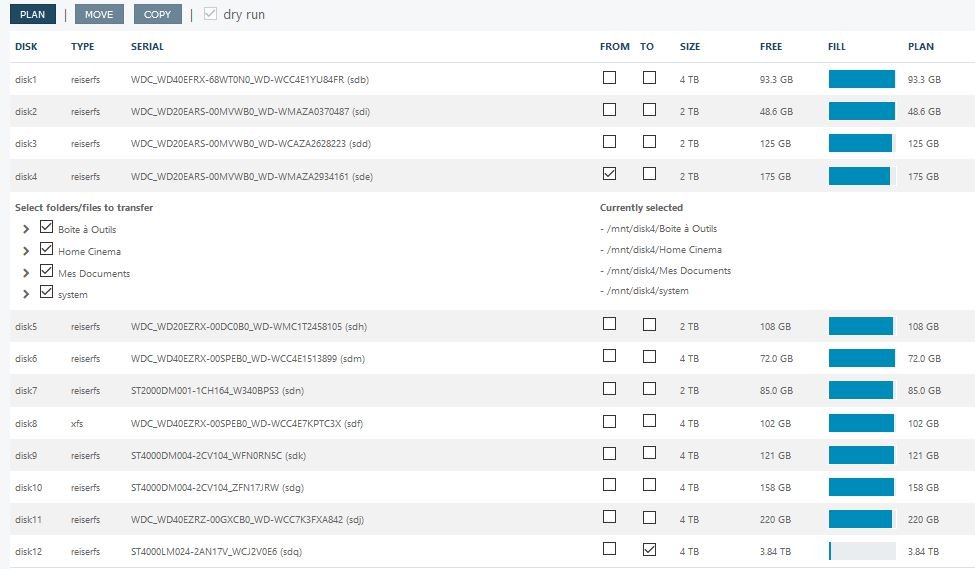
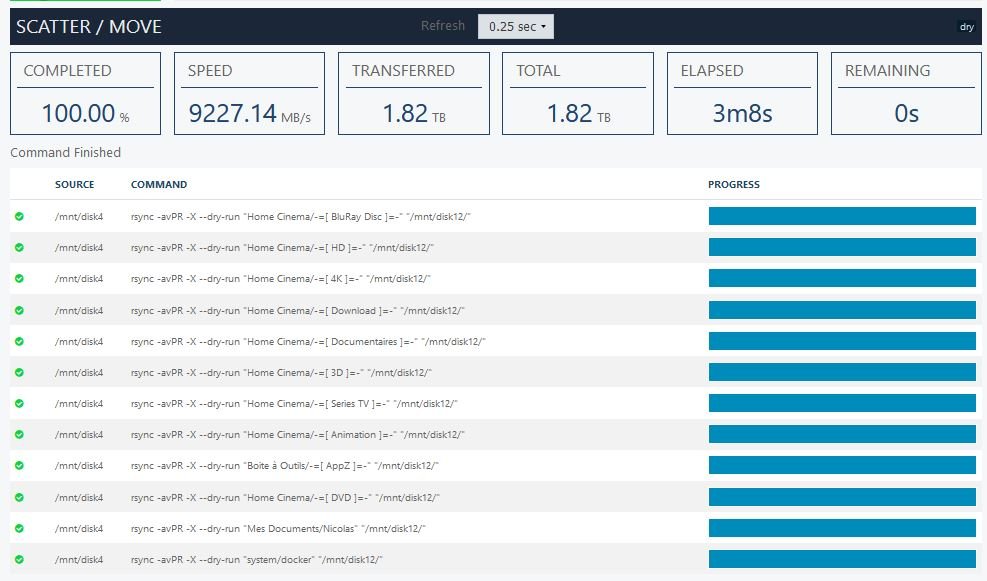
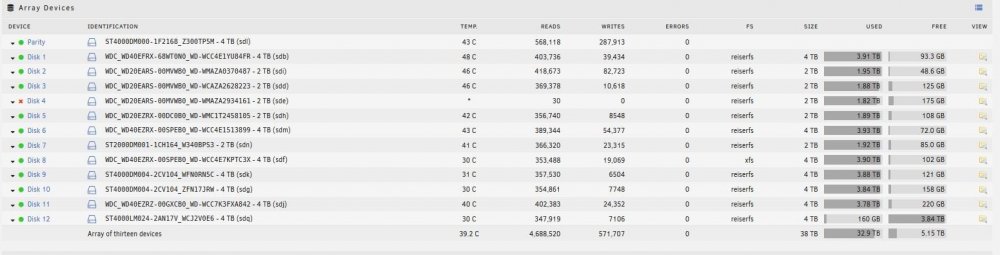
Hello, My disk4 has been disabled (2 To), but content is still emulated thanks to parity. I added a fresh new disk into the array (4 To) called disk12. I plan to move all datas from disk4 (emulated content) to disk12, but nothing is transferred. Let me show you the logs : I: 2020/09/01 21:33:51 planner.go:509: disk(/mnt/disk9):no-items:currentFree(121.25 GB) I: 2020/09/01 21:33:51 planner.go:510: --------------------------------------------------------- I: 2020/09/01 21:33:51 planner.go:511: --------------------------------------------------------- I: 2020/09/01 21:33:51 planner.go:512: I: 2020/09/01 21:33:51 planner.go:508: ========================================================= I: 2020/09/01 21:33:51 planner.go:509: disk(/mnt/disk10):no-items:currentFree(157.66 GB) I: 2020/09/01 21:33:51 planner.go:510: --------------------------------------------------------- I: 2020/09/01 21:33:51 planner.go:511: --------------------------------------------------------- I: 2020/09/01 21:33:51 planner.go:512: I: 2020/09/01 21:33:51 planner.go:508: ========================================================= I: 2020/09/01 21:33:51 planner.go:509: disk(/mnt/disk11):no-items:currentFree(219.88 GB) I: 2020/09/01 21:33:51 planner.go:510: --------------------------------------------------------- I: 2020/09/01 21:33:51 planner.go:511: --------------------------------------------------------- I: 2020/09/01 21:33:51 planner.go:512: I: 2020/09/01 21:33:51 planner.go:497: ========================================================= I: 2020/09/01 21:33:51 planner.go:498: disk(/mnt/disk12):items(12)-(1.82 TB):currentFree(3.84 TB)-plannedFree(2.02 TB) I: 2020/09/01 21:33:51 planner.go:499: --------------------------------------------------------- I: 2020/09/01 21:33:51 planner.go:502: [1.26 TB] /mnt/disk4/Home Cinema/./-=[ BluRay Disc ]=- I: 2020/09/01 21:33:51 planner.go:502: [184.78 GB] /mnt/disk4/Home Cinema/./-=[ HD ]=- I: 2020/09/01 21:33:51 planner.go:502: [162.79 GB] /mnt/disk4/Home Cinema/./-=[ 4K ]=- I: 2020/09/01 21:33:51 planner.go:502: [66.57 GB] /mnt/disk4/Home Cinema/./-=[ Download ]=- I: 2020/09/01 21:33:51 planner.go:502: [52.46 GB] /mnt/disk4/Home Cinema/./-=[ Documentaires ]=- I: 2020/09/01 21:33:51 planner.go:502: [43.78 GB] /mnt/disk4/Home Cinema/./-=[ 3D ]=- I: 2020/09/01 21:33:51 planner.go:502: [27.95 GB] /mnt/disk4/Home Cinema/./-=[ Series TV ]=- I: 2020/09/01 21:33:51 planner.go:502: [21.78 GB] /mnt/disk4/Home Cinema/./-=[ Animation ]=- I: 2020/09/01 21:33:51 planner.go:502: [949.12 MB] /mnt/disk4/Boite à Outils/./-=[ AppZ ]=- I: 2020/09/01 21:33:51 planner.go:502: [6.50 MB] /mnt/disk4/Home Cinema/./-=[ DVD ]=- I: 2020/09/01 21:33:51 planner.go:502: [49.36 KB] /mnt/disk4/Mes Documents/./Nicolas I: 2020/09/01 21:33:51 planner.go:502: [344.00 B] /mnt/disk4/system/./docker I: 2020/09/01 21:33:51 planner.go:505: --------------------------------------------------------- I: 2020/09/01 21:33:51 planner.go:506: I: 2020/09/01 21:33:51 planner.go:516: ========================================================= I: 2020/09/01 21:33:51 planner.go:517: Bytes To Transfer: 1.82 TB I: 2020/09/01 21:33:51 planner.go:518: --------------------------------------------------------- I: 2020/09/01 21:34:02 core.go:687: Running Move operation ... I: 2020/09/01 21:34:02 core.go:710: Command Started: (src: /mnt/disk4) rsync -avPR -X --dry-run "Home Cinema/-=[ BluRay Disc ]=-" "/mnt/disk12/" I: 2020/09/01 21:34:02 core.go:185: Sending operation I: 2020/09/01 21:34:02 core.go:835: monitor:transfer:(/mnt/disk4/Home Cinema/-=[ BluRay Disc ]=-/Chronique de Narnia - Le Lion, la Sorcière blanche et l'Armoire magique,) I: 2020/09/01 21:34:06 core.go:767: command:retcode(0):exitcode(0) I: 2020/09/01 21:34:06 core.go:1028: Command Finished I: 2020/09/01 21:34:06 core.go:1041: Current progress: 69.26% done ~ 1s left (267673.28 MB/s) I: 2020/09/01 21:34:06 core.go:710: Command Started: (src: /mnt/disk4) rsync -avPR -X --dry-run "Home Cinema/-=[ HD ]=-" "/mnt/disk12/" I: 2020/09/01 21:34:07 core.go:835: monitor:transfer:(/mnt/disk4/Home Cinema/-=[ HD ]=-/12 Year a Slave) I: 2020/09/01 21:34:12 core.go:767: command:retcode(0):exitcode(0) I: 2020/09/01 21:34:12 core.go:1028: Command Finished I: 2020/09/01 21:34:12 core.go:1041: Current progress: 79.38% done ~ 2s left (138070.07 MB/s) I: 2020/09/01 21:34:12 core.go:710: Command Started: (src: /mnt/disk4) rsync -avPR -X --dry-run "Home Cinema/-=[ 4K ]=-" "/mnt/disk12/" I: 2020/09/01 21:34:12 core.go:767: command:retcode(0):exitcode(0) I: 2020/09/01 21:34:12 core.go:1028: Command Finished I: 2020/09/01 21:34:12 core.go:1041: Current progress: 88.30% done ~ 1s left (146271.62 MB/s) I: 2020/09/01 21:34:12 core.go:710: Command Started: (src: /mnt/disk4) rsync -avPR -X --dry-run "Home Cinema/-=[ Download ]=-" "/mnt/disk12/" I: 2020/09/01 21:34:13 core.go:767: command:retcode(0):exitcode(0) I: 2020/09/01 21:34:13 core.go:1028: Command Finished I: 2020/09/01 21:34:13 core.go:1041: Current progress: 91.95% done ~ 0s left (145389.54 MB/s) I: 2020/09/01 21:34:13 core.go:710: Command Started: (src: /mnt/disk4) rsync -avPR -X --dry-run "Home Cinema/-=[ Documentaires ]=-" "/mnt/disk12/" I: 2020/09/01 21:34:13 core.go:767: command:retcode(0):exitcode(0) I: 2020/09/01 21:34:13 core.go:1028: Command Finished I: 2020/09/01 21:34:13 core.go:1041: Current progress: 94.82% done ~ 0s left (143414.67 MB/s) I: 2020/09/01 21:34:13 core.go:710: Command Started: (src: /mnt/disk4) rsync -avPR -X --dry-run "Home Cinema/-=[ 3D ]=-" "/mnt/disk12/" I: 2020/09/01 21:34:14 core.go:835: monitor:transfer:(/mnt/disk4/Home Cinema/-=[ 3D ]=-/Le Chasseur et la Reinde de Glace) I: 2020/09/01 21:34:19 core.go:767: command:retcode(0):exitcode(0) I: 2020/09/01 21:34:19 core.go:1028: Command Finished I: 2020/09/01 21:34:19 core.go:1041: Current progress: 97.22% done ~ 0s left (98031.05 MB/s) I: 2020/09/01 21:34:19 core.go:710: Command Started: (src: /mnt/disk4) rsync -avPR -X --dry-run "Home Cinema/-=[ Series TV ]=-" "/mnt/disk12/" I: 2020/09/01 21:34:19 core.go:767: command:retcode(0):exitcode(0) I: 2020/09/01 21:34:19 core.go:1028: Command Finished I: 2020/09/01 21:34:19 core.go:1041: Current progress: 98.75% done ~ 0s left (96768.83 MB/s) I: 2020/09/01 21:34:19 core.go:710: Command Started: (src: /mnt/disk4) rsync -avPR -X --dry-run "Home Cinema/-=[ Animation ]=-" "/mnt/disk12/" I: 2020/09/01 21:34:20 core.go:767: command:retcode(0):exitcode(0) I: 2020/09/01 21:34:20 core.go:1028: Command Finished I: 2020/09/01 21:34:20 core.go:1041: Current progress: 99.95% done ~ 0s left (95254.28 MB/s) I: 2020/09/01 21:34:20 core.go:710: Command Started: (src: /mnt/disk4) rsync -avPR -X --dry-run "Boite à Outils/-=[ AppZ ]=-" "/mnt/disk12/" I: 2020/09/01 21:34:21 core.go:835: monitor:transfer:(/mnt/disk4/Boite à Outils/-=[ AppZ ]=-/DVDFab 11.0.6.0 Complet & Portable/dvdfab_11.0.6.0_x64/DVDFab11/App) I: 2020/09/01 21:37:09 core.go:767: command:retcode(0):exitcode(0) I: 2020/09/01 21:37:09 core.go:1028: Command Finished I: 2020/09/01 21:37:09 core.go:1041: Current progress: 100.00% done ~ 0s left (9301.15 MB/s) I: 2020/09/01 21:37:09 core.go:710: Command Started: (src: /mnt/disk4) rsync -avPR -X --dry-run "Home Cinema/-=[ DVD ]=-" "/mnt/disk12/" I: 2020/09/01 21:37:09 core.go:767: command:retcode(0):exitcode(0) I: 2020/09/01 21:37:09 core.go:1028: Command Finished I: 2020/09/01 21:37:09 core.go:1041: Current progress: 100.00% done ~ 0s left (9276.38 MB/s) I: 2020/09/01 21:37:09 core.go:710: Command Started: (src: /mnt/disk4) rsync -avPR -X --dry-run "Mes Documents/Nicolas" "/mnt/disk12/" I: 2020/09/01 21:37:10 core.go:767: command:retcode(0):exitcode(0) I: 2020/09/01 21:37:10 core.go:1028: Command Finished I: 2020/09/01 21:37:10 core.go:1041: Current progress: 100.00% done ~ 0s left (9251.70 MB/s) I: 2020/09/01 21:37:10 core.go:710: Command Started: (src: /mnt/disk4) rsync -avPR -X --dry-run "system/docker" "/mnt/disk12/" I: 2020/09/01 21:37:10 core.go:767: command:retcode(0):exitcode(0) I: 2020/09/01 21:37:10 core.go:1028: Command Finished I: 2020/09/01 21:37:10 core.go:1041: Current progress: 100.00% done ~ 0s left (9227.14 MB/s) I: 2020/09/01 21:37:10 core.go:1107: unBALANCE - MOVE operation completed Started: Sep 1, 2020 21:34:02 Ended: Sep 1, 2020 21:37:10 Elapsed: 0s Move operation has finished Transferred 1.82 TB at ~ 9227.14 MB/s Could you please help me? Thanks
-
Hello, I followed VPN Docker FAQ but I'm still experiencing slow downloads. I subscribed to PIA, using port forwarding endpoint (France), port are opened, using reiserfs filesystem, Rate limit IP overhead is unticked. Could you please help me to find the reason? Thanks supervisord.log
-
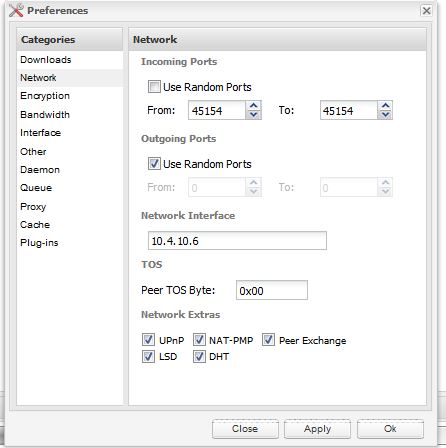
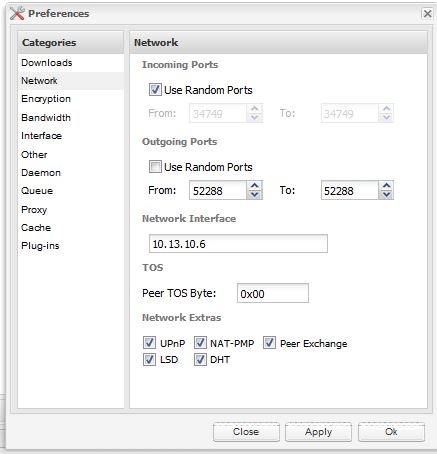
firstly uploads and downloads are done over the vpn tunnel, thus changing configuration on your router will make ZERO difference. the incoming port is automatically done for you, so dont touch incoming port, as for the outgoing port, you should leave random ticked, dont bother specifying the port, then reboot the container and you should be set. Like that ?

-
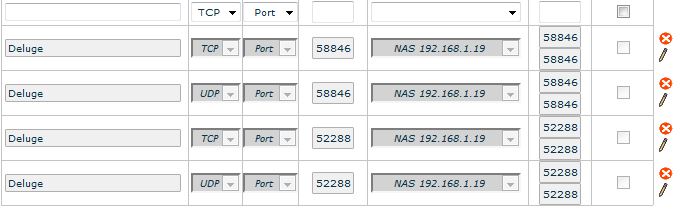
Hello, I can download easily now, but Deluge does not upload. I've searched into forums and I've opened ports on my router, but no upload. Do you now where it comes from? thanks
-
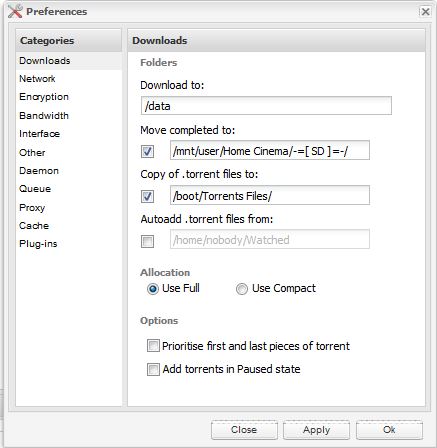
No, it's not a good idea. You will continue to have the same problem until you understand what is going on. Post a new screenshot of the details to a torrent you are trying to download. Pay attention to the path. MAKE SURE it says /data/ instead of /mnt/user/Torrent/. Thanks Jonathann, it works when I set download path to /data ! But it does not rellocated the file where I want. So, all my files will stay in /data, and I don't want to. set move completed to: /data/completed that way files will then be moved once completed to host path /mnt/user/torrent/completed you REALLY need to read FAQ Q4 from here http://lime-technology.com/forum/index.php?topic=45811.msg437673#msg437673 If you dont get it then re-read it several times, its an important part of docker and you will need to understand this. OK ! It's perfectly clear ! Thank you so much !
-
No, it's not a good idea. You will continue to have the same problem until you understand what is going on. Post a new screenshot of the details to a torrent you are trying to download. Pay attention to the path. MAKE SURE it says /data/ instead of /mnt/user/Torrent/. Thanks Jonathann, it works when I set download path to /data ! But it does not rellocated the file where I want. So, all my files will stay in /data, and I don't want to.
-
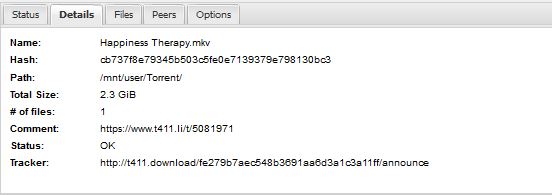
OK, change data path to /mnt/user/Home Cinema/Torrent/ and tried to /mnt/user/Torrent Your picture shows the torrent is trying to download to /mnt/user/Torrent, but that path does not exist inside the docker. Leave the docker config the way it is, and tell deluge to save the file to /data, like binhex told you. I did exactly what you told me : - I removed, and redownloaded the package, - Left the config as it is, but I fulfilled username & password - I change path to data /mnt/user/torrent through the Deluge Web UI -> Same problem : deluge cannot write / download. ( I don't understand what is happening. I'm desperate, and I think I'm going to format my unraid key and start a fresh install. Do you think it's agood idea ? Thanks

-
PIA https://www.privateinternetaccess.com/ AirVPN https://airvpn.org/ Thanks Jonathan but both website cannot be accessed : SSL_ERROR_ACCESS_DENIED_ALERT It's a nightmare.. Sounds like you have deeper issues. Both websites are fine from here. Maybe try different browser or computer? Can you access them from a smartphone? Hi Jonathann, Hi Binhex, I quit usenetserver vpn and I've subscribe to PIA. I've downloaded ovpn + crt files from https://www.privateinternetaccess.com/openvpn/openvpn.zip, and extract them to boot/config/openvpn I can access Web UI, and i've added torrent files. Deluge load them, tracker is nice, but deluge does not download. I don't understand... Please check config attached : 1 - I've opened 58846 UDP and TCP port on my router 2 - I sent a ping to france.privateinternetaccess.com and I've reached 108.61.122.152. Log told that I reached another ip : 108.61.122.157:1198. maybe it's normal, I don't know. So, could you please help me? I attach screenshot, and supervisor file. Thanks The path for your data volume mapping is a bit non standard, can you try setting it to something with no special characters, my theory is that deluge cannot write to that path and thus no downloads start. Also you are configuring deluge app to write to /data right? Sent from my SM-G900F using Tapatalk OK, change data path to /mnt/user/Home Cinema/Torrent/ and tried to /mnt/user/Torrent Same problem.. 3 hours without download. I think you're right. Deluge does not write on the disk. The proof is no file is created into the folder when I load a *.torrent to download. any idea?
-
PIA https://www.privateinternetaccess.com/ AirVPN https://airvpn.org/ Thanks Jonathan but both website cannot be accessed : SSL_ERROR_ACCESS_DENIED_ALERT It's a nightmare.. Sounds like you have deeper issues. Both websites are fine from here. Maybe try different browser or computer? Can you access them from a smartphone? Hi Jonathann, Hi Binhex, I quit usenetserver vpn and I've subscribe to PIA. I've downloaded ovpn + crt files from https://www.privateinternetaccess.com/openvpn/openvpn.zip, and extract them to boot/config/openvpn I can access Web UI, and i've added torrent files. Deluge load them, tracker is nice, but deluge does not download. I don't understand... Please check config attached : 1 - I've opened 58846 UDP and TCP port on my router 2 - I sent a ping to france.privateinternetaccess.com and I've reached 108.61.122.152. Log told that I reached another ip : 108.61.122.157:1198. maybe it's normal, I don't know. So, could you please help me? I attach screenshot, and supervisor file. Thanks supervisord.zip

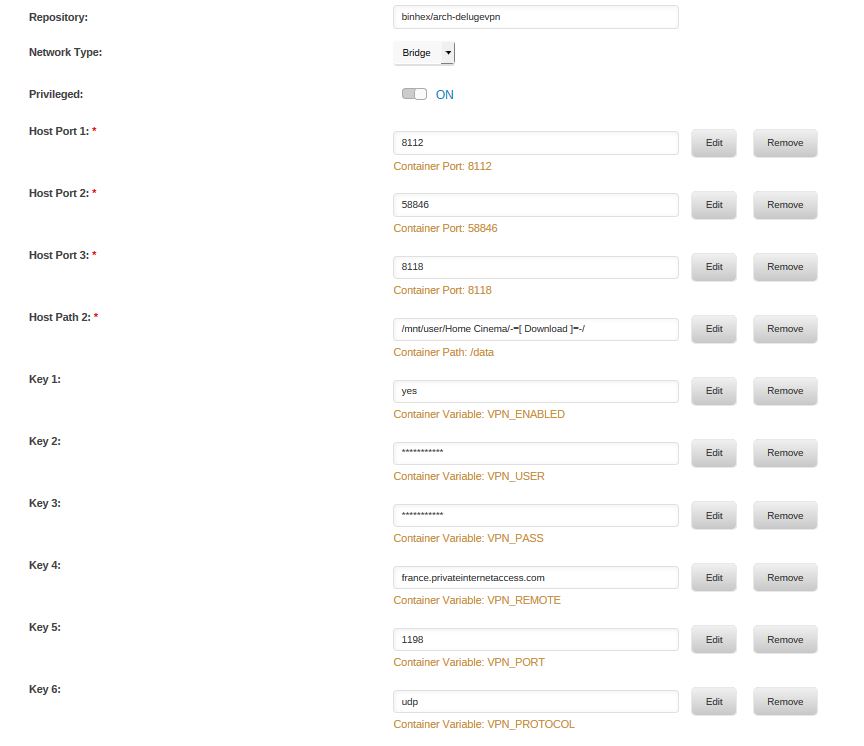
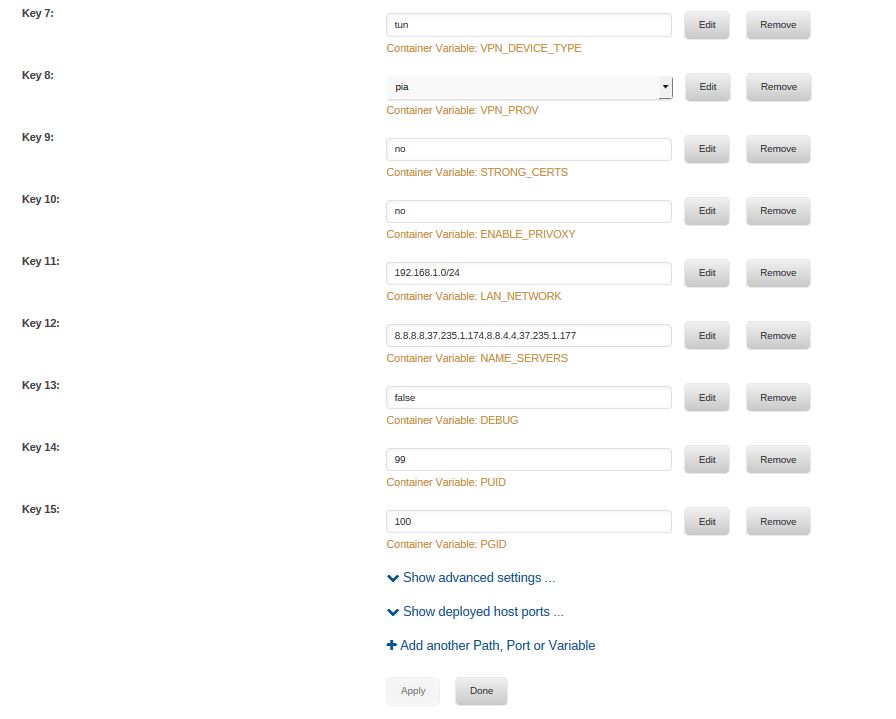
-
PIA https://www.privateinternetaccess.com/ AirVPN https://airvpn.org/ Thanks Jonathan but both website cannot be accessed : SSL_ERROR_ACCESS_DENIED_ALERT It's a nightmare..
-
OK, but how to be sure to subscrive to a PIA VPN provider ?
-
ok so still cert issues there, can you make sure you are downloading the correct files, you should have two files in /config/openvpn:- 1. https://www.usenetserver.com/vpn/software/configs/fra-a02.ovpn - this file is your openvpn config file, download it from this url and paste it into /config/openvpn/ 2. https://www.usenetserver.com/vpn/software/configs/vpn.crt - this is the certificate file, download it from this url and paste it into /config/openvpn/ there should be no other files in /config/openvpn/, if there are then delete them. then restart the docker container and see if it will connect. Hi Binhex, I followed your new instructions and unfortunatelly, problem remains : VPN can't connect. I precise that i have been able to connect through the openvpn plugin, so access to vpn is granted (just in case). Maybe I should subscribe to another one; I really want to make your container work on my unraid server. I attached new supervisor log. Let me know thank for your help ok i see that the ovpn file has an embedded cert, maybe openvpn is getting confused by the fact that a crt file also exists, so please delete all files with a crt extension from /config/openvpn/ directory and restart the container. Hello, I've deleted all the crt files into the config/openvpn server. I restarted container and it still can't started, and supervisor file attached Thanks supervisord.zip
-
ok so still cert issues there, can you make sure you are downloading the correct files, you should have two files in /config/openvpn:- 1. https://www.usenetserver.com/vpn/software/configs/fra-a02.ovpn - this file is your openvpn config file, download it from this url and paste it into /config/openvpn/ 2. https://www.usenetserver.com/vpn/software/configs/vpn.crt - this is the certificate file, download it from this url and paste it into /config/openvpn/ there should be no other files in /config/openvpn/, if there are then delete them. then restart the docker container and see if it will connect. Hi Binhex, I followed your new instructions and unfortunatelly, problem remains : VPN can't connect. I precise that i have been able to connect through the openvpn plugin, so access to vpn is granted (just in case). Maybe I should subscribe to another one; I really want to make your container work on my unraid server. I attached new supervisor log. Let me know thank for your help supervisord.zip

