





allanp81
Members
-
Joined
-
Last visited
Everything posted by allanp81
-
Does your kodi headless have access to that nfs path? And you've added the sources.xml etc?
-
Can't say I've noticed any issues like that personally.
-
Yes, via the command line: Update: curl --data-binary '{ "jsonrpc": "2.0", "method": "VideoLibrary.Scan", "id": "mybash"}' -H 'content-type: application/json;' http://username:[email protected]:8081/jsonrpc Clean: curl --data-binary '{ "jsonrpc": "2.0", "method": "VideoLibrary.Clean", "id": "mybash"}' -H 'content-type: application/json;' http://username:[email protected]:8081/jsonrpc
-
The main reason I use it is because things like Sonarr and Radarr can instruct a kodi client to update the DB when things are downloaded. This means your kodi headless docker can do this so that when you turn on your clients they will already be updated.
-
Mine are configured as file:///picons/%C.png
-
I think I configured my client first and then copied over advancedsettings.xml and sources.xml to the headless docker. When you say nothing happens, what do you mean?
-
@SquidThanks for the info, I've set up a scheduled task to balance the btrfs filesystem on the cache drive once a week. Strange I've never even heard of having to do this.
-
Hmm, I wonder if it's related to my cache pool running out of space that I corrected much earlier that day. My cache pool at the moment has well over 100Gb of free space on it. I'll have a look at the external drive, it's probably failing as it was a cheap piece of kit that's not exactly new! Thanks
-
Thanks, sorry forgot to post the whole thing. downloadbox-diagnostics-20190701-1246.zip
-
I seem to be having out of memory issues that I've never had before. Everything appears to be working ok, first time I had the out of memory error it seemed to kill my VM that I had running. downloadbox-syslog-20190701-0831.zip
-
So strangely this now seems to be working... No idea why as I tried starting afresh and same issue so reverted back to my previous advancedsettings.xml and sources.xml and now it's seemingly working!
-
Nothing to see here...
-
I've tried trashing my appdata entirely and same issue. Either sonarr/lidarr/radarr are sending something weird (which can't be the case as my other clients all respond to a test) or the headless docker has an issue somewhere.
-
Unfortunately nothing in that link seems relevant to my issue. The webserver on my headless docker is working and shows new items that other full clients have added.
-
OK, enabled debug logging and I get this when sending a test from sonarr/radarr/lidarr etc: 2019-05-25 16:15:11.607 T:22479361640192 DEBUG: CWebServer[8080]: request received for /jsonrpc 2019-05-25 16:15:11.621 T:22479361640192 DEBUG: Previous line repeats 1 times. 2019-05-25 16:15:11.621 T:22479361640192 DEBUG: JSONRPC: Value does not match any of the enum values in type
-
Yep, they both claim they were able to successfully talk to it, if I change a port etc. then they say they've failed. Worked fine with the krypton tag. Unfortunately I can't find many logs on the docker etc. to see where it's failing. There may be a way to enable verbose logging on the docker to get more of a clue.
-
Nevermind, opening on a mobile shows the page differently. I have added the leia tag to the run command already and I know it's working as the headless web interface shows updates that I've added via other clients.
-
Oh, the link just seems to take me to the root of the github page
-
What am I supposed to be looking for on that link?
-
I've updated all of my clients and docker to leia but it looks like the headless docker is not longer receiving updates from either sonarr or radarr and from the kodi.log it looks like nothing happens when they attempt to connect to it for update the library.
-
I'm having this same issue and haven't changed anything other than upgrade Unraid. It used to show me load usage etc. but now only shows me battery charge level and estimated time remaining. I'm using an APC Back-UPS ES 700G
-
Yes it seems to be working fine but obviously not reporting a version number anymore.
-
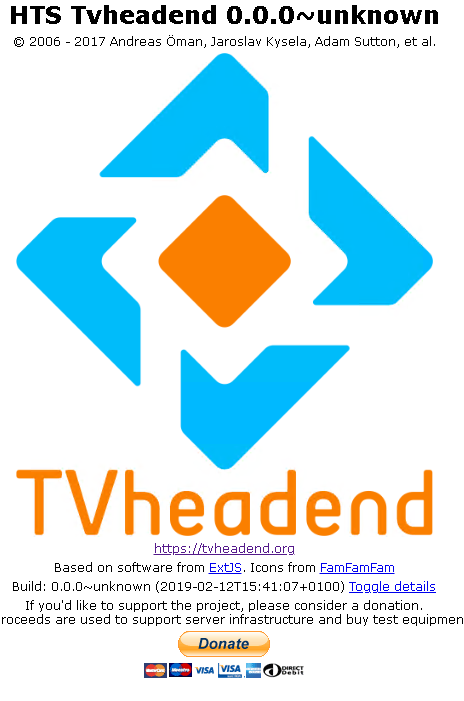
Anyone else seeing this: I'm on "linuxserver/tvheadend:release-4.2" and the last time the docker updated was last night.
-
So I fixed my issue, looks like the update to mysql screwed stuff up. I followed the suggestion here: https://help.nextcloud.com/t/nextcloud-13-php-7-1-mysql-8-error-500/34443/2 and it solved it. The solution was setting [mysqld] default_authentication_plugin=mysql_native_password in my.cnf seems to help.
-
So since a few days ago my nextcloud has stopped working and I just see the following errors in the log: Stack trace: #0 /config/www/nextcloud/lib/private/AppFramework/Utility/SimpleContainer.php(125): OC\AppFramework\Utility\SimpleContainer->resolve('defaultTokenPro...') #1 /config/www/nextcloud/lib/private/ServerContainer.php(132): OC\AppFramework\Utility\SimpleContainer->query('defaultTokenPro...') #2 /config/www/nextcloud/lib/private/AppFramework/Utility/SimpleContainer.php(81): OC\ServerContainer->query('defaultTokenPro...') #3 /config/www/nextcloud/lib/private/AppFramework/Utility/SimpleContainer.php(104): OC\AppFramework\Utility\SimpleContainer->buildClass(Object(ReflectionClass)) #4 /config/www/nextcloud/lib/private/AppFramework/Utility/SimpleContainer.php(125): OC\AppFramework\Utility\SimpleContainer->resolve('OC\\Authenticati...') #5 /config/www/nextcloud/lib/private/ServerContainer.php(132): OC\AppF in /config/www/nextcloud/lib/private/AppFramework/Utility/SimpleContainer.php on line 110 PHP Fatal error: Uncaught OCP\AppFramework\QueryException: Could not resolve defaultTokenProvider! Class defaultTokenProvider does not exist in /config/www/nextcloud/lib/private/AppFramework/Utility/SimpleContainer.php:110 Stack trace: #0 /config/www/nextcloud/lib/private/AppFramework/Utility/SimpleContainer.php(125): OC\AppFramework\Utility\SimpleContainer->resolve('defaultTokenPro...') #1 /config/www/nextcloud/lib/private/ServerContainer.php(132): OC\AppFramework\Utility\SimpleContainer->query('defaultTokenPro...') #2 /config/www/nextcloud/lib/private/AppFramework/Utility/SimpleContainer.php(81): OC\ServerContainer->query('defaultTokenPro...') #3 /config/www/nextcloud/lib/private/AppFramework/Utility/SimpleContainer.php(104): OC\AppFramework\Utility\SimpleContainer->buildClass(Object(ReflectionClass)) #4 /config/www/nextcloud/lib/private/AppFramework/Utility/SimpleContainer.php(125): OC\AppFramework\Utility\SimpleContainer->resolve('OC\\Authenticati...') #5 /config/www/nextcloud/lib/private/ServerContainer.php(132): OC\AppF in /config/www/nextcloud/lib/private/AppFramework/Utility/SimpleContainer.php on line 110 Nothing I try works, any occ command etc. always just returns the same rubbish. I'm using mysql as my db server and that updated the other day so I'm assuming the 2 are related but I'm blowed if I can work out how to resolve this.
