





wmcneil
Members
-
Joined
-
Last visited
Everything posted by wmcneil
-
Thank you for the info. I tried disabling NAT, adding a static route as you suggest, and creating a new peer for my phone using the QR code method. Neither "Remote access to server" nor "remote access to LAN" is working, and all I am trying to do is bring up the unRAID GUI using the local IP address of the unRAID server. I am out of things to try. I am going to have to give openVPN a try. Thanks again for posting the method that is working for you.
-
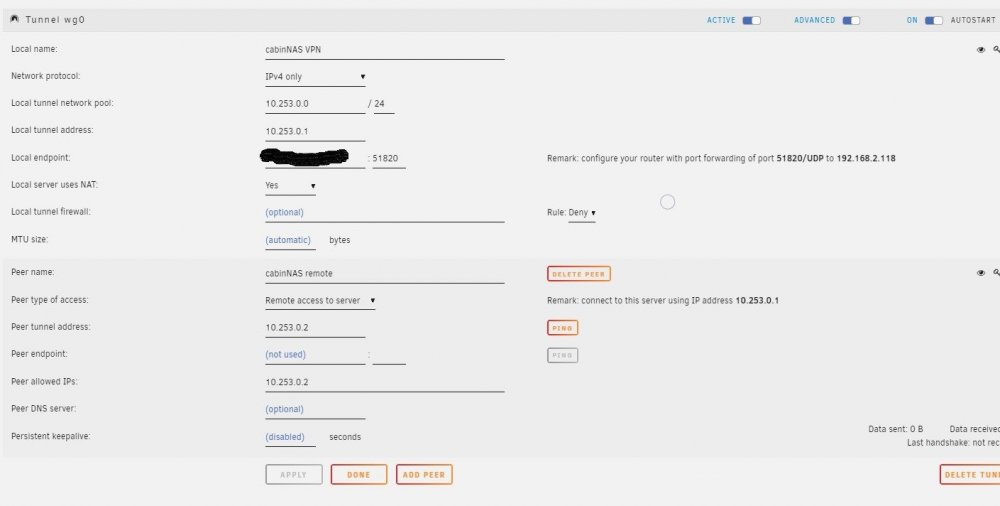
I'm trying to set up WireGuard on my unRAID server, with the most basic access to get things debugged, and I am stuck. I am using a "Remote Access to Server" peer definition (screen shot of unRAID GUI settings attached.) I am using my Android phone as the peer connection (with wifi disabled), and used the QR capture method to create the tunnel configuration on the phone. When I attempt to connect to the local numberic IP of the unRAID server GUI on the phone, the browser is unable to connect. I have double and triple checked that the router is port forwarding to the correct local IP of the unRAID server, using UDP, and the port (51820) in the settings. Don't know what else to try, thanks in advance for any advice.
-
I am attempting to switch from using a needo template to the lsio plex. I am using the CA interface to generate a "clean" template for lsio plex, and then add my customizations. I want to attempt to use my existing Plex database, so I have added a path that maps container path /config to host path /mnt/user/App/Plex/ . The problem is that when I attempt to add the container, it fails and I get a "Error response from daemon: Duplicate mount point '/config'." message. Apparently "under the covers" a mapping of /config to /mnt/user/appdata/plex is occurring, so the mapping that I am explicitly adding is seen as a duplicate mount point. Is there a way to work around this, or am I forced to use the /mnt/user/appdata/plex mapping?
