JWMutant
Members
-
Joined
-
Last visited
-
except when the ssd is not part of the cache pool, and unraid cant restore footage and update the database... I can.
-
Ok so I have been a busy not so young guy. When I first started using frigate I loved the whole idea, loved how easy it was to use and set up. My setup is using an unassigned drive to hold my footage which is an SSD as I didnt want to be spinning up my array for every recording captured. The problem I ran into was I have 2 cameras on a street that sees alot of fitness nuts walking up and down the street, so the SSD started to fill up pretty quick. I didnt want to have to spend each day reviewing and deleting footage in case I missed something important that happened during the night. So I put my thinking cap on and created a rather automated system that archives footage to the array as well as a whole host of other things not including making sure the database doesnt still think the footage is still there when it has been archived. I am almost at the stage where I am ready to do a public release..... anyone want to test it for me? My work in progress https://github.com/JWMutant/frigate-archive
-
All good. Happy to help resolve it to the communities benefit.. I’m still having problems with the tensor docker when it comes to recording footage and am pretty sure by now that it’s not my config. But after trying to problem solve for the past 3 days I’m giving it a break for a day before I tackle it again. It’s basically not capturing any footage. Any in regards to your earlier question I stupidly downloaded a pre-compiled yolov9 which was the original issue with the detector not working. After compiling. V8 myself I had no more problems
-
Turns out it was the detector model I was using. I was using yolov9, after switching to v8 it started working just fine.
-
Yea I removed it but am still getting the same error and a endless restart loop.
-
Thanks very very much for your help and patients. I think I am almost there. For the record when it comes to using my 1080ti I have the following config. But I dont think I have something set up correctly as I am getting the following error : 2026-06-30 17:21:29.010640640 2026-06-30 17:21:29.010578883 [W:onnxruntime:, transformer_memcpy.cc:83 ApplyImpl] 14 Memcpy nodes are added to the graph main_graph for CUDAExecutionProvider. It might have negative impact on performance (including unable to run CUDA graph). Set session_options.log_severity_level=1 to see the detail logs before this message. 2026-06-30 17:21:29.013960480 2026-06-30 17:21:29.013926115 [E:onnxruntime:, inference_session.cc:2094 Initialize] This session cannot use the graph capture feature as requested by the user as all compute graph nodes have not been partitioned to the CUDAExecutionProvider 2026-06-30 17:21:29.021954998 Process frigate.detector:onnx: 2026-06-30 17:21:29.021960147 Traceback (most recent call last): 2026-06-30 17:21:29.021962161 File "/usr/lib/python3.11/multiprocessing/process.py", line 314, in _bootstrap 2026-06-30 17:21:29.021963434 self.run() 2026-06-30 17:21:29.021965027 File "/opt/frigate/frigate/object_detection/base.py", line 143, in run 2026-06-30 17:21:29.021966590 object_detector = LocalObjectDetector(detector_config=self.detector_config) 2026-06-30 17:21:29.021971950 ^^^^^^^^^^^^^^^^^^^^^^^^^^^^^^^^^^^^^^^^^^^^^^^^^^^^^^^^^ 2026-06-30 17:21:29.021997579 File "/opt/frigate/frigate/object_detection/base.py", line 62, in init 2026-06-30 17:21:29.021998992 self.detect_api = create_detector(detector_config) 2026-06-30 17:21:29.022000124 ^^^^^^^^^^^^^^^^^^^^^^^^^^^^^^^^ 2026-06-30 17:21:29.022035772 File "/opt/frigate/frigate/detectors/__init__.py", line 18, in create_detector 2026-06-30 17:21:29.022036844 return api(detector_config) 2026-06-30 17:21:29.022037886 ^^^^^^^^^^^^^^^^^^^^ 2026-06-30 17:21:29.022039108 File "/opt/frigate/frigate/detectors/plugins/onnx.py", line 39, in init 2026-06-30 17:21:29.022058646 self.runner = get_optimized_runner( 2026-06-30 17:21:29.022059738 ^^^^^^^^^^^^^^^^^^^^^ 2026-06-30 17:21:29.022061020 File "/opt/frigate/frigate/detectors/detection_runners.py", line 592, in get_optimized_runner 2026-06-30 17:21:29.022062042 ort.InferenceSession( 2026-06-30 17:21:29.022063535 File "/usr/local/lib/python3.11/dist-packages/onnxruntime/capi/onnxruntime_inference_collection.py", line 472, in init 2026-06-30 17:21:29.022064797 self._create_inference_session(providers, provider_options, disabled_optimizers) 2026-06-30 17:21:29.022066471 File "/usr/local/lib/python3.11/dist-packages/onnxruntime/capi/onnxruntime_inference_collection.py", line 561, in createinference_session 2026-06-30 17:21:29.022087260 sess.initialize_session(providers, provider_options, disabled_optimizers) 2026-06-30 17:21:29.022089625 onnxruntime.capi.onnxruntime_pybind11_state.Fail: [ONNXRuntimeError] : 1 : FAIL : This session cannot use the graph capture feature as requested by the user as all compute graph nodes have not been partitioned to the CUDAExecutionProvider mqtt: enabled: false ffmpeg: hwaccel_args: preset-nvidia detectors: onnx: type: onnx device: GPU-6174797f-a41e-9293-c52f-5abb9464f868 providers: - CUDAExecutionProvider cuda_graphs: false model: path: /config/model_cache/yolov9-t-320.onnx model_type: yolo-generic width: 320 height: 320 input_tensor: nchw input_dtype: float labelmap_path: /labelmap/coco-80.txt
-
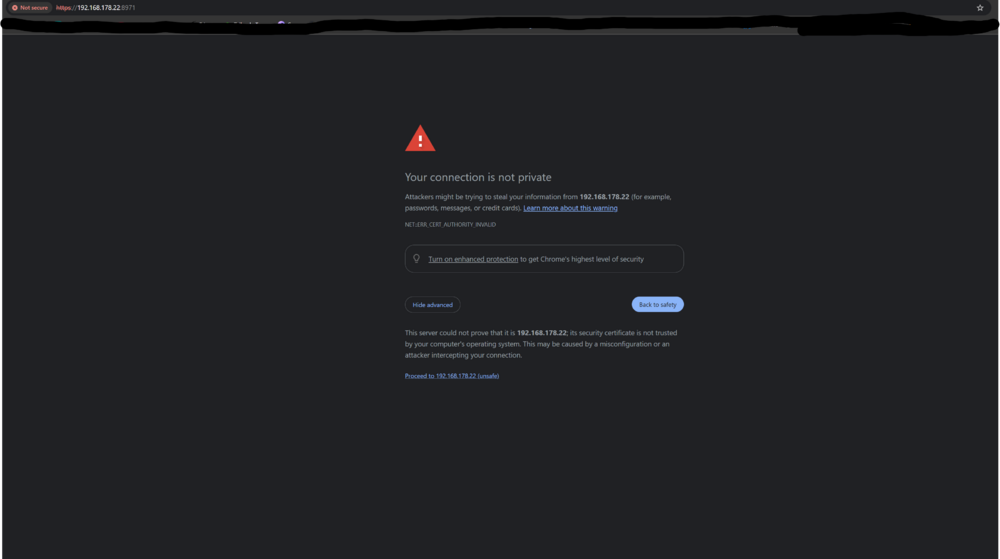
I worked out what the problem was/is. Frigate 0.17 serves the UI over HTTPS on port 8971, not HTTP. But when you left click on the Frigate docker and select webui it automatically launches a new webpage as http://192.168.178.22:8971. But what it should be doing is opening a new webpage as https://192.168.178.22:8971. I get the warning but at least I can open it now. Not sure if it is defaulting the new webpage to http because of something on my end or if its how the docker does things.
-
From what I can work out the internal port mapping is not correct. But am not sure how to resolve it purely because I haven’t changed anything in regards the initial set up. I haven’t changed any ports or anything like that.
-
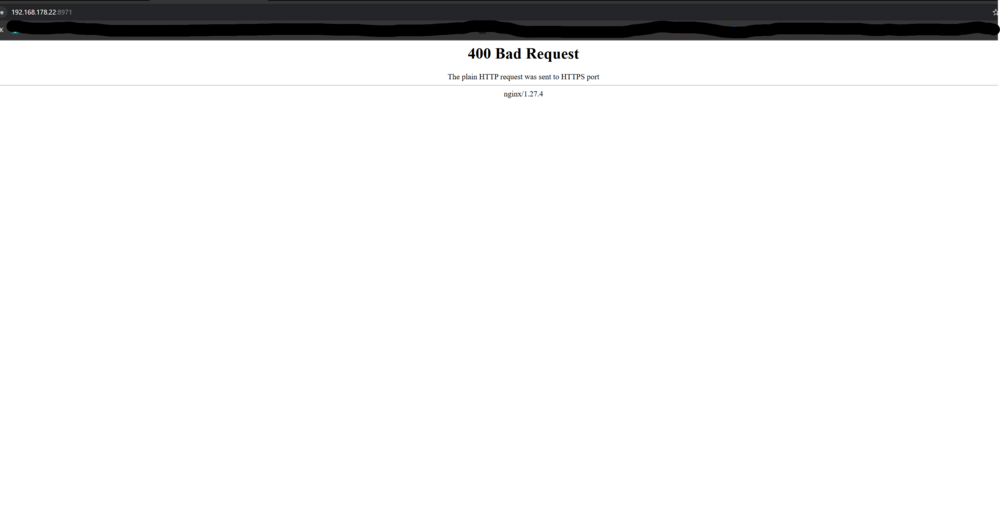
Yes I haven’t gotten as far as setting up the detector because I’m getting the 400 error when trying to access the UI.
-
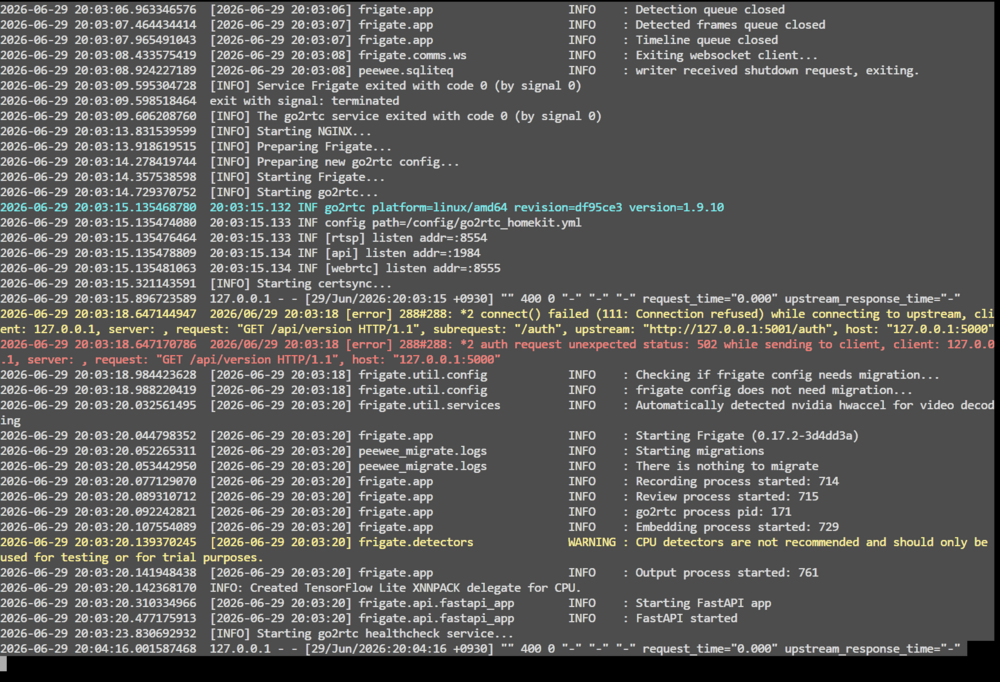
s6-rc: info: service frigate successfully stopped s6-rc: info: service go2rtc: stopping s6-rc: info: service frigate-log: stopping s6-rc: info: service frigate-log successfully stopped s6-rc: info: service go2rtc successfully stopped s6-rc: info: service prepare: stopping s6-rc: info: service go2rtc-log: stopping s6-rc: info: service prepare successfully stopped s6-rc: info: service go2rtc-log successfully stopped s6-rc: info: service log-prepare: stopping s6-rc: info: service s6rc-fdholder: stopping s6-rc: info: service log-prepare successfully stopped s6-rc: info: service legacy-cont-init: stopping s6-rc: info: service s6rc-fdholder successfully stopped s6-rc: info: service legacy-cont-init successfully stopped s6-rc: info: service fix-attrs: stopping s6-rc: info: service fix-attrs successfully stopped s6-rc: info: service s6rc-oneshot-runner: stopping s6-rc: info: service s6rc-oneshot-runner successfully stopped ERROR: driverInitFileInfo 578 result=11ERROR: init 664 result=11ERROR: init 250 result=11s6-rc: info: service s6rc-fdholder: starting s6-rc: info: service s6rc-oneshot-runner: starting s6-rc: info: service s6rc-oneshot-runner successfully started s6-rc: info: service fix-attrs: starting s6-rc: info: service s6rc-fdholder successfully started s6-rc: info: service fix-attrs successfully started s6-rc: info: service legacy-cont-init: starting s6-rc: info: service legacy-cont-init successfully started s6-rc: info: service prepare: starting s6-rc: info: service log-prepare: starting s6-rc: info: service log-prepare successfully started s6-rc: info: service nginx-log: starting s6-rc: info: service go2rtc-log: starting s6-rc: info: service frigate-log: starting s6-rc: info: service certsync-log: starting s6-rc: info: service nginx-log successfully started s6-rc: info: service go2rtc-log successfully started s6-rc: info: service frigate-log successfully started s6-rc: info: service certsync-log successfully started s6-rc: info: service prepare successfully started s6-rc: info: service go2rtc: starting s6-rc: info: service go2rtc successfully started s6-rc: info: service go2rtc-healthcheck: starting s6-rc: info: service frigate: starting s6-rc: info: service go2rtc-healthcheck successfully started s6-rc: info: service frigate successfully started s6-rc: info: service nginx: starting s6-rc: info: service nginx successfully started s6-rc: info: service certsync: starting s6-rc: info: service certsync successfully started s6-rc: info: service legacy-services: starting s6-rc: info: service legacy-services successfully started 2026-06-29 20:03:06.916540896 [2026-06-29 20:03:06] frigate.record.maintainer INFO : Exiting recording maintenance... 2026-06-29 20:03:06.963346576 [2026-06-29 20:03:06] frigate.app INFO : Detection queue closed 2026-06-29 20:03:07.464434414 [2026-06-29 20:03:07] frigate.app INFO : Detected frames queue closed 2026-06-29 20:03:07.965491043 [2026-06-29 20:03:07] frigate.app INFO : Timeline queue closed 2026-06-29 20:03:08.433575419 [2026-06-29 20:03:08] frigate.comms.ws INFO : Exiting websocket client... 2026-06-29 20:03:08.924227189 [2026-06-29 20:03:08] peewee.sqliteq INFO : writer received shutdown request, exiting. 2026-06-29 20:03:09.595304728 [INFO] Service Frigate exited with code 0 (by signal 0) 2026-06-29 20:03:09.598518464 exit with signal: terminated 2026-06-29 20:03:09.606208760 [INFO] The go2rtc service exited with code 0 (by signal 0) 2026-06-29 20:03:13.831539599 [INFO] Starting NGINX... 2026-06-29 20:03:13.918619515 [INFO] Preparing Frigate... 2026-06-29 20:03:14.278419744 [INFO] Preparing new go2rtc config... 2026-06-29 20:03:14.357538598 [INFO] Starting Frigate... 2026-06-29 20:03:14.729370752 [INFO] Starting go2rtc... 2026-06-29 20:03:15.135468780 20:03:15.132 INF go2rtc platform=linux/amd64 revision=df95ce3 version=1.9.10 2026-06-29 20:03:15.135474080 20:03:15.133 INF config path=/config/go2rtc_homekit.yml 2026-06-29 20:03:15.135476464 20:03:15.133 INF [rtsp] listen addr=:8554 2026-06-29 20:03:15.135478809 20:03:15.134 INF [api] listen addr=:1984 2026-06-29 20:03:15.135481063 20:03:15.134 INF [webrtc] listen addr=:8555 2026-06-29 20:03:15.321143591 [INFO] Starting certsync... 2026-06-29 20:03:15.896723589 127.0.0.1 - - [29/Jun/2026:20:03:15 +0930] "" 400 0 "-" "-" "-" request_time="0.000" upstream_response_time="-" 2026-06-29 20:03:18.647144947 2026/06/29 20:03:18 [error] 288#288: *2 connect() failed (111: Connection refused) while connecting to upstream, client: 127.0.0.1, server: , request: "GET /api/version HTTP/1.1", subrequest: "/auth", upstream: "http://127.0.0.1:5001/auth", host: "127.0.0.1:5000" 2026-06-29 20:03:18.647170786 2026/06/29 20:03:18 [error] 288#288: *2 auth request unexpected status: 502 while sending to client, client: 127.0.0.1, server: , request: "GET /api/version HTTP/1.1", host: "127.0.0.1:5000" 2026-06-29 20:03:18.984423628 [2026-06-29 20:03:18] frigate.util.config INFO : Checking if frigate config needs migration... 2026-06-29 20:03:18.988220419 [2026-06-29 20:03:18] frigate.util.config INFO : frigate config does not need migration... 2026-06-29 20:03:20.032561495 [2026-06-29 20:03:20] frigate.util.services INFO : Automatically detected nvidia hwaccel for video decoding 2026-06-29 20:03:20.044798352 [2026-06-29 20:03:20] frigate.app INFO : Starting Frigate (0.17.2-3d4dd3a) 2026-06-29 20:03:20.052265311 [2026-06-29 20:03:20] peewee_migrate.logs INFO : Starting migrations 2026-06-29 20:03:20.053442950 [2026-06-29 20:03:20] peewee_migrate.logs INFO : There is nothing to migrate 2026-06-29 20:03:20.077129070 [2026-06-29 20:03:20] frigate.app INFO : Recording process started: 714 2026-06-29 20:03:20.089310712 [2026-06-29 20:03:20] frigate.app INFO : Review process started: 715 2026-06-29 20:03:20.092242821 [2026-06-29 20:03:20] frigate.app INFO : go2rtc process pid: 171 2026-06-29 20:03:20.107554089 [2026-06-29 20:03:20] frigate.app INFO : Embedding process started: 729 2026-06-29 20:03:20.139370245 [2026-06-29 20:03:20] frigate.detectors WARNING : CPU detectors are not recommended and should only be used for testing or for trial purposes. 2026-06-29 20:03:20.141948438 [2026-06-29 20:03:20] frigate.app INFO : Output process started: 761 2026-06-29 20:03:20.142368170 INFO: Created TensorFlow Lite XNNPACK delegate for CPU. 2026-06-29 20:03:20.310334966 [2026-06-29 20:03:20] frigate.api.fastapi_app INFO : Starting FastAPI app 2026-06-29 20:03:20.477175913 [2026-06-29 20:03:20] frigate.api.fastapi_app INFO : FastAPI started 2026-06-29 20:03:23.830692932 [INFO] Starting go2rtc healthcheck service... 2026-06-29 20:04:16.001587468 127.0.0.1 - - [29/Jun/2026:20:04:16 +0930] "" 400 0 "-" "-" "-" request_time="0.000" upstream_response_time="-"
-
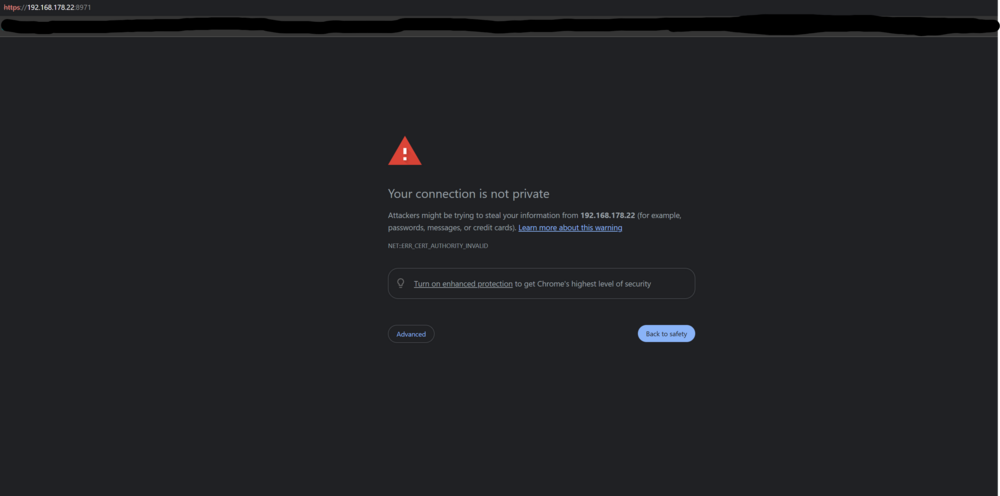
Thanks very much for the info, it really helped. Just out of interest has there been an up in the last 20 odd hours that may have broken something? Everything was working fine yesterday. Today I thought I would start from scratch like I have been doing over the past 3 days, but today Im getting the following. 2026-06-29 19:39:20.070663773 127.0.0.1 - - [29/Jun/2026:19:39:20 +0930] "" 400 0 "-" "-" "-" request_time="0.000" upstream_response_time="-" 2026-06-29 19:39:43.535285958 192.168.178.20 - - [29/Jun/2026:19:39:43 +0930] "GET / HTTP/1.1" 400 657 "-" "Mozilla/5.0 (Windows NT 10.0; Win64; x64) AppleWebKit/537.36 (KHTML, like Gecko) Chrome/149.0.0.0 Safari/537.36" "-" request_time="0.000" upstream_response_time="-" 2026-06-29 19:39:43.918769616 192.168.178.20 - - [29/Jun/2026:19:39:43 +0930] "GET /favicon.ico HTTP/1.1" 400 657 "http://192.168.178.22:8971/" "Mozilla/5.0 (Windows NT 10.0; Win64; x64) AppleWebKit/537.36 (KHTML, like Gecko) Chrome/149.0.0.0 Safari/537.36" "-" request_time="0.000" upstream_response_time="-" 2026-06-29 19:40:20.167602798 127.0.0.1 - - [29/Jun/2026:19:40:20 +0930] "" 400 0 "-" "-" "-" request_time="0.000" upstream_response_time="-" To get past that page I end up needing to place my cursor at the start of the address which is simply my ip:8971 and press enter. This then gives me the following page.
-
I have a general question that leads to more questions. I have started playing around with Frigate and have the Nvidia tensorRT branch. I have a 1080TI that I have in my unraid system that I generally use for encoding and what not so I am using it for decoding and encoding in frigate. I have the --runtime=nvidia paramater added to the extra parameters section and have the and have the GPU id in the NVIDIA_VISIBLE_DEVICES section with compute,utility,video in the capabilities section . Could I use the 1080TI for detecting as well or is it not powerful enough and should go down the path of getting a Coral TPU instead? I havent really played around much with frigate before so have very limited knowledge on what I should put in the config file and what additional variables I would need to add to the container setup. I have looked looked at the documentation in regards ONNX which I believe I would need to use if I wanted to use my GPU but same in way over my head from there. Thanks in advance.
-
Morning all, I currently have 2 x LSI SAS2008 cards in my system driving 14 HDD's and 1 x SSD's for a total of 15 drivers. My system is a thread ripper system so PCIe lanes isnt really an issue for me. The problem I have is that I currently have 2 x Video cards which I need and 2 x HBA cards which due to the amount of drives I have I need. I want to add a 4 port network card to my system but dont have enough PCIe slots. I know I could add an expander but dont really have room in my system for one. I am thinking of getting an LSI SAS3416 card which would negate needing two LSI SAS2008 cards. Will I be doing my system a disservice by making the change from SAS2008 to SAS3416?
-
Yea the audio was part of the problem. Turns out if your Video card has USB type C on it as well you have to pass through the whole lot Video card, Sound, USB controller and Bus controller. If you dont, the card will not reset.
-
Yes my heart is slowly starting to return to its normal Rythm