





Gizmotoy
Members
-
Joined
-
Last visited
-
I keep losing the webpage status while balancing operations are ongoing. I can see in the log ` /var/log/unbalanced.log` that move operations are still in progress, but it would be nice to be able to monitor progress on the web UI. I see lots of errors around web sockets, like these: 2024/12/11 09:05:51 unable to read websocket message: websocket: close 1006 (abnormal closure): unexpected EOF 2024/12/10 19:22:54 unable to read websocket message: websocket: close 1006 (abnormal closure): unexpected EOF Or is there a way to re-connect to an in-progress operation?
-
Rebuild finished successfully. I then formatted the drive I added. Then I stopped and started the array a few times to check that Disk1 mounts properly, and it did. I re-enabled Docker to get the server back to fully-operational, and kicked off a parity check just as final confirmation everything is good again (running without issue so far). I appreciate the help getting things back up and running!
-
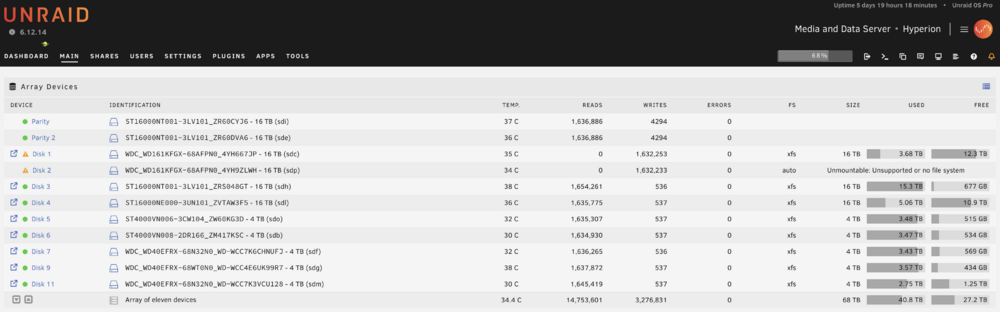
Ok, done, and disks are rebuilding. disk2 is the only unmountable disk. Before I format, figured I'd post one last diags Also, to be clear, I should probably be gentle with the server right now because I'm without parity protection, correct? Since 2x drives are rebuilding? hyperion-diagnostics-20241206-1101.zip
-
Done. disk1 emulated, but back to good state (mounted correctly). disk2 emulated and unformatted. No action taken beyond starting the array in this state and producing the diags. hyperion-diagnostics-20241206-1048.zip
-
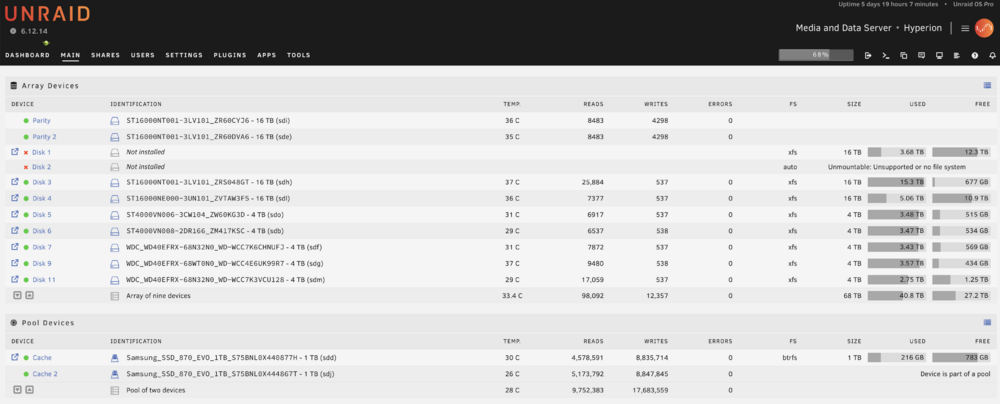
Sure, no worries. Diag attached. Current state: disk1 - assigned, but somehow corrupted disk2 - unassigned (and "missing") hyperion-diagnostics-20241206-1025.zip
-
How do I actually trigger the rebuild of disk1? When I reassign disk2 I’m back at the initial state from my first post. Are the steps then actually: 1) Stop the array 2) reassign disk 2 3) start the array Now disk1 is still invalid/corrupted, and disk2 is back in unformatted state. 4) stop the array 5) unassign disk 1 6) start the array disk1 is now in emulated state and disk2 is unformatted 7) stop the array 8 reassign disk1 9) start the array disk1 is now emulated and rebuilding, disk2 is unformatted is that about right?
-
Sorry, I'm a little slow here and want to move cautiously. Just to confirm: Disk1 - Recently-rebuilt disk. Should have data on it, but has some kind of MBR issue and won't mount. Disk2 - Newly added disk (precleared, but unformatted) in a brand new, previously-unused slot. Was not a previous disk in the system, so would have no data and does not need to be rebuilt. Unfortunately I found out about the problem with Disk1 when I added Disk2 to the system and started the array, complicating the problem. Unfortunately it seems like I can't just go back to the state without Disk2 to deal with the problem with Disk1 on its own (if I remove the Disk2 assignment, Unraid complains it is missing as the most recent diagnostic logs show). I assume we're trying to get to a place where disk1 gets rebuilt again? I'm not sure how to do that with disk2 in its current state.
-
I see. Ok, I unassigned disk2, then started the array with disk2 missing. It did not change the error associated with disk1. Attached are the new diagnostics. I did not run the check filesystem step on disk1 yet. The link is not clear if it should be run in standard mode or in maintenance mode. Since the repair could change the contents (I think? Or maybe invalidate current parity?), I wanted to be really clear how to run it. So to clarify: start array in standard mode, run check filesystem from the webgui? hyperion-diagnostics-20241206-0658.zip
-
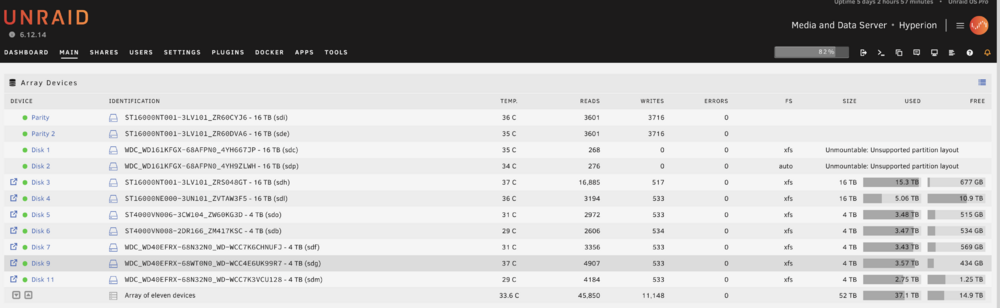
Hello, I recently got two drives to add to my system, which I first precleared. For the first drive, I replaced an existing drive in the system (Disk 1). I let data rebuild complete on the drive. All looked good and rebuild completed successfully. For the second drive, I stopped the array, added it as a new drive in an empty slot (Disk 2), and again started the array. Both the recently-rebuilt, and the newly added drive, now say "Unmountable: Unsupported partition layout". Disk 1 shows xfs (correct, that's what the prior drive was) and Disk 2 shows auto. But both show this unmountable error and a request to reformat the drives. I stopped the array without formatting. I'm not sure how to proceed. Formatting will delete all data on the rebuilt drive, but I do need to format the new drive. What do I do? Screenshot and diagnostic log attached. Here are the relevant fdisk entries: sdc is Disk 1, which was recently rebuilt. It shows a Linux Filesystem Disk /dev/sdc: 14.55 TiB, 16000900661248 bytes, 31251759104 sectors Disk model: WDC WD161KFGX-68 Units: sectors of 1 * 512 = 512 bytes Sector size (logical/physical): 512 bytes / 4096 bytes I/O size (minimum/optimal): 4096 bytes / 4096 bytes Disklabel type: gpt Disk identifier: 8249EC25-BC98-446C-BACF-B85E6F06A273 Device Start End Sectors Size Type /dev/sdc1 64 31251759070 31251759007 14.6T Linux filesystem sdp is Disk 2, the one I just added to an empty slot as a new drive. It shows unformatted. Disk /dev/sdp: 14.55 TiB, 16000900661248 bytes, 31251759104 sectors Disk model: WDC WD161KFGX-68 Units: sectors of 1 * 512 = 512 bytes Sector size (logical/physical): 512 bytes / 4096 bytes I/O size (minimum/optimal): 4096 bytes / 4096 bytes Disklabel type: dos Disk identifier: 0x00000000 Device Boot Start End Sectors Size Id Type /dev/sdp1 1 4294967295 4294967295 2T 0 Empty Partition 1 does not start on physical sector boundary. Perhaps worth mentioning that sdk is a precleared warm spare, so is not expected to have a filesystem. I saw a vaguely similar post where the output of lsblk was requested, so here that is (run without the array started). Seems like sdc1 being 2T is indicative of the problem here. Presumably that should be 14.6T. This conflicts with what fdisk says above for the same drive, though, so I am confused. root@Hyperion:~# lsblk NAME MAJ:MIN RM SIZE RO TYPE MOUNTPOINTS loop0 7:0 0 63.5M 1 loop /lib loop1 7:1 0 348.5M 1 loop /usr sda 8:0 1 3.7G 0 disk └─sda1 8:1 1 3.7G 0 part /boot sdb 8:16 0 3.6T 0 disk └─sdb1 8:17 0 3.6T 0 part sdc 8:32 0 14.6T 0 disk └─sdc1 8:33 0 2T 0 part sdd 8:48 0 931.5G 0 disk └─sdd1 8:49 0 931.5G 0 part sde 8:64 0 14.6T 0 disk └─sde1 8:65 0 14.6T 0 part sdf 8:80 0 3.6T 0 disk └─sdf1 8:81 0 3.6T 0 part sdg 8:96 0 3.6T 0 disk └─sdg1 8:97 0 3.6T 0 part sdh 8:112 0 14.6T 0 disk └─sdh1 8:113 0 14.6T 0 part sdi 8:128 0 14.6T 0 disk └─sdi1 8:129 0 14.6T 0 part sdj 8:144 0 931.5G 0 disk └─sdj1 8:145 0 931.5G 0 part sdk 8:160 0 14.6T 0 disk └─sdk1 8:161 0 2T 0 part sdl 8:176 0 14.6T 0 disk └─sdl1 8:177 0 14.6T 0 part sdm 8:192 0 3.6T 0 disk └─sdm1 8:193 0 3.6T 0 part sdn 8:208 0 3.6T 0 disk └─sdn1 8:209 0 3.6T 0 part sdo 8:224 0 3.6T 0 disk └─sdo1 8:225 0 3.6T 0 part sdp 8:240 0 14.6T 0 disk └─sdp1 8:241 0 2T 0 part sr0 11:0 1 1024M 0 rom hyperion-diagnostics-20241205-1842.zip

-
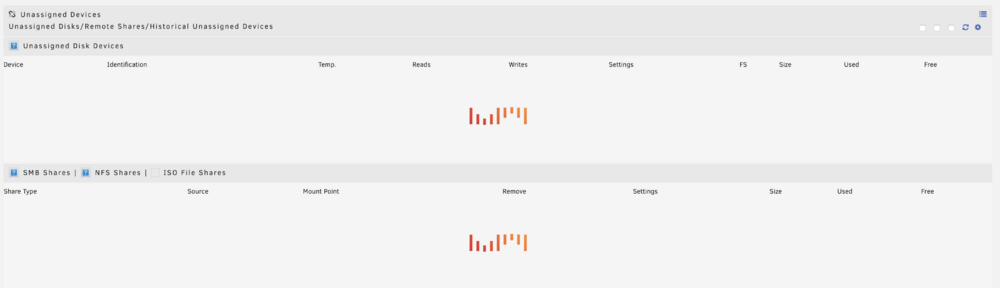
Update w/ Answer: This was a browser cache issue, somehow, simultaneously between both Safari and Chrome. Clearing website data for both browsers resolved the issue for both devices. Weird they would both become corrupted somehow at the same time. Recently my Unassigned Devices section on the Unraid main page simply display the "waiting"/"loading" animation and never populate. There was an update for the UD plugin so I installed that, but the behavior remains. I attached my diagnostics file after a clean boot. I hadn't even started the array yet and the behavior was already there. I use UD for easily tracking and pre clearing my warm spares, so I don't have any devices it's supposed to automatically mount to see if they're working or not. Any clues what is going on here? hyperion-diagnostics-20241110-1616.zip
-
I decided to give the mover path a try. It was trickier than I expected because was unfamiliar with the mover settings. For anyone finding this later, you can't just change the primary from Cache to Array and then run the mover. Nothing happens. You have to keep the Primary as Cache, then the secondary as Array. Then you need to set the mover direction to Cache -> Array. Then later when the new pool is ready you reverse the mover direction: Array -> Cache. Notably I had to run the mover two times each way even though there was nothing accessing the cache drive, nor was docker or any VMs running. Strange. In any case, it worked pretty well.
-
Got it. I figured it wasn't quite as easy as just replacing the drives, but was hopeful regardless. For the direct copy latter case you mentioned, what would that process look like? Install the new SSDs Create a new 2-drive cache pool Copy the files over (how would this work, just `cp` to `/mnt/driveX/` ?) Remove the original pool Remove the drives Something like that?
-
Hello, I recently upgraded the CPU, Motherboard, etc. in my Unraid server. Some things are super fast, but I believe I've uncovered a substantial bottleneck in the system: my spinning cache drives. I can frequently peg my Intel 12700k at 100%, as reported by Unraid Dashboard, just doing some docker tasks. If I view htop during that period, it shows CPU utilization under 10%. My understanding is that Unraid's CPU calculation includes IOWAITs while htop does not, so the processor is likely stalling waiting on drive access. During this period I can see my array drives are idle (no read/writes) and my cache drives are thrashing like crazy. So I'd like to replace my cache drives with SSDs. I currently have a pair of 4TB drives in a redundant pool as Cache and Cache 2. I only use about 256GB, I just had 4TB drives lying around. I don't want to buy 4TB SSDs to swap them out, so I assume I can't simply stop the array and assign one of the SSDs into the cache drive slot and have it work/rebuild. What is the best process to accomplish this? If it matters, I store appdata and system solely on the Cache. I do have a few shares set up as Cache -> Array.
-
Yes, with the right cable(s). I have only SATA drives in mine.
-
I populated with 3x Dell 4Y5H1 SAS3 (LSI SAS3008) cards from artofserver because they were super cheap on clearance. Works excellently. 2x train at full PCIe3 speed, all lanes (8). The last trains at full PCIe3 speed, but at 4x lanes. No BIOS modifications required. I use spinning drives so don't think I'd max out the controller even if I populate all 8 drives on it, which I do not plan to do. It's a little bit annoying because I should have just been able to use the built-in ports on the motherboard, but this just worked immediately with no fussing and I realized there's some value in having similar hardware in the path for all the drives. Bought a couple spare cards for later just in case.



