





coltonc18
Members
-
Joined
-
Last visited
-
That seems to be allowing it to work, strange that one server uses those DNS servers just fine, and this one is having issues with it. Thanks!
-
I am, and have tried, but it wont let me. I get this error everytime I try. plugin: installing: unRAIDServer.plg Executing hook script: pre_plugin_checks plugin: downloading: unRAIDServer.plg ... plugin: unRAIDServer.plg download failure: Network failure Executing hook script: post_plugin_checks
-
Helllo everyone, Not sure what exactly has happened here. I have two Unraid servers, I can access both via WebUI, and one can do docker and OS updates but the other one can't it just says it can't connect to network, and can't connect to GitHub. This server has been around for years, and nothing has changed that I know of to cause this. I tried searching around and following what was said there, but I wasn't finding anything that helped. Static IP is set, reboot server, reboot router. Also it seems when I turn off docker and turn it back on, it'll have internet for a short time before it goes away. Any thoughts? Thanks! tower-diagnostics-20250709-1450.zip
-
Thank you sooo much!! That was it, I removed it from the template and updated the USB manager and it's working now!!
-
Not sure what you mean here, once I attach the device manually it does show. I have about 30 zigbee devices on my HA, and its a pain when my zigbee system isnt working only to realize that the USB isnt showing as attached for whatever reason. Once I attach it, it starts working within a min or so.
-
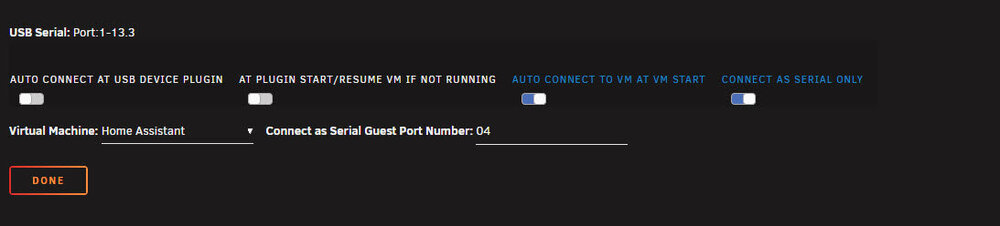
I just force stopped the VM, and restarted it...the zigbee was not added with the rest. Here is the entire log of the VM from start, no errors that I could see. https://pastebin.com/eQ1u1SRv Here is USB manager, and the settings setup for that device, is one of the settings wrong?

-
Anyone have any thoughts?
-
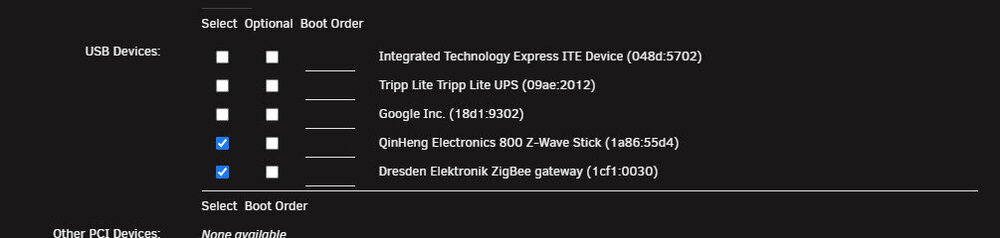
Hello, Hoping someone can help me address this issue. I run Home Assistant in a VM, and have two USB's that run in it. A Z wave and Zigbee switch. The Z wave switch loads into it fine, and when the server restarts it loads into it automatically like it should. The Zigbee switch will load into it if I do it manually, but wont do it automatically on restart. I am trying to correct that. Any thoughts? Here are the details of my VM <hostdev mode='subsystem' type='usb' managed='no'> <source> <vendor id='0x1a86'/> <product id='0x55d4'/> <address bus='1' device='6'/> </source> <alias name='hostdev0'/> <address type='usb' bus='0' port='1'/> </hostdev><hostdev mode='subsystem' type='usb' managed='no'> <source> <vendor id='0x1cf1'/> <product id='0x0030'/> <address bus='1' device='7'/> </source> <alias name='hostdev1'/> <address type='usb' bus='0' port='2'/> </hostdev> Thanks!! -Chase

-
This is what it is showing, but I did press this on the keyboard to get it to boot, because I had to plug in the keyboard to get it to exit memtest, and then it brought up the unraid boot menu.
-
ok, I can do that later today. Assuming that does correct the issue. What actions should I take from there? I'm just asking now because my USB is mounted inside my case in my rack, and i'd like to be able to do it all in one session if I could. Are there certain files I would need to copy into the stock image to retain my disc configs?
-
I don't keep a keyboard connected to this server. I have to grab one and plug it in to cancel it. So it'll boot to unraid.
-
Sorry, I was thinking it was just a setting I screwed up. Here they are. plex-diagnostics-20250112-1513.zip
-
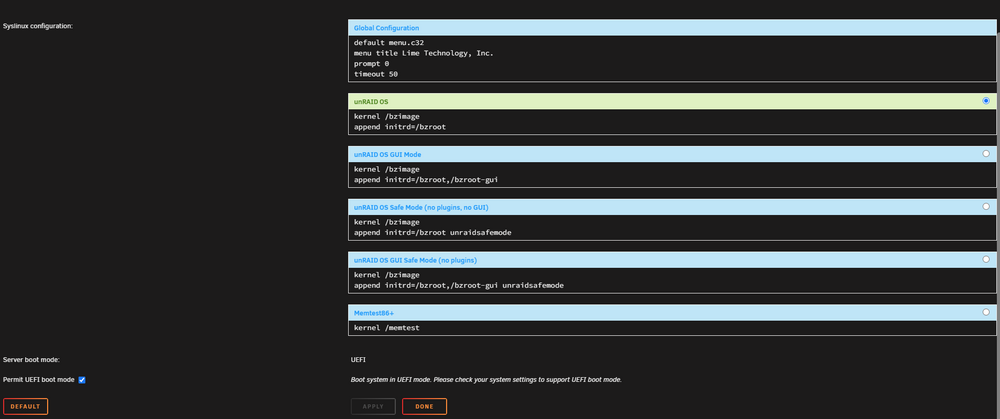
I was in there earlier....I just pulled it back up here is what it says. It looks like I have unraid as the default. default menu.c32 menu title Lime Technology, Inc. prompt 0 timeout 50 label unRAID OS menu default kernel /bzimage append initrd=/bzroot label unRAID OS GUI Mode kernel /bzimage append initrd=/bzroot,/bzroot-gui label unRAID OS Safe Mode (no plugins, no GUI) kernel /bzimage append initrd=/bzroot unraidsafemode label unRAID OS GUI Safe Mode (no plugins) kernel /bzimage append initrd=/bzroot,/bzroot-gui unraidsafemode label Memtest86+ kernel /memtest
-
How do I stop this? I had a flash failure about a month or 2 ago and got a new flash loaded in and running, but it seems like ever since then when I reboot the server it boots up and tries to do a memtest automatically. Then I need to hook a keyboard to it, and cancel it, and then click the unraid OS, and it boots fine. How do I stop this, or remove Memtest completely from the Flash so it will just boot to Unraid? Thanks!
-
looks like removing the plugin and reinstalling did it..... The upgrade got hung up trying to upgrade third party drivers after that, but I cancelled the upgrade, and redid it, and that seems to have done it. It didn't recognize any issues at that point. Thanks!



