





PixelPrint
Members
-
Joined
-
Last visited
-
Well the self hosted version isn't usable also, because it has no login protection at all, everyone can use it unlimited.... PS: I find hilarious that they don't use their tool to proofread their stuff...

-
On my 64gb server i usually have 16gb free, but sometimes i launch a heavy operation and then everything freezes for OOM. I only have btrfs drives in raid1: the instructions say that it can't be done. I ignored the instructions and I got in the syslog, would be that a problem? Otherwise at work i have many "useless" 16gb usb drives, i could put that there (i have hundreds of them, i don't care if they break, the important is that i don't get freeze for OOM errors that once monthly) edit: from the settings page i see that the swap is not in use so yes, placing it on a btrfs raid1 drive, as the instructions said, won't work
-
One month later I finally had the time to open the server and use this as an excuse to change the sata SSD with a more expensive but faster nvme one. I did a full surface scan with hd sentinel but it looks like the drive was working perfectly 😅 as you said probably it was a temporary cable/connection issue that went away the moment I plugged a different one
-
ok i hope in the weekend i have time to take it out and see what happens if i switch the sata cables (of course i installed the server in the most inconvenient place of the house where i need to disassemble everything to take it out)
-
I see a lot of unnecessary (shares configs, docker, qemu VMs) PII in the diagnostics, here are the relevant parts: syslog.txt TEAM_T2532TB_TPBFxxx-2024-04-03 ssd2 (sdb).txt btrfs-usage.txt
-
I have two cache drives set as RAID1 via BTRFS. Today I misclicked on the icon and i accidentally opened the logs of one of them. I see extremely worring strings like: Sep 10 12:54:05 Server kernel: I/O error, dev sdb, sector 541844120 op 0x0:(READ) flags 0x80700 phys_seg 4 prio class 2 Sep 10 12:54:05 Server kernel: ata1: EH complete Sep 10 12:54:05 Server kernel: BTRFS info (device sdb1): read error corrected: ino 4610 off 0 (dev /dev/sdb1 sector 490758712) Sep 10 12:54:05 Server kernel: BTRFS info (device sdb1): read error corrected: ino 7426 off 17612800 (dev /dev/sdb1 sector 54751520) Sep 10 12:54:05 Server kernel: BTRFS info (device sdb1): read error corrected: ino 7426 off 17616896 (dev /dev/sdb1 sector 54751528) Sep 10 12:54:05 Server kernel: BTRFS info (device sdb1): read error corrected: ino 7426 off 17625088 (dev /dev/sdb1 sector 54751544) Sep 10 12:54:05 Server kernel: BTRFS info (device sdb1): read error corrected: ino 7426 off 17620992 (dev /dev/sdb1 sector 54751536) Sep 10 12:54:05 Server kernel: BTRFS info (device sdb1): read error corrected: ino 7426 off 17629184 (dev /dev/sdb1 sector 54751552) Sep 10 12:54:05 Server kernel: BTRFS info (device sdb1): read error corrected: ino 7426 off 17633280 (dev /dev/sdb1 sector 54751560) Sep 10 12:54:05 Server kernel: BTRFS info (device sdb1): read error corrected: ino 4610 off 4096 (dev /dev/sdb1 sector 490758720) Sep 10 12:54:05 Server kernel: BTRFS info (device sdb1): read error corrected: ino 7426 off 17637376 (dev /dev/sdb1 sector 54751568) Sep 10 12:54:05 Server kernel: BTRFS info (device sdb1): read error corrected: ino 7426 off 17641472 (dev /dev/sdb1 sector 54751576) Sep 10 12:54:06 Server kernel: ata1.00: exception Emask 0x11 SAct 0x6002140 SErr 0x680100 action 0x6 frozen Sep 10 12:54:06 Server kernel: ata1.00: irq_stat 0x48000008, interface fatal error Sep 10 12:54:06 Server kernel: ata1: SError: { UnrecovData 10B8B BadCRC Handshk } Sep 10 12:54:06 Server kernel: ata1.00: failed command: READ FPDMA QUEUED But unraid didn't warn me at all about this problem. Should i replace this drive immediately?
-
no, the /v2 is the service endpoint for the API if in the browser extension i just put [IP]:8010 it gives an error until i place /v2 at the end
-
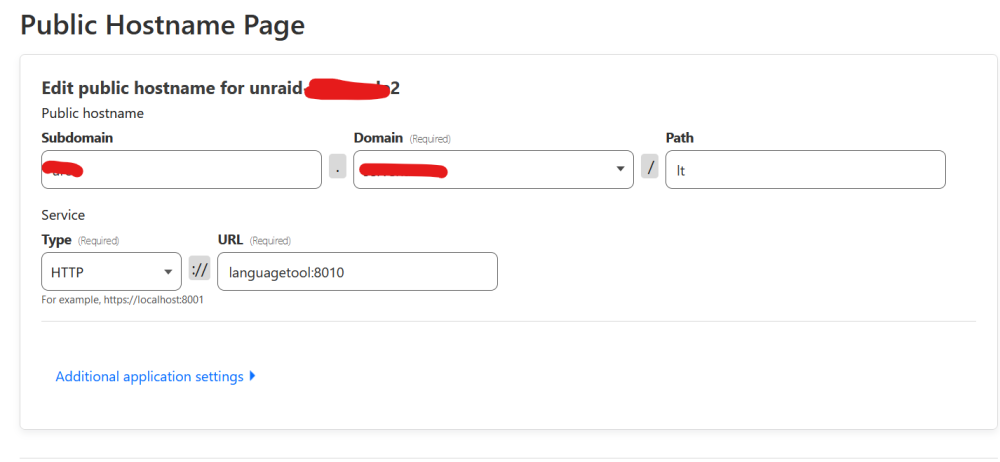
I'm just using cloudflare tunnel on my domain + I added it in the "zero trust" panel, network/routes
-
Hi, because there's no login protection at all, I'd like to run this in a subdirectory like example.com/languagetool/v2, but then it complains like Error: You have '/v2/' in your path, but not at the root. Try an URL like 'http://server/v2/...' There's a way to run it anyway? I can't give it a dedicated domain or subdomain, that's too prone to abuse from bots and such. Or they designed it to practically force everyone to use their own server?
-
I run it manually on sunday afternoons, as i like to watch what the updates do. In this way at midnight when unraid checks updates, finds nothing. Additionally, i hide the "update column" using a browser extension called "Amino", which allows to add custom CSS rules to pages. I added this custom CSS rule for the server page: .updatecolumn { display: none; }
-
Solution: after manually updating the containers, run this: rm /mnt/user/system/docker/unraid-update-status.json /usr/local/emhttp/plugins/dynamix.docker.manager/scripts/dockerupdate check the first command will remove any status of updates, the second line will check for updates, recreate that json file, then tell the status of the containers to the GUI Actually, i created for myself a more complex script that will update everything, then remove that json file. it's something like this percorso="/mnt/user/docker/" finale="/docker-compose.yml" comando="docker compose -f" managerpath="/boot/config/plugins/compose.manager/projects/" override="/docker-compose.override.yml" function aggiornamatic() { #primo argomento: nome directory percorsocompleto=$percorso$1$finale $comando $percorsocompleto -f $managerpath$1$override build && $comando $percorsocompleto -f $managerpath$1$override pull && $comando $percorsocompleto -f $managerpath$1$override down && $comando $percorsocompleto -f $managerpath$1$override up -d } #aggiornamatic: primo parametro è il nome container aggiornamatic "afterlogic" aggiornamatic "borgmatic" aggiornamatic "caddy" aggiornamatic "cloudflared" docker image prune --all rm /mnt/user/system/docker/unraid-update-status.json /usr/local/emhttp/plugins/dynamix.docker.manager/scripts/dockerupdate check
-
Until yesterday i was on 6.11 and i did not had this problem. Maybe i installed a plugin that hide the checks. Now it has this fake "update ready" warning which is not true. There's a way to change or remove the internal status? This version check should be saved somewhere. For example i could run a script that deletes the updates status every 10 seconds. Or write "installed version 999.999999" somewhere which will be the latest. Where is this "update ready" info stored? So i can delete it automatically edit: the info is stored in /mnt/user/system/docker/unraid-update-status.json and it's populated by the command /usr/local/emhttp/plugins/dynamix.docker.manager/scripts/dockerupdate check which is run every monday for example it contains: "library/mariadb:latest": { "local": "sha256:9ff479f244cc596aed9794d035a9f352662f2caed933238c533024df64569853", "remote": "sha256:5d851e999b84625ef9810589e832686cae58453452698ee69e2980041e626eb2", "status": "false" }, I was able to change the status of caddy to "up-to-date" by changing to "library/caddy:latest": { "local": "sha256:b3a7eac3daba82e1d682a7fa3f11b6d0dbe32869cdcc835fd30748021fbe3b9f", "remote": "sha256:b3a7eac3daba82e1d682a7fa3f11b6d0dbe32869cdcc835fd30748021fbe3b9f", "status": "true" }, unfortunately, deleting the file has no effect, maybe is cached somewhere else I also tried to make an invalid entry which on the GUI results as "not available" "library/munin-munin:latest": { "local": null, "remote": null, "status": "undef" }, but it has no effect i need to find a way to automate this otherwise my OCD will drive me crazy seeing "update ready" instead of "up-to-date". I exclusively use the docker compose plugin and never use docker containers from the community apps
-
Is it possible to play audio on the local device? No streaming, because I want to play on the server itself, everything works great (video, keyboard, mouse, but no audio)
-
Thanks, i disconnected the drive while writing and thanks to that script i got a notification
-
I'm doing tests on a clean computer. I created a pool with three drives, one SATA, one nvme, one USB. If i turn off the machine to disconnect the drives, on reboot I get a warning "the drive is missing", but if i unplug the USB drive while the pool is running, nothing happens Is this normal? Maybe it's just because it's USB? Running version 6.12.2, tried in btrfs raid or zfs mirror



