





thatnovaguy
Members
-
Joined
-
Last visited
-
Hello, I'm running into problems when trying to access my community applications tab. When loading the tab I'm met with this: Checking the PHP logs shows this entry each time I try to load the tab: [18-Sep-2025 09:17:44 America/New_York] PHP Fatal error: Uncaught TypeError: trim(): Argument #1 ($string) must be of type string, array given in /usr/local/emhttp/plugins/community.applications/include/exec.php:311 Stack trace: #0 /usr/local/emhttp/plugins/community.applications/include/exec.php(311): trim(Array) #1 /usr/local/emhttp/plugins/community.applications/include/exec.php(1120): DownloadApplicationFeed() #2 /usr/local/emhttp/plugins/community.applications/include/exec.php(90): force_update() #3 {main} thrown in /usr/local/emhttp/plugins/community.applications/include/exec.php on line 311Any ideas what's happening?

-
Ok. Sorry I wasn't exactly sure how trim worked. I'll keep an eye on it. I tried using zfs shortly after it was officially released but ran into corruption issues. I believe, however, it was the drives that caused my problems.
-
I did as you said. I plan to replace the drive once the replacements come in but it's working for now. However, after formatting and copying everything back I noticed it ran trim. Sep 14 00:00:13 HTPC root: /mnt/nvme: 735.9 GiB (790133469184 bytes) trimmed on /dev/nvme0n1p1 Is it normal to trim that much?
-
Had to pull the missing device to RMA it. I truly regret getting these drives. They've been nothing but trouble.
-
Ran that and restarted the array. Disk is readable but almost immediately went into read-only. Sep 12 17:48:30 HTPC emhttpd: read SMART /dev/nvme0n1 Sep 12 17:48:34 HTPC emhttpd: INTEL_SSDPE2KE016T8_BTLN84730E6A1P6AGN (nvme0n1) 512 3125627568 Sep 12 17:48:34 HTPC emhttpd: import 31 cache device: (nvme0n1) INTEL_SSDPE2KE016T8_BTLN84730E6A1P6AGN Sep 12 17:48:34 HTPC emhttpd: read SMART /dev/nvme0n1 Sep 12 17:49:00 HTPC emhttpd: devid 2 size 1.46TiB used 888.09GiB path /dev/nvme0n1p1 Sep 12 17:49:00 HTPC kernel: BTRFS info (device nvme0n1p1): using crc32c (crc32c-intel) checksum algorithm Sep 12 17:49:00 HTPC kernel: BTRFS info (device nvme0n1p1): allowing degraded mounts Sep 12 17:49:00 HTPC kernel: BTRFS info (device nvme0n1p1): using free space tree Sep 12 17:49:00 HTPC kernel: BTRFS warning (device nvme0n1p1): devid 1 uuid 4f00e3be-cb73-4615-aa54-2311591e7bfa is missing Sep 12 17:49:00 HTPC kernel: BTRFS info (device nvme0n1p1): bdev (efault) errs: wr 0, rd 0, flush 0, corrupt 8, gen 0 Sep 12 17:49:00 HTPC kernel: BTRFS info (device nvme0n1p1): bdev /dev/nvme0n1p1 errs: wr 0, rd 0, flush 0, corrupt 59, gen 0 Sep 12 17:49:00 HTPC kernel: BTRFS info (device nvme0n1p1): enabling ssd optimizations Sep 12 17:49:00 HTPC kernel: BTRFS info (device nvme0n1p1: state M): allowing degraded mounts Sep 12 17:49:00 HTPC kernel: BTRFS info (device nvme0n1p1: state M): turning on async discard Sep 12 17:49:00 HTPC kernel: BTRFS info (device nvme0n1p1): balance: start -f -dconvert=single -mconvert=dup -sconvert=dup Sep 12 17:49:00 HTPC kernel: BTRFS info (device nvme0n1p1): relocating block group 6094656110592 flags data Sep 12 17:49:02 HTPC kernel: BTRFS info (device nvme0n1p1): found 8 extents, stage: move data extents Sep 12 17:49:02 HTPC kernel: BTRFS info (device nvme0n1p1): found 8 extents, stage: update data pointers Sep 12 17:49:02 HTPC kernel: BTRFS info (device nvme0n1p1): relocating block group 6093582368768 flags data Sep 12 17:49:03 HTPC kernel: BTRFS info (device nvme0n1p1): found 8 extents, stage: move data extents Sep 12 17:49:03 HTPC kernel: BTRFS info (device nvme0n1p1): found 8 extents, stage: update data pointers Sep 12 17:49:03 HTPC kernel: BTRFS info (device nvme0n1p1): relocating block group 6092508626944 flags data Sep 12 17:49:04 HTPC kernel: BTRFS info (device nvme0n1p1): found 8 extents, stage: move data extents Sep 12 17:49:04 HTPC kernel: BTRFS info (device nvme0n1p1): found 8 extents, stage: update data pointers Sep 12 17:49:04 HTPC kernel: BTRFS info (device nvme0n1p1): relocating block group 6091434885120 flags data Sep 12 17:49:06 HTPC kernel: BTRFS info (device nvme0n1p1): found 6 extents, stage: move data extents Sep 12 17:49:06 HTPC kernel: BTRFS info (device nvme0n1p1): found 6 extents, stage: update data pointers Sep 12 17:49:06 HTPC kernel: BTRFS info (device nvme0n1p1): relocating block group 6090361143296 flags data Sep 12 17:49:06 HTPC kernel: BTRFS info (device nvme0n1p1): found 4 extents, stage: move data extents Sep 12 17:49:06 HTPC kernel: BTRFS info (device nvme0n1p1): found 4 extents, stage: update data pointers Sep 12 17:49:06 HTPC kernel: BTRFS info (device nvme0n1p1): relocating block group 6089287401472 flags data Sep 12 17:49:06 HTPC kernel: BTRFS info (device nvme0n1p1): found 2 extents, stage: move data extents Sep 12 17:49:06 HTPC kernel: BTRFS info (device nvme0n1p1): found 2 extents, stage: update data pointers Sep 12 17:49:06 HTPC kernel: BTRFS info (device nvme0n1p1): relocating block group 6088213659648 flags data Sep 12 17:49:07 HTPC kernel: BTRFS info (device nvme0n1p1): found 6 extents, stage: move data extents Sep 12 17:49:07 HTPC kernel: BTRFS info (device nvme0n1p1): found 6 extents, stage: update data pointers Sep 12 17:49:07 HTPC kernel: BTRFS info (device nvme0n1p1): relocating block group 6087139917824 flags data Sep 12 17:49:08 HTPC kernel: BTRFS info (device nvme0n1p1): found 8 extents, stage: move data extents Sep 12 17:49:08 HTPC kernel: BTRFS info (device nvme0n1p1): found 8 extents, stage: update data pointers Sep 12 17:49:08 HTPC kernel: BTRFS info (device nvme0n1p1): relocating block group 6086066176000 flags data Sep 12 17:49:10 HTPC kernel: BTRFS info (device nvme0n1p1): found 9 extents, stage: move data extents Sep 12 17:49:10 HTPC kernel: BTRFS info (device nvme0n1p1): found 9 extents, stage: update data pointers Sep 12 17:49:10 HTPC kernel: BTRFS info (device nvme0n1p1): relocating block group 6084992434176 flags data Sep 12 17:49:11 HTPC kernel: BTRFS info (device nvme0n1p1): found 5 extents, stage: move data extents Sep 12 17:49:11 HTPC kernel: BTRFS info (device nvme0n1p1): found 5 extents, stage: update data pointers Sep 12 17:49:11 HTPC kernel: BTRFS info (device nvme0n1p1): relocating block group 6083918692352 flags data Sep 12 17:49:12 HTPC kernel: BTRFS info (device nvme0n1p1): found 28 extents, stage: move data extents Sep 12 17:49:12 HTPC kernel: BTRFS info (device nvme0n1p1): found 28 extents, stage: update data pointers Sep 12 17:49:12 HTPC kernel: BTRFS info (device nvme0n1p1): found 1 extents, stage: update data pointers Sep 12 17:49:12 HTPC kernel: BTRFS info (device nvme0n1p1): found 1 extents, stage: update data pointers Sep 12 17:49:12 HTPC kernel: BTRFS info (device nvme0n1p1): found 1 extents, stage: update data pointers Sep 12 17:49:12 HTPC kernel: BTRFS info (device nvme0n1p1): found 1 extents, stage: update data pointers Sep 12 17:49:12 HTPC kernel: BTRFS info (device nvme0n1p1): relocating block group 6082844950528 flags data Sep 12 17:49:14 HTPC kernel: BTRFS info (device nvme0n1p1): found 8 extents, stage: move data extents Sep 12 17:49:14 HTPC kernel: BTRFS info (device nvme0n1p1): found 8 extents, stage: update data pointers Sep 12 17:49:14 HTPC kernel: BTRFS info (device nvme0n1p1): relocating block group 6081771208704 flags data Sep 12 17:49:15 HTPC kernel: BTRFS info (device nvme0n1p1): found 7 extents, stage: move data extents Sep 12 17:49:15 HTPC kernel: BTRFS info (device nvme0n1p1): found 7 extents, stage: update data pointers Sep 12 17:49:15 HTPC kernel: BTRFS info (device nvme0n1p1): relocating block group 6080697466880 flags data Sep 12 17:49:16 HTPC kernel: BTRFS info (device nvme0n1p1): found 7 extents, stage: move data extents Sep 12 17:49:16 HTPC kernel: BTRFS info (device nvme0n1p1): found 7 extents, stage: update data pointers Sep 12 17:49:17 HTPC kernel: BTRFS info (device nvme0n1p1): relocating block group 6079623725056 flags data Sep 12 17:49:18 HTPC kernel: BTRFS info (device nvme0n1p1): found 8 extents, stage: move data extents Sep 12 17:49:18 HTPC kernel: BTRFS info (device nvme0n1p1): found 8 extents, stage: update data pointers Sep 12 17:49:18 HTPC kernel: BTRFS info (device nvme0n1p1): relocating block group 6078549983232 flags data Sep 12 17:49:19 HTPC kernel: BTRFS critical (device nvme0n1p1): unable to find logical 13893481886742069248 length 4096 Sep 12 17:49:19 HTPC kernel: BTRFS critical (device nvme0n1p1): unable to find logical 13893481886742069248 length 16384 Sep 12 17:49:19 HTPC kernel: BTRFS error (device nvme0n1p1): failed to run delayed ref for logical 4078200520704 num_bytes 12288 type 184 action 1 ref_mod 1: -22 Sep 12 17:49:19 HTPC kernel: BTRFS: error (device nvme0n1p1: state A) in btrfs_run_delayed_refs:2144: errno=-22 unknown Sep 12 17:49:19 HTPC kernel: BTRFS info (device nvme0n1p1: state EA): forced readonly Sep 12 17:49:19 HTPC kernel: BTRFS warning (device nvme0n1p1: state EA): Skipping commit of aborted transaction. Sep 12 17:49:19 HTPC kernel: BTRFS: error (device nvme0n1p1: state EA) in cleanup_transaction:1958: errno=-22 unknown Sep 12 17:49:20 HTPC kernel: BTRFS info (device nvme0n1p1: state EA): balance: ended with status: -5
-
Not sure if the update caused it but last night I updated to 6.12.4 and the this morning my NVME cache drive was in read-only mode. Stop array hung trying to unmount the nvme drive and in the end I had to use 'umount /var/lib/docker' to get it to fully stop. When I restarted the array the drive was shown as unmountable file system. Disk log shows: Sep 12 09:53:29 HTPC kernel: BTRFS: error (device nvme0n1p1: state A) in __btrfs_free_extent:3070: errno=-22 unknown Sep 12 09:53:29 HTPC kernel: BTRFS error (device nvme0n1p1: state EA): failed to run delayed ref for logical 4078200520704 num_bytes 12288 type 178 action 2 ref_mod 1: -22 Sep 12 09:53:29 HTPC kernel: BTRFS: error (device nvme0n1p1: state EA) in btrfs_run_delayed_refs:2144: errno=-22 unknown Sep 12 09:53:29 HTPC kernel: BTRFS: error (device nvme0n1p1: state EA) in btrfs_replay_log:2414: errno=-22 unknown (Failed to recover log tree) Sep 12 09:53:29 HTPC root: mount: /mnt/nvme: wrong fs type, bad option, bad superblock on /dev/nvme0n1p1, missing codepage or helper program, or other error. Sep 12 09:53:29 HTPC kernel: BTRFS error (device nvme0n1p1: state EA): open_ctree failed BTRFS check gives me: root@HTPC:~# btrfs check /dev/nvme0n1 Opening filesystem to check... No valid Btrfs found on /dev/nvme0n1 ERROR: cannot open file system I'm planning to replace these drives with standard sata SSDs but would like to recover my appdata and docker image if possible. Diagnostics attached. htpc-diagnostics-20230912-1000.zip
-
Thank you I'll keep an eye on it. I wasn't able to use umount the last time it happened, though.
-
I'm running into an issue where /mnt/cache can't be unmounted during array stop. When poking around with losetup I found that /dev/loop1 is hanging. root@HTPC:/# lsof /dev/loop1 COMMAND PID USER FD TYPE DEVICE SIZE/OFF NODE NAME sh 5078 root cwd DIR 0,25 100 98 /usr/local/emhttp sh 5080 root cwd DIR 0,25 100 98 /usr/local/emhttp inotifywa 5081 root cwd DIR 0,25 100 98 /usr/local/emhttp sleep 6891 root cwd DIR 0,25 100 98 /usr/local/emhttp sleep 8080 root cwd DIR 0,25 100 98 /usr/local/emhttp notify_po 8828 root cwd DIR 0,25 100 98 /usr/local/emhttp session_c 8830 root cwd DIR 0,25 100 98 /usr/local/emhttp system_te 8832 root cwd DIR 0,25 100 98 /usr/local/emhttp device_li 9114 root cwd DIR 0,25 100 98 /usr/local/emhttp disk_load 9116 root cwd DIR 0,25 100 98 /usr/local/emhttp parity_li 9118 root cwd DIR 0,25 100 98 /usr/local/emhttp php-fpm 13024 root cwd DIR 0,25 100 98 /usr/local/emhttp php-fpm 14051 root cwd DIR 0,25 100 98 /usr/local/emhttp php-fpm 15734 root cwd DIR 0,25 100 98 /usr/local/emhttp php-fpm 17750 root cwd DIR 0,25 100 98 /usr/local/emhttp autofan 20735 root cwd DIR 0,25 100 98 /usr/local/emhttp ttyd 26217 root cwd DIR 0,25 100 98 /usr/local/emhttp Just guessing by the "autofan" in the list I'm assuming this is happening because of plugins. Is this a known bug since 6.12.2? EDIT: umount -l /dev/loop1 doesn't work either root@HTPC:/# umount -l /dev/loop1 umount: /dev/loop1: umount failed: Invalid argument.
-
I've also started seeing this error though I believe my problems may exceed merely this. I checked the developer's console and noticed while on the dashboard that the page is throwing javascript errors. This is Firefox within unraid's built-in desktop gui. I'm running unraid version 6.12.2. Uncaught ReferenceError: parseINI is not defined <anonymous> http://localhost:85/Dashboard:2483 emit http://localhost:85/webGui/javascript/dynamix.js?v=1680052794:15 onmessage http://localhost:85/webGui/javascript/dynamix.js?v=1680052794:15 listen http://localhost:85/webGui/javascript/dynamix.js?v=1680052794:15 start http://localhost:85/webGui/javascript/dynamix.js?v=1680052794:15 <anonymous> http://localhost:85/Dashboard:2610 e http://localhost:85/webGui/javascript/dynamix.js?v=1680052794:5 t http://localhost:85/webGui/javascript/dynamix.js?v=1680052794:5 setTimeout handler*Deferred/then/l/< http://localhost:85/webGui/javascript/dynamix.js?v=1680052794:5 c http://localhost:85/webGui/javascript/dynamix.js?v=1680052794:5 fireWith http://localhost:85/webGui/javascript/dynamix.js?v=1680052794:5 fire http://localhost:85/webGui/javascript/dynamix.js?v=1680052794:5 c http://localhost:85/webGui/javascript/dynamix.js?v=1680052794:5 fireWith http://localhost:85/webGui/javascript/dynamix.js?v=1680052794:5 ready http://localhost:85/webGui/javascript/dynamix.js?v=1680052794:5 $ http://localhost:85/webGui/javascript/dynamix.js?v=1680052794:5 EventListener.handleEvent* http://localhost:85/webGui/javascript/dynamix.js?v=1680052794:5 <anonymous> http://localhost:85/webGui/javascript/dynamix.js?v=1680052794:5 <anonymous> http://localhost:85/webGui/javascript/dynamix.js?v=1680052794:5 3 Dashboard:2483:15 <anonymous> http://localhost:85/Dashboard:2483 emit http://localhost:85/webGui/javascript/dynamix.js?v=1680052794:15 <anonymous> self-hosted:1359 onmessage http://localhost:85/webGui/javascript/dynamix.js?v=1680052794:15 <anonymous> self-hosted:1359 (Async: EventHandlerNonNull) listen http://localhost:85/webGui/javascript/dynamix.js?v=1680052794:15 start http://localhost:85/webGui/javascript/dynamix.js?v=1680052794:15 <anonymous> http://localhost:85/Dashboard:2610 e http://localhost:85/webGui/javascript/dynamix.js?v=1680052794:5 t http://localhost:85/webGui/javascript/dynamix.js?v=1680052794:5 (Async: setTimeout handler) l http://localhost:85/webGui/javascript/dynamix.js?v=1680052794:5 c http://localhost:85/webGui/javascript/dynamix.js?v=1680052794:5 fireWith http://localhost:85/webGui/javascript/dynamix.js?v=1680052794:5 fire http://localhost:85/webGui/javascript/dynamix.js?v=1680052794:5 c http://localhost:85/webGui/javascript/dynamix.js?v=1680052794:5 fireWith http://localhost:85/webGui/javascript/dynamix.js?v=1680052794:5 ready http://localhost:85/webGui/javascript/dynamix.js?v=1680052794:5 $ http://localhost:85/webGui/javascript/dynamix.js?v=1680052794:5 (Async: EventListener.handleEvent) <anonymous> http://localhost:85/webGui/javascript/dynamix.js?v=1680052794:5 <anonymous> http://localhost:85/webGui/javascript/dynamix.js?v=1680052794:5 <anonymous> http://localhost:85/webGui/javascript/dynamix.js?v=1680052794:5 (Sorry if that's formatted incorrectly)
-
I'm really not sure what's happened but my server has started running incredible slow and froze overnight. The dashboard is showing everything as 0% usage. I'm about ready to throw in the towel after all the issues over the past couple weeks.htpc-diagnostics-20230703-1615.zip
-
Seems that my mirrored zfs cache was causing problems so I removed the nvme SSDs from system. For whatever reason those particular SSDs have caused a lot of trouble.
-
I'm getting this strange error when I try to start my array: Jul 1 22:14:09 Tower nginx: 2023/07/01 22:14:09 [error] 9150#9150: *42 upstream timed out (110: Connection timed out) while reading upstream, client: 127.0.0.1, server: , request: "POST /update.htm HTTP/1.1", upstream: "http://unix:/var/run/emhttpd.socket:/update.htm", host: "localhost:85", referrer: "http://localhost:85/Main" I've no idea where to begin troubleshooting. I'd post diagnostics but they never complete to download.
-
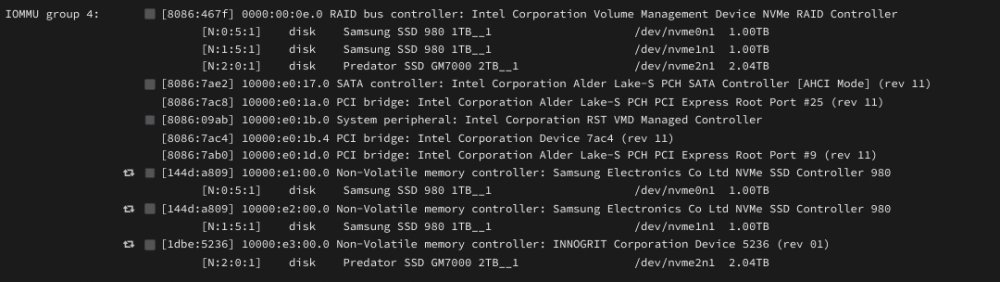
Figured it out. Had to disable Intel VMD. It kept grouping all nvme devices together.
-
Has anyone with a TUF Z690 had any luck stubbing an nvme drive for a vm while having other nvme drives as cache? Seems that no matter what slot I use (including a pcie adapter) all of my nvme drives fall into the same iommu group. I've tried ACS override as well.
-
Thank you for all of your help. I managed to save all the data in my array.



