





danmartyn
Members
-
Joined
-
Last visited
Everything posted by danmartyn
-
Thanks for the help everyone! I ended up needing to change my Docker settings to point at /mnt so that Handbrake could see my name drive for files to convert and my script could see /mnt/user/Media to move things. I also had to change the permissions on the directories as was mentioned. Thanks again for the help.
-
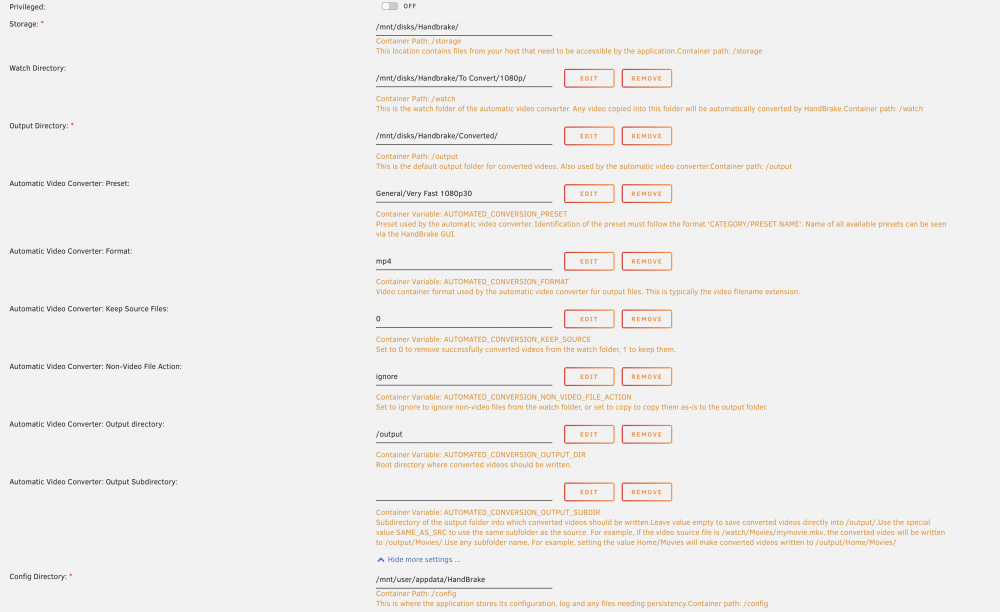
I'm overriding the Storage to pass in the Handbrake directory, which is on an nvme drive that isn't my cache drive, or part of the array that I use just for Handbrake. Is that going to be an issue for me?
-
I am running the script from inside the docker. Do I need to do something special to give it access to the array to be able to move the files for me?
-
I'm not super familiar with scripting, and sort of going off what I can find from Google, so I'm not sure how to find what user the script is running as. But here's the info from what you asked: ls -l /mnt/user/: drwxrwxrwx 1 nobody users 117 Nov 17 2019 Media/ drwxrwxrwx 1 nobody users 111 Jul 10 15:44 appdata/ drwxrwxrwx 1 nobody users 6 Jun 18 14:37 domains/ drwxrwxrwx 1 nobody users 6 Feb 22 2017 isos/ drwxrwxrwx 1 nobody users 35 Feb 22 2017 system/ ls -l /mnt/user/Media/: drwxrwxrwx 1 nobody users 27 Apr 22 23:32 Kids\ Shows/ drwxr-sr-x 1 nobody users 28672 Jul 10 23:03 Movies/ drwxrwxr-x+ 1 nobody users 167 Jul 10 2021 Plex\ Posters/ drwxr-sr-x 1 nobody users 16384 Jun 24 23:34 TV\ Shows/ The directories all existed previously, although the Kids Shows is recent and I forget if I created it from my Mac or Krusader. The other ones were created like 5+ years ago. I've been manually moving things around in Krusader and relying on Hazel running on my Mac to move things, so was just trying to automate that so it can all happen on the server side. Looking at the Movies and TV Show directories, it looks like they don't have write permissions for not the owner, which I assume is what's causing my problem? Do I just need to use chmod in the terminal on /mnt/user/Media/ to change the permissions, or do I need to do it for the Movies and TV Show directories directly? Thanks for the help!
-
HI All, I'm trying to setup a post_conversion script that moves converted files from the output directory to my array. I have it working to figure out if it's a TV show or Movie and what the destination path should be, but when I hit my mkdir command in the script, I get the following error in the log: mkdir: cannot create directory ‘/mnt/user/Media/TV Shows/Show/Season 1/’: Permission denied This is the script (I left off the top part with the comment and variables being set from the example): if [ "$CONVERSION_STATUS" -eq 0 ]; then #https://stackoverflow.com/a/24900088 # Successful conversion. FILE="${CONVERTED_FILE##*/}" echo "✅ [$FILE]" # Check for show or movie ISTVSHOW=$(echo "$FILE" | egrep '(S[0-9]+E[0-9]+)') if [ -z "$ISTVSHOW" ]; then # MOVIE DESTINATION="/mnt/user/Media/Movies" else # Get Show Name REMOVE=$(echo "$FILE" | egrep -o ' - S[0-9]+E[0-9]+.*$') LENGTH=${#REMOVE} SHOW=$(echo "$FILE" | rev | cut -c $(($LENGTH+1))- | rev) # Get Season Number CLEANED="${REMOVE:4}" SEASON=$((10#$(echo "$CLEANED" | egrep -o '^[0-9]+'))) DESTINATION="/mnt/user/Media/TV Shows/$SHOW/Season $SEASON" fi # Move the file to the destination, making any directories as needed echo "➡️ $DESTINATION/$FILE" mkdir -p "$DESTINATION/" && mv "$FILE" "$DESTINATION" else # Failed conversion. echo "❌ $SOURCE_FILE" fi I'm hoping it's just a simple thing I don't know about to have the right permissions. Any help appreciated!
-
Hi All, I'm trying to get Handbrake post conversion script to work. I made a script and put it into the hooks folder for Handbrake named post_conversion.sh. It's being run after an encode completes, but it gives an error and not the result I expect. When I run the script from the terminal though, I get the expected output. Any thoughts? Handbrake Info: Docker: jlesage/handbrake Version 1.25.1 Script: CONVERSION_STATUS=$1 CONVERTED_FILE="$2" SOURCE_FILE="$3" PRESET="$4" echo "post-conversion: Status = $CONVERSION_STATUS" echo "post-conversion: Output File = $CONVERTED_FILE" echo "post-conversion: Source File = $SOURCE_FILE" echo "post-conversion: Preset = $PRESET" if [ "$CONVERSION_STATUS" -eq 0 ]; then # Successful conversion. FILE="${CONVERTED_FILE##*/}" echo "✅ [$FILE]" # Check for show or movie REGEX='(.*)( - (S([0-9]+)E[0-9]+))' echo "REGEX = [$REGEX]" if [[ $FILE =~ $REGEX ]]; then SHOW=${BASH_REMATCH[1]} echo "SHOW = [$SHOW]" SEASON=$((10#${BASH_REMATCH[4]})) echo "SEASON = [$SEASON]" DESTINATION="/mnt/user/Media/TV Shows/$SHOW/Season $SEASON" else DESTINATION="/mnt/user/Media/Movies" fi # Move the file to the destination, making any directories as needed echo "➡️ $DESTINATION/$FILE" else # Failed conversion. echo "❌ $SOURCE_FILE" fi Output from Handbrake Logs: [autovideoconverter] Executing post-conversion hook... post-conversion: Status = 0 post-conversion: Output File = /output/Love Island - S08E33 - 1080p.mp4 post-conversion: Source File = /watch/Love Island - S08E33 - 1080p.mp4 post-conversion: Preset = General/Very Fast 1080p30 ✅ [Love Island - S08E33 - 1080p.mp4] REGEX = [(.*)( - (S([0-9]+)E[0-9]+))] sh: Island: unknown operand ➡️ /mnt/user/Media/Movies/Love Island - S08E33 - 1080p.mp4 [autovideoconverter] Post-conversion hook exited with 0 Terminal Testing: Command: `bash /mnt/cache/appdata/HandBrake/hooks/post_conversion.sh 0 "/output/Love Island - S08E33 - 1080p.mp4" "/watch/Love Island - S08E33 - 1080p.mp4" "General/Very Fast 1080p30"` Output: post-conversion: Status = 0 post-conversion: Output File = /output/Love Island - S08E33 - 1080p.mp4 post-conversion: Source File = /watch/Love Island - S08E33 - 1080p.mp4 post-conversion: Preset = General/Very Fast 1080p30 ✅ [Love Island - S08E33 - 1080p.mp4] REGEX = [(.*)( - (S([0-9]+)E[0-9]+))] SHOW = [Love Island] SEASON = [8] ➡️ /mnt/user/Media/TV Shows/Love Island/Season 8/Love Island - S08E33 - 1080p.mp4 Any thoughts on what's wrong with my script?
-
Is HFS+ supported? I was having issues transferring files from my externals onto my server and was told to try Unassigned Devices to mount the drive directly to my server. I have done that and the drive shows up, but the only partition it shows is one called EFI. When I use the external on my Mac, it's formatted for HFS+ and only has a single partition. When I refreshed once or twice I saw the partition I expected to see, but when I tried mounting it it refreshed and was gone, and now I haven't seen it since... This is the content of the log file if it helps: Apr 02 14:42:56 Disk 'EFI' removed successfully. Apr 02 14:43:03 Disk 'EFI' is not mounted and cannot be unmounted... Apr 02 14:43:03 Device '' script file not found. 'REMOVE' script not executed. Apr 02 14:43:03 Unmounting disk ''... Apr 02 14:43:03 Unmounting ''... Apr 02 14:43:03 Unmount of '' failed. Error message: umount: undefined mountpoint Apr 02 14:43:04 Since there aren't open files, try to force unmount. Apr 02 14:43:04 Unmounting ''... Apr 02 14:43:04 Unmount of '' failed. Error message: umount: undefined mountpoint Apr 02 14:43:19 Adding disk '/dev/sdf1'... Apr 02 14:43:19 Mount drive command: /sbin/mount -t vfat -o auto,async,noatime,nodiratime,nodev,nosuid,umask=000 '/dev/sdf1' '/mnt/disks/EFI' Apr 02 14:43:19 Successfully mounted '/dev/sdf1' on '/mnt/disks/EFI'. Apr 02 14:43:19 Partition 'EFI' is not set as sharable and will not be shared... Apr 02 14:43:19 Device '/dev/sdf1' script file not found. 'ADD' script not executed. Apr 02 14:44:49 Device '/dev/sdf1' script file not found. 'REMOVE' script not executed. Apr 02 14:44:49 Unmounting disk 'EFI'... Apr 02 14:44:49 Unmounting '/dev/sdf1'... Apr 02 14:44:49 Successfully unmounted '/dev/sdf1' Apr 02 14:44:49 Disk 'EFI' removed successfully. Apr 02 14:46:28 Disk 'EFI' is not mounted and cannot be unmounted... Apr 02 14:46:28 Device '' script file not found. 'REMOVE' script not executed. Apr 02 14:46:28 Unmounting disk ''... Apr 02 14:46:28 Unmounting ''... Apr 02 14:46:28 Unmount of '' failed. Error message: umount: undefined mountpoint Apr 02 14:46:29 Since there aren't open files, try to force unmount. Apr 02 14:46:29 Unmounting ''... Apr 02 14:46:29 Unmount of '' failed. Error message: umount: undefined mountpoint Apr 02 14:50:16 Adding disk '/dev/sdf1'... Apr 02 14:50:16 Mount drive command: /sbin/mount -t vfat -o auto,async,noatime,nodiratime,nodev,nosuid,umask=000 '/dev/sdf1' '/mnt/disks/EFI' Apr 02 14:50:16 Successfully mounted '/dev/sdf1' on '/mnt/disks/EFI'. Apr 02 14:50:16 Partition 'EFI' is not set as sharable and will not be shared... Apr 02 14:50:16 Device '/dev/sdf1' script file not found. 'ADD' script not executed.
-
That was exactly it. I went after reading this and tried again and it worked. Thanks for the help.
-
I was using the lime tech one this morning, and was able to load the WebUI and add my media, but then I realized it doesn't work with Plex Pass, so I deleted it and did the linuxserver one which does.
-
I can't get to the web UI to setup Plex I'm new to unRaid, so I'm sure I'm missing something simple. I installed this docker from the Community Applications. Set it up to be using plexpass, it installs and sets up properly, but when I click on it in the Dashboard and choose Web UI, it loads a page saying Safari can't connect to the server. It was going to http://192.168.1.110:32400/web. I looked at the URL for my current flex setup on my Mac Mini, and its going to /web/index.html, so I tried changing the Web UI URL to that in advanced settings, so it went to http://192.168.1.110:32400/web/index.html but same issue. Anyone know what I'm doing wrong?

