





cheesemarathon
Members
-
Joined
-
Last visited
Everything posted by cheesemarathon
-
No it's the data directory that is the problem. This post explains the issue. RELEASE.2022-10-24T18-35-07Z is the last known working version without work arounds. I saw you added a message to the container in CA. Can you add that version tag to the message? Also how do you see these messages so quick @Squid 😛 do you have an alert on any mention of community applications? 😂
-
Good shout! I’ll see what I can do
-
Please see my post linked below @CraziFuzzy https://forums.unraid.net/topic/54183-support-cheesemarathons-repo/?do=findComment&comment=1201519
-
Not suer if you fixed this. Sorry for the slow reply. Your net is set to br4. I'm using the default bridge network and I'm having no issues.
-
Hi @RedSpider In theory, yes, OAuth2 Proxy can work with any proxy system. However, I am not an expert in it and I am not familiar with HAProxy at all. As such i suggest you have a read of the OAuth2 Proxy Docs to get a better understanding of how it works and how you may be able to implement it. A quick google may turn up some results of people using it in a similar way to how you would like. Id look to see if HAProxy has some sort of Forward_Auth option as that is how OAuth2 integrates with Nginx and Traefik.
-
Thanks for the heads up! I’ll get that fixed
-
Unfortunately due to changes in Minio, the unRAID file system is no longer supported. The only way to get Minio to work on unRAID now is by mapping a single disk directly or setting up a V-Disk.
-
I removed my template for Bitwarden a year ago due to Bitwarden creating their own official template. So I’m no longer supporting the container here. Note it has also changed its name to Vaultwarden. Search for Vaultwarden in App Store.
-
Hi @EArroyo This topic is for all docker images and plugins I have created. Which one are you referencing in particular?
-
Correct! Unfortunately those are the only options with minio now 😢
-
Yes its just config issues. You will want to create two minio containers. Your old one but put it on version RELEASE.2022-10-24T18-35-07Z to get it to start. Create another minio container but with a different config directory and data location. Also change the ports. Then from your old minio data directory copy your .minio.sys/config/config.json file and put it in the same location in the new minio data directory. Both containers should now be running and you can use mc cp or mc mirror to move the data to the new minio container.
-
Yeh, works for me also!
-
Not a problem. The version I picked was just a random one from a few months ago. There may be a newer version that will work. If you want try going through the version tags found here to see what the latest working version is.
-
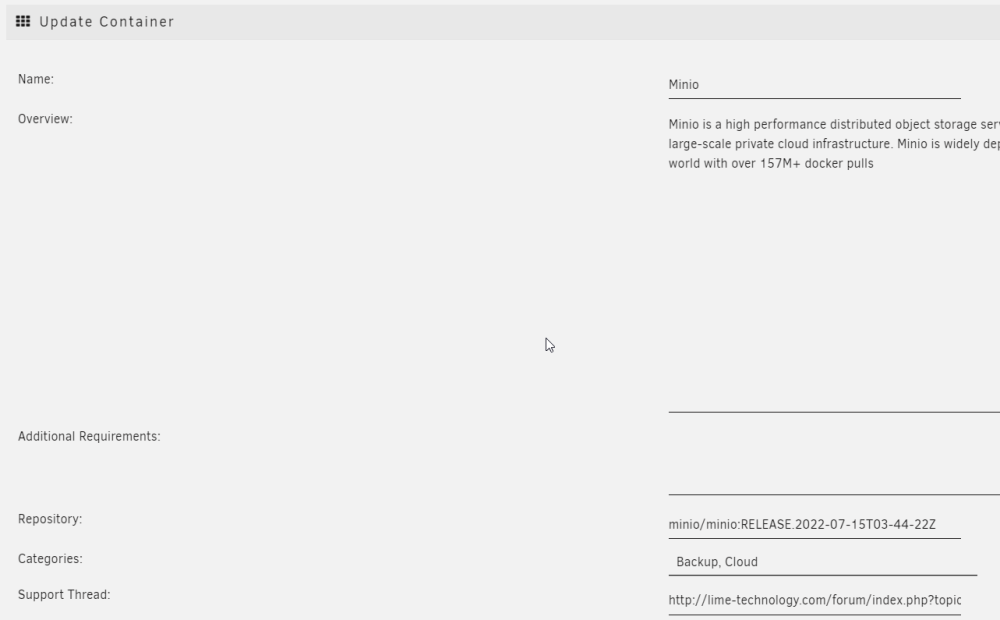
Edit the container and in the repository box type a colon then the version. e.g.
-
@TheSnotRocket I just saw that my Minio had also stopped with the same error as yours. I rolled back to version RELEASE.2022-07-15T03-44-22Z and it is working again. Probably worth a shot for you to try.
-
Minio doesn’t seem to play nicely with the FUSE file system unraid uses. So you have to options. 1. You directly mount only a single disk into the container. 2. Try a vdisk, I have not seen much feed back on this so I do not know if it works 100%. Link to that post The most annoying thing is my personal system works fine with multi disks but we can not pin down why. Good luck
-
Thanks for the heads up! It’s a shame that this issue still exists and that I can’t replicate it but at least we have a viable fix now.
-
I have just pushed this fix to the template. Thank you for letting me know about the change!
-
Does this fix the issues people have been having with Minio?
-
I imagine it’s overwriting your changes because those files are not meant to be edited by the user. All UI changes should be set in a theme. As for changes to the ownership and permissions those will be set by the docker container which is built and provided by ghost. Is there a reason you need them to be different. Id suggest reading the ghost docs and asking for further help over at the Ghost forum. I only made the unRAID template not the whole docker image so I’m far from an expert. Hopefully they will be able to clear things up further.
-
Have you read the instructions at https://squishedmooo.com/how-to-setup-a-blog-with-ghost/
-
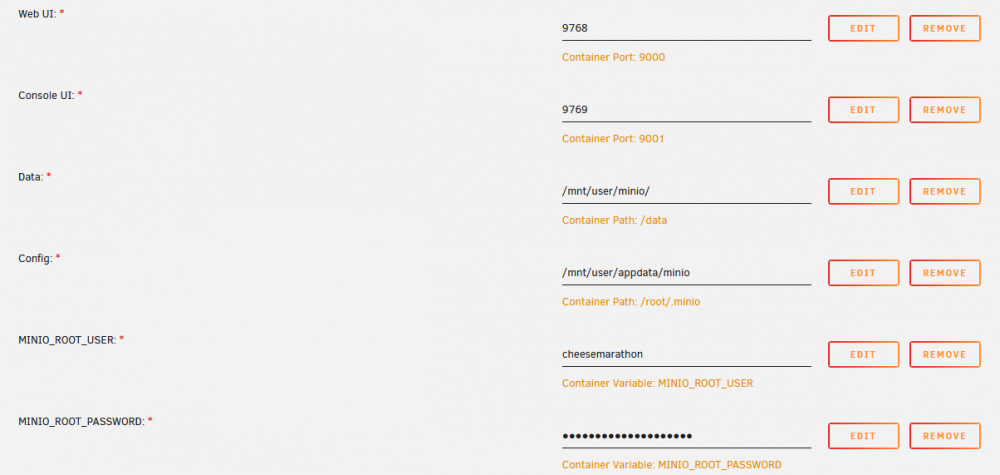
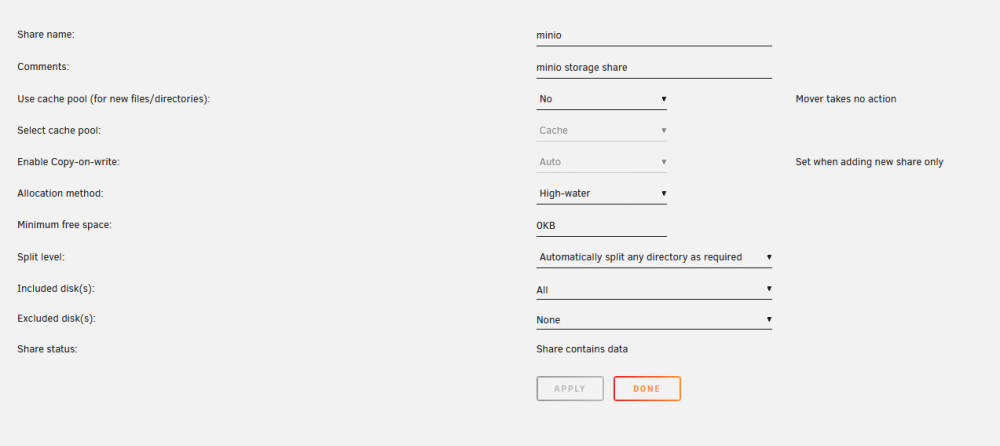
I run backups to my Minio instance every night without issue. So here is my minio config and my share config that i backup to. As for and issue with my version, the only thing I have done is created the template. It uses the official https://hub.docker.com/r/minio/minio/ container image. So the issue lies somewhere with its use specifically on unRAID. Failing spotting any issues with the above, I would look at raising an issue on the Minio github. I would stick as much of your logs as you can in a pastebin for the guys over there.
-
Are you accessing mimio via a reverse proxy? You might have a max file upload size set there. Try uploading via the local IP address.
-
No one has successfully as of yet. One guy did try so read back through some previous posts. Apart from that it will be trial and error to see if you can get it to work. Most of the docs are here: https://docs.min.io/docs/distributed-minio-quickstart-guide.html Please do let us know how you get on.
-
Not a problem at all. We are all here to help each other regardless of the issue! Glad you got it sorted 😀


