





cheesemarathon
Members
-
Joined
-
Last visited
Everything posted by cheesemarathon
-
Site is back up, try the link again!
-
Thanks for spotting that. I'm at work right now, but I'll either send you the instructions or fix the link as soon as I get back home in a few hours.
-
Hi Alphahelix Take a look at LinuxServer's reverse proxy docker container. It is how I have my Bitwarden setup and it works perfect in every browser I have tried. Shout if you need further help setting it up and ill share my config with you.
-
This shouldn't be an issue with this docker image but may be an issue with unRAID. Perhaps ask for some help in the networking forum. I'm not an expert on vlan's
-
Apologies for this. I'm moving house at the moment and the server hosting the instructions currently doesn't have an internet connection. Should be backup sometime this weekend fingers crossed!
-
I had to take my server down for several hours the other day. It's back up and running now. Sorry for the inconvenience.
-
In theory, yes, we can add webmin, but it would require completely rebuilding the container. What I'm confused about is why you want to edit the BIND instance inside steamcache. BIND is used to redirect specific domains to the cache server. If you start redirecting other domains there could be unexpected and unpredictable results. Also if you make changes to BIND and we then update the container, there could be conflicts that break things. When we are not in control of everything inside the container, we can't guarantee it will work. I'd recommend setting up your own system for anything custom, that way you are in control of your side of things and we control the steamcache side of things.
-
Just let the internet handle it all. I don't notice any issues with speed or responsiveness and I wanted remote access. Plus one of my machines is a laptop which may not always be at home local to my bitwarden instance so it's easier to set it up to just use the public URL. If you want to handle it locally, you can look to see if your router is able to do DNS redirects.
-
@FireFtw When signups are disabled, the Create Account button will still appear and you can click on it and fill out the form. However, when you click the submit button to create a new account, it should say "Registration not allowed" If your still having issues, make sure the container is up to date. Also, try recreating the container. I had an issue where I had changed SIGNUPS_ALLOWED to false but not saved it properly so it didn't recreate the container and a restart didn't apply the change. So you can just remove the "e" in false and retype it, thus making a change so the Apply button is enabled but keeping the settings the same. Then click Apply to recreate the container with the new settings. I hope that makes sense. Let me know if you're still having issues.
-
Hmmm, not sure at the moment. I'm looking in to this!
-
The current caching system has a few bugs with the way it is set up, especially when it comes to windows updates. We are working on a completely new system that should fix this. However, in the meantime, you should be able to just disable windows updates from caching. I don't understand why this doesn't work. @mlebjerg are you able to shed any light on this? Also, sorry for taking ages to reply 😝
-
I'm a little bit confused as to what it is exactly you want to do. You can't really setup webmin inside the container. What is it exactly your trying to achieve? What do you mean by "set up domains on my local network such as example.lab"? Also, sorry for taking ages to reply 😝
-
See here:
-
All info for the bitwarden is stored in your appdata folder. All I am doing is backing up my entire appdata folder every day using duplicati. However, you could use this image to create incremental backups of the sqlite database. In theory if you backup the app data folder whilst data is being written to the database you could create a corrupted backup, hence the need for the additional container to run the sqlite backup command. However, im the only user on my instance and I run my backups late at night so it's not been an issue for me. Yet...
-
Yeh, sorry about that. I think it's due to the fact that the image is not hosted on docker hub. When the check for update script runs, I would image it only compares the current image to whatever is on docker hub. As those don't match it says that an update exists even though it doesn't. As I don't maintain the image, there is nothing I can do about this. All I can suggest is turning it off automatic updates, so it doesn't attempt an update all the time. And just updating it manually periodically. You can check for updates by seeing when the latest tag was last updated here However, updating it every night shouldn't cause any issues apart from a few mins of downtime. It's a little annoying but it won't break anything
-
This uses a docker image built from dani_garcia's repo, so any changes/improvements that get made there will appear in an update here. So in short, if and when Duo support arrives, it will be supported here on unRAID
-
Hi Andreas Unfortunately the drop in download speed is just a function of the current caching system. There is no fix or work around at the moment. However, @mlebjerg is working on a new version that should fix a large number of bugs. However, both @mlebjerg and I have been rather busy with school and work, so it's taking a while to get together. Sorry about this. As for battle net, have you made sure that in the container settings, battle net is NOT disabled?
-
Unfortunately yes. With the current version of the cache, it can take several downloads for it to cache fully. A new version of the cache is being worked on. @mlebjerg How go's your work with the new version
-
You will have to add some environment variables in manually. You can find the required info here. Just shout if you need more help
-
Currently host but I have tried both. No luck with either
-
If you're having the issue then it still unfortunately exists. @mlebjerg is working on a new version of this container that should fix a large number of the previous issues. Hopefully, you can wait for that to be released.
-
Have you run Resolve-DnsName steamcache.cs.steampowered.com -server X.X.X.X To make sure that the container is up and running. Replace X.X.X.X with the IP of your unRAID machine. Make sure you have set your DNS settings on your gaming machine. Windows instructions here! Then try tail your logs again. There should be things in there even if your download is failing.
-
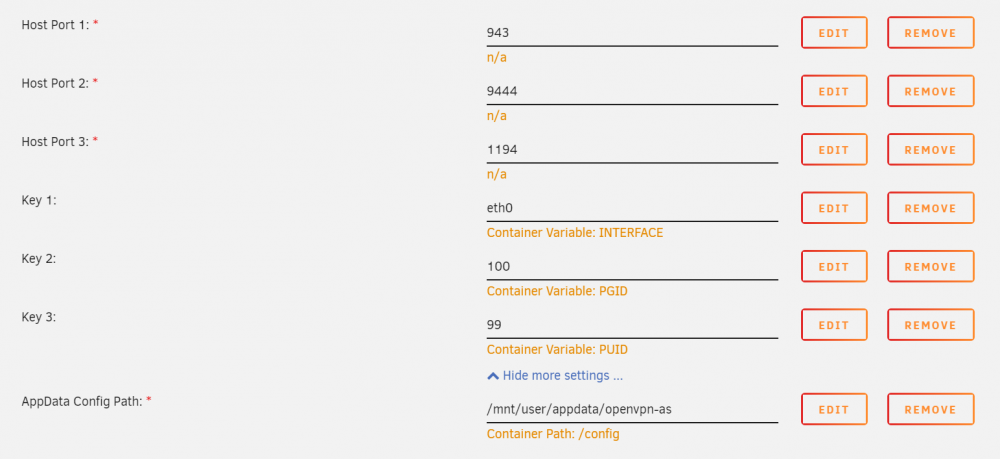
Just started having issues with openvpn-as. I noticed first that I was unable to connect and when I returned home, the web ui was not comming up. I have had issues in the past after an update so I deleted the container and the appdata config folder, then recreated the container. This did not help. As you will see in the logs. The container starts but the web ui fails to come up. Logs: https://pastebin.com/6tFC05r5 Config: Any ideas on what the issue is?
-
Ah, apologies. That is a very strange behavior! I'd suggest waiting for the monolithic image @mlebjerg is building. Hopefully, this will fix a lot of issues. If it still persists we will look at it again. Sorry for the issues in the meantime.
-
Hmm, that is strange! You have looked at all the bottlenecks that I would have suggested. And the fact it is just steam makes it even more strange. Perhaps @mlebjerg can help. He is also working on moving the container over to a new caching system which should perform better all around so it may be a case of waiting for that.


