





bubo
Members
-
Joined
-
Last visited
Everything posted by bubo
-
You are correct, this is the Docker console. The In Game Console is a question you should ask in a forum about the game itself, as it is specific to the game. I am familiar with the 7 Days to Die software and the ARK software, but I've never played Factorio so I don't know how to access it's In Game Console. Generally, though, it's an unmapped key like Tab or Esc, or one of the Function keys.
-
Left click on your Docker and choose Console. Don't forget to exit out of the console when you're done, or the connection will remain open inside the Docker.
-
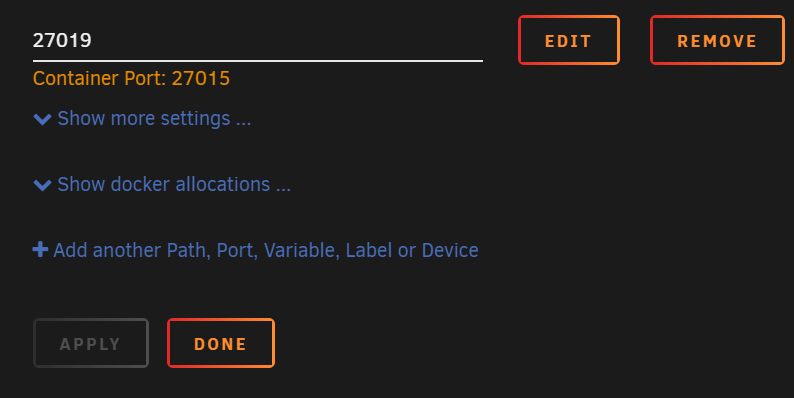
Adding on to what ich777 said, when you change the ports it is in your best interest to recreate all four ports. The UDP ports are needed to connect to the game. The RCON port technically is optional, but if you want to use any RCON tools then they are needed. Steam UDP technically works with the internal ports all set to 27015 in the sense that you can see and connect to your server when you are browsing for your server. However, CrossARK transfers cannot see the other servers if their Steam UDP ports are the same as the map you are currently on. If you can see your server from the initial connect screen but cannot see the server for CrossARK transfer after setting the ClusterFile correctly, then check to make sure the Container Port for Steam UDP is not the same on both maps.
-
It is located at <ServerFiles location>\ShooterGame\Saved\Config\LinuxServer So, for my Aberration map, it is located at: ServerFiles Location: /mnt/user/appdata/ark-se/aberration \appdata\ark-se\aberration\ShooterGame\Saved\Config\LinuxServer
-
I am just allowing Docker to manage core allocation. What I'm observing is that after the server finishes startup procedures, each map is consuming less than 0.5% on idle and less than 2% on load (it's just me and my boys playing). My concern is more the RAM usage. I used /mnt/user because that was the default in this Docker, and I wanted the cluster directory to be in the same directory as the map serverfiles. I don't know if there is a significance between /mnt/user and /mnt/cache in this usage scenario.
-
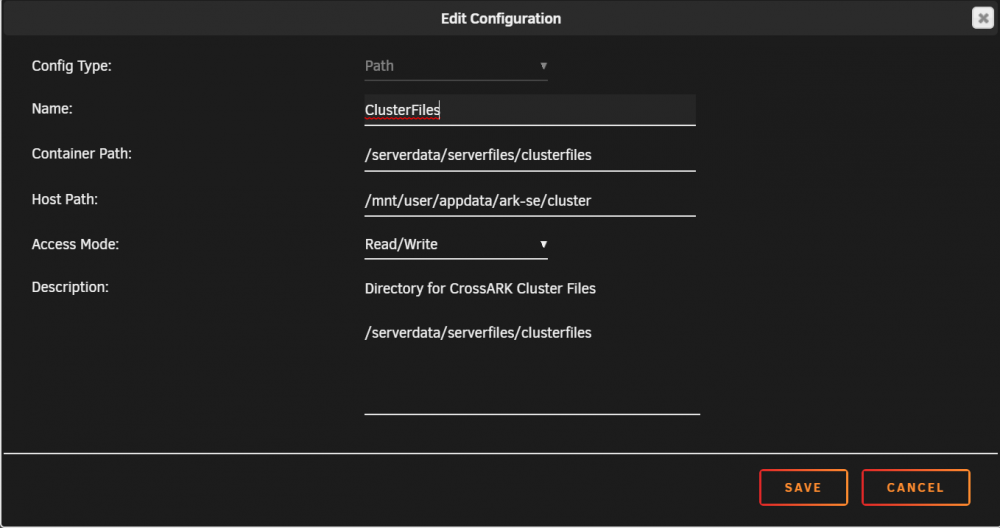
1. Make sure your different servers are up and running, and that you can see them all at the same time from your in game server browser. 2. Add a new path to the docker settings for the Cluster directory. This should be pointing to the same directory for each of your servers: 3. Add the Cluster ID and Cluster Dir Override flags to your Extra Game Parameters field. I use "call1" for my Cluster ID, but this can be anything you prefer. My flags look like: -clusterid=call1 -ClusterDirOverride=/serverdata/serverfiles/clusterfiles
-
I did change it to /serverdata/serverfiles/clusterfiles/ However, I don't see any issue with /mnt/clusterfiles either. It does need to have a note in the description to the effect of: This directory is used for CrossARK transfers when running multiple servers. The directory needs to be the same in each server that is enabled for CrossARK transfers.
-
That is correct per the ARK command line. However, the Docker gives the same looping error on startup as when I use the -automanagedmods flag if I do not have the spaces in there. I noticed on @Jo7410 's post that they were using spaces before the ? and when I added spaces to mine the looping error was resolved. OK, this is strange. The looping error was the first major problem I encountered the first time I used the Docker, and it was resolved by adding spaces to the Game Parameters field like I saw in @Jo7410's screenshot. I tried removing the spaces just now so that I could capture the error and Docker build message, and everything worked just fine. I cannot explain it. I'm not understanding what needs to be corrected here. The INI file location is where the ARK software sets it up at. Yes, by changing the required setting and leaving the field blank my issue is resolved. Thank you for your assistance so far, and thank you for building this Docker image!
-
Interesting. I've always used the ARK Server Tools by FezVrasta so I was not aware of the issue with -automanagedmods. The Wiki page at the end has a solution involving symlinks, and I will likely play with that this weekend to see if it is successful inside of the Docker. ********************************************** I've just added the ?MaxPlayers=10 line in my Game Parameters, edited my ini file to 20 so I can observe what change is made and restarted. The Docker has changed max players to 70 again. root@localhost:# /usr/local/emhttp/plugins/dynamix.docker.manager/scripts/docker run -d --name='ARK-Aberration' --net='bridge' -e TZ="America/Chicago" -e HOST_OS="Unraid" -e 'GAME_ID'='376030' -e 'USERNAME'='' -e 'VALIDATE'='' -e 'PASSWRD'='' -e 'MAP'='Aberration_P' -e 'SERVER_NAME'='' -e 'SRV_PWD'='' -e 'SRV_ADMIN_PWD'='ARKAdmin' -e 'GAME_PARAMS'='?Port=7781 ?QueryPort=27015 ?RCONEnabled=True ?RCONPort=27020 ?bAllowUnlimitedRespecs=true ?FastDecayUnsnappedCoreStructures=true ?MaxPlayers=10' -e 'GAME_PARAMS_EXTRA'='-server -log -exclusivejoin -NoBattlEye -clusterid=call1 -ClusterDirOverride=/serverdata/clusterfiles' -e 'UID'='99' -e 'GID'='100' -p '27020:27020/tcp' -p '7781:7781/udp' -p '7782:7782/tcp' -p '27019:27015/udp' -v '/mnt/user/appdata/steamcmd':'/serverdata/steamcmd':'rw' -v '/mnt/user/appdata/ark-se/aberration':'/serverdata/serverfiles':'rw' -v '/mnt/usr/appdata/ark-se/cluster':'/serverdata/clusterfiles':'rw' --restart=unless-stopped 'ich777/steamcmd:arkse' ********************************************** \ark-se\aberration\ShooterGame\Saved\Config\LinuxServer\GameUserSettings.ini ********************************************** That does not surprise me about not allowing spaces, but if this is not easily fixable then it may be of benefit to add a note to the Description text about no spaces because many ARK servers in the public list have spaces. Perhaps: Spaces are not permitted in this field. Container Variable: SERVER_NAME That said, I did try disabling the required field flag from the Advanced view. After changing the name in the INI to include spaces and leaving the Docker config empty, this worked perfectly. Thank you! However, it did not push the Server name back into the Docker config. The field remains empty.
-
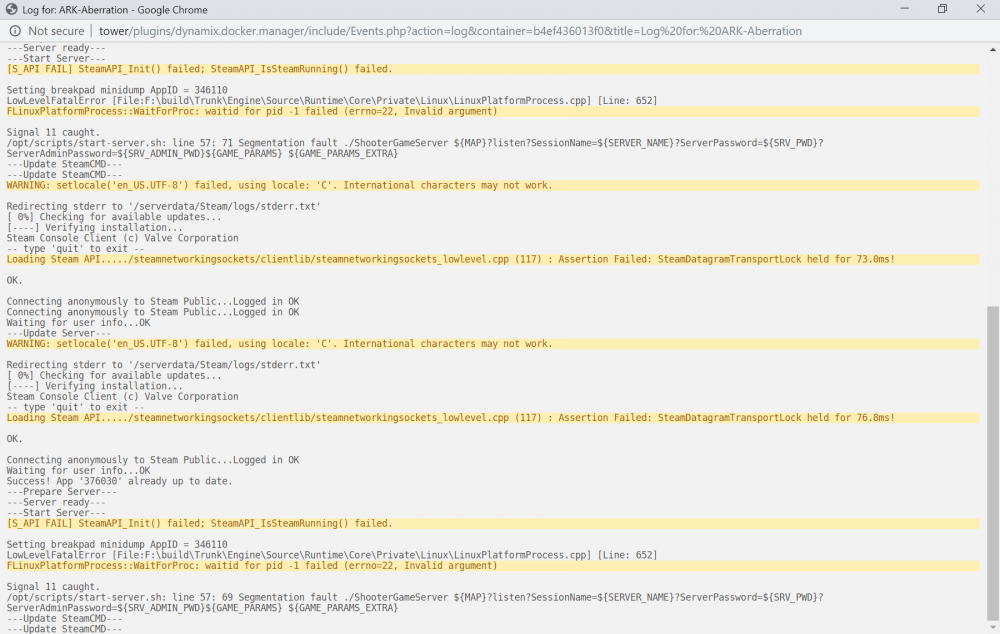
I apologize for how long it has taken to reply to this. My priority was getting my kids setup how they wanted, and this allowed me to work a little more with this Docker Image: I have verified that I placed this flag into Extra Game Parameters. I went ahead and captured the output from when I edit the Docker: root@localhost:# /usr/local/emhttp/plugins/dynamix.docker.manager/scripts/docker run -d --name='ARK-TheIsland' --net='bridge' -e TZ="America/Chicago" -e HOST_OS="Unraid" -e 'GAME_ID'='376030' -e 'USERNAME'='' -e 'VALIDATE'='' -e 'PASSWRD'='' -e 'MAP'='TheIsland' -e 'SERVER_NAME'='Call-The-Island' -e 'SRV_PWD'='' -e 'SRV_ADMIN_PWD'='ARKAdmin' -e 'GAME_PARAMS'='?Port=7777 ?QueryPort=27015 ?RCONEnabled=True ?RCONPort=27016 ?bAllowUnlimitedRespecs=true ?FastDecayUnsnappedCoreStructures=true' -e 'GAME_PARAMS_EXTRA'='-server -log -exclusivejoin -automanagedmods -NoBattlEye -clusterid=call1 -ClusterDirOverride=/serverdata/clusterfiles' -e 'UID'='99' -e 'GID'='100' -p '7777:7777/udp' -p '7778:7778/udp' -p '27015:27015/udp' -p '27016:27016/tcp' -v '/mnt/user/appdata/steamcmd':'/serverdata/steamcmd':'rw' -v '/mnt/user/appdata/ark-se/island':'/serverdata/serverfiles':'rw' -v '/mnt/usr/appdata/ark-se/cluster':'/serverdata/clusterfiles':'rw' --restart=unless-stopped 'ich777/steamcmd:arkse' 30e4fd7cbd207015fc8a7ac69096a52b41cd6befba92f8fe5c4ba03e2a84b864 Whenever I include the -automanagedmods flag, I get this error looping in my log until I stop the Docker image. Removing only the -automanagedmods flag allows the server to start and run as expected, except it does not check/update the installed mods. This behavior is consistent across three separate ARK Docker Images. ********************************************** I apologize, I probably mixed things up while I was performing my initial troubleshooting. You are correct about this error. ********************************************** From what I've observed in my continued testing of this issue, the ini file entries do not make any changes to the Docker config. Rather, whenever an edit is performed to the Docker config it pushes changes into the ini file that overwrite the existing setting. Honestly, I think this is preferable in most cases since I see most users working with the Docker config rather than going to the ini file. That said, my testing consistently results in only the first word being pushed to the ini file when a space is involved. What is strange is that the docker output when you save changes is capturing the entire field, so I suspect that something is happening either when the variable is passed to the startup script or somewhere within the script. Replacing spaces with underscores or dashes solves the problem, unless you prefer spaces in the name. One thing that also seems to happen is that the Docker config is overwriting the MaxPlayers field with the value of 70. I like to keep mine capped at 10 players, but the Docker keeps overwriting the ini field with 70 instead. I don't observe an entry in the Docker settings, so I'm not sure where I can adjust that behavior. [/Script/Engine.GameSession] MaxPlayers=70 ********************************************** Thank you! I did not know you could change required fields in Docker images like this. That worked perfectly, and seems to me to be the preferable method since my use case is pretty unusual. ********************************************** On a more positive note, I did manage to get my cluster directory to work to allow for CrossARK transfers. I intend to write a guide for setting up multiple maps via your Docker (mainly because it involves complete removal of the default UDP ports and rebuilding them to different values), and how to get CrossARK Transfers to work. I'm hoping that Jo7410 would be willing to review it since they have also built multiple servers and clustering, then I'll share it.
-
First, I would like to thank @ich777 for building these Docker images! I would also like to thank @Jo7410 for posting his config earlier. This helped me confirm what I thought I needed to put in to make certain things work (like clustering, which I think I've configured but I need to test). I have been setting up my local copy of the ARK Server docker image, and I've come across one issue, one minor issue, and one feature request that I would like to see implemented. ********************************************** Whenever I attempt to use the flag -automanagedmods the Docker image will not successfully start the server. When I try to use it, I end up with a loop that ends with: Signal 11 caught. /opt/scripts/start-server.sh: line 57: 71 Segmentation fault ./ShooterGameServer ${MAP}?listen?SessionName=${SERVER_NAME}?ServerPassword=${SRV_PWD}?ServerAdminPassword=${SRV_ADMIN_PWD}${GAME_PARAMS} ${GAME_PARAMS_EXTRA} Due to this, I have to manually copy over the Mod files I want to use in my server. In addition, if Mods are specified without manually copying the files over then I get the error in my log (the actual value after container: is different depending on the mod(s) specified): e":"No such container: 8c4de0864230"} I used the instructions at https://www.akliz.net/manage/knowledgebase/66/How-to-Install-ARK-Survival-Evolved-Mods-on-a-Server.html to copy the Mod files over. This is not a major issue for me, but perhaps add a comment to the documentation about this if it is not an easy solution to fix this. ********************************************** One minor issue is that the Server Name: (Container Variable: SERVER_NAME) field does not appear to handle spaces despite the Ark Server ini file allowing spaces in the Server Name. This is not a major issue, and can be corrected in the ini file after the Docker is up and running, but there is risk of the Server Name changing whenever the Docker image rebuilds the ini file. If possible, please adjust this setting to pass spaces correctly, but if this is not an easy fix then it should be fine with the documentation mentioning that it cannot parse spaces. ********************************************** I would like to request that the field Server Password (Container Variable: SRV_PWD) be made optional instead of mandatory. Due to the age of my children, I use a whitelist with the -exclusivejoin flag so that they do not need to type a password to play. However, the Docker image requires that a password be specified. I think I can modify this after the Docker is built and running from the ini file, but I have observed that the ini file is recreated whenever the Docker config is changed (and also at other times, although I have not figured out what triggers this).
-
OK, thank you for the quick answer. 6.5.3-rc2 is out now, so I believe 6.6 is currently being worked on? Until 6.6 is ready, does anyone have a workaround that can be employed?
-
I am also experiencing the same issue reported here. ubuntu 16.04 typing 'SHIFT + \' produces '>' and 'SHIFT + <' produces '>' I was setting up a new server when I experienced this issue. I then tried booting an existing Ubuntu server that I've used for 2 years, initially setup in an unRAID VM with no issues with the pipe character. When trying to type a pipe character, this old server also produced a > instead of |. This appears to be an issue with either unRAID, or more likely the noVNC being used.


