





bubo
Members
-
Joined
-
Last visited
Everything posted by bubo
-
To continue the weirdness: I've been unable to access the WebUI via hostname for 3 days since I performed the upgrade (across multiple reboots both planned and unplanned). After I accessed the WebUI via IP, the hostname allowed access to the WebUI again.
-
OK, that is weird. It does access via IP! I've never had an issue accessing it via the name before.
-
Like others, I've been unable to access my WebUI from other computers ever since I upgraded to 7.3.1. When attempting to access the WebUI, I get a 404 error with nginx below the error. Aside from the WebUI problem, my services appear to be functioning correctly. That said, my system has had two unprompted unclean reboots ever since the upgrade - it's difficult to diagnose since I don't normally interact directly with the unRaid GUI without going through WebUI plus the system is almost 10 years old (so I won't be surprised that I'm seeing early signs of hardware failure). Attached is my latest diagnostics file. Please help me resolve the WebUI issue. tower-diagnostics-20260617-1116.zip
-
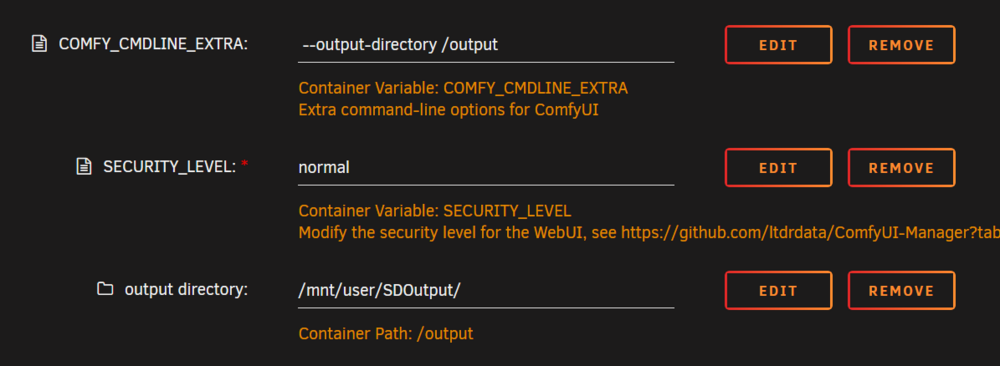
I was not specific enough. What I'm requesting is an additional parameter besides the Base Directory option. I'm already using the base directory option in the new template. The behavior of the base directory option by itself is to have the Output folder in the same base directory as the Inputs (checkpoints/loras/embeddings/etc). Many people put their inputs in a SSD to facilitate load times, and some of them may not want to have their generated images output to the same SSD due to size and repeated write concerns. ComfyUI allows for the separation of the Output Folder from the Base Directory folder via the --output-directory command line flag, but in order to utilize that flag to put the Output folder anywhere besides the Base Directory folder in the current Docker template requires an additional field to allow the user to specify where the Output folder resides in the array. As shown in my screenshot, it's not difficult to get it working. However, I think that many users would prefer having that field added as part of the default Docker installation, and the corresponding --output-directory command line flag incorporated into the docker instead of needing to be manually entered into the COMFY_CMDLINE_EXTRA field.
-
I would like to request that the docker template be adjusted to utilize the --output-directory command line flag to specify an output directory separate from the directory where I store my checkpoints/loras/embeddings/etc. I have my checkpoints/loras/embeddings stored in a directory on a SSD, and I don't want to be writing continuously to that SSD with the output of my image generations. With the addition of the /basedir feature, the default behavior is to have the output folder in the same base directory as the inputs. Fortunately, by utilizing the --output-directory command line flag, we are able to specify a location outside of the base directory to output images to. However, in order to move it away from the same drive as the base directory, the docker needs to have an additional path added to it which points towards where you want to output images to. I've done this on my end as shown in the screenshot: While it was not difficult to work this out, I feel that other users would find it more convenient if the docker config already included the field to identify the output path, and the --output-directory command line flag was built into the docker by default.
-
+1 from me as well. I feel that if there are supporting packages available on slackware.org and a non-UnRaid dev was able to pull together the necessary package (drivers / config / packages), then the time has arrived for a re-review of native wireless support within the UnRaid system. I do fully believe that there is a lot more that the devs would need to build/configure in UnRaid to make this an Official Feature than what Pourko has done, but I think that the factors which made wireless unfavorable in past dev cycles has changed enough to warrant a re-review. From my perspective, my children are already writing code while in High School and Middle School, and they are looking to pursue Computer Science or Engineering degrees. It's telling that both of them happily chose to give up new video cards in favor of having hardware that is capable of running UnRaid just so that they can have VMs to write code with. Reviewing college options with my oldest shows that network availability in dorm life (which I know COVID will likely alter) is showing mostly poorly maintained and non-upgraded copper in the walls coupled with limited port availability. It feels like more dorms are switching to wireless networks instead of tending to the copper in the wall, and I'd like the UnRaid machines that I build my children to be usable when they leave for college with them.
-
Some quick questions: 1. Are you trying to access to second map from a VM on the same UnRaid server, another machine in the LAN, or from an external source? 2. What ports are your internal config files pointed to on your second map?
-
Did someone mention me? I felt a disturbance in my gaming bubble. It's been awhile since I've visited this thread.
-
I'll try, but I may have to wait until I get home from work to pull the specific examples out. From my memory: 1. Under the original setup for the ARK Docker, all game files were stored in the serverdata path. Something would trigger instances were the folder identified for the serverdata path would have it's permissions changed to a state where I could not even open the folder with my normal user role (both from the unRaid Terminal CMD, and also from where I had previously mapped to it from Windows Explorer). When this occurred, I could issue a chmod 777 command in the unRaid Terminal CMD (I think I SU the command, but it's been awhile since I did it), and this would correct the problem until it was triggered again. 2. When I was building my alternate paths prior to submitting my XMLs to you, ich777, I discovered that whenever the serverdata folder was locked in this manner, the specific paths that I broke out into the admin path would not be locked. I figured the locking trigger was something unique to me, since my unRaid is configured strangely. I didn't think too much of it, but the main reason I moved the Mods folder to the Admin path was to avoid triggering the lock on that folder. 3. When I read that this was happening to another user, it seemed similar enough to my experience that I posted here. Unfortunately, I'm at work right now. If needed, I can recreate what I experienced and give precise commands and paths that I used tonight when I get home.
-
I have this happen frequently with my ARK server folders. I'm not certain that ich777's container is entirely at fault though. I have learned by splitting folders out of the default paths that this phenomenon seems to reside with the default game install folder(s). When I moved the config and world files for ARK to a separate external path via the docker config, those external folders stopped having their permissions changed. For my ARK instances, I had to log into the unRaid terminal and use chmod to unlock the folders.
-
The Docker will overwrite certain values if they are populated in the Docker template. 1. What are you using to edit gameusersetting.ini? 2. Which parts of the gameusersetting.ini are being overwritten? (If you suspect that it is the entire thing, then please add a new entry to see if it's deleting anything.) 3. What are the contents of your Game Parameters and Extra Game Parameters fields? 4. Just to check possibilities, what is the path to the gameusersetting.ini that you are using?
-
That is correct. At this time, the built in Mod Manager for ARK doesn't work right (this is an ARK Dev issue, and the only known fix involves Symlinking folders and running the executable from a specific directory). One thing to be aware of is that ARK Mods require you to start ARK once after you finish the download, to finish the extraction and installation of the Mod. If you do not start ARK once after the Mod download, and wait for it to finish "Installing Mod(s)" (seen in the lower right corner of the menu), then the files you copy over will be incomplete. Also, be aware that if you have Mods on the server and the Mod updates, the server will not be visible to any clients that have the updated Mod until you are able to update the Mod on the server. Updating the server Mod involves the same steps as installing it (download, start ARK, wait for the install to finish, copy files)
-
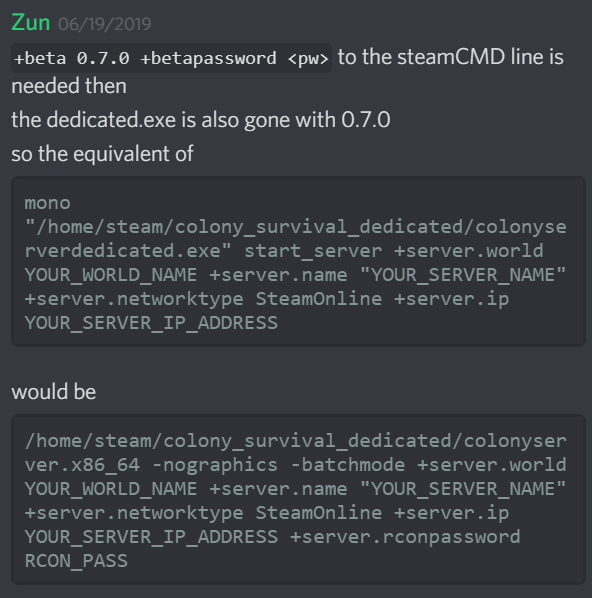
In regard to Colony Survival, they did. Unfortunately, at the time that I figured this out they did not have any documentation on the change yet. I found it by finding a comment from the beta for 0.7.0 in their official Discord, as shown in my post here. To recap, Old Syntax: mono "/home/steam/colony_survival_dedicated/colonyserverdedicated.exe" start_server +server.world YOUR_WORLD_NAME +server.name "YOUR_SERVER_NAME" +server.networktype SteamOnline +server.ip YOUR_SERVER_IP_ADDRESS New Syntax: /home/steam/colony_survival_dedicated/colonyserver.x86_64 -nographics -batchmode +server.world YOUR_WORLD_NAME +server.name "YOUR_SERVER_NAME" +server.networktype SteamOnline +server.ip YOUR_SERVER_IP_ADDRESS +server.rconpassword RCON_PASS Unfortunately, I don't know enough about it to know if there are any other flags add/removed from the command line.
-
This really sounds like a Steam side issue, but can you post your log with this error in it?
-
I apologize for taking so long to get back to this. Looking in latest.log, I am seeing this segment at the end: [22:50:30] [Server thread/INFO] [net.minecraft.server.dedicated.DedicatedServer]: Loading properties [22:50:30] [Server thread/INFO] [net.minecraft.server.dedicated.DedicatedServer]: Default game type: SURVIVAL [22:50:30] [Server thread/INFO] [net.minecraft.server.dedicated.DedicatedServer]: Generating keypair [22:50:31] [Server thread/INFO] [net.minecraft.server.dedicated.DedicatedServer]: Starting Minecraft server on 192.168.1.137:25565 [22:50:31] [Server thread/INFO] [net.minecraft.network.NetworkSystem]: Using default channel type [22:50:31] [Server thread/WARN] [net.minecraft.server.dedicated.DedicatedServer]: **** FAILED TO BIND TO PORT! [22:50:31] [Server thread/WARN] [net.minecraft.server.dedicated.DedicatedServer]: The exception was: java.net.BindException: Cannot assign requested address [22:50:31] [Server thread/WARN] [net.minecraft.server.dedicated.DedicatedServer]: Perhaps a server is already running on that port? [22:50:31] [Server thread/INFO] [net.minecraft.server.MinecraftServer]: Stopping server [22:50:31] [Server thread/INFO] [net.minecraft.server.MinecraftServer]: Saving worlds Can you try changing the port on your server/docker?
-
Is this causing a problem in your Docker? This error simply means that the en_US.UTF-8 locale is not configured. The Docker dev is from Austria, so it's probably using the Austrian locale instead of the US locale. That said, I've not seen any issues aside from that warning in any of my deployments.
-
Can you share your logs from the point of shut down?
-
I do not play or host Minecraft, so take my comments with caution. Based on your problem descriptions, my initial suspicion is with the server software itself, not the Docker container. Performing a Google search for "minecraft spigot lag on save" produces a great many reports of this issue over at least 4 years at www.spigotmc.org alongside with their recommendations for trying to alleviate it. This seems to be a recurring issue with Minecraft Spigot servers. Have you run a Minecraft Spigot server outside of Docker on your machine before, and have you followed any of the recommendations at www.spigotmc.org yet?
-
It looks like your installation is not succeeding at downloading the files for the server. Some quick questions: 1. Has this server ever been operational, or is it a new install? 2. Are there any files in the ark-se directory? 3. How long has it been having this error during the download? Looking up the states listed here doesn't show the exact codes you are getting, but the family of errors you are seeing seem to be related to either a Steam issue or a connection to Steam issue. If this just started, then I'd try again in a few hours.
-
OK, I went ahead and installed the docker myself just to see what files are pulled. My installation of the Colony Survival server also does not have the colonyserverdedicated.exe file. I tried to find a file manifest, and according to SteamDB the new release does not have colonyserverdedicated.exe as part of the distro from Steam. I'm not sure if colonyserverdedicated.exe is supposed to be generated out of the distro, or if the developers for Colony Survival have changed how the dedicated server is setup. I did find that others are looking for instructions for 0.7.0 as seen on Reddit. Again, I don't play this game so I can't say I'm correct, but I'm leaning towards a change from the developers of Colony Survival. Can you check the Colony Survival community to see if anyone has had success with a 0.7.0 dedicated server? We would need to know the command line they are using with 0.7.0 (and if their command line uses colonyserverdedicated.exe then ask if they can tell you what path it's supposed to be located at). Once we can confirm how 0.7.0 is supposed to launch the server, then we'll have to wait for @ich777 to have time to rebuild the Docker to match it (assuming there is a new method other than colonyserverdedicated.exe). Doing these checks for him should reduce the time/load needed to get it working. *********************** I couldn't leave it alone, so I hopped into the official Discord for Colony Survival. I found that the new launch file is colonyserver.x86_64 so we will need for @ich777 to adjust the script inside the Docker to point there.
-
OK, again I don't play this game so take my advice with caution. Linux64/ is a folder, so can you check inside there as well. If the colonyserverdedicated.exe file is not in there, then it looks like your download had an issue. Inside the Docker configuration there is a field for "Validate Installation". Type "true" in that field and it should check the files then attempt a new download. If that works, then don't forget to remove true afterwards or it will check every time the Docker starts.
-
Hopefully @ich777 can look at this, but this summer has him short on time. I don't play Colony Survival myself, but a quick look at today's update indicates that it was a significant overhaul including an upgrade from the 2017 Unity version to the 2019 Unity version. Can you look in your directory to see if "colonyserverdedicated.exe" is present? I suspect either corruption during the download, or it was renamed as part of the change to the 2019 Unity version.
-
@ridge and I communicated through messages. His ARK issue appears to be resolved now.
-
OK, the lack of files in the clusterwtf folder indicates that the character is not being exported from the original ARK for some reason. Do you mind sending me your XML files for the Docker templates via a private message? You'll find it in your unRaid flash drive, in the /config/plugins/dockerMan/templates-user folder (you'll need to connect via something like WinSCP or change the file sharing status of that drive to access it - don't forget to change it back if you change share permissions) I'll be away for a bit, but should be back in a couple of hours.
-
Two things to check on: 1. Are there profile files located in /mnt/disks/SamsungSSD_1TB/ark-se/clusterfiles/clusters/clusterwtf/ ? If there are file located in that folder, then we know that the original ARK is exporting the character correctly. 2. Is noTributeDownloads=False in your gameusersettings.ini config? I've had some back and forth with other admins with the issue you described, and we arrived at combining noTributeDownloads=False with -noTransferfromFiltering to resolve CrossARK transfer issues in the Docker while still protecting from external uploads. ****** On a side note, I still intend to write a guide. I've drastically changed my Docker template to reduce the number of duplicate files between the map instances (went from 64GB to 13GB with 5 map instances). @ich777 has agreed to review my current templates to ensure I haven't royally messed something up, and then determine what can be safely brought into the public template. Unfortunately, during the summer @ich777 is rather busy, so it will take some time for this. My guide will come after this review.


