





Mylo75
Members
-
Joined
-
Last visited
Everything posted by Mylo75
-
Idiots guide needed for me. 1. Start array with disk 1 unassigned 2
-
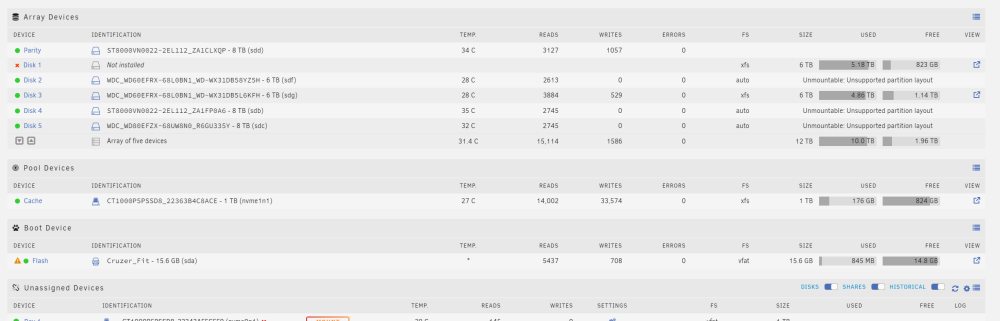
Ok done that. I stopped the array immediately after downloading diagnostics. tower-diagnostics-20221219-1135.zip
-
-
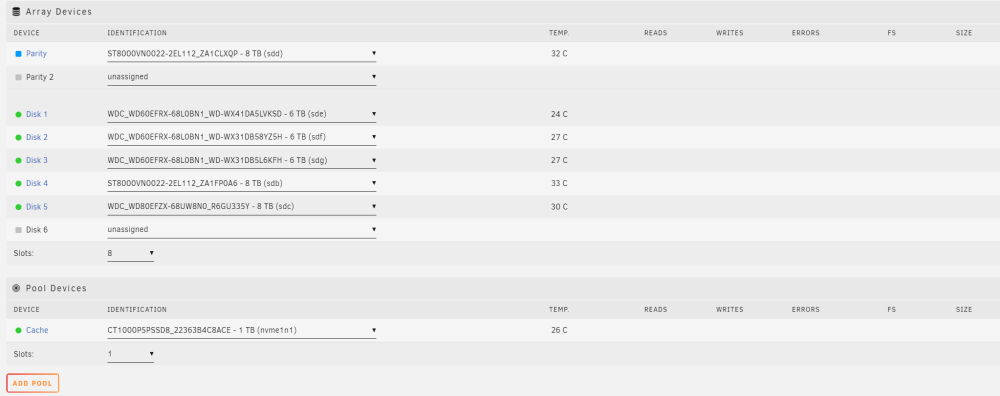
Yes I clicked the preserve all slots.
-
I got advise on another forum to do a new config. Did I just make things even worse!

-
When I remove 1 disk it says 'Too many wrong and/or missing disks!'
-
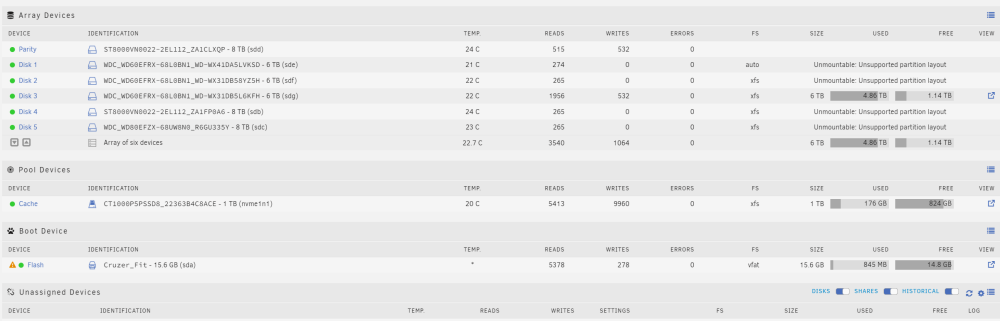
Ok I think I have made an absolute balls up with my server. I got new hardware and was messing about with dual booting windows and unraid. But when I went back and booted unraid my parity and 4 out of my 5 disks are now showing as unmountable saying 'unsupported partition layout'. Am I totally screwed or can I recover my data. I tried running Check Filesystem Status using -v on 1 disk but didn't seem to do anything. Any help would be very much appreciated. Thanks. tower-diagnostics-20221219-1037.zip
-
-
-
Would the below hardware be good for a new unraid build. Will be running a windows vm (some gaming) , 1-2 plex users and maybe 12 or so docker apps. I'm no expert so if someone could give some advice that would be great. Thanks. CPUIntel Core i7-12700 2.1 GHz 12-Core Processor CPU CoolerNoctua NH-D9L 46.44 CFM CPU Cooler Owned MotherboardAsus ROG STRIX Z690-E GAMING WIFI ATX LGA1700 Motherboard MemoryCorsair Vengeance 32 GB (2 x 16 GB) DDR5-5600 CL36 Memory StorageWestern Digital Red 6 TB 3.5" 5400RPM Internal Hard Drive Owned StorageWestern Digital Red 6 TB 3.5" 5400RPM Internal Hard Drive Owned StorageWestern Digital Red 6 TB 3.5" 5400RPM Internal Hard Drive Owned StorageWestern Digital Red 8 TB 3.5" 5400RPM Internal Hard Drive Owned StorageSeagate IronWolf NAS 8 TB 3.5" 7200RPM Internal Hard Drive Owned StorageSeagate IronWolf NAS 8 TB 3.5" 7200RPM Internal Hard Drive Owned Video CardAsus GeForce RTX 2060 6 GB DUAL EVO OC Video Card Power SupplyEVGA SuperNOVA 650 650 W 80+ Gold Certified Fully Modular ATX Power Supply Owned
-
Just trying to help by suggesting to put this important info somewhere as to stop lots of future questions and time wasting as hdhomerun and tvheadend are popular dockers in unraid. Buy hey I'm no community developer so what would I know! Thanks for the help BTW.
-
After much googling solution discovered https://tvheadend.org/boards/5/topics/24870?r=24877#message-24877 This might be good info to put somewhere for future users to see.
-
Yes, completely deleted all previous versions and files of previous installs. Even threw in a system reboot for good measure. Maybe I should try the unRAID DVB Edition?
-
Yes in host mode.
-
Yea I have tried all 3 options when installing linuxserver tvheadend docker, but always end up with the same result no DVB-T tuners found. Very strange.
-
I do not have the unRAID DVB Edition installed as the first page on that thread says hdhomerun tuners will work without this special unraid version installed. I am using an hdhomerun tuner but my tvheadend docker will only find the dvb-c tuners, no dvb-t tuners are listed. Whereas using tvheadend from my libreelec vm all tuners are found and working correctly. Any thoughts or suggestions. Thanks.
-
Thanks Bungy, I'll have another bash at it myself (it's a good way for me to learn all this stuff), if I'm still having problems I'll get back to you. Cheers.
-
No joy. This is from the nzbgetvpn log 2017-04-11 14:54:50,226 DEBG 'start-script' stdout output:-P INPUT DROP-P FORWARD ACCEPT-P OUTPUT DROP-A INPUT -i tun0 -j ACCEPT-A INPUT -s 172.17.0.0/16 -d 172.17.0.0/16 -j ACCEPT-A INPUT -i eth0 -p udp -m udp --sport 1198 -j ACCEPT-A INPUT -i eth0 -p tcp -m tcp --dport 6789 -j ACCEPT-A INPUT -i eth0 -p tcp -m tcp --sport 6789 -j ACCEPT-A INPUT -s 192.168.1.0/24 -i eth0 -p tcp -m tcp --dport 58846 -j ACCEPT-A INPUT -p udp -m udp --sport 53 -j ACCEPT-A INPUT -p icmp -m icmp --icmp-type 0 -j ACCEPT-A INPUT -i lo -j ACCEPT-A OUTPUT -o tun0 -j ACCEPT-A OUTPUT -s 172.17.0.0/16 -d 172.17.0.0/16 -j ACCEPT-A OUTPUT -o eth0 -p udp -m udp --dport 1198 -j ACCEPT-A OUTPUT -o eth0 -p tcp -m tcp --dport 6789 -j ACCEPT-A OUTPUT -o eth0 -p tcp -m tcp --sport 6789 -j ACCEPT-A OUTPUT -d 192.168.1.0/24 -o eth0 -p tcp -m tcp --sport 58846 -j ACCEPT-A OUTPUT -p udp -m udp --dport 53 -j ACCEPT-A OUTPUT -p icmp -m icmp --icmp-type 8 -j ACCEPT-A OUTPUT -o lo -j ACCEPT2017-04-11 14:54:50,226 DEBG 'start-script' stdout output:--------------------[info] Starting OpenVPN...2017-04-11 14:54:50,231 DEBG 'start-script' stdout output:Tue Apr 11 14:54:50 2017 OpenVPN 2.3.11 x86_64-unknown-linux-gnu [SSL (OpenSSL)] [LZO] [EPOLL] [MH] [IPv6] built on May 12 2016Tue Apr 11 14:54:50 2017 library versions: OpenSSL 1.0.2h 3 May 2016, LZO 2.09Tue Apr 11 14:54:50 2017 WARNING: file 'credentials.conf' is group or others accessible2017-04-11 14:54:50,252 DEBG 'start-script' stdout output:Tue Apr 11 14:54:50 2017 UDPv4 link local: [undef]Tue Apr 11 14:54:50 2017 UDPv4 link remote: [AF_INET]213.120.234.114:11982017-04-11 14:54:51,253 INFO success: nzbget entered RUNNING state, process has stayed up for > than 1 seconds (startsecs)
-
You mean my "tower" ip address, or default gateway Network mask: 255.255.255.0
-
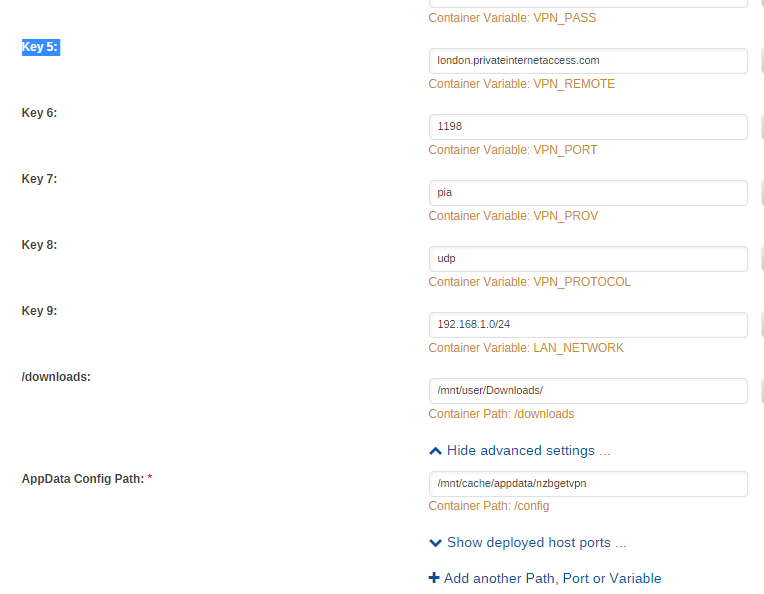
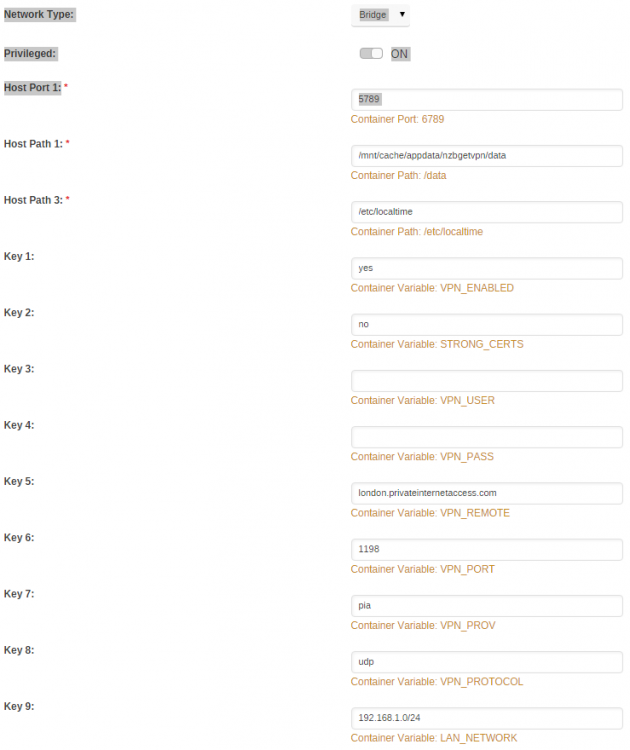
See pics attached as previous post didn't post correctly.
-
Bump. Is this docker no longer supported?
-
WARNING: file 'credentials.conf' is group or others accessible I get the above error (the only error) in the log when trying to run nzbgetvpn, This site can’t be reached when i try to access the gui. If i set to "no" in " Container Variable: VPN_ENABLED " I can access the gui and this docker works fine. Any help appreciated, let me know if more info needed.
-
Wasn't having a go at you Squid, just in case you thought that. 2 mins got rid of the stragglers, made all shares public, went to Windows Explorer on my desktop, searched for Squid and sapped them.
-
Yea my mistake, I was tired deleting all those wee Squid files
-
Ah Squid that sounds correct " version on the plugin that had a bug within it, and the system didn't keep track of them." Its a painful process going through each share and folder/sub folder to delete these Windows explorer, all shares public, search and delete got it now. Thanks for this docker btw.


