





DZMM
Members
-
Joined
-
Last visited
Everything posted by DZMM
-
Create a rclone remote that isn't encrypted and run a second mount and upload script pair to upload to it.
-
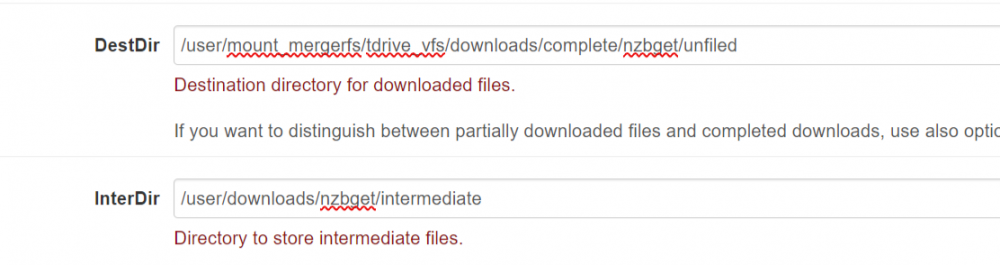
do you have any fast drives for your /mnt/user/mount_mergerfs2 share or just HDDs? That could be why you are slow - e.g. I download to a non-mergerfs folder and then unpack to my mergerfs share which is 100% HDDs:
-
post your mount settings, nzbget docker mappings and a screenshot of your path settings within nzbget.
-
re-run the upload. Your suspicion was right - you changed files that rclone had in a pending queue to upload, so it didn't upload them for safety.
-
right at the end.....all looks good????
-
The errors usually aren't anything to worry about. I suspect what's happened is that when you started the script theire was 8.7TB to transfer, but while it was running 257 files were "removed" e.g. renamed or upgraded by radarr, sonarr etc. To the script this is an error as when those files are no longer there when it gets around to trying to move them.
-
are you opening plex AFTER you've successfully mounted? Plex is saying the file isn't there and that's why it's not playing. You need to launch plex, radarr etc after the mount is successful - that's why the script has a section to do this.
-
post your rclone config and mount settings please
-
I used to have similar problems where the first attempt would fail, but eventually it would mount as the cron job made further attempts. This seems to have stopped for me since I reduced the size of RcloneCacheMaxSize. My suspicion is hat trclone needs a bit of time to compare what's sitting in the cache locally and not uploaded yet, Vs what's in the remote location, before creating the actual mount. With a 3TB cache I think this is the problem. Try dropping to say 20GB and see if this solves the "issue" and then decide if you want a 1st mount experience, or you're happy for your cron job to handle it and you want a bigger cache.
-
I agree. Have you tried browsing the directory? If you go to /disk1/mount_rclone/ /disk2/mount_rclone/ etc etc you'll see the files that are actually on your machine, rather than all the files in the mount if you went to /user/mount_rclone. Or, unmount and then look to see what files are left.
-
If it doesn't work locally just on apple tv it's nothing to do with the script. To verify move the offending file to a non script folder and try and play.
-
Post your mount settings from the script
-
Thanks. I think your find means we can ditch mergerfs and use rclone union instead. I didn't use union before because it doesn't support hardlinks, but I think this workaround fixes that. I'll try and test this week.
-
This is very interesting, and I think you've unlocked a significant improvement. One question first. So, in your torrent client have you changed the download location from /cloud/downloads/torrents/sonarr to /cloud/local/downloads/torrents/sonarr? Or was it always /cloud/local/downloads/torrents/sonarr?
-
Thanks for the beer - supping it now
-
I'm not sure - I'm tempted to turn the cache off completely as my hit rate must be virtually zero as files don't reside there long enough. Maybe it's Plex scanning a file that leads to rclone downloading the file for it to be analysed?
-
sometimes files end up in your mergerfs mount location PRIOR to mount. Go into each disk and manually move files from /mount_mergerfs --> /local then run the mount script again .i.e. /mnt/disk1/mount_mergerfs/.... ----> /mnt/disk1/local/ /mnt/disk2/mount_mergerfs/.... ----> /mnt/disk2/local/ etc etc until you've moved all troublesome files.
-
Just spotted the beer via PayPal - cheers!
-
Glad you got it all working.
-
Linuxserver
-
depends how much you are uploading and at what speed!
-
post your upload settings but I think you've got a ":" in "gdrive_upload_vfs:" that you shouldn't have: RcloneRemoteName="tdrive_vfs" # Name of rclone remote mount WITHOUT ':'.
-
I have no idea why your first launch is so slow (the 2nd is fast cause it's coming from the local cache). I can see that you've copied my mount settings and my 1st launch (900/120 connection) is never greater than 3-5s. Does your rclone config look something like this: [tdrive] type = drive scope = drive service_account_file = /mnt/user/appdata/other/rclone/service_accounts/sa_tdrive.json team_drive = xxxxxxxxxxxxxxxx server_side_across_configs = true [tdrive_vfs] type = crypt remote = tdrive:crypt filename_encryption = standard directory_name_encryption = true password = xxxxxxxxxxxxxxxxxxxx password2 = xxxxxxxxxxxxxxxxxxxxxxxxx
-
Hmm this is interesting (in a wrong way of course!) I have the same setup and the only thing I can think of is that maybe rclone upload doesn't like hardlinks i.e. after it's uploaded the file it's deleting the original file rather than respecting the hardlink? Mergerfs definitely supports hardlinks. This would explain why I haven't come across this as I seed for a max of 14 days, whereas because of my slow upload speed, rclone upload doesn't typically upload a file until 14 days+. I can't think of a solution, other than maybe ditching hardlinks and doing a copy to your media folder so that rclone can move the copy? Worth a test to see if this is the cause?
-
sounds like an Apple or Plex issue. Have you tried playing a local copy to see what happens?


