





DZMM
Members
-
Joined
-
Last visited
Everything posted by DZMM
-
Not sure, bit Enterprise Standard comes with unlimited storage and costs $20/mth
-
I don't have this problem (used to, but somehow it went away) - there is a script somewhere in the thread that has helped a few users. I think it's a few pages back
-
My personal rclone mount script was a bit different to the one on github - this is what I have: # create rclone mount rclone mount \ $Command1 $Command2 $Command3 $Command4 $Command5 $Command6 $Command7 $Command8 \ --allow-other \ --umask 000 \ --dir-cache-time 5000h \ --attr-timeout 5000h \ --log-level INFO \ --poll-interval 10s \ --cache-dir=/mnt/user/mount_rclone/cache/$RcloneRemoteName \ --drive-pacer-min-sleep 10ms \ --drive-pacer-burst 1000 \ --vfs-cache-mode full \ --vfs-cache-max-size 100G \ --vfs-cache-max-age 96h \ --vfs-read-ahead 1G \ --bind=$RCloneMountIP \ $RcloneRemoteName: $RcloneMountLocation & I've updated the github version just now. I think you should see playback and scanning improvements.
-
I just did a full power cycle (modem, router, switch, server) and it seems ok now.
-
I had a power cut this morning that caused my server to reboot. The server started "ok" afterwards, but everything is slow, particularly my W10 VMs that take forever to start, but are unusable as everything is mega slow. Even trying to move the mouse around is impossible - it took over an hour just to boot to the desktop. The extended test for FCP is still running even though it's been running for a few hours. At first I thought it was a dodgy docker as my CPU usage was at 80% which is unusual, but even after turning docker off and only running the main VM (Buzz) that I need, the VMs are still running very slow, which means I can't do my job. I'm hoping that there's something in my diagnostics that explains why and that someone can help me please. highlander-diagnostics-20211130-1431.zip
-
looks fine as you're not using mergerfs and cloud files are being handled just by rclone, so things should be even simpler. Have you changed any of the mount entries further down the script - the section should look like this: # create rclone mount rclone mount \ $Command1 $Command2 $Command3 $Command4 $Command5 $Command6 $Command7 $Command8 \ --allow-other \ --dir-cache-time 5000h \ --attr-timeout 5000h \ --log-level INFO \ --poll-interval 10s \ --cache-dir=/mnt/user/mount_rclone/cache/$RcloneRemoteName \ --drive-pacer-min-sleep 10ms \ --drive-pacer-burst 1000 \ --vfs-cache-mode full \ --vfs-cache-max-size 100G \ --vfs-cache-max-age 96h \ --vfs-read-ahead 2G \ --bind=$RCloneMountIP \ $RcloneRemoteName: $RcloneMountLocation & Can you post your rclone config as well please to eliminate any problems there.
-
I don't think the cache works at all to be honest, as it keeps EVERY file that is accessed i.e. if Plex does a scan/analysis it stores those files. In my scenario, the cache would have to be very big to have a decent hit rate. I keep my cache fairly small so that it probably can cope with someone rewinding a show, but not much else.
-
logs as well would be useful......
-
If anyone finds a discount code please share!
-
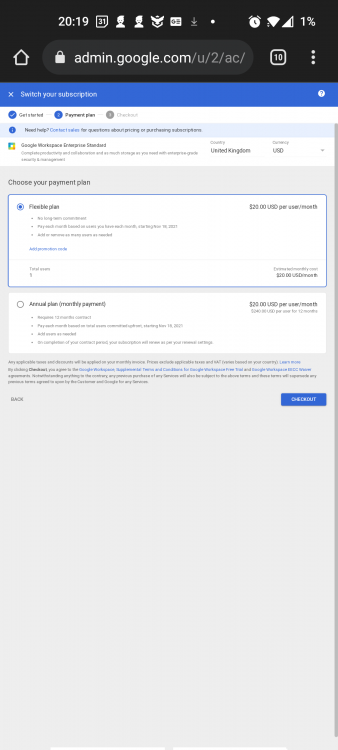
You can definitely buy enterprise standard for one user - here's my page (email just arrived). $20/mth is still a good deal. I'm going to purchase the annual plan even though there's no discount, in case Google change their mind
-
Looks like the 5 user limit isn't enforced: https://forum.rclone.org/t/gsuite-is-evolving-to-workspace-so-prices-and-tbs-too/19594/113?u=binsonbuzz
-
If they start enforcing the min 5 requirement (they don't now), then I think that might be the solution - users pairing up in groups of 5.
-
read up on --exclude on the rclone forums - you can stop files being uploaded by folder, type, age, name etc
-
lol if you were the person who just bought me a few beers - thanks! It is a game changer - I can't imagine how much work it would be to run a server with so many disks involved. And the cost!
-
I've created a poll to see how much people are storing - curious to see 1) how many people are using my scripts, and 2) how much people are typically uploading!
-
It's been 3 years since I posted my GUIDE: HOW TO USE RCLONE TO MOUNT CLOUD DRIVES AND PLAY FILES and I know many users have saved hundreds, some thousands of pounds, by moving their files to their cloud - as well as not having the overhead of running and managing a massive storage array. I'm curious to see just how many users are benefiting!
-
If the backup is a copy of your appdata folder, with potentially hundreds of thousands of files, I would recommend creating a new tdrive to keep the files away from your media mount, as streaming performance gets worse once a tdrive has more than around 100k files. To be honest if you're just copying or syncing files you don't need this script, just run a separate rclone sync job (although the script does have the facility to do basic versioning)
-
Are you sure another app or docker isn't creating the folder? E.g. Are all your dockers that use the mount starting AFTER a successful mount, rather than at array start?
-
this is why I recommend that dockers mappings ONLY use the mergerfs folders, otherwise you lose out on all the file-transfer benefits e.g. hardlinking, as unRAID will see files in /local and /mount_rclone and /mount_mergerfs as different files, when they might be the same. /local should only be used to manually verify everything is working correctly.
-
Another way to update Plex (better in the long run IMO) is to add your new merged folder to Plex which contains ALL your media (remote, local & local pending upload), then scan it, and when it's finished scanning, remove your old local folders from Plex and all your media will be in Plex with just your mergerfs file references. This is a better solution, because if you decide to e.g. move a TV show in the future from local-->local-pending-->remote, this won't be transparent to Plex and you won't have to mess around with Emptying Trash or files becoming temporariliy unavailable.
-
It's been a while and I don't use pfsense anymore, but I think I created an alias that included her static IP address e.g. HIGH_PRIORITY_DEVICES, and then created floating rules (UDP and TCP) for the alias to assign traffic to the high priority queue
-
no problems here.
-
Did you at least bother to read the first sentence of the first post?
-
not sure what's going on - new files should be stored locally until uploaded, so any performance issues shouldn't be down to rclone/mergerfs.
-
Playing files from the cloud can be bandwidth "intensive" depending on how big the file is you are trying to play, how many concurrent streams etc Vs your line speed. I have a 900/120 connection and re download my usage (at peak about 5-6 streams) never becomes a concern for me, although in the evenings I do make sure any other activity is low so that my friends get a good experience. Re Upload I do have to manage to balance my remote plex demand, seeding, uploading to gdrive etc requirements are all met. You should set bwlimits that are appropriate for your connection - both upload and download.


