





Zippi
Members
-
Joined
-
Last visited
Everything posted by Zippi
-
Yes, docker is enabled and i don't touch anything of the settings...... I did not think about it..... Now I try to add more disks to see if it changes anything. Thanks and I'll update you soon!
-
In fact.....I fully agree with you.......I was asking someone who has already tried ProxMox (for example the author of the guide) to understand which setting on ProxMox I may be wrong.... .
-
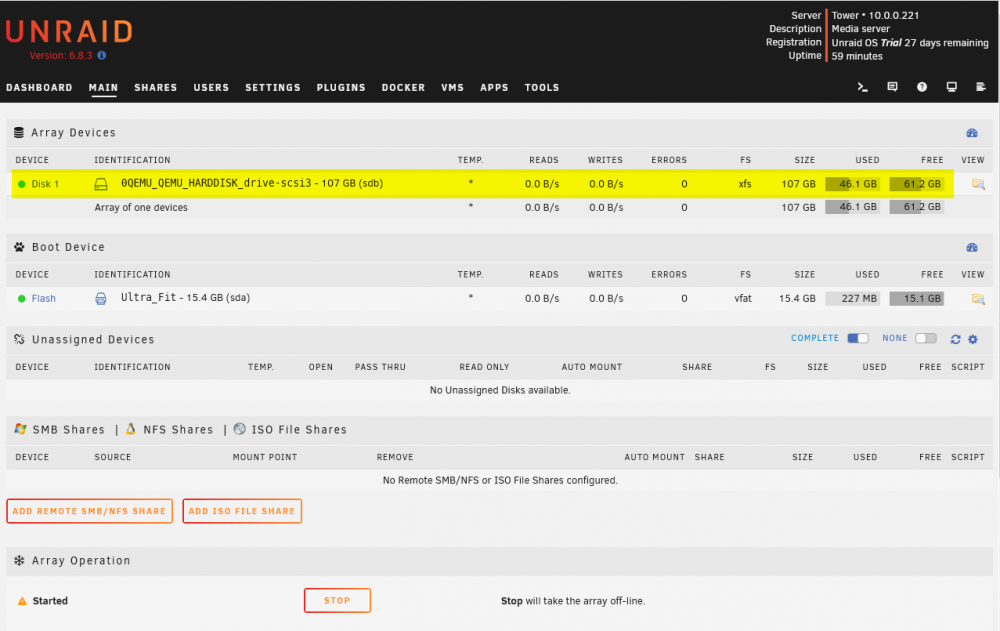
Even at the beginning of this guide if you look at this image it looks the same thing, 100GB HDD and 46GB occupied..... The proportions look the same.....
-
No unfortunately.....it's a new virtual disk normally added via ProxMox when you create a normal vm. I tried to format it via unRAID both xfs and btrfs but nothing changes, I don't understand why....
-
Or if I added a 1TB HDD would it still "only" take up 21GB? I ask because I have never tried such small disks! 🙂 Thanks for your help!
-
Yes, i know but a new "empty" ( virtual for test ) 50 Gb HDD suffered 21 gb occupied, isn't it a bit too much? It's the 42% occupied, isn't it a bit too much? A real attached HDD has not so much GB occupied!
-
Hi, @jbat66, i'm trying unRAID VM on ProxMox. It's running fine and for test i'm using only 1 50Gb vdisk but i don't understand why now is empty ( fresh install ) and 20Gb are already occupied on this QEMU HARD DRIVE. Why? What's the reason? Is there a way to have all the 50Gb free as a real Hard Disk? Thanx in advance! Zippi
-
The SHARES / STREAMS counter in the DASHBOARD always remains at 0. I updated unRAID to version 6.11.1 hoping to solve the problem that already existed with 6.10.3 but nothing, the value of the STREAMS column always remains at 0. Yet I remember that when I had 6.9.3 (?) It worked when for example a stream of a file was in progress. Is it a bug or do I need to change something? Thanks to those who will help me.
-
Hi ghost82, meanwhile, thanks for your answer ..... I try to better explain what I did: 1 - This GPU has a UEFI custom bios because originally it was NOT UEFI. It is natively recognized on the Mac Pro without any problems. 2 - I re-extracted the vBIOS via Windows 10 VM (I know it's not the best) and the file is 132KB 3 - I installed virt manager because unlike the one I saw in the Spaceinvader One video, Macinabox didn't give me the option to choose if I wanted it or not. Maybe it's this latest version of Macinabox that no longer includes it, I don't know ..... I installed it to better see everything on the VMs. 4 - I copied the EFI partition folders of the bootloader to the EFI partition of the Mac OS installed as Spaceinvader One did in the video and I did not touch any of the various parameters because I would not even be able, that's why I asked if I needed to retouch some parameters like when building a Hackintosh. 5 - I did NOT use VFIO nor ACS patch, audio and video were already on the correct bus together. I also specify that this GPU is the only one installed on unRAID. However now everything works! I see Catalina both on the monitor attached to unRAID and via the web as a vm on another computer! Thanks again for your time, I really appreciate it !! Zippi
-
Hi everyone, I have installed Mac OS Catalina through Macinabox and so far everything is OK. Since I have an MSI Radeon HD7950 Twin Frozr GPU that I bought some time ago because it was among the few that did not suffer from the infamous RESET BUG I wanted to add it to Catalina VM. I dumped the VBIOS ROM with Techpowerup and it made me a 132Kb file. I didn't use the one made by Spaceinvaders One because it generated me a file of only 70Kb which is probably not good. I have assigned the GPU to the VM but it doesn't work. Since I am a newbie I ask you for help: should the GPU work like this or do you have to tweak some parameters like when building a baremetal Hackintosh? Do I have to set something else? GPU video e audio are together so no vfio, right? My hardware is: Motherboard: AsRock X299 Taichi CPU: i9 7980XE 18C/36T GPU: MSI Radeon HD7950 Twin Frozr OC 3 Gb GDDR5 Thanx in advance! Zippi
-
I've tried and it works! But why was it doing this? Why maybe it doesn't recognize the type of monitor connected? Thanks so much again!
-
In the log keeps writing me this every 10 seconds ..... In another forum of OPENMEDIAVAULT they managed to solve the problem like this but I don't know if it can also be applied to unRAID, I don't mean it, please help me!
-
Hi, i just do upgrade 6.9.2 to 6.10.3 and now unRAID keep writing : kernel: [drm:radeon_vga_detect [radeon]] *ERROR* VGA-1: probed a monitor but no|invalid EDID What should i do to stop it? Thanx in advance! Zippi
-
Hi everyone, i need your help I'm on NextCloud 21.0.3 and, of course, i've these messeges: this is my DEFAULT file: upstream php-handler { server 127.0.0.1:9000; } server { listen 80; listen [::]:80; server_name _; return 301 https://$host$request_uri; } server { listen 443 ssl http2; listen [::]:443 ssl http2; server_name _; ssl_certificate /config/keys/cert.crt; ssl_certificate_key /config/keys/cert.key; # Add headers to serve security related headers # Before enabling Strict-Transport-Security headers please read into this # topic first. add_header Strict-Transport-Security "max-age=15768000; includeSubDomains; preload;" always; # # WARNING: Only add the preload option once you read about # the consequences in https://hstspreload.org/. This option # will add the domain to a hardcoded list that is shipped # in all major browsers and getting removed from this list # could take several months. add_header X-Content-Type-Options nosniff; add_header X-XSS-Protection "1; mode=block"; add_header X-Robots-Tag none; add_header X-Download-Options noopen; add_header X-Frame-Options "SAMEORIGIN"; add_header X-Permitted-Cross-Domain-Policies none; add_header Referrer-Policy no-referrer; fastcgi_hide_header X-Powered-By; root /config/www/nextcloud/; # display real ip in nginx logs when connected through reverse proxy via docker network set_real_ip_from 172.0.0.0/8; real_ip_header X-Forwarded-For; location = /robots.txt { allow all; log_not_found off; access_log off; } location = /.well-known/carddav { return 301 $scheme://$host:444/remote.php/dav; } location = /.well-known/caldav { return 301 $scheme://$host:444/remote.php/dav; } location = /.well-known/webfinger { return 301 $scheme://$host:444/public.php?service=webfinger; } location = /.well-known/host-meta { return 301 $scheme://$host:444/public.php?service=host-meta; } location = /.well-known/host-meta.json { return 301 $scheme://$host:444/public.php?service=host-meta-json; } client_max_body_size 10G; fastcgi_buffers 64 4K; gzip on; gzip_vary on; gzip_comp_level 4; gzip_min_length 256; gzip_proxied expired no-cache no-store private no_last_modified no_etag auth; gzip_types application/atom+xml application/javascript application/json application/ld+json application/manifest+json application/rss+xml application/vnd.geo+json application/vnd.ms-fontobject application/x-font-ttf application/x-web-app-manifest+json application/xhtml+xml application/xml font/opentype image/bmp image/svg+xml image/x-icon text/cache-manifest text/css text/plain text/vcard text/vnd.rim.location.xloc text/vtt text/x-component text/x-cross-domain-policy; location / { rewrite ^ /index.php; } location ~ ^\/(?:build|tests|config|lib|3rdparty|templates|data)\/ { deny all; } location ~ ^\/(?:\.|autotest|occ|issue|indie|db_|console) { deny all; } location ~ ^\/(?:index|remote|public|cron|core\/ajax\/update|status|ocs\/v[12]|updater\/.+|oc[ms]-provider\/.+|.+\/richdocumentscode\/proxy)\.php(?:$|\/) { fastcgi_split_path_info ^(.+?\.php)(\/.*|)$; set $path_info $fastcgi_path_info; try_files $fastcgi_script_name =404; include /etc/nginx/fastcgi_params; fastcgi_param SCRIPT_FILENAME $document_root$fastcgi_script_name; fastcgi_param PATH_INFO $path_info; fastcgi_param HTTPS on; fastcgi_param modHeadersAvailable true; fastcgi_param front_controller_active true; fastcgi_pass php-handler; fastcgi_intercept_errors on; fastcgi_request_buffering off; } location ~ ^\/(?:updater|oc[ms]-provider)(?:$|\/) { try_files $uri/ =404; index index.php; } location ~ \.(?:css|js|woff2?|svg|gif|map)$ { try_files $uri /index.php$request_uri; add_header Cache-Control "public, max-age=15778463"; # Add headers to serve security related headers # Before enabling Strict-Transport-Security headers please read into this # topic first. #add_header Strict-Transport-Security "max-age=15768000; includeSubDomains; preload;" always; # # WARNING: Only add the preload option once you read about # the consequences in https://hstspreload.org/. This option # will add the domain to a hardcoded list that is shipped # in all major browsers and getting removed from this list # could take several months. add_header X-Content-Type-Options nosniff; add_header X-XSS-Protection "1; mode=block"; add_header X-Robots-Tag none; add_header X-Download-Options noopen; add_header X-Frame-Options "SAMEORIGIN"; add_header X-Permitted-Cross-Domain-Policies none; add_header Referrer-Policy no-referrer; access_log off; } location ~ \.(?:png|html|ttf|ico|jpg|jpeg|bcmap|mp4|webm)$ { try_files $uri /index.php$request_uri; access_log off; } } What i must do/modify to make this messages disappear? i have already tried to add this but it doesn't work: location ^~ /.well-known { location = /.well-known/carddav { return 301 /remote.php/dav/; } location = /.well-known/caldav { return 301 /remote.php/dav/; } location = /.well-known/webfinger { return 301 /index.php$uri; } location ^~ /.well-known { return 301 /index.php$uri; } try_files $uri $uri/ =404; } Thanks in advance to anyone who wants to help me! Zippi

-
Thank you for your reply. I tried to add these 2 lines of instructions but then nextcloud no longer works, it tells me that the site is not reachable. Is there a specific point where I need to add these lines? Inside the DEFAULT file i've already have these lines: location = /.well-known/carddav { return 301 $scheme://$host:$server_port/remote.php/dav; } location = /.well-known/caldav { return 301 $scheme://$host:$server_port/remote.php/dav; } Do I have to modify these or add the other 2 from before? Thanks again for the help! Zippi
-
Hello everyone, i installed NextCloud v20 with MariaDB as database. Everything works fine and I was able to eliminate almost all security warnings by following this thread and the Spaceinvader One videos. The only warnings I can't get rid of are these: "Your web server is not properly set up to resolve "/.well-known/caldav". Further information can be found in the documentation." "Your web server is not properly set up to resolve "/.well-known/carddav". Further information can be found in the documentation" I know this has already been mentioned and I found in a post back that a user suggested this: if anyone have the resolve "/.well-known/caldav warning here is how i fix it go to you letsencrypt nginx folder sites-config and add this lines location = /.well-known/carddav {return 301 $ scheme: //$host/remote.php/dav; } location = /.well-known/caldav {return 301 $ scheme: //$host/remote.php/dav; } But I don't have letsencrypt / Swag installed and so I ask: which file should I modify to add these instructions? Thanks in advance! Zippi

