






bubbl3
Members
-
Joined
-
Last visited
Everything posted by bubbl3
-
v0.1.34 improvements to logging and handling of a full /var/log
-
v0.1.33 adds an optional MCP endpoint so Claude Code, Codex and other MCP clients can use the same 55 tools as the OpenClaw plugin, and ships a new unraidclaw command-line client for the server and for remote machines. Docker, VM, array, parity, share and notification actions now validate their input more strictly and check the real state before reporting success. TLS certificates gain alternative names so clients can verify the host, and a few login and logging bugs are fixed.
-
v0.1.32 released with a small fix, new features for Community Apps and Plugins, support for Unraid 7.4
-
@Mrtj18 you may want to update the OpenClaw plugin (assuming you are on a June build of OpenClaw), the new version of the NPM package takes advantage of the new features to better declare the tools available: https://github.com/emaspa/unraidclaw/issues/15#issuecomment-4698083784
-
That was actually a very good suggestion, I never considered it, made the change and released v0.1.31: https://github.com/emaspa/unraidclaw/releases/tag/v0.1.31
-
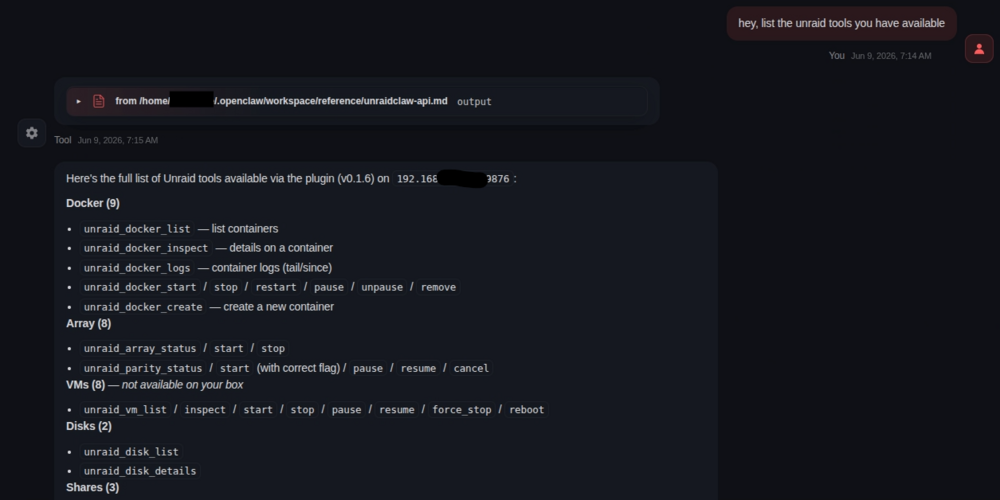
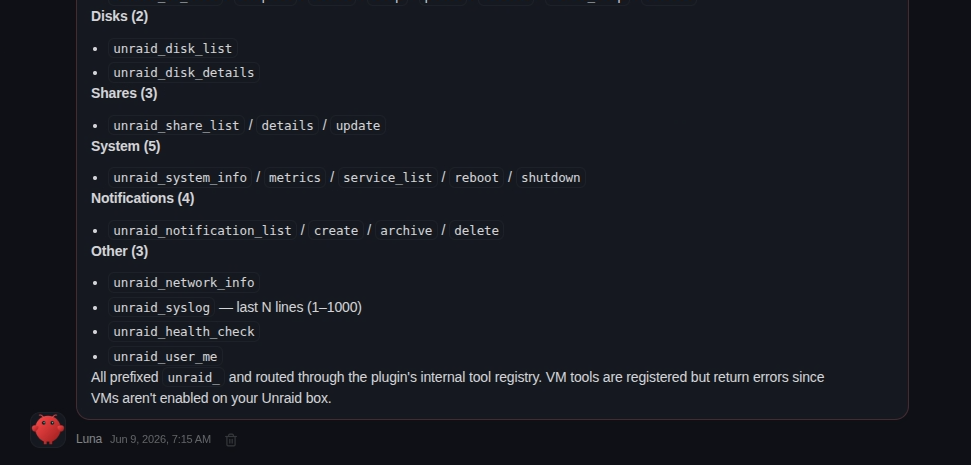
Ask Openclaw about the unraid tools available, this is the kind of answer you should be getting: If it says can't find the tools, ask to look in its configuration file and build a reference for itself so it can easily find them. If it really can't find them then there's an issue with your config.
-
Plugin now has support for unRAID 7.3.1: https://github.com/emaspa/wireview-hwmon-unraid/releases/tag/v0.6 Supported Unraid versions Unraid Kernel Package 7.2.x 6.12.54-Unraid wireview-hwmon-0.6-x86_64-6.12.54-Unraid.txz 7.3.0 6.18.29-Unraid wireview-hwmon-0.6-x86_64-6.18.29-Unraid.txz 7.3.1 6.18.33-Unraid wireview-hwmon-0.6-x86_64-6.18.33-Unraid.txz
-
What I mean is that the calls in the logs are not API calls, they are simple http calls like the ones you just showed in the screenshot from your phone. This is not how the service is supposed to be accessed so the error is expected.
-
From the screenshot you can see the calls are not API calls but just http requests for the index page and it's favicon. Basically your OpenClaw instance is trying to open a webpage, not making API calls.
-
You have a trailing comma there: "plugins": { "unraidclaw": { "serverUrl": "http://192.168.50.122:9876", "apiKey": "7f3fa56ce...", ← trailing comma },It should be: "plugins": { "unraidclaw": { "serverUrl": "http://192.168.50.122:9876", "apiKey": "7f3fa56ce..." }, In general you seems a bit inexperienced here, would suggest reading docs and asking for help in the OpenClaw subreddit, having an LLM writing your config means you won't really know how it works. Also not sure what LLM you're using, it should have catched the trailing comma, it's basic JSON.
-
Interesting suggestion, will keep it in mind, atm I can't spend much time on this aside essential fixes as I'm traveling for work, but will look into it sometime in June.
-
The OpenClaw logs don't say much unfortunately, from your screenshot doesn't seem like there has been any request to UnraidClaw server, you should see both successful and failed ones there under activity. Can you share the related OpenClaw config (minus the API key of course).
-
Sorry for the late reply, I was on holiday. Would suggest pointed Herms to the repo and ask to build a skill, it should be able to do it by itself: https://github.com/emaspa/unraidclaw
-
Aside of general automation and orchestration, here's just a few scenarios: Monitoring and alerts -- Ask your AI agent "how are my disks doing?" and get back temperatures, SMART status, array health, and parity check progress in plain English. No need to open the WebGUI. Docker management -- "Stop the Plex container, update it, and start it again" or "spin up a new Nginx container on port 8080 with these volume mounts" -- all through natural language. Troubleshooting -- "Show me the last 200 lines of syslog filtered for errors" or "which containers are using the most resources?" -- get answers without SSH-ing in. Multi-server oversight -- If you run multiple Unraid boxes (home NAS + media server, or home + offsite backup), you can manage them all from one AI conversation: "compare disk usage across my home and backup servers." Scheduled checks -- Have your AI agent run a morning briefing: array status, any failed disks, parity errors, Docker containers that crashed overnight, unread notifications. Quick actions from anywhere -- Reboot the server, start/stop VMs, pause a parity check -- all from your phone through whatever chat interface your AI agent uses (Telegram, Discord, etc.), without opening a browser. The key value is turning Unraid management into a conversation instead of clicking through the WebGUI. The permission matrix means you control exactly what the agent can and can't do.
-
Thanks for surfacing this, nothing wrong with the plugin, Clawhub is being stupid and classified this as a skill instead of a plugin, submitted a correction but they are not the fastest, use this command to install: npm pack unraidclaw && openclaw plugins install unraidclaw-*.tgz && rm unraidclaw-*.tgzYou will need the same to update: rm -rf ~/.openclaw/extensions/unraidclaw && npm pack unraidclaw && openclaw plugins install unraidclaw-*.tgz && rm unraidclaw-*.tgzIf you installed from Clawhub you'll need to uninstall and install again
-
Multi server support in OpenClaw has been added, config is backwards compatible, but you can have multiple servers configured this way: { "plugins": { "allow": ["unraidclaw"], "entries": { "unraidclaw": { "config": { "servers": [ { "name": "home", "serverUrl": "https://192.168.1.100:9876", "apiKey": "...", "tlsSkipVerify": true, "default": true }, { "name": "work", "serverUrl": "https://10.0.0.50:9876", "apiKey": "..." } ] } } } } }With multi-server, every tool accepts an optional server parameter (e.g. unraid_docker_list(server: "work")). If omitted, the default server is used.
-
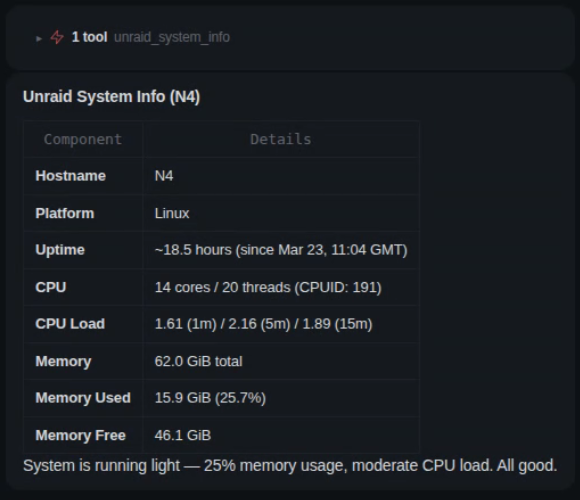
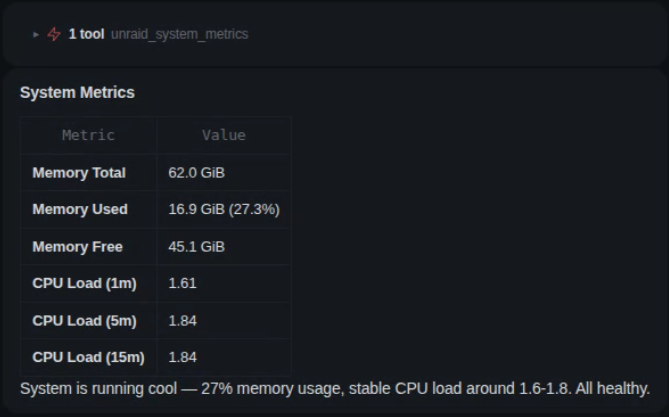
@schford There is also a new metrics endpoint for easy polling: Update plugin in unRAID and in OpenClaw: openclaw plugins update unraidclaw openclaw gateway restart
-
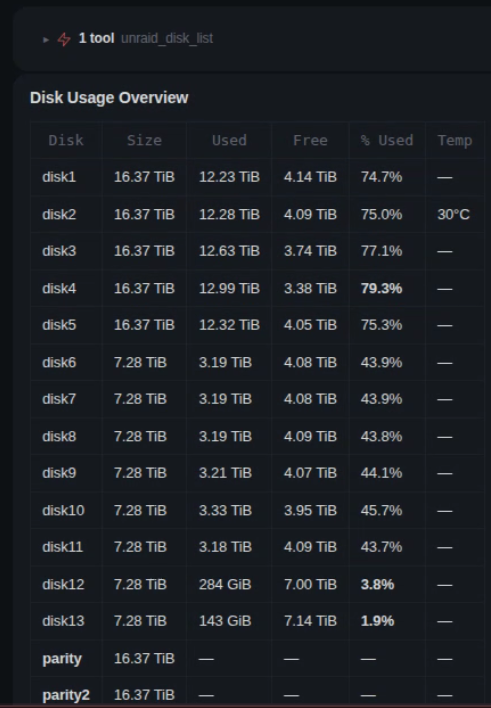
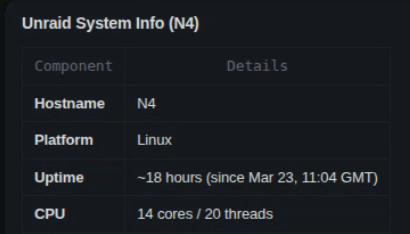
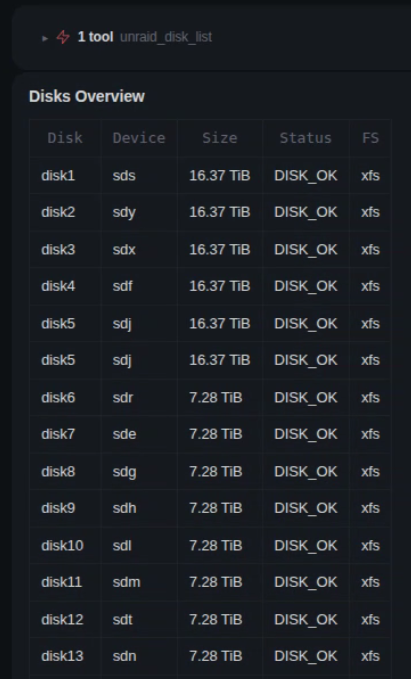
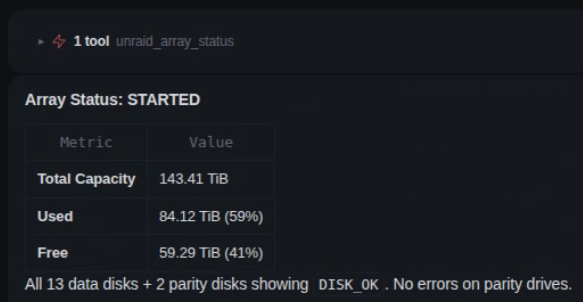
That is correct, is not a bug, this is the data available on that API endpoint: Will see if it makes sense to add memory and cpu usage. Disks are on another endpoint, but only status no details on usage space: The array status shows the total used and free space: Having per disk stats is a good idea and will take it as a feature request.
-
Just FYI this has been tested and working on unraid 7.3.0 beta
-
Plugin now has support for unRAID 7.3.0 beta: https://github.com/emaspa/wireview-hwmon-unraid/releases/tag/v0.5 Supported Unraid versions Unraid Kernel Package 7.2.3 / 7.2.4 6.12.54-Unraid wireview-hwmon-0.5-x86_64-6.12.54-Unraid.txz 7.3.0-beta 6.18.18-Unraid wireview-hwmon-0.5-x86_64-6.18.18-Unraid.txz
-
Yes you can, install the plugin in unraid and then point Claude to the github repository, it will figure it out :)
-
Since the plugin is stable features and functionality wise, the next couple of releases starting from v0.1.26 are going to be security hardening focused: https://forums.unraid.net/topic/197498-plugin-support-unraidclaw-ai-agent-gateway-with-permission-control/#findComment-1610700
-
This adds an additional layer of control and security, since many of the commands are not available through the unraid API the alternative is to give OpenClaw SSH root access to your server, which i wouldn't recommend. The focus here is on risk aware security, give enough granular access for what you want OpenClaw to do without full unrestricted root access to your unraid machine.
-
v0.5 released Config V2 support for firmware v4: new 96-byte config struct with UiConfigStructV2 Color pickers for primary, secondary, highlight, and background colors (replaces theme dropdown) Default screen selector Display inversion toggle Fix config size auto-detection (72/74/96 bytes) Update upstream submodule to wireview-hwmon v1.3
-
v0.1.34 Security and reliability fixes The service keeps serving when /var/log is full. A failed write to /var/log/unraidclaw.log used to raise an error inside the request logger, whose shutdown then retried the same write forever. The service stayed listening on its port but never completed a TLS handshake, never answered a request and ignored rc.unraidclaw stop until it was killed. Log lines that cannot be written are now dropped and the service carries on. Thanks to @golgoth85 for the report and the diagnosis in #18. rc.unraidclaw stop always ends the service. If closing open connections stalls, the process exits on its own after five seconds instead of waiting for the SIGKILL the script sends after ten. rc.unraidclaw start warns when /var/log has no free space, since the service log will explain nothing in that state. /var/log/unraidclaw.log is rotated at 5 MB through Unraid's daily logrotate run, so the request log cannot fill /var/log on its own. Upgrade notes Nothing to configure. If your /var/log is full, the service now starts and answers, but its log stays empty until space is freed. On Unraid 7.3.2, a full /var/log is often nginx/error.log growing from the missing question.png container icon; clearing the rotated logs frees it. v0.1.33 MCP support New Streamable HTTP endpoint at /mcp on the service port, off by default and switched on with Enable MCP in Settings. It exposes the same 55 tools with the same API key, permissions, input validation and activity logging as the REST API. REST and the OpenClaw plugin keep working as before. Activity log entries for MCP tool calls name the tool and show the outcome of the API route it ran. Successful MCP handshakes and GET/DELETE responses with status 405 are left out of the log; other failed connection requests are still logged. Setup for Claude Code, Codex and other clients is described in the MCP section of the README. Command-line client The plugin now installs the unraidclaw command at /usr/local/bin/unraidclaw, with the same tools and permissions as OpenClaw and MCP. On the server it finds the local gateway and trusts its certificate on its own; set the API key once with unraidclaw config set-key. For other machines, the same client is published as unraidclaw-cli on npm and as unraidclaw-cli-0.1.33.tar.gz on this release. It needs Node.js 22 or newer. Connection errors name the cause (untrusted certificate, address not in the certificate, nothing listening, protocol mismatch or DNS), and invalid arguments name the failing flag and rule. Tables and help are shorter, logs and nested values are formatted for reading, certificate details are shown once when trusting in table mode, and supported dry runs proceed without confirmation. See the CLI guide for install, credentials, certificate trust, all commands and exit codes. TLS certificate Generated certificates now list the server's host name, its .local name, loopback and stable global addresses in subjectAltName, so clients that trust the certificate can verify the host name. Settings shows the certificate's subject, alternative names, expiry and SHA-256 fingerprint, so remote CLI users can compare the fingerprint before trusting it. A Regenerate certificate button replaces the certificate when the server's address or host name changed. It keeps the old pair as .bak files (older backups get numbered suffixes) and restarts the service. Security and reliability fixes A parity check started with correct sent as the text "false" no longer runs as a correcting check. The field must now be true or false. Share comments containing quotes, backslashes, $, backticks or control characters are rejected, since they could write extra keys into the share's config file. Share settings are now written atomically and read back. Docker, VM, array, parity and notification actions reject malformed input and unknown fields, refuse IDs that start with -, time out instead of hanging, and check the real state afterwards. Responses include a verified field; a VM shutdown or reboot still in progress returns verified: false. A container created through the API keeps its Unraid template even when it exits right after starting, and a failed create reports Docker's error without echoing environment values. Requests to paths that do not exist return 404 instead of 401 when sent without a key, and no longer count toward the failed-login limit. MCP clients that probe for OAuth metadata locked themselves out before connecting. /api/health stays public and unlogged when called with a query string. /api/health no longer reports the previous version after an upgrade until the service restarted again. The package now records its own version instead of the service reading it from the .plg, which Unraid saves only after the install script restarts the service. Other changes Settings Apply reports when the service did not end up running or stopped, and no longer restarts the service when the settings file could not be written. The Disk Info permission description no longer mentions SMART data, which the disk endpoints do not return. The unused vms:create permission is removed from the VM Manager preset. Upgrade notes MCP is off after the upgrade. Turn it on with Enable MCP in Settings if you want the /mcp endpoint. A certificate created by an earlier version has no subjectAltName and is replaced once on the first service start after the upgrade. The previous pair is kept as cert.pem.bak and key.pem.bak in /boot/config/plugins/unraidclaw/tls. Clients that pinned or trusted the old certificate must trust the new one; the OpenClaw plugin with tlsSkipVerify: true is not affected. Regenerating the certificate from Settings has the same effect: clients that trusted the old certificate must trust the new one. Docker, VM, array, parity, share and notification routes now reject unknown fields and wrongly typed values that earlier versions accepted. Check API scripts that send extra or loosely typed fields, and note that responses from these routes now carry a verified field. Unknown paths answer 404 without a key where they previously answered 401. v0.1.32 Fixes Check /etc/rc.d after upgrading Earlier packages carried directory entries for shared paths. Installing one could replace Unraid's /etc/rc.d symlink with a plain directory holding only rc.unraidclaw. That hides rc.0 and rc.6, so a reboot can't shut the array down cleanly. 0.1.32 builds the package without directory entries and installs it with --keep-directory-symlink --no-overwrite-dir. A new archive safety test runs in the release workflow against a host where /etc/rc.d is a symlink. The upgrade doesn't repair a server that was already hit. Run ls -ld /etc/rc.d. If it shows a directory instead of a symlink, stop the array from the WebGUI before you reboot. Unraid rebuilds its root filesystem from the boot image on every start, so the symlink is back after that reboot. Features Community Applications You can search the CA catalog, read an app's template, and install it with overrides. Installed apps can be updated and removed. An update rebuilds the container from the template saved on the flash drive, not from today's catalog, so the ports, paths and variables you set stay as they are. Volumes attached to the running container are carried over. Removal keeps appdata, volumes, images and the saved template. If the replacement container fails, UnraidClaw tries to put the old one back. Anything it can't reproduce exactly is refused with a blocker code instead of being dropped. Extra Parameters, device passthrough, custom networks, privileged containers and resource limits the template doesn't describe all fall in that group. The new operations accept dryRun: true. Masked template values such as passwords and API keys are redacted from update previews and errors. Plugin Management A separate Plugins category lists, inspects, installs, checks, updates and removes Unraid plugins. Permissions New keys: ca:read, ca:create, ca:update, ca:delete, plugins:read, plugins:create, plugins:update, plugins:delete. The Docker Manager preset includes the CA permissions and Read Only includes plugins:read. Plugin write permissions need an explicit checkbox or Full Admin. ca:update and ca:delete are off in a default permission file. Unraid 7.4 Unraid 7.4 adds a memory limit and Additional Networks to Docker templates. Installs and updates pass the template's memory limit to docker as --memory. An update is refused if the running container's limit doesn't match the template. On Unraid before 7.4, which ignores the field, an install with a memory limit is refused. Templates with Additional Networks are refused rather than installed on a single network. VM listings no longer query the deprecated uuid GraphQL field. The uuid in responses now comes from the VM id and keeps the same value. OpenClaw plugin 0.1.14 Published to npm as [email protected]. It adds 11 tools, 55 in total: unraid_ca_search, unraid_ca_app, unraid_ca_install, unraid_ca_update, unraid_ca_remove, unraid_plugins_list, unraid_plugin_info, unraid_plugin_install, unraid_plugin_check_updates, unraid_plugin_update, unraid_plugin_remove The new tools call endpoints that exist only in gateway 0.1.32, so upgrade the Unraid plugin first. The plugin README and SKILL.md had stale tool counts, a 6.12+ requirement where 7.0.0+ is correct, and outdated config examples. Those are fixed. The repo also has a CONTRIBUTING.md and an AGENTS.md now. v0.1.31 Fixes Parity-check status now reflects reality (#14, thanks @rodaballo) /api/array/parity/status previously read Unraid's GraphQL array.parityCheckStatus, which doesn't reflect parity checks started outside Connect (via mdcmd, cron, or the webGUI) — so it reported no activity during a running check. It now reads live md-driver state from mdcmd status (the same source the webGUI uses, consistent with how start/pause/resume/cancel already shell out to mdcmd). API Backward compatible — the existing keys keep their names and now carry real data, with new fields added: Field Source running mdResyncPos>0 ‖ mdResync>0 progress mdResyncPos / mdResyncSize (0–100) speed / speedHuman mdResyncDb / mdResyncDt (KiB/s) / MB/s string errors sbSyncErrs paused (new) in progress but not advancing correcting (new) mdResyncCorr action (new) mdResyncAction (e.g. "check P Q") position / size (new) KiB done / total lastCheck (new) start/finish/duration/exit of the previous check No changes required for existing API consumers (OpenClaw included) v0.1.30 Important Critical fix. v0.1.27–v0.1.29 silently chowned host root paths (/, /usr, /usr/local, /usr/local/emhttp, ...) to UID 1001 on install, breaking SSH key authentication on systems with default StrictModes yes. All users on those versions should upgrade. Fixes Stop chowning host paths (#13) The build's tar invocation lacked --owner=root --group=root, so the GitHub Actions runner's UID 1001 was baked into every directory entry of the .txz. upgradepkg then preserved that ownership on the host's matching paths. Build now uses tar --owner=root --group=root --numeric-owner. All archive metadata is root:root. Heal existing installs Postinstall step issues a corrective chown root:root on the affected host paths. Upgrading to v0.1.30 fixes already-broken systems automatically. No-op on healthy systems. After upgrade, you can safely revert any StrictModes no workaround in /etc/ssh/sshd_config. Huge thanks to @justinmeader for the exceptional bug report, root cause and fix included. v0.1.29 Fixes Fix POST /api/docker/containers rejecting valid registry-prefixed image references (#12) Now accepts host[:port]/path/name:tag (e.g. 192.168.178.158:5000/homelab/myapp:latest) Now accepts digest references (e.g. nginx@sha256:...) The previous validator only allowed a single : and didn't permit @, which blocked everyone running a local/private Docker registry. v0.1.28 Fix min/max version to align with XML v7 minimum by @mstrhakr in #11 v0.1.27 Add memory stats (total, used, free, percent) to /api/system/info and /api/system/metrics Add CPU load averages (1m, 5m, 15m) to /api/system/info and /api/system/metrics Add disk usage (used, free, percent) to /api/disks endpoints via df Make /api/system/metrics a lightweight endpoint for polling (memory + CPU load only) v0.1.26 Security Hardening Release Fix command injection in syslog and notification endpoints (execSync to execFileAsync) Fix path traversal in notification archive/delete and docker template filename Restrict CORS to local network origins only Stop exposing Unraid API key in settings page HTML Remove internal error details from API error responses Add rate limiting on API authentication (10 attempts/min per IP) Add input validation on docker:create parameters (image, ports, volumes, env, network) Validate share update fields (floor, splitLevel, comment) Set restrictive file permissions on config, permissions, and log files Enforce strict boolean types in permission saves Require WebGUI authentication on activity log PHP endpoints Move CSRF token from global JS variable to data attribute v0.1.25 Add Unraid WebUI Port setting for non-standard port configurations GraphQL URL is now constructed automatically from the port (no more manual URL editing) v0.1.24 Remove GraphQL URL from settings (hardcode to http://localhost/graphql) Prevents misconfiguration that caused 500 errors on all GraphQL-based endpoints v0.1.23 Fix /api/health reporting hardcoded version "0.1.0" instead of actual installed version Version is now read from the .plg file automatically, so it always matches the installed release v0.1.22 Fix Docker inspect, logs, and all actions (start/stop/restart/pause/unpause) failing with 400 Bad Request Switch all Docker and VM operations from GraphQL to CLI for compatibility with Unraid 7.2.3 Add docker:create endpoint for deploying containers via AI agents (thanks @bitcryptic-gw) Fix OpenAI function calling compatibility Fix global TLS bypass in OpenClaw plugin (now scoped per-connection) Fix XML injection in docker:create template generation Add ADMIN API key requirement to documentation Correct API route paths in README OpenClaw plugin also updated to v0.1.3 on npm: rm -rf ~/.openclaw/extensions/unraidclaw && npm pack unraidclaw && openclaw plugins install unraidclaw-*.tgz && rm unraidclaw-*.tgz openclaw gateway restart On the OpenClaw side, multi server support has been added, config is backwards compatible, but you can have multiple servers configured this way: { "plugins": { "allow": ["unraidclaw"], "entries": { "unraidclaw": { "config": { "servers": [ { "name": "home", "serverUrl": "https://192.168.1.100:9876", "apiKey": "...", "tlsSkipVerify": true, "default": true }, { "name": "work", "serverUrl": "https://10.0.0.50:9876", "apiKey": "..." } ] } } } } }With multi-server, every tool accepts an optional server parameter (e.g. unraid_docker_list(server: "work")). If omitted, the default server is used.




