bubbl3
Members
-
Joined
-
Last visited
Everything posted by bubbl3
-
Same issue, default admin/admin doesn't work.
-
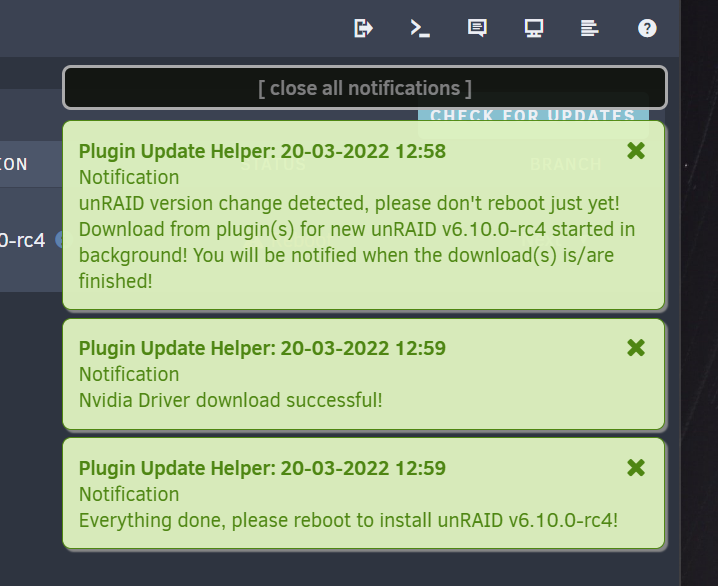
Tried as well: upgraded to RC4 error, but after reboot all is good downgraded to RC3 reboot, all is good upgrade to RC4, no more errors reboot, all is good Thanks for fixing this so fast!
-
FYI looks like this plugin is not ready for 6.10.0-rc4, got the message that the driver could not be downloaded, immediately rolled back to RC3.
-
I run Tdarr for a week then started to randomly have this issue, resolved by running both server and node in a VM which uses network shares paths instead of accessing /mnt/user directly.
-
Used to dump my RTX A4000 vbios, attached in case someone else needs it. RTX A4000 - 16gb.rom
-
LAN adapter: Intel X550-T2 Switch: TP-Link TL-SG108-M2 [8086:1563] 07:00.0 Ethernet controller: Intel Corporation Ethernet Controller 10G X550T (rev 01) [8086:1563] 07:00.1 Ethernet controller: Intel Corporation Ethernet Controller 10G X550T (rev 01) Asus XT8 access point can successfully negotiate 2.5Gbit link on the switch, but the Intel X550-T2 only negotiates 1Gbit, 2500baseT/Full and 5000baseT/Full are listed as supported but are not advertised: root@Mammuth:~# ethtool eth0 Settings for eth0: Supported ports: [ TP ] Supported link modes: 100baseT/Full 1000baseT/Full 10000baseT/Full 2500baseT/Full 5000baseT/Full Supported pause frame use: Symmetric Supports auto-negotiation: Yes Supported FEC modes: Not reported Advertised link modes: 100baseT/Full 1000baseT/Full 10000baseT/Full Advertised pause frame use: Symmetric Advertised auto-negotiation: Yes Advertised FEC modes: Not reported Speed: 1000Mb/s Duplex: Full Auto-negotiation: on Port: Twisted Pair PHYAD: 0 Transceiver: internal MDI-X: Unknown Supports Wake-on: d Wake-on: d Current message level: 0x00000007 (7) drv probe link Link detected: yes Manually setting link speed with ethtool -s eth0 speed 2500 duplex full successfully sets the link to 2.5Gbit: root@Mammuth:~# ethtool eth0 Settings for eth0: Supported ports: [ TP ] Supported link modes: 100baseT/Full 1000baseT/Full 10000baseT/Full 2500baseT/Full 5000baseT/Full Supported pause frame use: Symmetric Supports auto-negotiation: Yes Supported FEC modes: Not reported Advertised link modes: 2500baseT/Full Advertised pause frame use: Symmetric Advertised auto-negotiation: Yes Advertised FEC modes: Not reported Speed: 2500Mb/s Duplex: Full Auto-negotiation: on Port: Twisted Pair PHYAD: 0 Transceiver: internal MDI-X: Unknown Supports Wake-on: d Wake-on: d Current message level: 0x00000007 (7) drv probe link Link detected: yes Everything works correctly but is not persistent after reboot, solved by adding commands in the go file to set ports speed at boot: root@Mammuth:/boot/config# cat go #!/bin/bash # Start the Management Utility /usr/local/sbin/zenstates --c6-disable /usr/local/sbin/emhttp & ln -s /boot/scripts/diskmv /usr/sbin ln -s /boot/scripts/consld8 /usr/sbin /usr/sbin/ethtool -s eth0 speed 2500 duplex full /usr/sbin/ethtool -s eth1 speed 2500 duplex full Had this issue in Archlinux as well and it was fixed in June 2021 with the Network Manager 1.32 release.
-
I use QLogic 8142 adapters on a few servers, the drivers is not present in the 6.9 unRAID kernel, but should be possible to compile it from the kernel staging drivers https://git.kernel.org/pub/scm/linux/kernel/git/stable/linux.git/tree/drivers/staging/qlge?h=v5.7.4 Could this be included in 6.9 or will I be stuck on 6.8.3? Thanks
-
I really appreciate this kind of work, would be wonderful if you could explain how you compiled it and/or how to compile kernel modules. I am trying to add support for RTL8156 USB3 2.5G chipset and finding many hurdles.
-
Easy board search.... https://lime-technology.com/forum/index.php?topic=55557.0
-
If you want to virtualise a router why not use an x64 one like pfsense? No need to use ARM for that. Virtualized ARM router VMs are very valuable for the kind of testing I do
-
Would love arm emulation, virtualized router ftw!
-
Glad it helped mafoster
-
The group 7 has a device that starts with 00: Devices that start with 00: such as 00:1d.0 are generally built into the motherboard so as such can't be physically moved elsewhere Devices that start with another number such as 02:00.0 are discrete devices. Exactly it's a PCI-E root port, it usually corresponds to a PCI-E slot on the motherboard in my experience, if he finds it and install the USB controller in that slot he would be able to pass it to the VM. Thanks bubbl3 and gridrunner. Unfortunately I only have two PCIe slots (1 x16 and 1 x4), one for VGA and the other for this card so cannot try another. Is there any way to break the group manually? Bad design by SuperMicro... Alternatively, is there any way you see me being able to passthrough one of my integrated USB controllers (I have two as you can see from my PCI list)? What happens when you try to pass this one that is in your group 3? 00:14.0 USB controller [0c03]: Intel Corporation Sunrise Point-H USB 3.0 xHCI Controller [8086:a12f] (rev 31)
-
The group 7 has a device that starts with 00: Devices that start with 00: such as 00:1d.0 are generally built into the motherboard so as such can't be physically moved elsewhere Devices that start with another number such as 02:00.0 are discrete devices. Exactly it's a PCI-E root port, it usually corresponds to a PCI-E slot on the motherboard in my experience, if he finds it and install the USB controller in that slot he would be able to pass it to the VM.
-
@mafoster Most of your PCI-E root ports are in group 6: /sys/kernel/iommu_groups/6/devices/0000:00:1c.0 /sys/kernel/iommu_groups/6/devices/0000:00:1c.5 /sys/kernel/iommu_groups/6/devices/0000:00:1c.6 /sys/kernel/iommu_groups/6/devices/0000:00:1c.7 This one is alone in group 7: /sys/kernel/iommu_groups/7/devices/0000:00:1d.0 Try and see which slot is associated to that, if you find it, that is where you need to install your card.
-
Any help anyone? Thanks. For some reason your IOMMU group 6 is very crowded, to get a very easy visual of which devices are in each group you can go to /Tools/SysDevs on the web UI, it would also help if you post a screenshot of that.
-
The successor of the kingston HS3 the HS4 seems to have a unique ID as well (serial number in the device ID). https://www.amazon.com/Kingston-Digital-Hi-Speed-Reader-FCR-HS4/dp/B00VAGX6MW Beware: I didn't try to license it yet, just checked the device ID after attaching it to my box.
-
Here is something I don't understand, this is the PCI 5 ports USB 2.0 card I am using: It's a NEC chipset. This is the IOMMU group: I have the IDs stubbed in syslinux: I can see the devices available to VMs: I assigned all of them to my Windows 10 VM and got an error when trying to start the VM: -device vfio-pci,host=04:02.1 .................. vfio: Error: Failed to setup INTx fd: Device or resource busy -device vfio-pci,host=04:02.1 .................. Device initialization failed Now here is the strange thing, if I don't try to pass 04:02.1 the VM starts correctly, all the 4 external ports work, didn't test the internal one yet: Anyone has any clue of why? Not complaining as all is working, but would like to understand.
-
Sorry, just saw this post, I did not do anything particular, the fan has worked fine since the start. I now running 6.3.0-rc4 and all is well, but moving away from QNAP next week as I am finishing my PC build with unRAID as my main OS.
-
Asustor is in general much better hardware than QNAP imo, but that's what I had
-
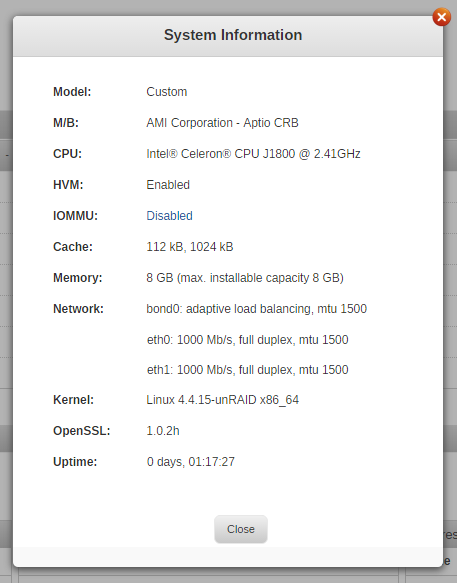
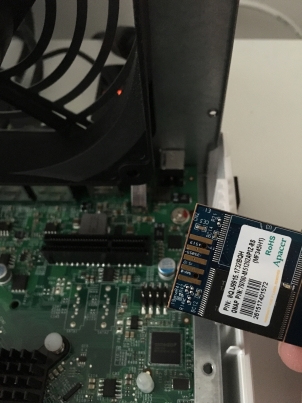
Crazy idea while reading the firmware recovery part of the QNAP wiki: install a custom OS on my QNAP TS-451 Turns out it's not that hard! (if you are willing to lose your warranty..) All I did was open the NAS, remove the drive cage and disconnect the QNAP DOM (512MB USB storage connected to an internal 8pin USB connector) and then it booted from any USB, like the unRAID usb key After the successful boot I had to organize my backups and then booted it again with couple of drives installed to start and copy data over, all good so far and happy about the performance